Sava lalana
Thank you for choosing the Boytond YYK-526 Bluetooth 5.4 Single Ear Headset. This manual provides detailed instructions for setting up, operating, and maintaining your headset to ensure optimal performance and a seamless user experience. Please read this manual thoroughly before using the product.
Vita ny vokatraview
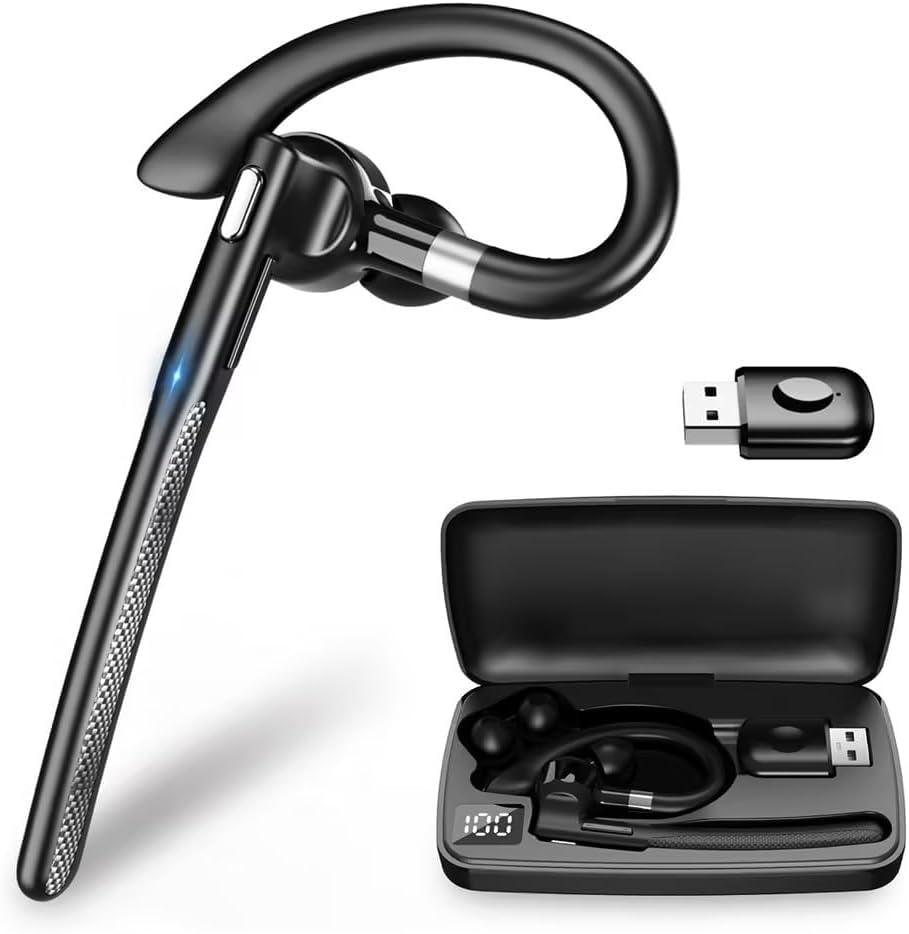
The Boytond YYK-526 is a versatile Bluetooth headset designed for clear communication and extended use. Key features include:
- Teknolojia Bluetooth 5.4: Provides a stable, fast, and low-power connection.
- Fiainana bateria lava be: Up to 10-12 hours of talk/music playback on a single charge, with a 500mAh charging case providing 5-7 full recharges for a total of up to 100 hours.
- CVC8.0 Noise Cancelling: Equipped with a unidirectional microphone and CVC8.0 noise cancelling to accurately pick up your voice and block ambient noise for clear calls.
- Asa moana: Allows you to mute your microphone during calls for privacy.
- Pairing mandeha ho azy: Simplifies connection after the initial setup.
- Ergonomic Ear-hook Design: Ensures a comfortable and secure fit for extended wear.
- Bokotra maro miasa: Easy control for music playback, call management, and voice assistant activation.
- Wide Compatibility: Supports various Bluetooth-enabled devices including PCs, tablets, and smartphones.


Torolàlana fametrahana
1. Fametrahana ny Headset
Before first use, fully charge the headset and its charging case.
- Place the headset into the charging case.
- Connect the charging case to a USB power source using the provided cable.
- The LED display on the charging case will indicate the battery level. A full charge takes approximately 1.5 hours.

2. Mampifanaraka amin'ny fitaovanao
The headset supports automatic pairing after the initial setup.
- Take the headset out of the charging case. It will automatically enter pairing mode.
- On your smartphone, tablet, or PC, enable Bluetooth.
- Hitady ny available devices and select "YYK-526" from the list.
- Once connected, the headset will indicate a successful pairing.
- For subsequent uses, the headset will automatically connect to the last paired device when taken out of the case.
Torolàlana miasa
1. Power On/off
- Herim-batana: Take the headset out of the charging case. It will power on automatically.
- Mamono hery: Place the headset back into the charging case. It will power off automatically.
2. Fitantanana ny antso
Use the Multi-function Button (MFB) on the headset for call control:
- Valio ny antso: Tsindrio ny MFB indray mandeha.
- Hamarana ny antso: Tsindrio indray mandeha ny MFB mandritra ny antso.
- Mandà ny antso: Tsindrio ary mihazona ny MFB mandritra ny 2 segondra.
- Avereno antsoy ny isa farany: Tsindrio indroa ny MFB.
- Mangina/Atsaharo ny mikrô: During a call, press the MFB once to mute your voice. Press again to unmute.

3. Famerenana mozika
Use the MFB for music control:
- Play/Pause: Tsindrio ny MFB indray mandeha.
4. Voice Assistant (Siri)
Ampandehano ny mpanampy feo ao amin'ny fitaovanao:
- Ampandehano ny Siri/Mpanampy amin'ny Feo: Press and hold the MFB for 2 seconds (when not on a call).
5. Fanaovana ny écouteur
The ergonomic ear-hook design ensures a comfortable and secure fit. Adjust the ear-hook to fit snugly around your ear. The package includes different sizes of ear tips (S/M/L) to find your best fit.


fikarakarana
To ensure the longevity and optimal performance of your Boytond YYK-526 headset, follow these maintenance guidelines:
- Fanadiovana: Regularly wipe the headset and charging case with a soft, dry cloth. Avoid using harsh chemicals or abrasive materials.
- fitahirizana: Store the headset in its charging case when not in use to protect it from dust and damage. Keep it in a cool, dry place away from extreme temperatures.
- Avoir rano (Avoid Water): Tsy tantera-drano ity écouteur ity. Aza avela ho tratran'ny rano, orana, na hamandoana be loatra.
- famandrihana: Use only the provided charging cable and a compatible USB power source.
Fanamboarana
If you encounter any issues with your headset, refer to the following common problems and solutions:
| OLANA | vahaolana |
|---|---|
| Tsy mandeha ny headset. | Ensure the headset is charged. Place it in the charging case and connect the case to power. |
| Tsy afaka mifandray amin'ny fitaovana. | Make sure Bluetooth is enabled on your device. Ensure the headset is in pairing mode (out of the case). Forget previous pairings on your device and try again. |
| Tsy misy feo na ratsy kalitao. | Check the volume level on both the headset and your connected device. Ensure the headset is within the 10M transmission range of your device. Re-pair the headset. |
| Microphone tsy mandeha. | Ensure the microphone is not muted. Check privacy settings on your device to allow the headset access to the microphone. |
| Matetika tapaka ny écouteur. | Ensure the headset is fully charged. Stay within the 10M Bluetooth range. Avoid obstacles between the headset and your device. |
fepetra arahana
Detailed technical specifications for the Boytond YYK-526 Bluetooth Headset:
| endri-javatra | antsipirihany |
|---|---|
| Anarana modely | YYK-526 |
| Marika | Boytond |
| Teknolojia fifandraisana | Wireless (Bluetooth 5.4) |
| Wireless Communication Technology | Bluetooth |
| Fanaraha-maso ny tabataba | Adaptive Noise Cancelling (CVC8.0) |
| Famaliana matetika | 2.4 GHz |
| Fametrahana sofina | Over-Sofina |
| Headphone endrika endrika | Over-Sofina |
| Impedance | 13 ohm |
| Fomba fanaraha-maso | Kitiho ny bokotra |
| Faharetan'ny bateria (Headset) | Approx. 10-12 hours (talk/music) |
| Fahaizan'ny raharaha fiampangana | 500mAh (provides 5-7 full recharges) |
| Time Charging | Approx. 1.5 ora |
| Distance Transmission | Haavo 10 metatra (tsy misy sakana) |
| Anisan'ny singa | Instruction Manual, Charging Case, USB Cable, Ear Tips (S/M/L) |
| Ny refin'ny vokatra | 14.5 x 7.8 x 2.7 cm; 100 g (Package) |
Warranty sy fanohanana
This product is a wireless device that complies with relevant technical standards. For warranty information or technical support, please refer to the contact details provided with your purchase documentation or visit the official Boytond website. Tehirizo ny tapakila fividiananao ho porofon'ny fividianana.
Video vokatra
An official product video demonstrating the features and usage of the Boytond YYK-526 Bluetooth Headset.


