1. Fampidirana
The House of Marley Get Together Go is a portable Bluetooth speaker designed for high-quality audio and outdoor durability. It features sustainable materials, multiple sound modes, and a robust, adventure-ready design.

Figure 1: Get Together Go Speaker in an outdoor environment.
Key features include IP67 waterproof and dustproof rating, up to 20 hours of playtime, customizable EQ modes, and Auracast multi-speaker pairing. The speaker is crafted from renewable bamboo and REGRIND silicone, reflecting a commitment to sustainable design.

Sary 2: Tapitraview of main features including EQ settings, playtime, IP67 protection, and ambient lighting.
2. Ny votoatin'ny fonosana
Ataovy azo antoka fa misy ny entana rehetra ao anaty fonosana:
- House of Marley Get Together Go Portable Bluetooth Speaker
- USB-C Charging Cable
- Quick Start Guide (tsy tafiditra ao anatin'ity boky ity)
3. Fametrahana
3.1 Fametrahana ny Mpandahateny
- Ampifandraiso amin'ny seranana famandrihana an'ny fanamafisam-peo ny tariby famandrihana USB-C omena.
- Ampifandraiso amin'ny adaptatera herinaratra USB mifanaraka amin'izany ny faran'ny tariby iray (tsy tafiditra).
- Hazava mandritra ny fiampangana ny jiro famantarana ny fiampangana ary ho faty rehefa feno.
3.2 Mamelona/Mamono
- To power on, press and hold the Power button until the indicator lights activate.
- Mba hamonoana dia tsindrio ary hazòny indray ny bokotra Hery mandra-pahafatin'ny jiro famantarana.

Sary 3: Eo anoloana view of the speaker, illustrating general layout and control area.
3.3 Fanambadiana Bluetooth
- Ataovy azo antoka fa mandeha ny fanamafisam-peo.
- Press and hold the Bluetooth button on the speaker until the Bluetooth indicator light begins to flash, indicating pairing mode.
- Amin'ny fitaovanao (smartphone, tablette, sns.), avelao ny Bluetooth ary tadiavo ireo fitaovana misy.
- Select "Get Together Go" from the list of devices.
- Once connected, the Bluetooth indicator light will become solid.
3.4 Auracast Multi-Speaker Pairing
The Get Together Go supports Auracast for connecting multiple compatible speakers for a larger sound experience. Refer to the official House of Marley website for detailed instructions on Auracast setup.
4. Torolàlana miasa
4.1 Famerenana Audio
- Once paired via Bluetooth, play audio from your connected device.
- Ampiasao ny bokotra "Volume Up" (+) sy "Volume Down" (-) eo amin'ny fanamafisam-peo mba hanitsiana ny hamafin'ny feo.
- Tsindrio ny bokotra Play/Pause mba hifehezana ny playback.

Figure 4: Speaker control panel for power, Bluetooth, volume, and playback.
4.2 Custom EQ Modes
The speaker features three customizable EQ modes to optimize sound for different environments:
- Marley Signature Sound: Pro audio voalanjalanjafile.
- Fampiroboroboana Bass: Enhanced low-frequency response.
- Fomba ivelany: Optimized for open-air listening.
To switch between EQ modes, briefly press the Power button while the speaker is on. The ambient lighting may change to indicate the active mode.

Figure 5: Speaker in an outdoor setting, demonstrating its durability and suitability for various environments, where EQ modes can be adjusted.
4.3 Jiro manodidina
The speaker includes ambient lighting at its base. This lighting can be toggled or adjusted by pressing a dedicated button (refer to the speaker's physical controls for exact button location, often integrated with power or EQ controls).
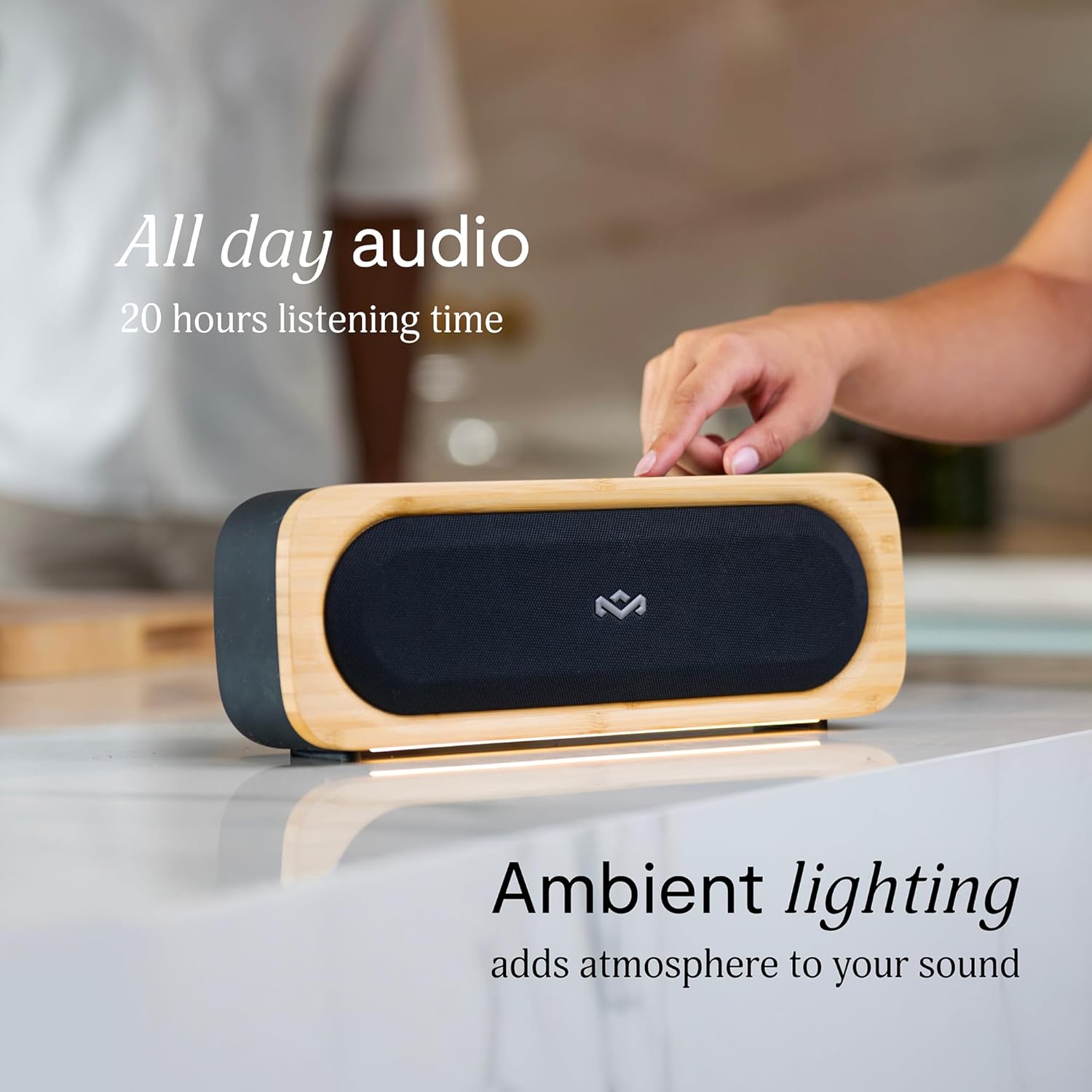
Figure 6: Speaker with ambient lighting active.
4.4 Famoahana tavoahangy voaorina
A bottle opener is integrated into the speaker's design for convenience. Locate the bottle opener on the rear or side of the speaker and use it as you would a standard bottle opener.

Figure 7: Demonstrating the use of the built-in bottle opener.
5. Fikojakojana
5.1 Fanadiovana
- The speaker features a removable grill for easy cleaning. Gently detach the grill to clean any dust or debris from the speaker drivers.
- Wipe the speaker's exterior with a soft, damp lamba. Fadio ny mampiasa akora simika mahery vaika na mpanadio abrasive.
- Ensure the speaker is completely dry before reattaching the grill or using it near water.

Figure 8: Speaker with removable grill detached for cleaning.
5.2 Fiarovana amin'ny rano sy vovoka (IP67)
- The IP67 rating means the speaker is protected from dust ingress and can withstand immersion in water up to 1 meter for 30 minutes.
- Always ensure the charging port cover is securely closed before exposing the speaker to water or dust.
- After exposure to water, dry the speaker thoroughly before charging.
5.3 Fikarakarana bateria
- For optimal battery life, avoid fully discharging the speaker frequently.
- Tehirizo ao amin'ny toerana mangatsiatsiaka sy maina ny mpandahateny rehefa tsy ampiasaina mandritra ny fotoana maharitra.
6. Famahana olana
6.1 Speaker Not Powering On
- Hamarino tsara fa feno ny bateria. Ampifandraiso amin'ny loharanon-kery ny fanamafisam-peo ary avelao hipetraka mandritra ny 30 minitra farafahakeliny alohan'ny hanandramana hampiasa azy indray.
- Press and hold the Power button for a few seconds to ensure it's not a brief press.
6.2 Bluetooth Pairing Issues
- Hamarino tsara fa ao amin'ny "pair mode" ny fanamafisam-peo (mirehitra ny famantarana Bluetooth).
- Ensure your device's Bluetooth is enabled and within range (typically 10 meters or 33 feet).
- Try forgetting the speaker from your device's Bluetooth settings and re-pairing.
- Avereno indray ny mpandahateny sy ny fitaovana Bluetooth anao.
6.3 Tsy misy feo na feo ambany
- Jereo ny haavon'ny feo eo amin'ny mpandahateny sy ny fitaovanao mifandray.
- Hamarino tsara fa mifandray tsara amin'ny fitaovanao ny fanamafisam-peo.
- Try playing audio from a different application or source on your device.
7. Famaritana
| endri-javatra | antsipirihany |
|---|---|
| Anarana modely | MIARAHA MADEHA |
| Laharana modely | EM-JA036-SB |
| Teknolojia fifandraisana | Bluetooth |
| Mpandahateny Hery Output faratampony | 20 Watts |
| IP Rating | IP67 (Tsy tantera-drano sy tsy tantera-vovoka) |
| Fotoana filalaovana | Hatramin'ny 20 ora |
| Ny refin'ny vokatra | 5.75" D x 16.13" W x 4.75" H |
| Lanja entana | 4.05 kg |
| Fitaovana | Renewable Bamboo, REGRIND Silicone, REWIND Fabric |
| UPC | 846885011706 |
8. Warranty sy fanohanana
For warranty information and technical support, please refer to the official House of Marley webtranokala na mifandray mivantana amin'ny serivisy mpanjifany. Tehirizo ny porofon'ny fividiananao ho an'ny fitakiana fiantohana.
9. Sustainability Commitment
The House of Marley Get Together Go speaker is designed with sustainability in mind, utilizing:
- Renewable Bamboo: Crafted from one of the world's fastest-growing plants.
- REWIND Fabric: Made from recycled plastic bottles for a durable finish.
- REGRIND Silicone: Produced using reclaimed and upcycled post-process and post-consumer waste.

Figure 9: Details on the sustainable materials used in the speaker's construction.


