1. Vokatra mihoatraview
The DOOGEE Note 56 is a modern smartphone designed for daily use, featuring a powerful Octa-Core processor, a large 6150 mAh battery, and a vibrant 6.56-inch HD+ display with a 90 Hz refresh rate. This manual provides essential information for setting up, operating, and maintaining your device.

Sary 1.1: Eo anoloana sy aoriana view of the DOOGEE Note 56, showcasing ny endrika kanto sy ny fakan-tsary.
2. Inona no ao anaty boaty
- DOOGEE Note 56 Smartphone
- Power Adapter
- USB Cable
- SIM Ejector Tool
- Torolalana fanombohana haingana
- Karazana fiarovana (mety miovaova arakaraka ny faritra)
- Arovy amin'ny efijery (efa napetraka mialoha na miaraka aminy)
3. Fametrahana
3.1 Fampidirana karatra SIM sy karatra MicroSD
The DOOGEE Note 56 supports Dual SIM functionality and MicroSD card expansion up to 2TB. Follow these steps to insert your cards:
- Alefaso ny telefaoninao.
- Tadiavo ny lovia karatra SIM eo amin'ny sisin'ny fitaovana.
- Ampidiro ao anatin'ilay lavaka kely eo akaikin'ny lovia ny fitaovana ejector SIM ary atosio moramora mandra-pipoitra ilay lovia.
- Place your Nano-SIM cards and/or MicroSD card into the designated slots on the tray. Ensure they are correctly oriented.
- Atsofohy amim-pitandremana ao amin'ny telefaona ilay lovia mandra-pikitika amin'ny toerany.
3.2 Powering On/Off and Initial Setup
To power on your device, press and hold the Power button until the DOOGEE logo appears. To power off, press and hold the Power button, then select 'Power off' from the options. On first use, follow the on-screen instructions to set up your language, Wi-Fi, Google account, and security features.
4. Fampandehanana ny fitaovanao
4.1 Fikarohana fototra
The DOOGEE Note 56 runs on Android 16, offering an intuitive user interface. Use gestures or the navigation bar at the bottom of the screen to navigate:
- Trano: Swipe up from the bottom or tap the Home button to return to the home screen.
- aoriana: Swipe from the left or right edge, or tap the Back button to go back to the previous screen.
- Fampiharana vao haingana: Swipe up and hold from the bottom, or tap the Recent Apps button to view ary mifamadika eo amin'ny fampiharana misokatra.
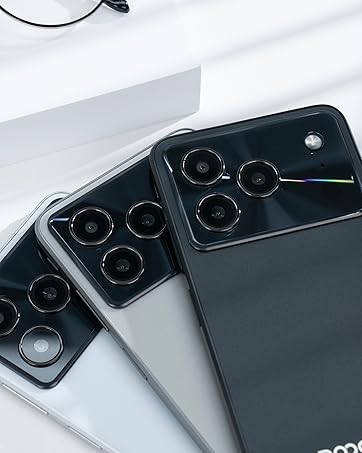
Figure 4.1: Android 16 operating system interface on the DOOGEE Note 56.
4.2 Antso sy Hafatra
To make a call, open the Phone app, enter the number, and tap the call icon. For messaging, open the Messages app, select a contact or start a new conversation, type your message, and send.
4.3 Fakan-tsary Functions
The DOOGEE Note 56 features an 8 MP rear camera and a 5 MP front camera. Open the Camera app to access various modes such as Photo, Video, Portrait, and more. Tap the shutter button to capture photos or start/stop video recording.

Figure 4.2: Camera features and AI scene recognition.
4.4 Fikirana fampisehoana
Customize your 6.56-inch HD+ 90 Hz IPS display by going to Fikirana > Aseho. Here you can adjust brightness, dark mode, screen timeout, and refresh rate for a smoother visual experience.

Figure 4.3: The 90 Hz HD+ display provides smooth visuals.
5. Fitehirizana sy Fahombiazana
The DOOGEE Note 56 is equipped with 24GB RAM (3GB physical + 21GB virtual) and 64GB of internal storage, expandable up to 2TB via a MicroSD card (sold separately). This configuration ensures smooth multitasking and ample space for your apps, photos, and videos.
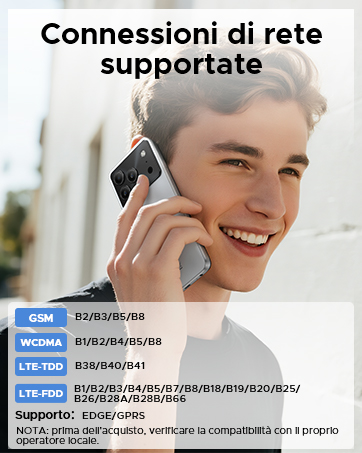
Figure 5.1: Memory configuration of the DOOGEE Note 56.
6. Fifandraisana sy fiarovana
6.1 Fifandraisana amin'ny tambajotra
The device supports 4G LTE for fast mobile data. Ensure your SIM cards are active and correctly inserted. For Wi-Fi, go to Settings> Network & Internet> Wi-Fi and connect to your preferred network.

Figure 6.1: Supported network connections for the DOOGEE Note 56.
6.2 Face ID
Unlock your phone quickly and securely using Face ID. To set it up, go to Settings> Security> Face Unlock and follow the on-screen instructions to register your face.
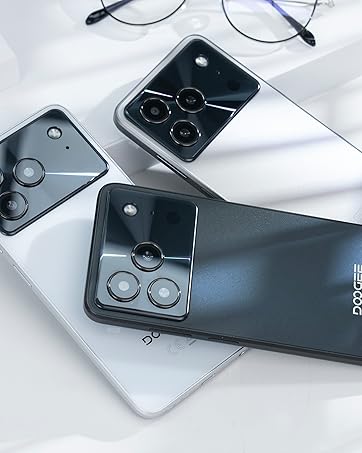
Figure 6.2: Instant facial recognition for unlocking.
6.3 OTG and GPS
The device supports OTG (On-The-Go) for connecting USB accessories like flash drives. GPS functionality provides accurate location services for navigation and location-based apps.
7. Fitantanana bateria
The DOOGEE Note 56 is equipped with a 6150 mAh silicon-carbon battery, offering extended usage. It supports 10W fast charging. To optimize battery life:
- Ahitsio ny famirapiratry ny efijery.
- Akatona ny fampiharana tsy ampiasaina mandeha ao ambadika.
- Alefaso ny fomba fitsitsiana batterie rehefa ilaina.
- Fadio ny hafanana tafahoatra.
Figure 7.1: The 6150 mAh battery provides long-lasting power.

Figure 7.2: Estimated usage times on a single charge.
8. Fikojakojana
8.1 Fanavaozana rindrambaiko
Jereo tsy tapaka ny fanavaozana rindrambaiko mba hahazoana antoka fa manana ireo endri-javatra sy fanavaozana fiarovana farany indrindra ny fitaovanao. Mandehana any amin'ny Fikirana > Rafitra > Fanavaozana ny rafitra hanamarina sy hametraka fanavaozana.
8.2 Fanadiovana ny fitaovanao
Mampiasà lamba malefaka sy tsy misy volo mba hanadiovana ny efijery sy ny vatan'ny findainao. Fadio ny mampiasa akora simika mahery vaika na fitaovana mikikitra.
9. Famahana olana
9.1 Olana sy Vahaolana iraisana
- Tsy mandeha ny finday: Ataovy azo antoka fa voaloa ny bateria. Ampifandraiso amin'ny charger mandritra ny 10 minitra fara-fahakeliny, dia andramo velomina.
- Apps mianjera: Clear the cache of the problematic app (Settings > Apps > [App Name] > Storage & cache > Clear cache). If the issue persists, reinstall the app.
- Faharetan'ny bateria: Review Section 7 for battery optimization tips.
- Olana mifandray amin'ny tambajotra: Check if SIM cards are properly inserted. Restart the phone. Verify network settings in Settings > Network & internet.
10. Famaritana
| endri-javatra | famaritana |
|---|---|
| MODELY | FANAMARIHANA56 |
| Rafitra fikirakirana | Android 16 |
| miseho | 6.56-inch HD+ IPS, 90 Hz |
| processeur | Octa-Core |
| ram | 24 GB (3GB + 21GB virtoaly) |
| Fitehirizana anatiny | 64 GB |
| Fitehirizana azo itarina | Up to 2 TB MicroSD |
| Fakan-tsary aoriana | 8 MP |
| Camera Front | 5 MP |
| Fahaizana bateria | 6150mAh |
| fa mamaly ny | 10W Famandrihana haingana |
| lafiny | 8.45 mm ny hateviny |
| lanja | 262 g |
| fifandraisana | 4G, Dual SIM, Wi-Fi, Bluetooth, GPS, OTG |
| ARO | Face ID |
11. Lahatsary vokatra ofisialy
Video 11.1: DOOGEE Note 56 Plus Smartphone Overview. This video highlights the ultra-thin design, camera features, and overall elegance of the Note 56 Plus, which shares many characteristics with the Note 56 model.
Video 11.2: DOOGEE Note 56 Plus Ultra-thin Smartphone. This video focuses on the slim profile and aesthetic appeal of the Note 56 Plus, demonstrating its comfortable handling and modern look.
12. Warranty sy fanohanana
Your DOOGEE Note 56 smartphone comes with a limited warranty. Please refer to the warranty card included in your product packaging for specific terms and conditions. For technical support or service inquiries, please visit the official DOOGEE webtranokala na mifandray amin'ny serivisy mpanjifany.
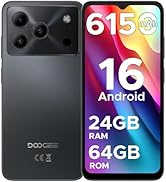
Figure 12.1: DOOGEE customer service details, including warranty and support options.


