1. Fampidirana
This manual provides essential instructions for setting up, operating, maintaining, and troubleshooting your Cricket Icon 6 (SL219C) smartphone. Please read this manual thoroughly to ensure proper use and to maximize the device's performance.
The Cricket Icon 6 (SL219C) is an Android smartphone featuring a 6.5-inch HD+ display, a 13MP camera, 64GB of internal storage, and 4GB of RAM. This device operates on the Android platform and is designed for reliable everyday performance.

Sary 1: Eo anoloana sy aoriana View of the Cricket Icon 6 (SL219C) Smartphone. The front displays the home screen with app icons, while the rear shows the camera module and Cricket branding.
2. Inona no ao anaty boaty
Hamarino fa misy ny entana rehetra ao anaty fonosanao vokatra:
- Cricket Icon 6 (SL219C) Smartphone
- Tariby USB-C
- SIM Ejector Tool
3. Fametrahana
3.1. Ampidiro ny karatra SIM sy ny karatra microSD
- Tadiavo ny lovia karatra SIM eo amin'ny sisin'ny fitaovanao.
- Insert the SIM ejector tool into the small hole on the SIM tray and press gently until the tray pops out.
- Place your Nano-SIM card into the designated slot on the tray. If using a microSD card for expanded storage, place it in the appropriate slot. Ensure the gold contacts face downwards.
- Ampidiro amim-pitandremana ao amin'ny telefaona ilay lovia mandra-pikitika amin'ny toerany.
3.2. Herin'ny voalohany
- Press and hold the Power button (usually on the right side of the device) until the Cricket logo appears.
- Araho ny bitsika eo amin'ny efijery hisafidianana ny fiteninao, hifandray amin'ny tambajotra Wi-Fi, ary amboary ny kaontinao Google.
3.3. Fametrahana ny fitaovana
Connect the USB-C cable to the charging port at the bottom of the phone and plug the other end into a compatible USB power adapter (sold separately) or a computer. The battery indicator will show charging status.
4. Torolàlana miasa
4.1. Fikarohana fototra
- mikasika: Tsindrio ny kisary iray mba hanokafana fampiharana na hisafidianana zavatra iray.
- Swipe: Tariho manerana ny efijery ny rantsan-tananao mba hivezivezy amin'ny lisitra na hifamadika eo amin'ny efijery fandraisana.
- Kitapo: Mampiasà rantsantanana roa hanamarihana na hivoaka amin'ny sary ary web pejy.
- bokotra an-trano: Miverina amin'ny efijery.
- bokotra miverina: Miverina amin'ny efijery teo aloha.
- Bokotra fampiharana vao haingana: Mampiseho fampiharana vao haingana.
4.2. Fiantsoana
- Peho ny kisary Phone eo amin'ny efijery.
- Enter the phone number using the dial pad or select a contact from your contacts list.
- Tsindrio ny bokotra Antso hanombohana ny antso.
4.3. Fandefasana hafatra
- Tap the Messages icon.
- Tap the 'Start chat' or '+' icon to compose a new message.
- Ampidiro ny laharan-telefaonin'ny mpandray na mifidiana fifandraisana.
- Type your message in the text field and tap the Send button.
4.4. Mampifandray amin'ny Wi-Fi
- Mandehana any Fikirana > Tambajotra & Internet > Wifi.
- Ampidiro ny Wi-Fi.
- Safidio ny tambajotra Wi-Fi tianao avy amin'ny lisitra.
- Ampidiro ny tenimiafina raha asaina ary tsindrio Connect.
4.5. Mampiasa ny Camera
The Cricket Icon 6 features a 13MP main camera.
- Tap the Camera icon on the home screen.
- Amboary ny tifitrao amin'ny fampiasana ny efijery ho a viewizay nahita.
- Tsindrio ny bokotra Shutter raha haka sary.
- Mifandimby eo amin'ny fomba fanaovana sary sy horonan-tsary araka izay ilaina.
5. Fikojakojana
5.1. Fikarakarana bateria
The device is equipped with a 3400 mAh battery. To prolong battery life:
- Fadio ny hafanana tafahoatra.
- Aza avela ho fenoina mandritra ny fotoana maharitra ny fitaovana rehefa mahatratra 100% ny heriny.
- Ampiasao ny tariby USB-C nomena mba hamenoana.
5.2. Fanavaozana rindrambaiko
Hamarino sy asio fanavaozam-baovao tsy tapaka mba hahazoana antoka fa mahomby sy azo antoka.
- Mandehana any Fikirana > RAFITRA > Fanavaozana ny rafitra.
- Araho ny toromarika eo amin'ny efijery raha hisintona sy hametraka izay fanavaozana misy.
5.3. Manadio ny fitaovana
Mampiasà lamba malefaka sady tsy misy loko mba hanadiovana ny efijery sy ny vatan'ny telefaona. Fadio ny mampiasa akora simika masiaka na akora abrasive.
5.4. Fitantanana fitahirizana
The device has 64GB of internal storage, expandable via microSD. To manage storage:
- Mandehana any Fikirana > fitahirizana.
- View storage usage and free up space by uninstalling unused apps, deleting old files, or moving data to a microSD card.
6. Famahana olana
6.1. Olana iraisana
- Tsy mandeha ny fitaovana: Hamarino tsara fa feno tsara ny bateria. Ampifandraiso amin'ny charger mandritra ny 15 minitra farafahakeliny, dia andramo alefa indray ny herinaratra.
- Tsy misy fifandraisana amin'ny tambajotra: Check if the SIM card is properly inserted. Verify that Airplane Mode is off (swipe down from the top of the screen to access Quick Settings).
- Apps mianjera na mangatsiaka: Akatona ary sokafy indray ny fampiharana. Raha mbola mitohy ny olana dia esory ny cache an'ny fampiharana (Settings > Apps > [App Name] > Storage & cache > Clear cache).
- Fahombiazana miadana: Close unused apps, clear cache, or restart the device.
6.2. Famerenana ny orinasa
A factory reset will erase all data from your phone and restore it to its original factory settings. Back up important data before proceeding.
- Mandehana any Fikirana > RAFITRA > Reset safidy.
- Select Fafao ny angona rehetra (famerenan'ny orinasa).
- Hamafiso ny fanapahan-kevitrao ary ampidiro ny PIN/tenimiafinao raha asaina ianao.
7. Famaritana
| endri-javatra | famaritana |
|---|---|
| Anarana modely | Cricket Icon 6 (SL219C) |
| Rafitra fikirakirana | Android |
| Haben'ny efijery | 6.5 santimetatra |
| RAM Memory Habe napetraka | 4 GB |
| Fahaizana fitahirizana fahatsiarovana | 64 GB (azo itarina amin'ny microSD) |
| Modely CPU | Exynos 850 S5E3830 |
| Hafaingan'ny CPU | 2.2 GHz |
| Famerenana ny herin'ny bateria | 3400mAh |
| Wireless Carrier | nanokatra |
| loko | White |
| mpanamboatra | lalao cricket |
8. Warranty sy fanohanana
8.1. Amazon Renewed Product Information
This Cricket Icon 6 (SL219C) is an Amazon Renewed product. Amazon Renewed products are inspected, undergo full diagnostic tests, thorough cleaning, and are refurbished as necessary to be fully functional. They are backed by the Amazon Renewed Guarantee.

Figure 2: Explanation of the Amazon Renewed program, highlighting quality, trust, and coverage.
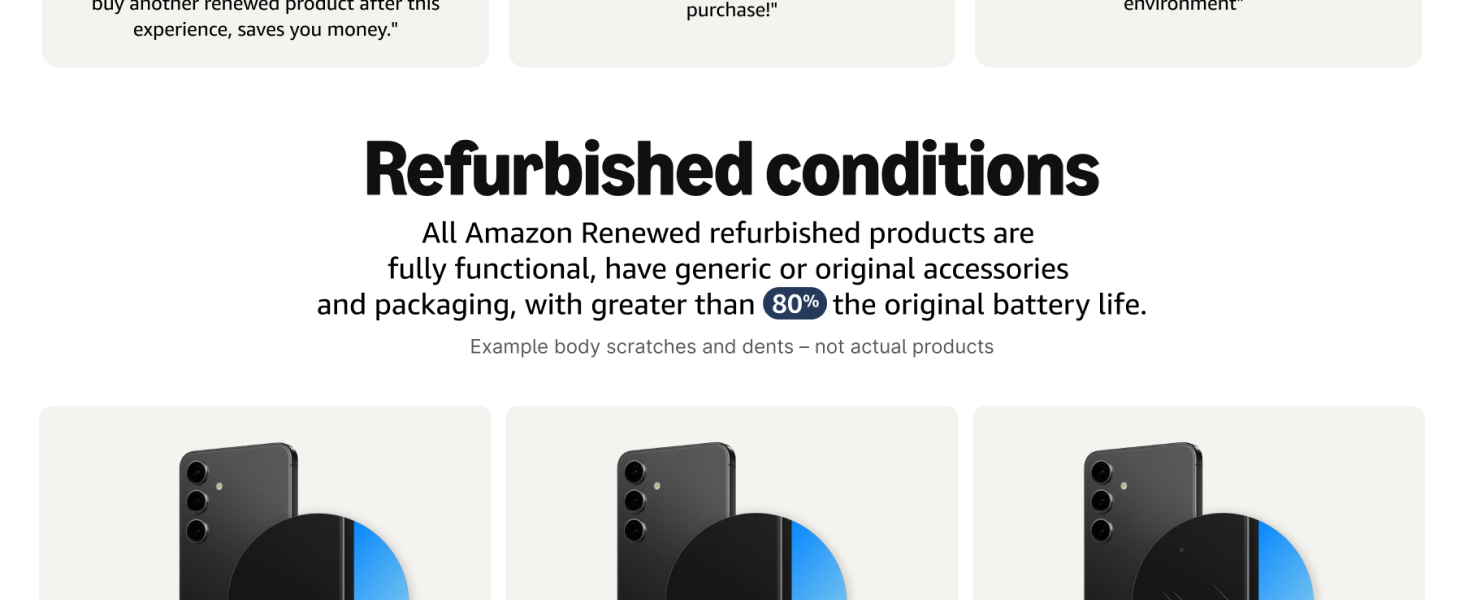
Figure 3: Details on the refurbished conditions of Amazon Renewed products, including functionality and battery life.
8.2. Politika fiverenana
Your purchase is eligible for a 90-day refund/replacement return policy through Amazon Renewed. For specific details, please refer to the Amazon Renewed Guarantee terms and conditions.
8.3. Fanohanana ara-teknika
For technical assistance or further inquiries regarding your Cricket Icon 6 (SL219C), please contact Amazon Renewed customer support or refer to the official Cricket Wireless support resources online.


