1. Fampidirana
This manual provides comprehensive instructions for the setup, operation, maintenance, and troubleshooting of your Elitech Digital Bluetooth Hygrometer Thermometer IPT-100S and Elitech Digital Fridge Thermometer TM-2T. Please read this manual thoroughly before using the devices to ensure proper function and longevity.
2. Vokatra mihoatraview
2.1 Elitech IPT-100S Digital Bluetooth Hygrometer Thermometer
The IPT-100S is a versatile digital hygrometer and thermometer equipped with both internal and external sensors. It offers Bluetooth connectivity for real-time monitoring and data logging via a mobile application. This device is suitable for various environments requiring precise temperature and humidity tracking.
- Dual High-Precision Sensors: Features internal (-10°C~60°C) and external (-20°C~70°C) sensors for stable and rapid-changing environments.
- Smart Data Logging & Analysis: Supports 5,000 offline records with adjustable 30s–1h intervals. Data can be exported as Excel/PDF with trend graphs via the APP.
- User-Friendly Display & Connectivity: Allows quick 2–12h history review via button or real-time Bluetooth APP monitoring.
- Fiainana maharitra bateria: Operates for 6+ months (always-on) or 500 days total on 3×AAA batteries.
2.2 Elitech TM-2T Digital Fridge Thermometer
The TM-2T is a compact digital thermometer designed specifically for refrigerators and freezers. It provides accurate temperature readings and tracks maximum/minimum values, ensuring optimal storage conditions for food and other perishables.
- High Accuracy: Offers ±1°C accuracy (-10°C~50°C) with real-time max/min tracking.
- Fametrahana flexible: Includes a hook, magnet, and stand for secure mounting inside a fridge or freezer.
- Famolavolana maharitra: Features an IPX3 waterproof, ABS eco-friendly body.
- Fikojakojana ambany: Uses a replaceable CR2032 battery for hassle-free operation.
- Fampisehoana mazava: Large LCD screen for easy temperature checks.
3. Torolàlana fananganana
3.1 Elitech IPT-100S Setup
- Fametrahana bateria: Open the battery compartment on the back of the device. Insert three (3) AAA batteries, ensuring correct polarity. Close the compartment securely.
- Herim-batana: The device will automatically power on after battery installation.
- Fampidinana fampiharana: Download the Elitech app from your smartphone’s app store (iOS or Android).
- Fifandraisana momba ny Bluetooth: Enable Bluetooth on your smartphone. Open the Elitech app and follow the on-screen instructions to pair with the IPT-100S device.
- Fantenana sensor: The IPT-100S allows selection between internal and external sensors. Use the button on the device to switch between sensor types as needed. The external sensor is connected via a probe.

Image: Elitech IPT-100S display showing options for internal or external sensor measurement. The external sensor probe is visible.
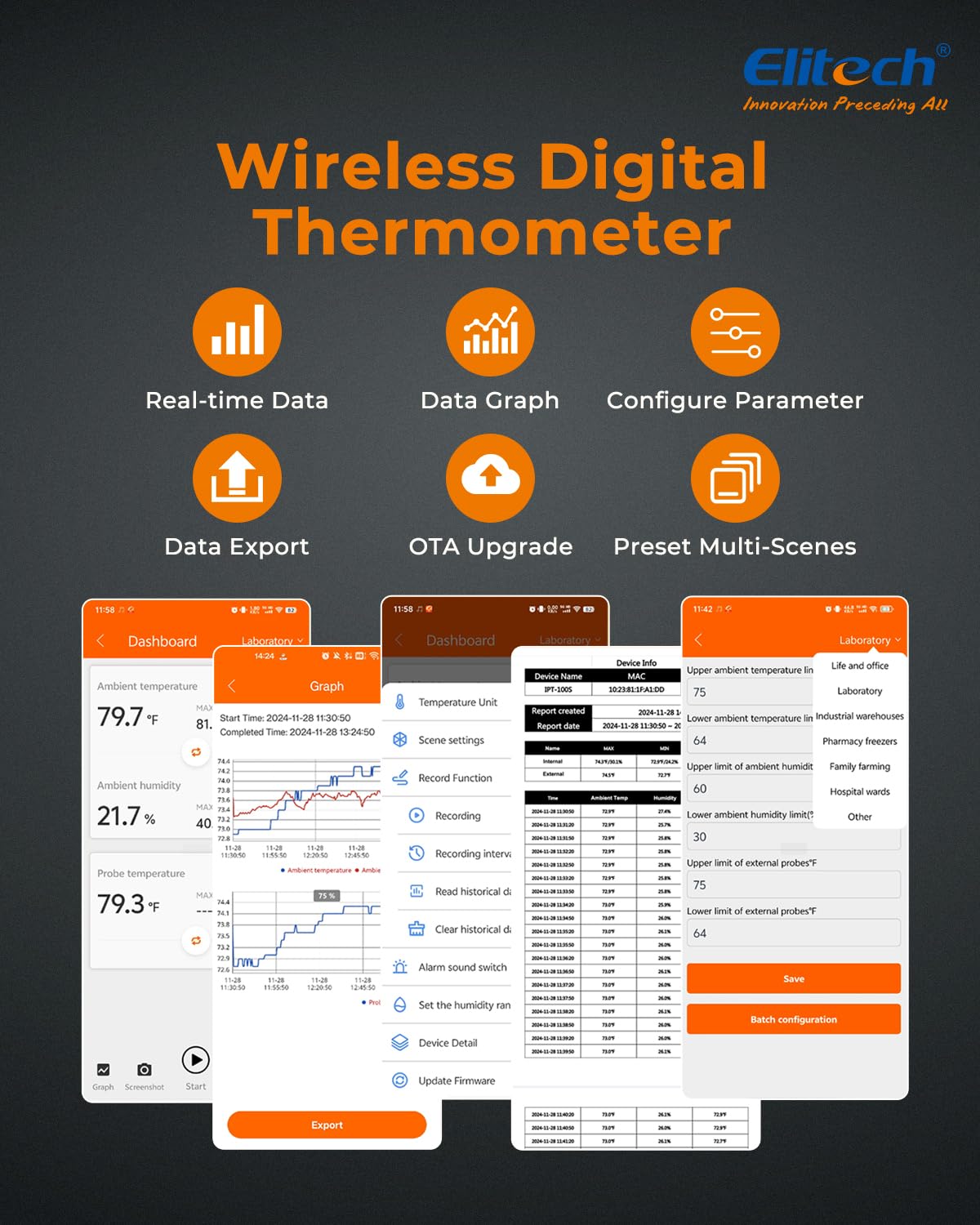
Image: Elitech app interface displaying real-time data, data graphs, configuration parameters, and data export options for the IPT-100S.
3.2 Elitech TM-2T Setup
- Fametrahana bateria: Locate the battery compartment on the back of the TM-2T. Use a coin or small tool to open the compartment. Insert one (1) CR2032 button cell battery with the positive (+) side facing up. Close the compartment securely.
- Herim-batana: The device will automatically power on and display the current temperature after battery installation.
- Fametrahana: The TM-2T offers multiple placement options:
- Ahantona: Use the integrated hook to hang the thermometer from a shelf or rack inside your refrigerator or freezer.
- Mijoro: Utilize the fold-out stand to place the thermometer on a flat surface.
- Andriamby: Attach the thermometer to any metal surface using the built-in magnet on its back.
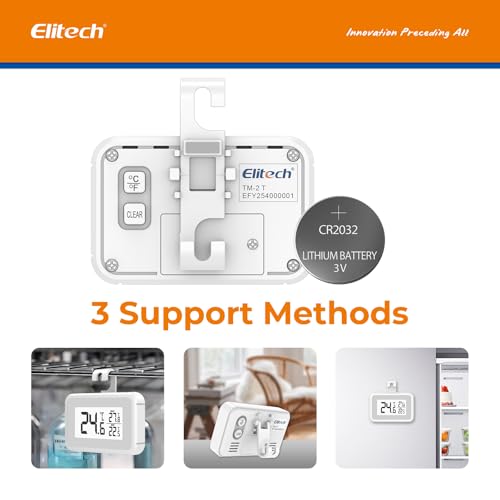
Sary: aoriana view of the Elitech TM-2T thermometer, highlighting the CR2032 battery compartment and the three support methods: hook, magnet, and stand.

Image: Three distinct images demonstrating the Elitech TM-2T's versatile placement options: hanging from a shelf, standing on a surface, and magnetically attached to a refrigerator door.
4. Torolàlana miasa
4.1 Elitech IPT-100S Operation
- Fanaraha-maso tena fotoana: Once connected via Bluetooth, open the Elitech app to view real-time temperature and humidity data from your IPT-100S.
- Data logging: The device automatically logs data at preset intervals. You can adjust these intervals (30 seconds to 1 hour) within the app settings.
- Fanondranana angona: Access historical data and trend graphs within the app. Export data in Excel or PDF format for further analysis.
- History Review: Press the button on the device to quickly review 2-hour or 12-hour historical data directly on the screen.
- Humidity Comfort Level: The device displays a humidity comfort level indicator. The default comfort range is 40%~60% RH, which can be customized via the app.

Image: Elitech IPT-100S display indicating humidity comfort levels (Wet, Comfort, Dry) with corresponding percentage ranges and measurement accuracy.

Image: An illustration showing the Elitech IPT-100S devices monitoring temperature and humidity in a large space, with a smartphone displaying real-time data via Bluetooth connection up to 30 meters (98.5 feet).
4.2 Elitech TM-2T Operation
- Current Temperature Display: The large LCD screen continuously displays the current temperature.
- Max/Min Temperature Tracking: The TM-2T automatically records the maximum and minimum temperatures detected since the last reset. These values are displayed on the screen.
- Switch Temperature Units: Press the '°C/°F' button to toggle between Celsius and Fahrenheit temperature units.
- Clear Max/Min Records: Press the 'CLEAR' button to reset the recorded maximum and minimum temperatures.

Image: The Elitech TM-2T thermometer displaying current temperature, along with recorded maximum and minimum temperatures, illustrating its ability to track temperature extremes within a refrigerator.
5. Fikojakojana
5.1 Fanoloana bateria
- IPT-100S: When the battery indicator on the screen or app shows low power, replace the three (3) AAA batteries. Refer to Section 3.1 for installation steps.
- TM-2T: When the display becomes dim or the device stops functioning, replace the CR2032 button cell battery. Refer to Section 3.2 for installation steps.
5.2 Fanadiovana
Wipe the device surfaces with a soft, damp cloth. Do not use abrasive cleaners, solvents, or immerse the device in water. Ensure the device is dry before use.
5.3 Fitehirizana
When not in use for extended periods, remove the batteries from both devices to prevent leakage. Store the devices in a cool, dry place away from direct sunlight and extreme temperatures.

Image: The Elitech TM-2T thermometer, highlighting its construction from ABS environmentally friendly material, indicating durability and safety.
6. Famahana olana
| OLANA | Antony mety hitranga | vahaolana |
|---|---|---|
| IPT-100S / TM-2T: Tsy misy fampisehoana na fampisehoana manjavozavo | Batterie ambany na maty; Fametrahana batterie tsy mety. | Soloy vaovao ny bateria, hiantohana ny polarity marina. |
| IPT-100S: Cannot connect to app via Bluetooth | Bluetooth is off on phone; Device is out of range; App not running correctly. | Ensure Bluetooth is enabled on your phone. Move closer to the device (within 30m/98.5ft). Restart the app or your phone. |
| IPT-100S: Vakiteny tsy marina | Sensor obstruction; Device placed in extreme conditions; External sensor not properly connected. | Ensure sensors are clear. Place device in a stable environment. Check external sensor connection. |
| TM-2T: Max/Min values not resetting | 'CLEAR' button not pressed or held long enough. | Press and hold the 'CLEAR' button until the Max/Min values reset. |
7. Famaritana
7.1 Elitech IPT-100S Specifications
| endri-javatra | antsipirihany |
|---|---|
| Internal Sensor Temperature Range | -10°C hatramin'ny 60°C (14°F hatramin'ny 140°F) |
| External Sensor Temperature Range | -20°C hatramin'ny 70°C (-4°F hatramin'ny 158°F) |
| Fahamarinan'ny maripana | ±0.5°C (0°C to 40°C), ±1°C (other ranges) |
| Sehatra fanetren-tena | 10% hatramin'ny 99% RH |
| Hamandoana marina | ± 5% RH |
| Fahaizana mirakitra angona | 5,000 rakitra |
| logging Interval | Adjustable from 30 seconds to 1 hour |
| fifandraisana | Bluetooth (up to 30m / 98.5ft) |
| Karazana bateria | 3 x AAA bateria |
| Fiainana bateria | 6+ months (always-on) or 500 days total |
7.2 Elitech TM-2T Specifications
| endri-javatra | antsipirihany |
|---|---|
| Temperature Range | -10°C hatramin'ny 50°C (14°F hatramin'ny 122°F) |
| Fahamarinan'ny maripana | ±1°C (±1.8°F) |
| Temperature Resolution | ±0.1°C (±0.2°F) |
| Rating tsy tantera-drano | IPX3 |
| Karazana bateria | 1 x CR2032 bokotra sela bateria |
| KEVITRA | ABS fitaovana ara-tontolo iainana |
8. Warranty sy fanohanana
For information regarding product warranty, please refer to the warranty card included with your purchase or visit the official Elitech website. If you encounter any issues or require technical assistance, please contact Elitech customer support through their official channels.


