1. Torolàlana manan-danja momba ny fiarovana
Please read all instructions carefully before using this appliance and retain them for future reference. Failure to follow these instructions may result in electric shock, fire, or serious personal injury.
- Ataovy azo antoka ny famatsiana herinaratra voltage mifanaraka amin'ny mari-pamantarana naoty amin'ny fitaovana.
- Do not operate the fan with a damaged cord or plug. If the cord is damaged, it must be replaced by the manufacturer, its service agent, or similarly qualified persons to avoid a hazard.
- Esory foana ny fanesorana ny mpankafy amin'ny faladiany herinaratra alohan'ny hanadiovana, hanamboarana, na hamindrana azy.
- Aza ampidirina rantsantanana na zavatra hafa ao anatin'ny harato mpankafy rehefa miasa izy io.
- Keep the fan away from water or other liquids. Do not use it in wet or damp tontolo iainana.
- Ity fitaovana ity dia natao ho an'ny fampiasana anatiny ihany. Aza mampiasa any ivelany.
- Do not place the fan near heat sources such as radiators, heat registers, stoves, or other appliances that produce heat.
- Arovy ny ankizy mba hahazoana antoka fa tsy milalao amin'ny fitaovana izy ireo.
- Do not use the fan in areas where gasoline, paint, or flammable liquids are stored.
2. Vokatra mihoatraview
The Altus AL 40 TFB is a sleek and efficient tower air cooler designed for indoor use. It features a compact design, multiple speed settings, and easy-to-use push-button controls.
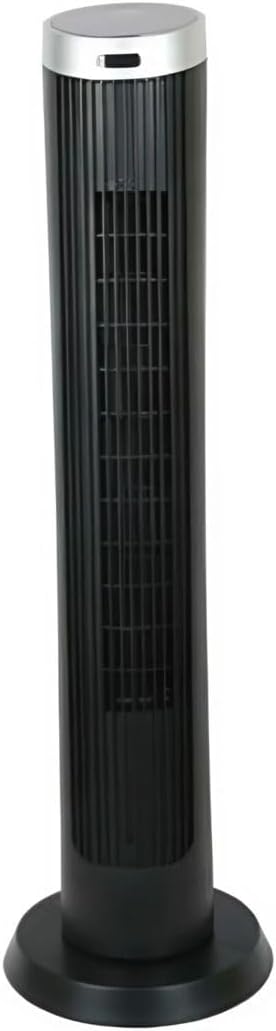
Sary 2.1: anoloana view of the Altus AL 40 TFB Tower Air Cooler. This image shows the tall, slender black body of the fan with its air outlet grille and a stable round base.
singa:
- Takelaka fikirakirana: Located on the top of the unit for easy access to all functions.
- Fametrahan'ny rivotra: Vertical grille on the front for air dispersion.
- fototra: Stable round base for secure placement.
- Tady herinaratra: Any amin'ny faran'ny fitaovana no misy azy.

Sary 2.2: antsipiriany view of the control panel on top of the Altus AL 40 TFB Tower Air Cooler. The panel features a digital display showing '28' and several push buttons for various functions.
3. Fametrahana
Follow these steps to set up your Altus AL 40 TFB Tower Air Cooler:
- Vahao: Carefully remove the fan from its packaging. Retain the packaging for future storage or transport.
- Base Assembly (if required): Some models may require minor base assembly. If your unit's base is detached, align the base sections and secure them according to the diagrams in the packaging. Ensure it is firmly attached.
- Fametrahana: Place the fan on a firm, level surface. Ensure there is adequate space around the fan for proper airflow, at least 30 cm (12 inches) from walls or furniture. This appliance is designed for indoor use only.
- Fampifandraisana herinaratra: Plug the power cord into a standard electrical outlet. Ensure the outlet meets the voltage fepetra voalaza ao amin'ny etikety vokatra.
4. Torolàlana miasa
Your Altus AL 40 TFB Tower Air Cooler is equipped with user-friendly push-button controls on the top panel.
Fonction Panel fanaraha-maso:
- Bokotra Hery (⏻): Press once to turn the fan ON, press again to turn it OFF.
- Bokotra hafainganam-pandeha (💨): Press repeatedly to cycle through the 3 available fan speeds: Low, Medium, and High. The current speed setting may be indicated on the digital display.
- Button Mode (M): If available, press to select different operating modes (e.g., Normal, Natural, Sleep). Refer to the digital display for the active mode.
- Button Oscillation (↔): Press to activate or deactivate the oscillation function, which allows the fan to rotate from side to side to distribute air over a wider area.
- Button fameram-potoana (🕒): If available, press to set an automatic shut-off timer. Each press typically increases the timer duration by a set increment (e.g., 1 hour).
Hetsika ankapobeny:
- Ampidiro amin'ny fivoahana herinaratra mety tsara ny fantson-drano.
- Tsindrio ny bokotra Hery (⏻) to turn on the fan.
- Select your desired fan speed using the Speed Button (💨).
- Activate oscillation if desired by pressing the Oscillation Button (↔).
- To turn off the fan, press the Power Button (⏻) indray.
5. Fikojakojana
Regular maintenance ensures optimal performance and extends the lifespan of your Altus AL 40 TFB Tower Air Cooler.
Fanadiovana:
- Esory foana ny fantson-drano alohan'ny hanadiovana.
- Fanadiovana ivelany: Fafao amin'ny lamba malefaka ny ety ivelany amin'ny fantson-drano, damp cloth. Do not use abrasive cleaners, waxes, or polishes as they may damage the finish.
- Grille fidirana/fivoahana rivotra: Use a vacuum cleaner with a brush attachment to gently remove dust and debris from the air inlet and outlet grilles. Do not attempt to disassemble the fan for cleaning.
- Ataovy azo antoka fa maina tanteraka ny fantson-drivotra alohan'ny hampidirana azy indray ary hiasa.
fitahirizana:
When not in use for extended periods, store the fan in a cool, dry place. It is recommended to store it in its original packaging to protect it from dust and damage.
6. Famahana olana
If you encounter any issues with your Altus AL 40 TFB Tower Air Cooler, please refer to the following common problems and solutions:
- Tsy mandeha ny mpankafy:
- Hamarino raha mipetaka tsara amin'ny fivoahana herinaratra miasa ny tariby herinaratra.
- Ensure the power button on the control panel has been pressed.
- Verify that the household circuit breaker or fuse has not tripped.
- Ny fikorianan'ny rivotra malemy:
- Check if the fan speed is set to a higher setting.
- Ensure the air inlet and outlet grilles are not blocked by dust or obstructions. Clean them if necessary.
- tabataba tsy mahazatra:
- Ataovy azo antoka fa apetraka amin'ny toerana milamina sy marin-toerana ny mpankafy.
- Check for any foreign objects that might have fallen into the fan grilles.
- Raha mbola mitohy ny tabataba, atsaharo ny fampiasana ary mifandraisa amin'ny fanohanan'ny mpanjifa.
If the problem cannot be resolved using the above steps, please contact Altus customer support.
7. Famaritana
Detailed technical specifications for the Altus AL 40 TFB Tower Air Cooler:
| endri-javatra | famaritana |
|---|---|
| Marika | Altus |
| Anarana modely | AL 40 TFB |
| loko | Mainty |
| Famolavolana mpankafy elektrika | Floor Fan (Tower Type) |
| Loharanon-kery | Corded Electric |
| Haben'ny vokatra (D x W x H) | 29D x 29W x 101H cm |
| Karazana fametrahana | Tendrombohitra gorodona |
| Karazana vita | voaloko |
| Fampiasana anatiny / ivelany | an-trano |
| Fomba fanaraha-maso | Kitiho ny bokotra |
| Isan'ny haavon'ny hery | 3 |
| Wireless | tsy misy |
8. Warranty sy fanohanana
Altus provides comprehensive support for its products. For any assistance or warranty-related inquiries, please contact our customer service.

Sary 8.1: Altus customer service and warranty information. The image displays the Altus logo, a message about service availability, and a contact number for support.
Our services are always available for your Altus products. You can benefit from our door-to-door service by calling our support line for any assistance you may need.
Arçelik Service Warranty: For products under warranty, our home product pickup service is provided free of charge.
Customer Support Line: 0850 210 0 888
Please have your product model number (AL 40 TFB) and purchase details ready when contacting support.


