Sava lalana
This manual provides detailed instructions for the setup, operation, and maintenance of your HTC N15 Wireless Clip On Earbuds. Please read this manual thoroughly before using the product to ensure proper function and longevity.
Fonosana fonosana
Hamarino fa misy ny entana rehetra ao amin'ny fonosanao vokatra:
- 1 Pair HTC N15 Clip On Earbuds
- Raharaha famakiana 1
- 1 Cable USB-C Charging
- 1 Quick Start Guide (Basic Operations)
Vita ny vokatraview
The HTC N15 Wireless Clip On Earbuds feature an open-ear design for situational awareness and a lightweight, secure fit. They come with a compact charging case for extended use.
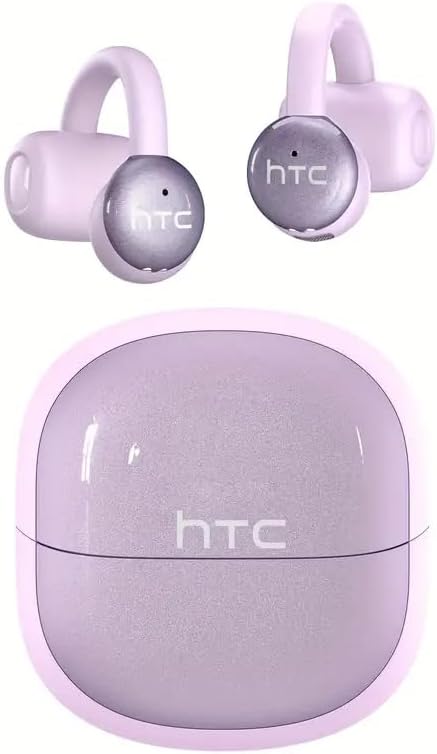
Image: HTC N15 Wireless Clip On Earbuds and Charging Case.

Image: The HTC N15 earbuds and charging case, highlighting battery life features such as 1.5 hours fast charging, 24 hours with the charge case, 8 hours on a single charge, and a Type-C charge port.
Fametrahana ny Earbuds sy Case
Before first use, fully charge the earbuds and charging case. The charging case provides additional power for on-the-go charging.
- Fametrahana ny raharaha: Connect the provided USB-C cable to the charging port on the case and a power source. The indicator lights on the case will show the charging status.
- Fametrahana ny Earbuds: Place the earbuds into the charging case. Ensure they are correctly seated. The earbuds will begin charging automatically.
A single charge provides approximately 8 hours of playback. The charging case extends total playtime to about 22 hours. Fast charging allows for quick power replenishment.

Image: Visual representation of the HTC N15 earbuds' battery life: 8 hours on a single charge, 24 hours with the charging case, and 1.5 hours for fast charging.
Fametrahana sy fampiarahana
The HTC N15 earbuds utilize Bluetooth 6.0 technology for a stable and low-latency connection. They are compatible with iOS and Android devices.
- Herim-batana: Sokafy ny vata fampangatsiahana. Ny earbuds dia mandeha ho azy ary miditra amin'ny fomba fampiarahana.
- Ampidiro ny Bluetooth: Amin'ny fitaovanao (smartphone, tablette, solosaina finday), avelao ny Bluetooth.
- Mifidiana fitaovana: In your device's Bluetooth settings, search for 'HTC NE15' and select it to pair.
- fanamafisana: Once paired, a voice prompt will confirm the connection.

Image: A diagram illustrating the 'Upgraded Bluetooth 6.0 Technology' with a comparison to Bluetooth 5.3 and 5.4, emphasizing low latency and fast connection.

Image: The HTC N15 earbuds and charging case shown with various compatible devices including notebooks, TVs, desktops, watches, phones, and iPads, demonstrating flexible connectivity. A phone screen displays 'HTC NE15 Connected'.
Operating Instructions (Touch Control)
The HTC N15 earbuds feature smart touch controls on both earbuds for easy management of calls and music playback.
- Valio/Atsaharo ny antso: Click either earbud once.
- Mandà ny antso: Tsindrio ary tazony mandritra ny 2 segondra ny sofina roa.
- Alefaso/Atsaharo ny mozika: Tsindrio indroa ny iray amin'ireo écouteur.
- Hira teo aloha: Triple-click the left earbud.
- Hira manaraka: Triple-click the right earbud.
- Fiakaram-peo: Kitiho indray mandeha ny sofina havanana.
- Mihena ny feo: Kitiho indray mandeha ny sofina ankavia.
- Mpanampy amin'ny feo: Tazony mandritra ny 2 segondra ny sofina ankavia.
- Lalao Mode: Tazony mandritra ny 2 segondra ny sofina havanana.

Image: A diagram illustrating the touch control functions for the HTC N15 earbuds, showing actions for answering/ending calls, rejecting calls, playing/pausing music, skipping tracks, adjusting volume, activating voice assistant, and enabling game mode.
Mitafy toromarika
The HTC N15 earbuds feature an ergonomic open-ear clip design for a secure and comfortable fit, allowing you to remain aware of your surroundings.
- Identify L/R: Confirm the left (L) and right (R) earbuds.
- Fametrahana: Confirm the direction of the earbud.
- Clip mandeha: Gently clip the earbud onto the thinnest part of your ear by sliding it down.
- Manitsy: Adjust the earbud tip to align with your ear canal for optimal sound and comfort.
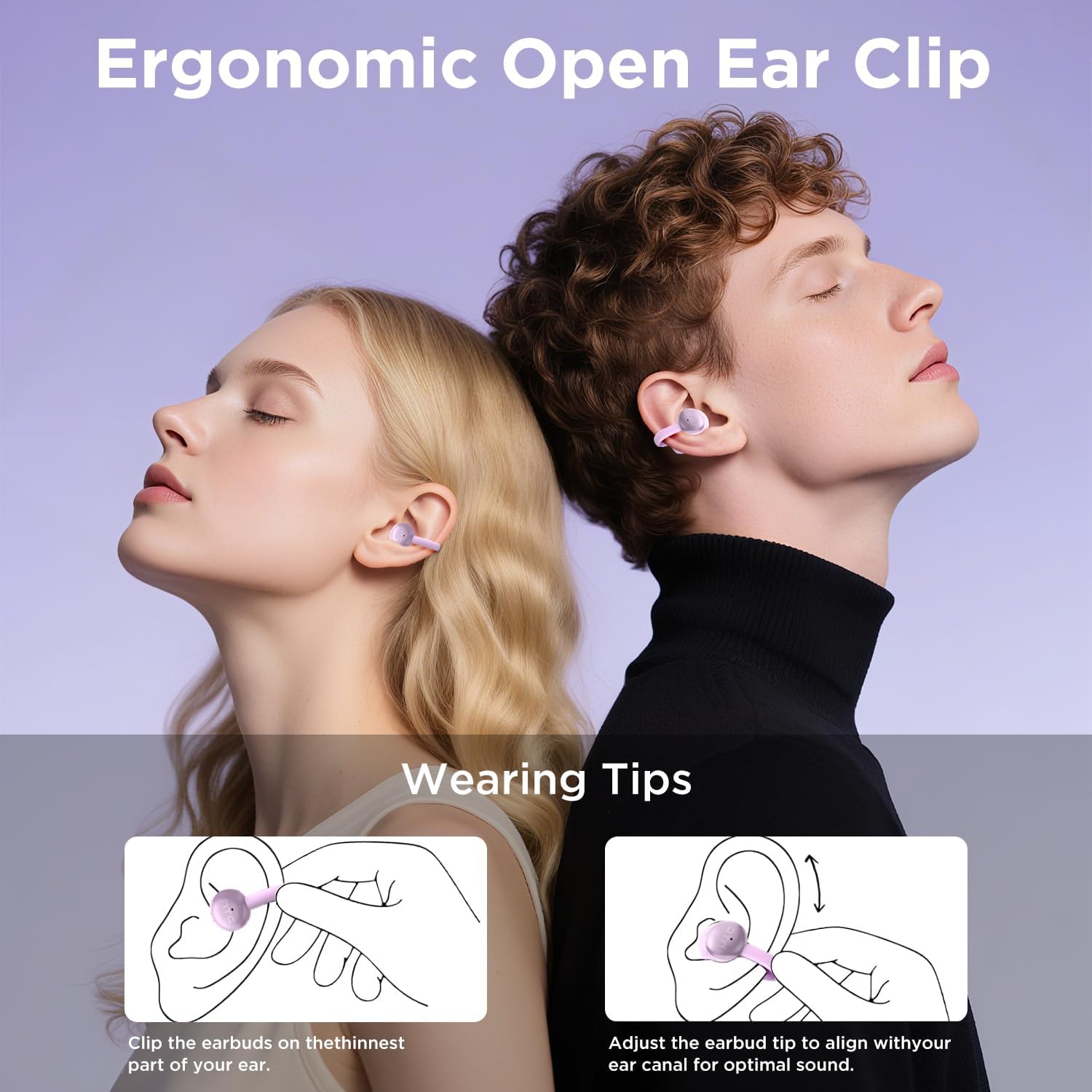
Image: A visual guide demonstrating the ergonomic open-ear clip design and wearing tips for the HTC N15 earbuds, showing how to clip them onto the ear and adjust for optimal sound.

Image: The HTC N15 earbuds emphasizing 'All-Day Comfort' with features like '4.7g Super Light' and a 'Flexible C-Bridge Design' for a secure fit.

Image: A four-step visual guide titled 'HOW TO WEAR?' showing how to correctly position and adjust the HTC N15 earbuds on the ear.
fikarakarana
To ensure the longevity and optimal performance of your HTC N15 earbuds, follow these maintenance guidelines:
- Fanadiovana: Fafao tsy tapaka amin'ny lamba malefaka sy maina ny sofina sy ny vata fampangatsiahana. Fadio ny mampiasa akora simika masiaka na akora abrasive.
- fanoherana ny rano: The earbuds are IPX4 sweatproof, meaning they are resistant to splashes and sweat. Do not submerge them in water or expose them to heavy rain.
- fitahirizana: Rehefa tsy ampiasaina dia tehirizo ao anaty vata fampangatsiahana ny sofina mba hiarovana azy amin'ny vovoka sy ny fahasimbana.
- Temperature: Avoid exposing the earbuds to extreme temperatures (hot or cold) or direct sunlight for extended periods.
Fanamboarana
If you encounter issues with your HTC N15 earbuds, refer to the following common solutions:
- Earbuds tsy mampiaraka: Hamarino tsara fa samy voafahana tsara ny écouteur roa ary ao anatin'ny "pair mode". Vonoy ary alefaso ny Bluetooth-n'ny fitaovanao, dia andramo indray ny "pair".
- Tsy misy feo na feo ambany: Check the volume levels on both your device and the earbuds. Ensure the earbuds are correctly positioned in your ears. Due to the open-ear design, you may need to increase the volume slightly in noisy environments.
- Milatsaka ny écouteur: Ensure you are wearing the earbuds correctly as per the wearing instructions. Adjust the clip and earbud tip for a snug fit.
- Mifehy ny mikasika tsy mamaly: Ensure your fingers are clean and dry. Try restarting the earbuds by placing them back in the case and taking them out again.
- Olana momba ny fiampangana: Verify the USB-C cable and power source are working. Ensure the earbuds are properly seated in the charging case.
fepetra arahana
| endri-javatra | antsipirihany |
|---|---|
| Anarana modely | HTC NE15 |
| Teknolojia fifandraisana | Wireless (Bluetooth 6.0) |
| Earpiece endrika | Open-Sofina |
| Fomba fanaraha-maso | mikasika |
| Fahaveloman'ny bateria (Earbuds) | 8 ora (fiara tokana) |
| Fotoam-pilalaovana manontolo (miaraka amin'ny tranga) | 22 ora |
| Ny haavon'ny fanoherana ny rano | IPX4 (Sweat Resistant) |
| KEVITRA | Plastika, silicone |
| Lanja entana | 4.6 oz |
| Fitaovana mifanentana | Cellphones, Tablets |
| UPC | 768649989703 |
Video vokatra
Video: Unboxing sy mihoatraview of the HTC Wireless Clip On Earbuds N15 Bluetooth 6.0. This video demonstrates the product packaging, contents, and the physical appearance of the earbuds and charging case.
Warranty sy fanohanana
HTC provides customer support for its products. For any questions or assistance, please refer to the contact information provided with your purchase or visit the official HTC support website.
Fanohanana ny mpanjifa: 7*24 Live Chat Support is available for assistance with your HTC N15 earbuds.
Azafady, tehirizo ny porofon'ny fividiananao ho an'ny fitakiana fiantohana.


