Introduction to OBDeleven 3 PRO Pack
The OBDeleven 3 PRO Pack is a comprehensive diagnostic and customization tool designed for a wide range of vehicles, including Audi, Volkswagen, BMW, Mini, Skoda, Seat, Cupra, Lamborghini, Bentley, Rolls-Royce, Toyota, Lexus, and Ford (US models only). This device connects to your vehicle's OBD2 port and communicates wirelessly with your mobile device via Bluetooth, providing access to advanced diagnostics, one-click applications, and expert-level coding functionalities.
This manual provides detailed instructions on setting up, operating, and maintaining your OBDeleven 3 PRO Pack to ensure optimal performance and a better understanding of its capabilities.
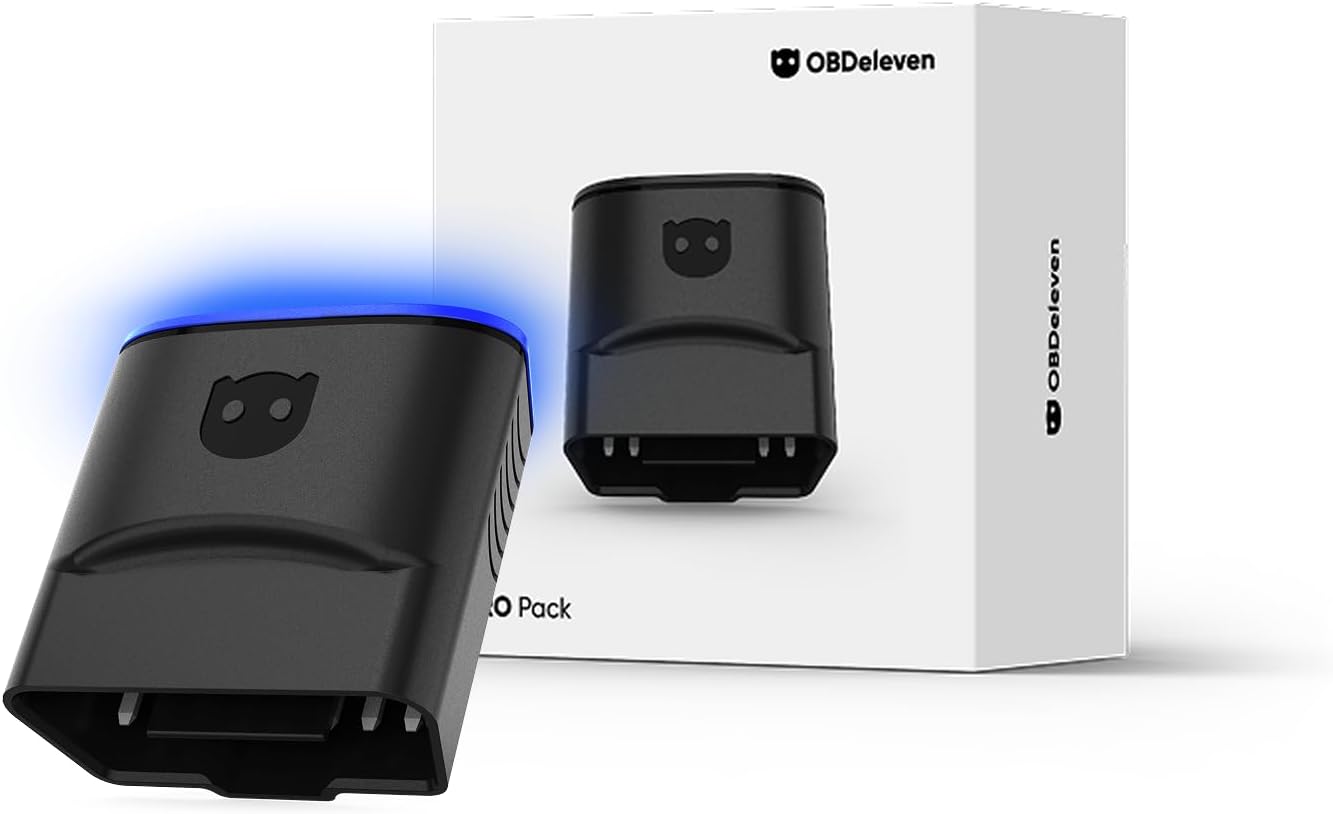
Image: The OBDeleven 3 PRO Pack, showing the diagnostic device and its retail packaging.
Inona no ao anaty boaty
Your OBDeleven 3 PRO Pack includes the following components:
- OBDeleven 3 Device
- 12-month PRO plan activation
- 100 Credits for activating One-Click Apps
Setup Guide
Setting up your OBDeleven 3 PRO Pack is a simple three-step process:
Step 1: Plug the Device into Your Car's OBD2 Port
Locate your vehicle's OBD2 port, typically found under the dashboard on the driver's side. Firmly insert the OBDeleven 3 device into the port. The device will power on automatically.

Image: A hand plugging the compact OBDeleven 3 device into a vehicle's OBD2 port, located under the dashboard.
Step 2: Pair with Your OBDeleven Mobile App
Download the official OBDeleven app from your device's app store (Android 8.0+ or iOS 16.6+). Open the app and follow the on-screen instructions to connect to your OBDeleven 3 device via Bluetooth. Ensure Bluetooth is enabled on your mobile device.
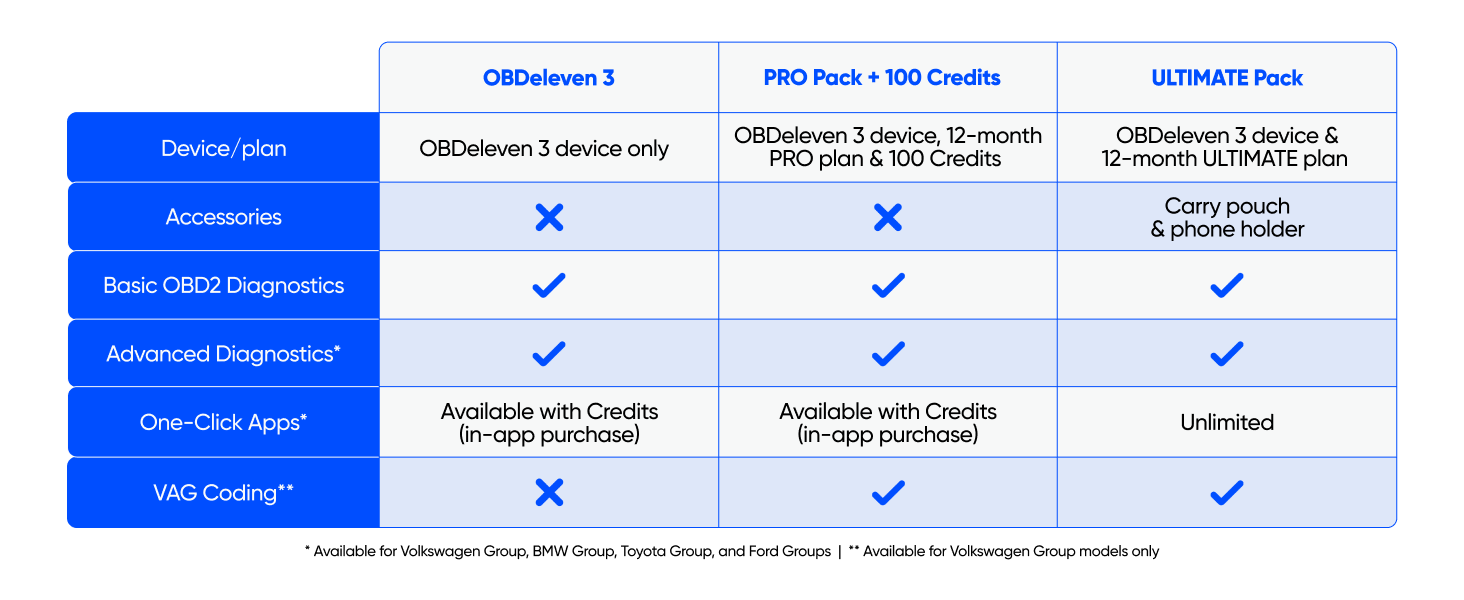
Image: A visual guide illustrating the three simple steps: plug the device, pair with the app, and enjoy the experience.
Step 3: Enjoy a Better Driving Experience
Once connected, you can begin using the app to scan your vehicle, access various features, and customize settings. The app provides an intuitive interface for all functions.

Image: A smartphone screen displaying the OBDeleven app, showing a vehicle scan in progress with fault detection.
Operating the OBDeleven 3 PRO Pack
The OBDeleven 3 PRO Pack offers a range of powerful features accessible through the mobile application. Below are the primary functionalities:
1. Advanced Diagnostics
Scan all available vehicle systems to read and clear fault codes quickly. This feature helps identify critical issues and minor faults across various car brands supported by OBDeleven.

Image: A smartphone displaying the OBDeleven app's diagnostics screen, with a car interior in the background, illustrating real-time use.
2. Access to One-Click Apps
Utilize pre-made coding options to activate ambient lighting, folding mirrors, video in motion, needle sweep, and more. These apps simplify complex coding tasks, allowing you to turn on, off, or adjust car features, integrate retrofitted parts, and reset service lights with a single tap. One-Click Apps are available for Volkswagen Group, BMW Group, Toyota Group, and Ford Group vehicles (US models only).

Image: Multiple smartphone screens displaying the OBDeleven app's One-Click Apps interface, showcasing various customization options like parking lights and ambient colors.
3. Manual Coding & Adaptations (VAG-only)
For Volkswagen Group vehicles, the PRO plan provides access to expert-level coding. You can modify control units, tweak factory settings, unlock hidden functions, or disable unwanted features. This requires a deeper understanding of vehicle systems.
4. SFD Unlock
Gain access to SFD-protected features, allowing full customization of newer Volkswagen Group vehicles that have security restrictions.
5. Additional Smart Features
- Hybrid Battery Check: Monitor battery health and temperature in real-time.
- Car Buying Assistant: Check vehicle condition and identify potential issues before purchasing a used car.
- Fomba fitsitsiana herinaratra: Allows the device to remain plugged in without draining your car's battery.

Image: An infographic detailing additional smart features: Hybrid battery check, Car buying assistant, and Power-saving mode, with corresponding icons.
fepetra arahana
| toetra | antsipirihany |
|---|---|
| Marika | OBDeleven |
| Laharana modely | P1052 |
| Lanja entana | 2.11 oz |
| Ny haben'ny fonosana | 3.11 x 3.03 x 1.54 santimetatra |
| Fifanarahana amin'ny rafitra fandidiana | Android 8.0+, iOS 16.6+ |
| Karazana Fitaovana fiara | Universal Fit |
| Daty azo alaina voalohany | 9 Jolay 2025 |

Image: A detailed comparison table outlining the features included with OBDeleven 3, PRO Pack, and ULTIMATE Pack, such as device/plan, accessories, diagnostics, One-Click Apps, and VAG Coding.
Famahana olana & Fanontaniana matetika
Q: Does it support my car brand?
A: The OBDeleven PRO Pack includes a PRO plan and 100 Credits for activating One-Click Apps. Currently, the PRO plan includes manual coding features available for Volkswagen Group models only, while One-Click Apps are available for vehicles from Volkswagen, BMW, Toyota, and Ford* Groups. However, the OBDeleven 3 car scanner works with all car brands with the CAN-bus protocol (manufactured mainly from 2008). You can find available features for your car brand on our Supported vehicles page. *Currently available for US-manufactured Ford Group vehicles only.

Image: A graphic addressing the question of car brand compatibility for the OBDeleven device, with a car icon.
Q: How do One-Click Apps work?
A: One-Click Apps are pre-made coding options used to adjust, turn on, or disable car safety, comfort, and driving features with a few taps. You don't need any special know-how, because our team already did the hardest part – coding – for you. The PRO plan includes 5000 Credits for activating maintenance One-Click Apps. For retrofit and customization One-Click Apps, you'll need to get extra Credits. One-Click Apps are currently available for Volkswagen Group, BMW Group, Toyota Group, and Ford Group* vehicles. *Currently available for US-manufactured Ford Group vehicles only.
Q: Can I use the OBDeleven PRO Pack for multiple vehicles?
A: Yes, there's no limit on how many vehicles you can connect to your account.
fikarakarana
To ensure the longevity and optimal performance of your OBDeleven 3 device, follow these simple maintenance guidelines:
- Keep it clean Fafao amin'ny lamba malefaka sy maina ny fitaovana. Fadio ny mampiasa akora simika mahery vaika na fitaovana marokoroko.
- Store araka ny tokony ho izy: Rehefa tsy ampiasaina dia tehirizo ao amin'ny toerana mangatsiatsiaka sy maina ny fitaovana, lavitry ny tara-masoandro mivantana sy ny mari-pana tafahoatra.
- Fanavaozana rindrambaiko: Regularly check the OBDeleven app for software and firmware updates to ensure compatibility and access to the latest features and vehicle support.
- Mitantana amin'ny fikarakarana: Avoid dropping the device or subjecting it to physical shock.
Warranty sy fanohanana
For detailed warranty information and technical support, please refer to the official OBDeleven website or contact their customer service. You can also find a comprehensive user manual in PDF format for additional guidance:
Misintona Boky Torolàlana Ofisialy mpampiasa (PDF)
Raha mila fanampiana fanampiny dia azonao atao ny mitsidika ny OBDeleven Store on Amazon.


