Sava lalana
This manual provides detailed instructions for the setup, operation, and maintenance of your new Merwry DL-4112T-02 Fan Remote Control Replacement. This remote is designed to be a direct replacement for Home Decorators Ceiling Fans, offering enhanced functionality and ease of use.
It features an all-in-one control design, allowing you to manage fan speeds, light functions, and reverse mode directly from the front of the remote, eliminating the need to access internal switches for reverse function.

Image: Comparison of the original remote (left) and the Merwry DL-4112T-02 replacement remote (right).
Hametraka
1. Fametrahana bateria
The remote control requires one 9V battery (not included). To install the battery:
- Tadiavo ao ambadiky ny fanaraha-maso lavitra ny fonon'ny fitoeran-bateria.
- Atsofohy midina ny fonony mba hanokafana azy.
- Insert a new 9V battery, ensuring the polarity (+/-) matches the diagram inside the compartment.
- Atsofohy amin'ny toerany ny fonony mandra-pikitika tsara.
2. Fametrahana Wall Mount
The remote comes with a convenient wall mount and screws for secure storage.
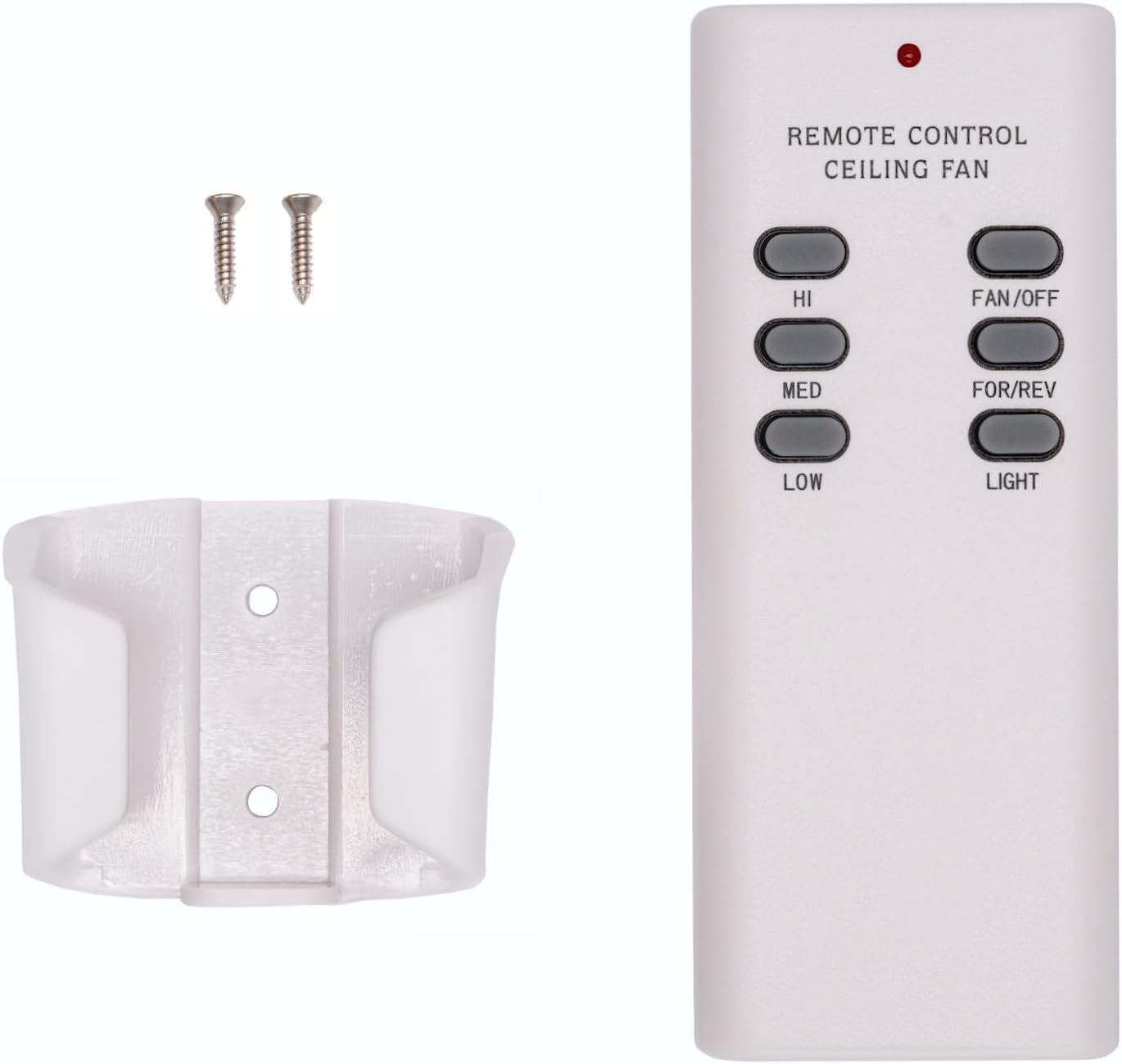
Image: The Merwry DL-4112T-02 remote control, its wall mount cradle, and two mounting screws.
Mametraka ny rindrin'ny rindrina:
- Choose a suitable location on a wall, away from direct heat or moisture.
- Ampiasao ny rindrina ho toy ny môdely hanamarihana ny toerana misy ny visy roa.
- Manaova lavaka mpanamory raha ilaina.
- Ampifandraiso amin'ny rindrina ny fitoeran-drindrina amin'ny alalan'ny visy omena.
- Place the remote control into the mounted cradle for easy access.
3. Pairing Process (Syncing the Remote)
Follow these steps to pair your new remote control with your ceiling fan:
- Turn off power to the fan: Locate the circuit breaker or wall switch that controls power to your ceiling fan and turn it OFF. Ensure the fan is completely powered down.

Image: A hand turning off a wall light switch, illustrating the first step of power cycling.
- Avereno hery: After a few seconds, turn the power back ON at the circuit breaker or wall switch.
- Press and hold the "FAN/OFF" button: Within 30 seconds of restoring power, press and hold the "FAN/OFF" button on your remote control for 10 seconds. The fan light (if applicable) should blink, indicating successful pairing.

Sary: akaiky view of the Merwry DL-4112T-02 remote control, with the 'FAN/OFF' button highlighted by a green rectangle.
If pairing is unsuccessful, repeat the steps. Ensure the remote is within range of the fan's receiver during the pairing process.
Torolàlana miasa
The Merwry DL-4112T-02 remote control provides comprehensive control over your ceiling fan's functions. Familiarize yourself with the buttons:

Sary: Front view of the Merwry DL-4112T-02 replacement remote control, showing all control buttons.
- HI: Sets the fan speed to High.
- MED: Sets the fan speed to Medium.
- ambany: Sets the fan speed to Low.
- FAN/OFF: Turns the fan off. Also used for pairing (see Setup section).
- FOR/REV: Toggles the fan's direction between forward (downward airflow for cooling) and reverse (upward airflow for heat distribution). This button is conveniently located on the front, unlike some original remotes.
- MAZAVA: Toggles the fan light On or Off.
fikarakarana
Fanoloana bateria
Replace the 9V battery when the remote's indicator light dims or if the remote becomes unresponsive. Refer to the "Battery Installation" section under Setup for instructions.
FANADIOVANA
To clean the remote control, wipe it gently with a soft, dry cloth. Do not use abrasive cleaners, solvents, or expose the remote to excessive moisture, as this can damage the electronics.
Fanamboarana
| OLANA | Antony mety hitranga | vahaolana |
|---|---|---|
| Tsy mamaly ny fitaovana lavitra. | Batery ambany na maty. | Soloy ny bateria 9V. |
| Tsy mamaly ny fitaovana lavitra. | Remote is not paired with the fan. | Perform the pairing process again (see Setup section). |
| Fan or light not responding after pairing. | Power interruption to the fan. | Ensure the fan's power supply (wall switch/breaker) is ON. |
| Fan operates but light does not. | Light bulb issue. | Check if the light bulb is properly installed and not burnt out. |
| Fan direction (FOR/REV) does not change. | Fan motor issue or internal switch. | Ensure the fan is running at a low speed before attempting to change direction. If issues persist, consult your fan's manual or a qualified electrician. |
fepetra arahana
- Laharana modely: CD7030T4DS-2 (DL-4112T-02 Replacement)
- marika: Comfort Direct
- Fitaovana mifanentana: Home Decorators Ceiling Fans (Merwry series, 2A767-DL-4112T-01, 28865-DL4112T)
- Loharano herinaratra: 1 x 9V Battery (not included)
- Endri-javatra manokana: Radiofrequency (RF) control, All-in-One Control (Fan Speed, Light, Reverse)
- loko: White
- Haben'ny vokatra: 2.76 x 1.8 x 4.57 santimetatra
- Lanja entana: 4 oz
- Firenena nihaviana: TAÏWAN
Warranty Information
This Merwry DL-4112T-02 Fan Remote Control Replacement is backed by a Garantie 1 taona amin'ny mpanamboatra. Ity fiantohana ity dia manarona ny lesoka amin'ny fitaovana sy ny asa amin'ny fampiasana mahazatra. Azafady, tehirizo ny porofon'ny fividiananao ho an'ny fitakiana fiantohana.
For specific warranty terms and conditions, or to initiate a warranty claim, please contact the manufacturer directly.
Fanohanana ny mpanjifa
If you encounter any issues not covered in this manual or require further assistance, please contact Comfort Direct customer support. Refer to the product packaging or the retailer's webtranokala momba ny fifandraisana.
When contacting support, please have your product model number (CD7030T4DS-2) and purchase details ready.


