1. Fampidirana
This manual provides detailed instructions for the Loutoc SRC4526 Universal Remote Control, designed for seamless compatibility with Philips Ambilight Smart TVs. Please read this guide thoroughly to ensure optimal use and longevity of your remote control.
1.1 Ny vokatraview
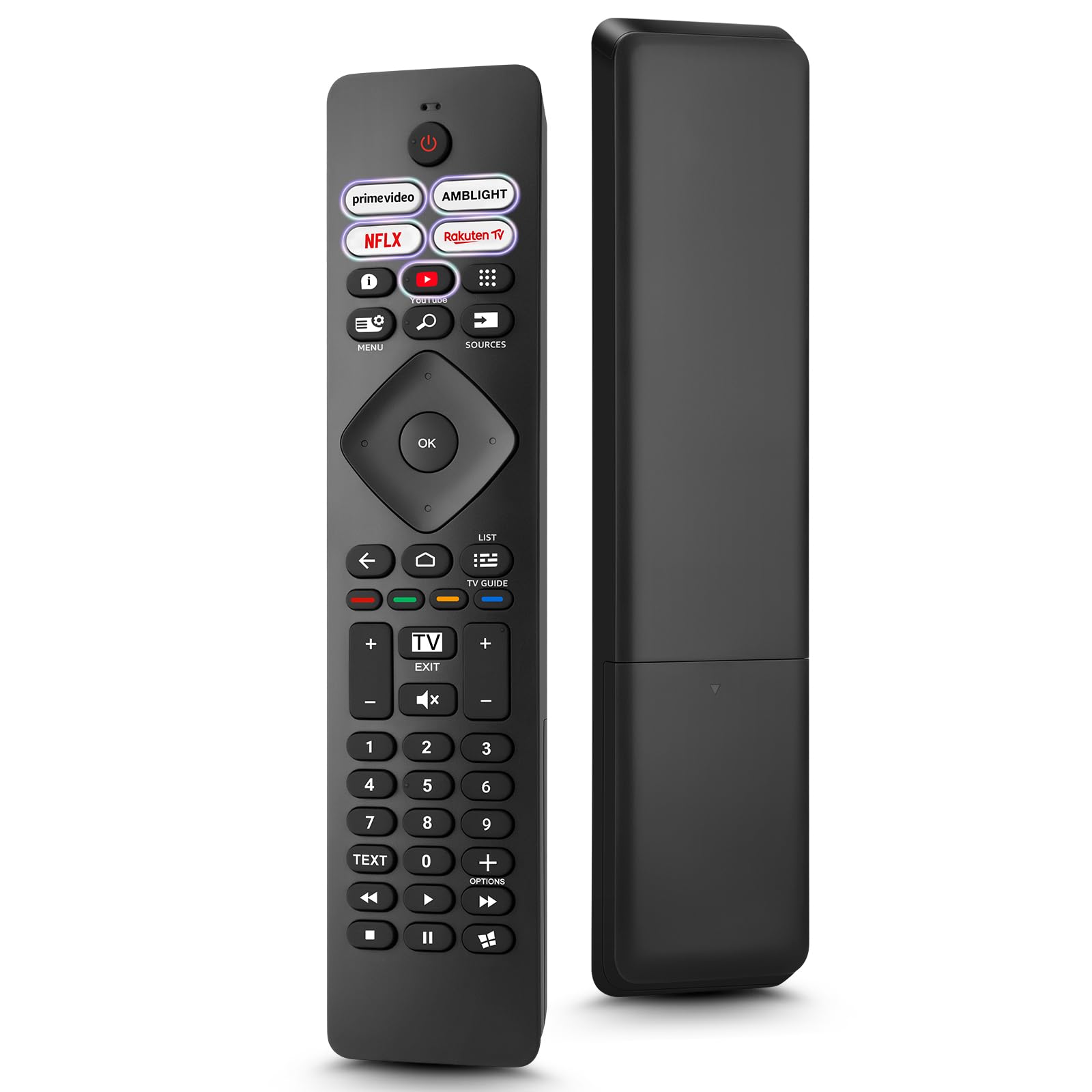
Image: The Loutoc SRC4526 Universal Remote Control, showcasing ny endrika ergonomika sy ny fametrahana bokotra.
1.2 Lafin-javatra fototra
- Convenient Plug-and-Play: No complex setup or programming required. Simply insert batteries and the remote is ready for use.
- Wide TV Compatibility: Fully compatible with Philips Ambilight TVs, including 4K Ambilight LED, OLED, FHD, and Full Ultra HD models.
- Dedicated Shortcut Buttons: Features 5 direct access buttons for popular streaming platforms: Ambilight, Video, NFLX (Netflix), Rakuten TV, and YouTube.
- Fampisehoana azo antoka: Offers an effective operating range of 8 meters (26 feet) and an ultra-fast response time of 0.2 seconds.
2. Fametrahana
2.1 Fametrahana bateria
The Loutoc SRC4526 remote control requires two AAA batteries (not included) for operation.
- Tadiavo ny toerana misy ny bateria ao ambadiky ny fanaraha-maso lavitra.
- Atsofohy ny fonony.
- Ampidiro ny batteries AAA roa, hiantohana tsara ny terminal tsara (+) sy négatif (-) mifanaraka tsara amin'ny tondro ao anaty efitrano.
- Akatona tsara ny saron'ny efitrefitra bateria.
2.2 Fampiasana voalohany
This remote control is designed for immediate use with compatible Philips Ambilight TVs. No programming or pairing is required. Once batteries are installed, point the remote at your TV and begin operation.
3. Torolàlana miasa
3.1 Ny fiasan'ny bokotraview
Refer to the image below for a visual guide to the remote control's buttons and their corresponding functions.

Image: Detailed diagram of the Loutoc SRC4526 remote control, illustrating each button and its primary function.
| bokotra | asa |
|---|---|
| fahefana | Switches the TV on or off (Standby mode). |
| Prime Video, Ambilight, Netflix, Rakuten TV | Quickly launches the corresponding application. |
| sakafo | Opens the Quick Menu with typical TV functions. Hold to show Gaming control bar. |
| Mitady | Opens the Search tab on the Home screen. |
| loharanom-baovao | Opens or closes the TV's input sources menu. |
| OK | Confirms a selection or setting. |
| Arrow/Navigation Keys | Navigates up, down, left, or right through menus and options. |
| indray | Miverina amin'ny efijery na fantsona teo aloha. |
| an-trano | Opens the TV's Home menu. |
| TV Guide | Opens or closes the TV Guide. Long press to open the channel list. |
| Color Keys (Red, Green, Yellow, Blue) | Provides direct selection of on-screen options. The blue key typically opens Help. |
| Volume (+/-) | Adjusts the TV's volume level. |
| Lakandrano (+/-) | Switches to the next or previous channel. |
| Fivoahana | Exits current menu/application or returns to live TV. From standby, goes to last viewed loharano. |
| Mangina | Mampangina na manala ny feon'ny TV. |
| Fanalahidin'ny isa (0-9) | Mifidy mivantana fantsona fahitalavitra. |
| TEXT | Opens or closes Text/Teletext. |
| Fanaraha-maso Playback | Controls media playback: Play, Pause, Stop, Rewind, Fast Forward. |
| app | Opens the Apps tab on the Home screen. |
3.2 Ambilight Functionality
For Philips TVs equipped with Ambilight functionality, the dedicated Ambilight button on your remote allows you to control the lighting effects.
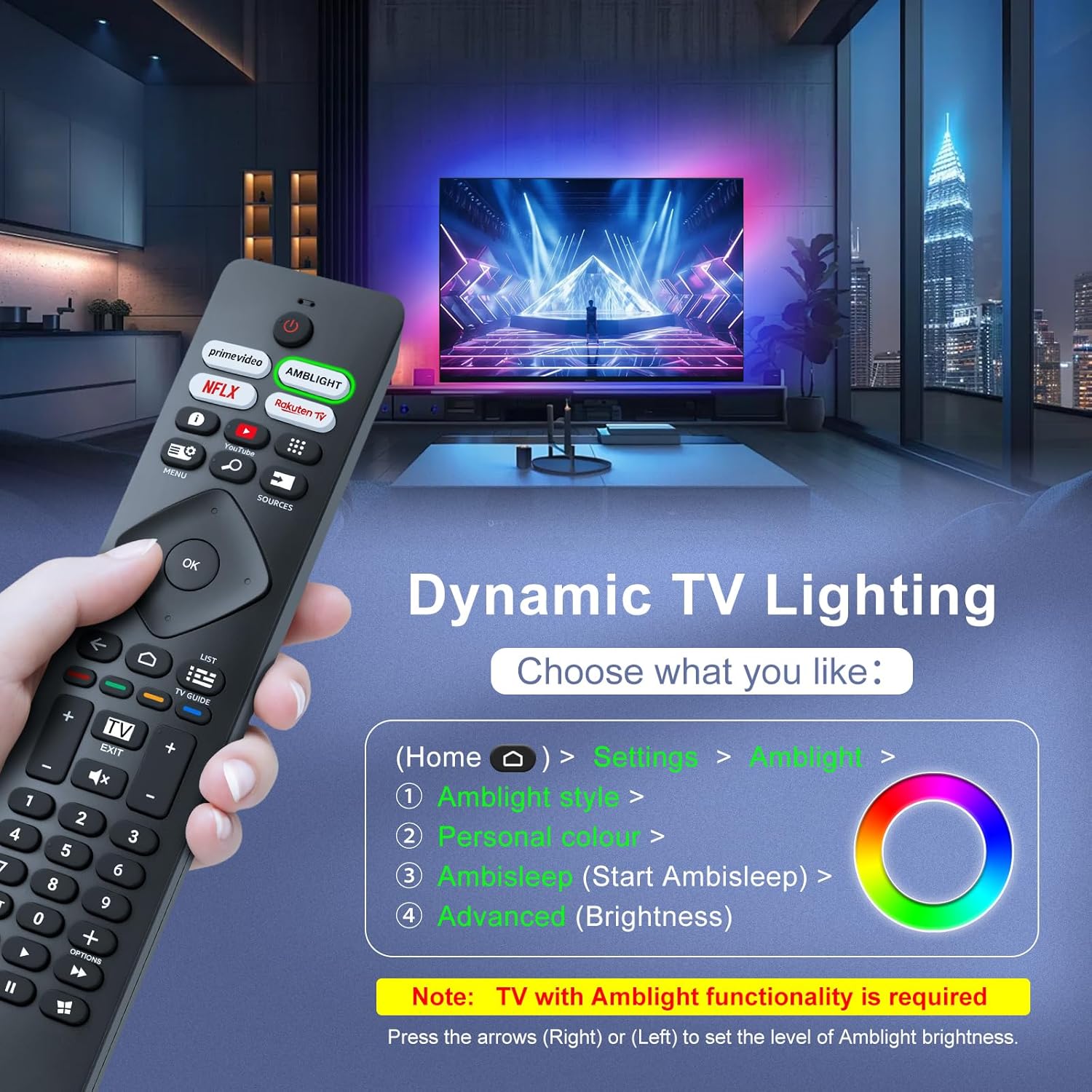
Image: A hand holding the remote control, with an overlay showing Ambilight settings on a TV screen.
After pressing the Ambilight button, you can navigate through the TV's menu to:
- Select different Ambilight display styles.
- Adjust personal color preferences.
- Initiate AmbiSleep mode.
- Adjust Ambilight brightness levels (using the right or left arrow keys).
Note: This feature requires a Philips TV with built-in Ambilight functionality.
4. Fikojakojana
4.1 Fanadiovana
To clean your remote control, gently wipe it with a soft, dry cloth. Avoid using liquid cleaners, aerosols, or harsh chemicals, as these can damage the remote's surface or internal components.
4.2 Fitehirizana
Tehirizo ao amin'ny toerana mangatsiaka sy maina ny fanaraha-maso lavitra, lavitry ny tara-masoandro mivantana sy ny mari-pana tafahoatra. Raha tsy hampiasaina mandritra ny fotoana maharitra ny fanaraha-maso lavitra, dia asaina esorina ny bateria mba hisorohana ny fivoahan'ny rano.
4.3 Fikarakarana bateria
- Soloy ny bateria rehetra amin'ny fotoana iray ihany; aza afangaro ny bateria taloha sy vaovao.
- Do not mix different types of batteries (e.g., alkaline and rechargeable).
- Ario am-pahamendrehana ny bateria efa nampiasaina araka ny fitsipika eo an-toerana.
5. Famahana olana
5.1 Olana sy Vahaolana iraisana
- Remote tsy mamaly:
- Jereo raha ampidirina tsara amin'ny polarity marina ny bateria.
- Soloy ny bateria AAA vaovao.
- Ataovy azo antoka fa tsy misy sakana eo anelanelan'ny fanaraha-maso lavitra sy ny mpandray taratra infrarouge an'ny fahitalavitra.
- Ataovy azo antoka fa ao anatin'ny elanelana azo ampiasaina tsara ianao (hatramin'ny 8 metatra).
- Bokotra manokana tsy mandeha:
- Clean the remote control, especially around the non-functioning buttons, to remove any dirt or debris.
- If only Ambilight functions are not working, ensure your Philips TV model supports Ambilight.
5.2 Contact Support
If you encounter persistent issues that cannot be resolved with the troubleshooting steps above, please contact Loutoc customer support directly. We aim to respond to all inquiries within 12 working hours.
6. Famaritana
| endri-javatra | antsipirihany |
|---|---|
| Marika | Loutoc |
| Anarana modely | SRC4526-FBA |
| Laharana modely | SRC4526 |
| loko | Mainty |
| Teknolojia fifandraisana | Infrared |
| Endri-javatra manokana | No programming required, Ergonomic, Lightweight |
| Fitaovana mifanentana | Television (Philips Ambilight TVs) |
| Maximum Number of Supported Devices | 1 |
| Karazana Controller | Fanaraha-maso bokotra |
| Faritra faratampony | 8 metatra (26 metatra) |
| Famaritana ny bateria | AAA (2 required, not included) |
| mpanamboatra | Loutoc |
| Firenena nihaviana | CHINE |
| Daty azo alaina ao amin'ny Amazon.com.be | 31 aogositra 2025 |
7. Warranty sy fanohanana
7.1 Fampahalalana momba ny fiantohana
This Loutoc remote control comes with a manufacturer's warranty of 30 days from the date of purchase. Please retain your proof of purchase for any warranty claims.
7.2 Fanohanana ny mpanjifa
For any questions, technical assistance, or warranty inquiries, please contact Loutoc customer support. We are committed to providing timely assistance and will respond to your queries within 12 working hours.