OPPO Reno 13 5G PKM110 Dual SIM Smartphone
Boky torolalana
Sava lalana
This manual provides essential information for the safe and efficient use of your OPPO Reno 13 5G PKM110 Dual SIM smartphone. Please read this guide thoroughly before operating your device to ensure optimal performance and longevity. Keep this manual for future reference.
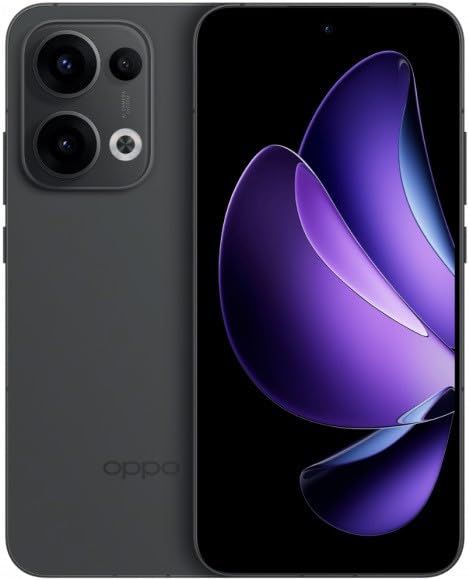
Figure 1: OPPO Reno 13 5G PKM110 Dual SIM Smartphone. This image displays the front and back of the device, highlighting its sleek design and camera module.
Hametraka
1. Unboxing sy fisafoana voalohany
Esory tsara ny entana rehetra ao anaty fonosana. Hamarino fa misy ireto singa manaraka ireto:
- OPPO Reno 13 5G PKM110 Smartphone
- Cable USB Type-C
- Power Adapter
- SIM Ejector Tool
- Torolàlana fanombohana haingana (ity antontan-taratasy ity)
Inspect the device for any visible damage. If any components are missing or damaged, contact your retailer.
2. Fametrahana karatra SIM
- Tadiavo ny lovia karatra SIM eo amin'ny sisin'ny fitaovanao.
- Insert the SIM ejector tool into the small hole on the SIM tray and press gently until the tray pops out.
- Place your Nano-SIM cards into the designated slots on the tray. Ensure the gold contacts face downwards and the cut corner aligns correctly. This device supports Dual SIM functionality.
- Avereno ampidirina moramora ao anaty finday ny fitoeran-karatra SIM mandra-pikitikitika azy ho eo amin'ny toerany.
3. Fahefana voalohany sy fametrahana
- Tsindrio ary hazòny ny bokotra Power (hita eo amin'ny ilany ankavanana) mandra-pisehoan'ny logo OPPO.
- Araho ny toromarika eo amin'ny efijery mba hamitana ny fanamboarana voalohany, ao anatin'izany ny fifantenana fiteny, ny fifandraisana Wi-Fi, ny fananganana kaonty Google ary ny fiarovana.
4. Fametrahana ny fitaovana
Before first use, it is recommended to fully charge your device. Connect the USB Type-C cable to the phone's charging port and the other end to the power adapter. Plug the adapter into a wall outlet. The charging indicator will appear on the screen.
Torolàlana miasa
1. Fikarohana fototra
- Fihetsehana amin'ny efijery fikasihana: Tsindrio raha hisafidy, swipe hanisy horonam-boky, kitiho mba zoom.
- Efijery voalohany: Access your apps and widgets. Swipe left or right to navigate between screens.
- Panel fampahafantarana: Swipe midina avy eo an-tampon'ny efijery mankany view fampahafantarana sy fanovana haingana.
- Fampiharana vao haingana: Swipe up from the bottom of the screen and hold (or tap the recent apps button, if configured) to view fampiasa vao haingana.
2. Fiantsoana sy fandefasana hafatra
- Fiantsoana: Open the 'Phone' app, enter the number, and tap the call icon.
- Mandefa hafatra: Open the 'Messages' app, tap the new message icon, enter the recipient's number or select from contacts, type your message, and tap send.
3. Mampifandray amin'ny tambajotra
- Wifi: Mandehana any Fikirana > Wi-Fi, turn Wi-Fi on, select your desired network, and enter the password if required.
- Data finday (5G): Mandehana any Settings > Mobile Network, ensure 'Mobile data' is enabled. Your device supports 5G connectivity where available.
- Bluetooth: Mandehana any Fikirana > Bluetooth, turn Bluetooth on, and pair with compatible devices.
4. Fampiasana fakan-tsary
Open the 'Camera' app. Tap the shutter button to take a photo. Swipe left or right to switch between different modes (e.g., Photo, Video, Portrait). Tap the camera icon to switch between front and rear cameras.
5. Toetran'ny fiarovana
- Fingerprint Unlock: Register your fingerprints in Settings > Password & Biometrics > Fingerprint.
- Face Unlock: Set up face recognition in Settings > Password & Biometrics > Face.
- Lock Screen: Choose a PIN, pattern, or password for screen lock in Settings > Password & Biometrics > Lock screen password.
fikarakarana
1. Fanavaozana rindrambaiko
Jereo tsy tapaka ny fanavaozana rindrambaiko mba hahazoana antoka fa manana ireo endri-javatra sy fanavaozana fiarovana farany indrindra ny fitaovanao. Mandehana any amin'ny Fikirana > Momba ny fitaovana > Nohavaozina hanamarina sy hametraka fanavaozana.
2. Manadio ny fitaovanao
Mampiasà lamba malefaka sy tsy misy volo mba hanadiovana ny efijery sy ny vatan'ny findainao. Fadio ny mampiasa akora simika mahery vaika na fitaovana marokoroko. Aza atao ambanin-javatra ny fitaovana amin'ny hamandoana be loatra.
3. Fikarakarana bateria
- Fadio ny hafanana tafahoatra.
- Do not let the battery drain completely too often.
- Ampiasao ihany ireo tariby sy charger eken'ny OPPO.
4. Fitantanana fitahirizana
To free up storage space, regularly clear cache data, uninstall unused apps, and transfer large files (photos, videos) to cloud storage or a computer. Go to Settings > About device > Storage hitantanana ny fitahirizana ao amin'ny fitaovanao.
Fanamboarana
1. Tsy mamaly ny fitaovana
Raha tsy mamaly ny fitaovanao dia tsindrio ary hazòny ny bokotra Hery mandritra ny 10-15 segondra eo ho eo mba hamerenana amin'ny laoniny ny fitaovanao.
2. Olana mifandray amin'ny tambajotra
- Tsy misy famantarana: Ensure your SIM card is properly inserted. Try restarting the device. Check if airplane mode is off.
- Olana amin'ny fifandraisana Wi-Fi: Restart your router and your phone. Forget the network in Wi-Fi settings and reconnect.
3. Apps mianjera na mangatsiaka
Esory ny cache sy ny angon-drakitra ho an'ny fampiharana misy olana (Settings > Apps > App management > [App Name] > Storage usage > Clear cache/Clear data). If the issue persists, uninstall and reinstall the app.
4. Famerenana ny orinasa
WARNING: A factory reset will erase all data on your phone, including apps, photos, and settings. Back up your data before proceeding.
Raha hanao famerenan'ny orinasa dia mandehana any Settings > System settings > Back up and reset > Reset phone > Erase all data. You will need to confirm your screen lock password.
fepetra arahana
| endri-javatra | famaritana |
|---|---|
| Marika | OPPO |
| Anarana modely | Oppo Reno 13 5G PKM110 |
| Fahaizana fitahirizana fahatsiarovana | 256 GB |
| RAM Memory Habe napetraka | 12 GB |
| Karazana fampisehoana | AMOLED |
| Teknolojia finday | 5G |
| Isan'ny toerana misy ny karatra SIM | Dual SIM |
| Form Factor | bara |
| Color | Mainty |
| Wireless Service Provider | nanokatra |
Warranty sy fanohanana
1. Fampahalalana momba ny fiantohana
Your OPPO Reno 13 5G PKM110 is covered by a limited warranty. Please refer to the warranty card included in your product packaging for detailed terms and conditions, including warranty period and coverage specifics. Keep your proof of purchase for warranty claims.
2. Fanohanana ny mpanjifa
For technical assistance, troubleshooting beyond this manual, or warranty service, please contact OPPO customer support. Visit the official OPPO website for contact information, service center locations, and online support resources.


