1. Fampidirana sy Fitohizanaview
Welcome to the Vibox V-525 Gaming PC. This manual provides essential information for setting up, operating, maintaining, and troubleshooting your new computer. The Vibox V-525 is a high-performance gaming system featuring an AMD Ryzen 5 5500 processor, an Nvidia RTX 4060 8GB graphics card, 16GB of DDR4 RAM, and a 1TB SSD, pre-installed with Windows 11.
Please read this manual carefully before using your PC to ensure optimal performance and longevity.
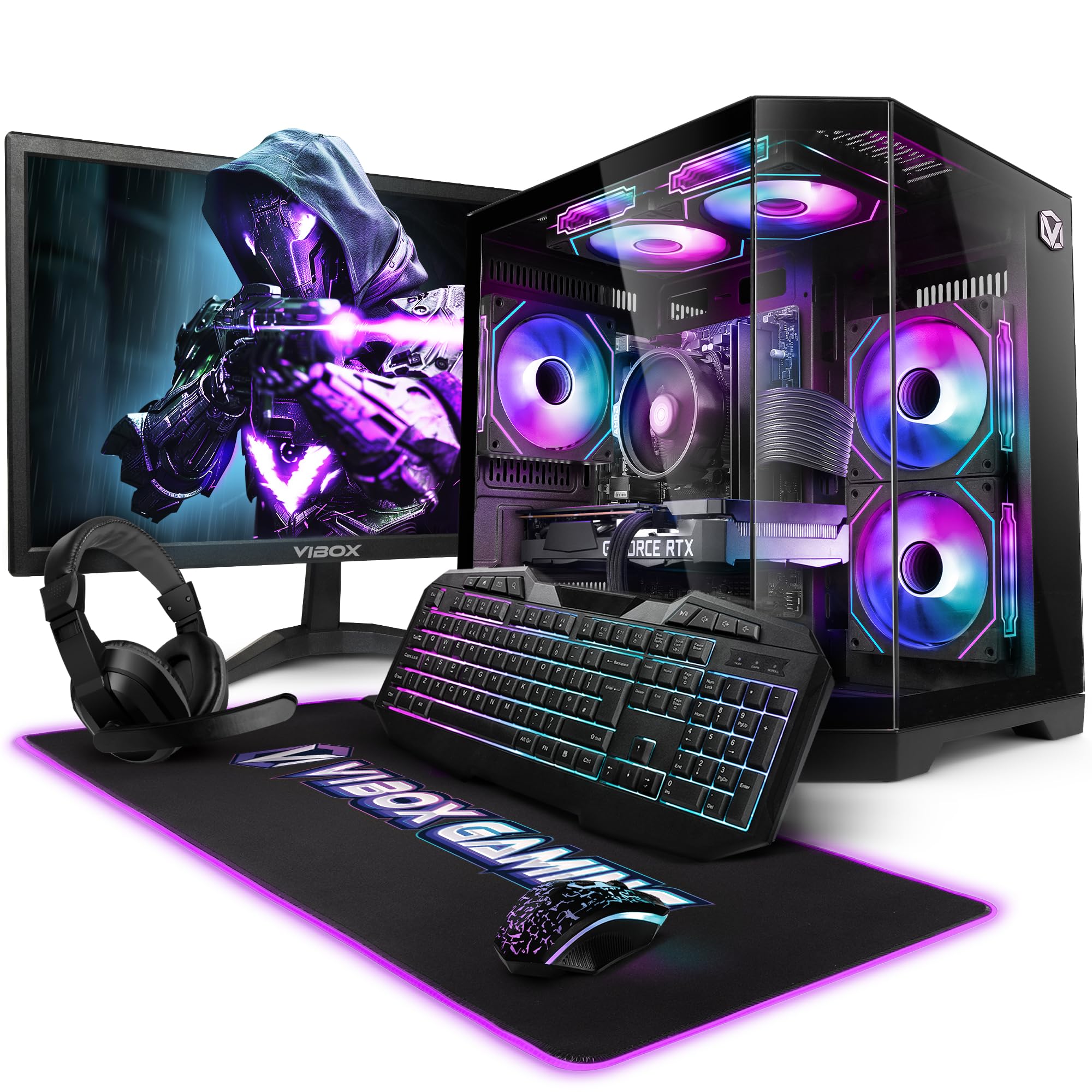
Figure 1.1: Vibox V-525 Gaming PC
2. Torolàlana fananganana
2.1 Famoahana
Carefully remove all components from the packaging. Ensure you have the PC tower, 23-inch monitor, gaming keyboard, gaming mouse, headset, mouse pad, Wi-Fi adapter, and power cables.
2.2 Fampifandray ny periferika
- Manara-maso: Connect the 23-inch monitor to the graphics card (Nvidia RTX 4060) using an HDMI or DisplayPort cable. Ensure the cable is securely fastened.
- Kitendry sy totozy: Connect the gaming keyboard and mouse to the available USB ports on the rear or front of the PC.
- Headset: Plug your headset into the dedicated audio jacks on the front panel or rear I/O.
- Wi-Fi Adapter: Insert the 300 Mbps Wi-Fi adapter into an available USB port.
- Hery: Connect the power cable to the PC's power supply unit (PSU) and then to a wall outlet. Connect the monitor's power cable as well.
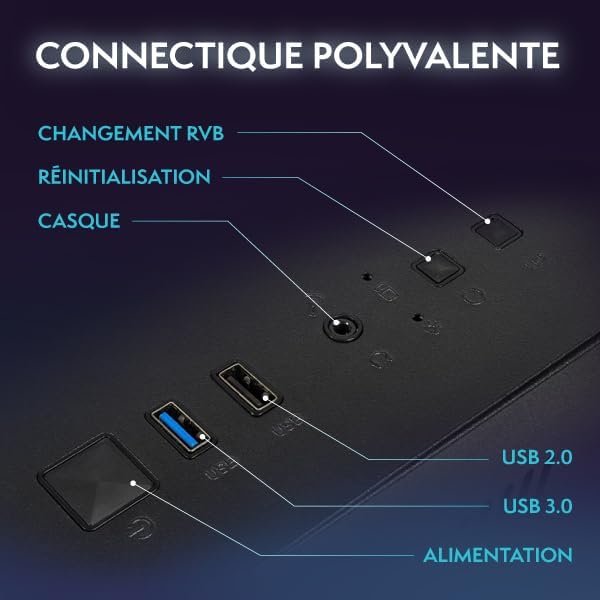
Figure 2.1: Front Panel Connectivity (Power, USB 2.0, USB 3.0, Headset, Reset, RGB Change)
2.3 Initial Boot-Up and Windows 11 Setup
- Press the power button on the front of the PC.
- Follow the on-screen instructions to complete the Windows 11 setup process. This typically involves selecting your region, language, creating a user account, and connecting to a network.
- Once Windows 11 is set up, ensure all drivers are installed. You can check this in Device Manager.

Figure 2.2: Windows 11 Home Features
3. Torolàlana miasa
3.1 Power On/off
- Hamelona: Tsindrio ny bokotra herinaratra eo amin'ny tontonana anoloana.
- Atsaharo: Click the Start button in Windows, then select Power > Shut down. Avoid simply holding the power button to turn off, as this can lead to data loss.
- Hanomboka indray: Click the Start button, then select Power > Restart.
3.2 Basic Windows 11 Navigation
Windows 11 features a redesigned user interface. The Start menu is centrally located, and widgets provide quick access to information. Explore the settings menu to personalize your experience.
3.3 Mampifandray amin'ny Wi-Fi
- Ensure your USB Wi-Fi adapter is plugged in.
- Click the network icon (Wi-Fi symbol) in the taskbar.
- Safidio ny tambajotra Wi-Fi tianao avy amin'ny lisitra ary tsindrio ny 'Connect'.
- Ampidiro ny lakile fiarovana ny tambajotra (tenimiafina) raha asaina.
3.4 Fanaraha-maso ny Jiro RGB
Your Vibox V-525 features Hex RGB Infinity 120mm fans. Use the 'RGB Change' button on the front panel to cycle through various lighting modes and colors. Refer to the software provided by Vibox (if applicable) for more advanced customization.

Figure 3.1: Hex RGB Infinity 120mm Fans
4. Fikojakojana
4.1 Cleaning Your PC
Regular cleaning helps maintain optimal performance and extends the lifespan of your components.
- ivelany: Ampiasao malefaka, damp cloth to wipe down the exterior of the case. Avoid harsh chemicals.
- Interior (Dust): Periodically, and with the PC powered off and unplugged, use compressed air to remove dust from inside the case, especially from fans, heatsinks, and vents. Pay attention to the Hex RGB Infinity fans and the GPU heatsink.
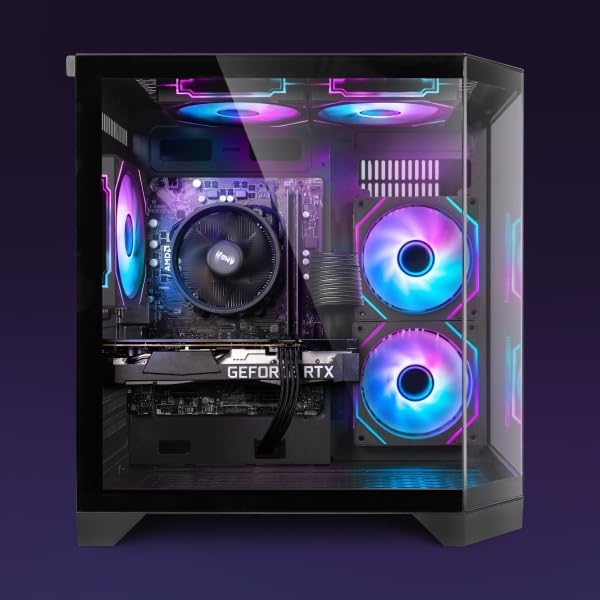
Sary 4.1: anatiny View of PC Components
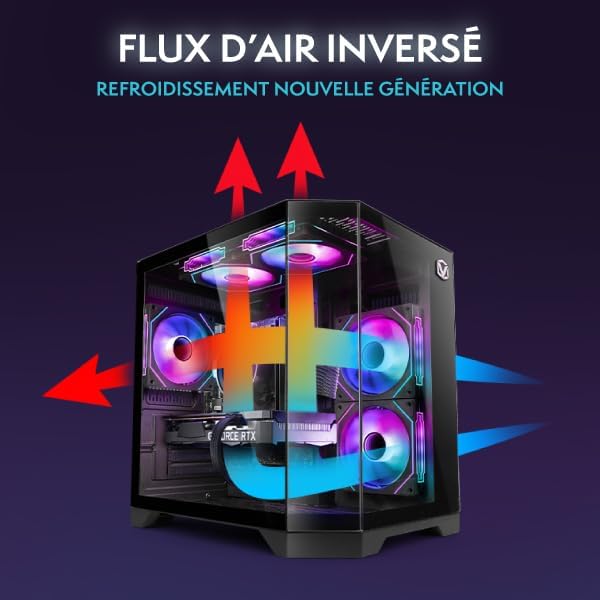
Figure 4.2: Reverse Airflow Next Generation Cooling Diagram
4.2 Fanavaozana rindrambaiko
- Fanavaozana Windows: Regularly check for and install Windows updates via Settings > Windows Update.
- Fanavaozana mpamily: Keep your graphics card drivers (Nvidia GeForce Experience) and other component drivers up to date for optimal performance and stability.
4.3 Backup Data
Avereno tsy tapaka ny zava-dehibeo files any amin'ny kapila ivelany na fitahirizana rahona mba hisorohana ny fahaverezan'ny angona.
5. Famahana olana
Ity fizarana ity dia miresaka olana mahazatra mety ho hitanao.
5.1 Tsy misy hery
- Ensure the power cable is securely connected to both the PC and the wall outlet.
- Check if the power switch on the PSU (at the back of the PC) is in the 'On' position.
- Manandrama fivoahana herinaratra hafa.
5.2 Tsy misy fampisehoana eo amin'ny efijery
- Verify that the monitor's power cable is connected and the monitor is turned on.
- Ensure the video cable (HDMI/DisplayPort) is securely connected to both the graphics card (Nvidia RTX 4060) and the monitor.
- Andramo tariby video na monitor hafa raha misy.
5.3 Fampisehoana miadana
- Check Task Manager (Ctrl+Shift+Esc) for applications consuming excessive CPU, RAM, or disk resources.
- Hamarino tsara fa havaozina ny Windows sy ny mpamily.
- Manaova fitiliana viriosy.
- Ensure adequate airflow and clean any dust buildup (refer to Section 4.1).
5.4 Olana mifandray amin'ny tambajotra
- Verify the Wi-Fi adapter is properly installed and recognized by Windows.
- Avereno indray ny router/modem-nao.
- Run the Windows Network Troubleshooter.
6. Famaritana
The following table details the key specifications of your Vibox V-525 Gaming PC:
| singa fototra | famaritana |
|---|---|
| processeur | AMD Ryzen 5 5500 (6 Cores, Max 4.2 GHz) |
| Karatra sary | Nvidia GeForce RTX 4060 (8 GB GDDR6 RAM, HDMI 2.1, DisplayPort 1.4a) |
| ram | 16 GB DDR4 Dual Channel (3200 MHz) |
| fitahirizana | 1 TB SSD |
| Rafitra fikirakirana | Windows 11 Home |
| Monitor | 23-inch (Max Resolution: 1920 x 1080) |
| fifandraisana | Wi-Fi (300 Mbps adapter included), 4 Total USB Ports |
| Cache Memory | 16 mb |
| Famolavolana tranga | 3-Panel Tempered Glass |
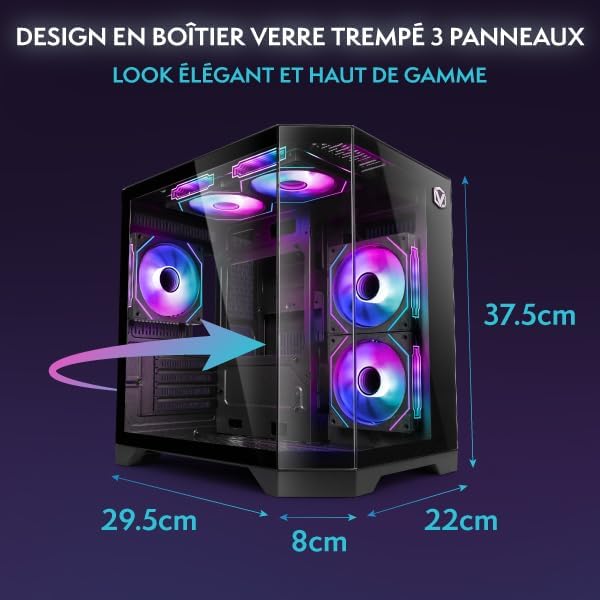
Figure 6.1: PC Case Dimensions
7. Warranty sy fanohanana
Your Vibox V-525 Gaming PC comes with a manufacturer's warranty. Please refer to the warranty card included in your product packaging for specific terms and conditions, including the warranty period and coverage details.
For technical support, troubleshooting assistance beyond this manual, or warranty claims, please contact Vibox customer service through their official webtranokala na ny fampahafantarana momba ny fifandraisana omena miaraka amin'ny antontan-taratasy fividiananao.
Always provide your product model (V-525) and purchase date when contacting support.


