Sava lalana
This manual provides essential information for setting up, operating, and maintaining your Sony BRAVIA 5 55-Inch 4K Mini LED Smart TV (K-55XR50, 2025 Model) and the included SU-WL905 Ultra-Slim Wall Mount Bracket. Please read this manual thoroughly before using your product to ensure proper and safe operation.

Image: The Sony BRAVIA 5 TV seamlessly integrated into a modern living room setting, showcasing ny endrika tsara tarehy sy ny fampisehoana mavitrika.
Hametraka
Famoahana sy Fametrahana voalohany
Carefully remove all components from the packaging. Ensure you have the TV, SU-WL905 wall mount, remote control, power cord, and any necessary screws or accessories. Place the TV on a stable, flat surface or prepare for wall mounting.
Wall Mount Installation (SU-WL905)
The SU-WL905 Ultra-Slim Wall Mount Bracket is designed for a secure and flush installation. Follow these steps:
- Fantaro ny toerana fametrahana azy: Choose a suitable wall location, ensuring it can support the weight of the TV and mount. Use a stud finder to locate wall studs for secure attachment.
- Apetaho ny takelaka rindrina: Securely fasten the wall plate component of the SU-WL905 bracket to the wall studs using appropriate screws. Ensure it is level.
- Ampifandraiso amin'ny fononteny fahitalavitra: Fasten the TV-side brackets to the back of your BRAVIA 5 TV.
- Mount TV: Carefully lift the TV and hook the TV-side brackets onto the wall plate. Ensure the TV is securely latched.

Sary: Side view of the Sony BRAVIA 5 TV, illustrating its slim profile and how it sits close to the wall when mounted with the SU-WL905 bracket.
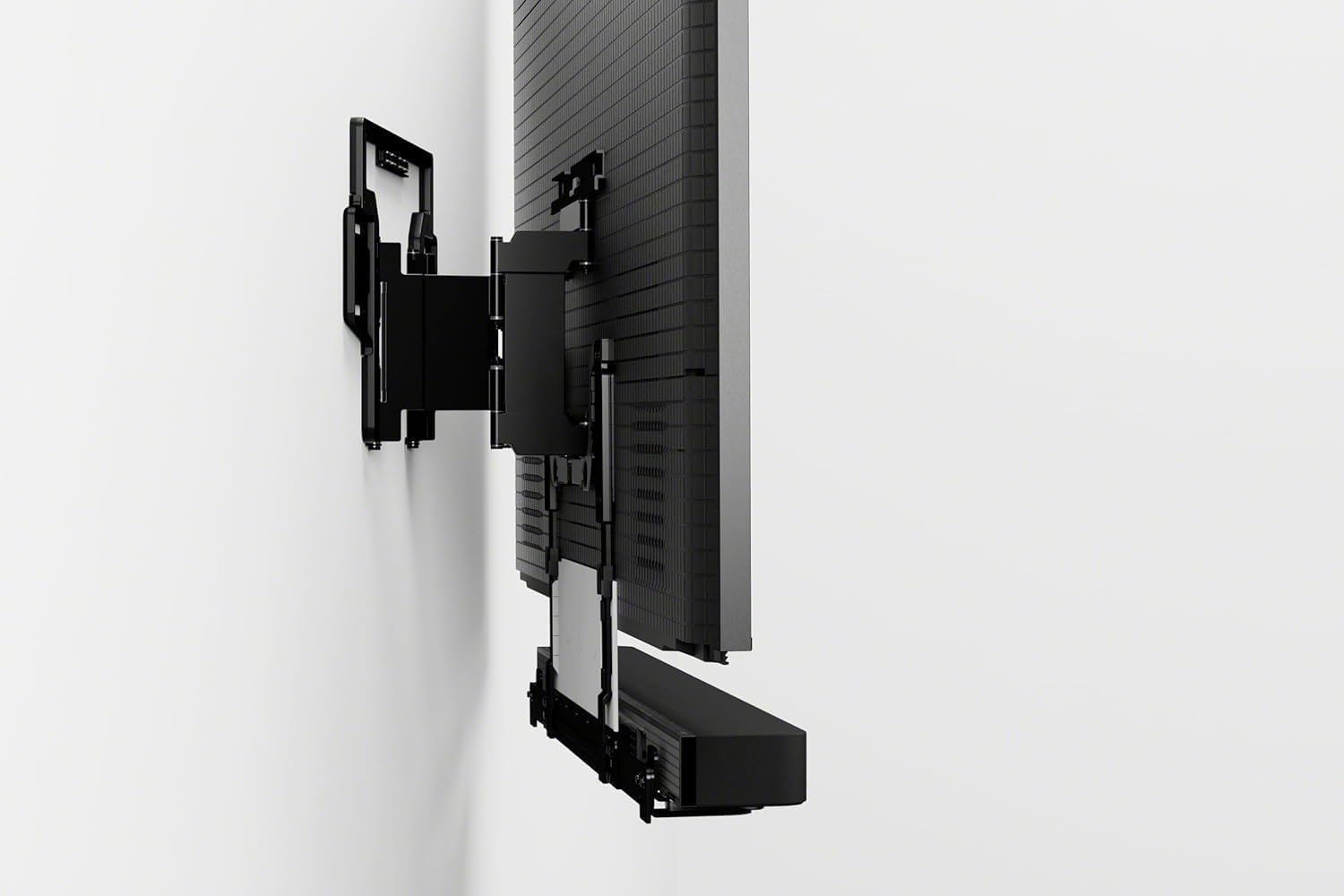
Sary: aoriana view of the Sony BRAVIA 5 TV, showing the various input ports and the mounting points for the wall bracket.
Fampifandraisana Periferika
- Hery: Ampifandraiso amin'ny fahitalavitra sy amin'ny faladia rindrina ny tariby herinaratra.
- Fitaovana HDMI: Connect your gaming consoles (e.g., PlayStation 5), Blu-ray players, or other HDMI devices to the available HDMI ports.
- Internet: Connect an Ethernet cable for a wired internet connection or follow on-screen instructions for Wi-Fi setup.
Operating Your Sony BRAVIA 5 TV
Fametrahana voalohany sy Google TV
Upon first power-on, the TV will guide you through the initial setup process, including language selection, network connection, and Google TV account setup. Google TV organizes movies, shows, live TV, and more from your apps and subscriptions, making it easy to find what you want to watch.

Image: The Google TV home screen displayed on the BRAVIA 5, showing various streaming app icons and content recommendations.
Fanatsarana ny kalitaon'ny sary
- Mini LED Brightness and Contrast: Thousands of Mini LEDs are precisely controlled by XR Backlight Master Drive to deliver captivating brightness and authentic contrast.
- XR Triluminos Pro: Access billions of accurate real-world colors with XR Triluminos Pro, ensuring a vibrant and lifelike viewamin'ny traikefa.
- XR Processor with AI: The powerful XR Processor with AI technology intelligently enhances every scene in real-time, boosting color, contrast, and clarity for optimal picture quality.

Image: A split image demonstrating the enhanced brightness and contrast on a motorcycle scene, highlighting the effect of Mini LED technology.

Image: A split image of a street scene with a car, illustrating the expanded color palette and vibrancy achieved with XR Triluminos Pro.

Image: A collage of diverse images, including landscapes and portraits, showcasing the intelligent enhancement capabilities of the XR Processor with AI.
Gaming Features
The BRAVIA 5 is optimized for gaming, especially with PlayStation 5. It features auto HDR tone mapping and picture modes that optimize every game for an immersive experience.
Video: A short clip highlighting the Sony Bravia 5's features that make it ideal for PlayStation 5 gaming, including smooth motion and vibrant graphics.
Audio Experience
Experience immersive audio with the BRAVIA 5. The TV's audio system is designed to complement the stunning visuals, providing clear dialogue and dynamic soundscapes.
Video: A demonstration of the immersive audio experience provided by the Sony BRAVIA Theater Setup, showcasing how sound enhances the viewamin'ny traikefa.
fikarakarana
Manadio ny efijery
Fafao moramora amin'ny lamba mikrofibera maina sy malefaka ny efijery. Ho an'ny smudes mafy loha, moramora dampen ilay lamba misy rano na vahaolana fanadiovana azo antoka. Fadio ny zavatra simika masiaka na akora abrasive.
Fikarakarana ankapobeny
Keep the TV in a well-ventilated area. Avoid blocking ventilation openings. Do not expose the TV to direct sunlight, extreme temperatures, or high humidity.
Fanamboarana
Tsy misy sary/feo
- Check if the TV is properly plugged into a power outlet and turned on.
- Verify that all HDMI cables are securely connected to both the TV and the external devices.
- Hamarino tsara fa voafantina ao amin'ny fahitalavitra ny loharano fampidirana marina.
Remote Control Tsy mandeha
- Soloy ny bateria amin'ny fanaraha-maso lavitra.
- Ataovy azo antoka fa tsy misy sakana eo anelanelan'ny lavitr'ezaka sy ny sensor IR an'ny fahitalavitra.
Olana mifandray amin'ny tambajotra
- Avereno indray ny router sy ny modem.
- Check the Wi-Fi password if connecting wirelessly.
- Try a wired Ethernet connection if Wi-Fi issues persist.
fepetra arahana
| Anarana marika | Sony |
| MODELY | K-55XR50 |
| Karazana fampisehoana | 4K Mini LED Smart TV |
| Haben'ny efijery | 55 santimetatra |
| processeur | XR Processor with AI |
| Teknolojian'ny Loko | XR Triluminos Pro |
| Backlight Technology | XR Backlight Master Drive (Mini LED) |
| Rafitra fikirakirana | Google TV |
| Wall Mount Bracket | SU-WL905 Ultra-Slim |
| Daty misy voalohany | 14 aprily 2025 |
Warranty & Support
Your Sony BRAVIA 5 TV comes with a limited manufacturer's warranty. Please refer to the warranty card included in your product packaging for specific terms and conditions. For technical support, product registration, or service inquiries, please visit the official Sony support webtranonkala na mifandraisa amin'ny laharan-tariby ho an'ny serivisy ho an'ny mpanjifa. Tazomy ny rosia fividiananao ho porofon'ny fividianana raha mila fanazavana fanampiny momba ny garantie.
Fanohanana an-tserasera: www.sony.com/electronics/support


