1. Fampidirana
The AOCHUAN Smart M3 is a versatile 3-in-1 device combining a selfie stick, desktop stand, and floor tripod, featuring advanced AI face tracking and remote control capabilities. Designed for content creators and everyday users, it offers hands-free video recording and photography without the need for a dedicated application. This manual provides comprehensive instructions for setting up, operating, and maintaining your Smart M3 tripod.
2. Information momba ny fiarovana
- Do not expose the device to extreme temperatures or direct sunlight for extended periods.
- Arovy amin'ny rano sy ranon-javatra hafa ilay fitaovana.
- Fadio ny milatsaka na mametraka ilay fitaovana amin'ny fiantraikany mahery vaika.
- Aza manandrana manongotra na manamboatra ilay fitaovana. Mifandraisa amin'ny fanohanan'ny mpanjifa hahazoana fanampiana.
- Ensure your smartphone is securely mounted in the holder before use.
3. Ny votoatin'ny fonosana
Hamarino fa tafiditra ao anatin'ny fonosanao ny entana rehetra:
- Smart M3 AI Face Tracking Tripod
- Fanaraha-maso lavitra (x1)
- Cable USB-C Charging (x1)
- Boky Torolalana ho an'ny Vokatra (x1)

4. Vokatra mihoatraview
The AOCHUAN Smart M3 features an integrated design with several key components:
- Mitazona finday: Securely holds smartphones from 1.8 to 3.8 inches in width.
- AI Tracking Camera: Located on the main unit, it detects and follows faces.
- Bokotra hery: For turning the device on/off.
- USB-C Charging Port: Mba hamerenana ny bateria anatiny.
- Remote Control Slot: Stores the detachable Bluetooth remote.
- Tsato-kazo azo mivelatra: Made from aluminum alloy, extends up to 57 inches.
- Tripod legs: Four-legged design with anti-slip rubber pads for enhanced stability.


5. Fametrahana
5.1 Fanokafana ny Tripod
- Gently pull the bottom of the device to extend the tripod legs. Ensure they are fully spread for maximum stability.
- Extend the telescopic pole to your desired height. The pole can reach up to 57 inches.
5.2 Fampifandraisana ny findainao finday avo lenta
- Open the phone holder by pulling the top clip upwards.
- Carefully place your smartphone into the holder, ensuring it is centered and securely gripped. The holder accommodates devices from 1.8 to 3.8 inches wide.
5.3 Mamelona
Press and hold the power button on the main unit until the indicator light illuminates.
5.4 Fanaraha-maso lavitra
The remote control uses Bluetooth. To pair, ensure the remote is charged and the tripod is powered on. Activate Bluetooth on your smartphone and select the Smart M3 remote from the list of available devices. The remote is typically pre-paired or automatically connects upon activation.
6. Torolàlana miasa
6.1 AI Face Tracking
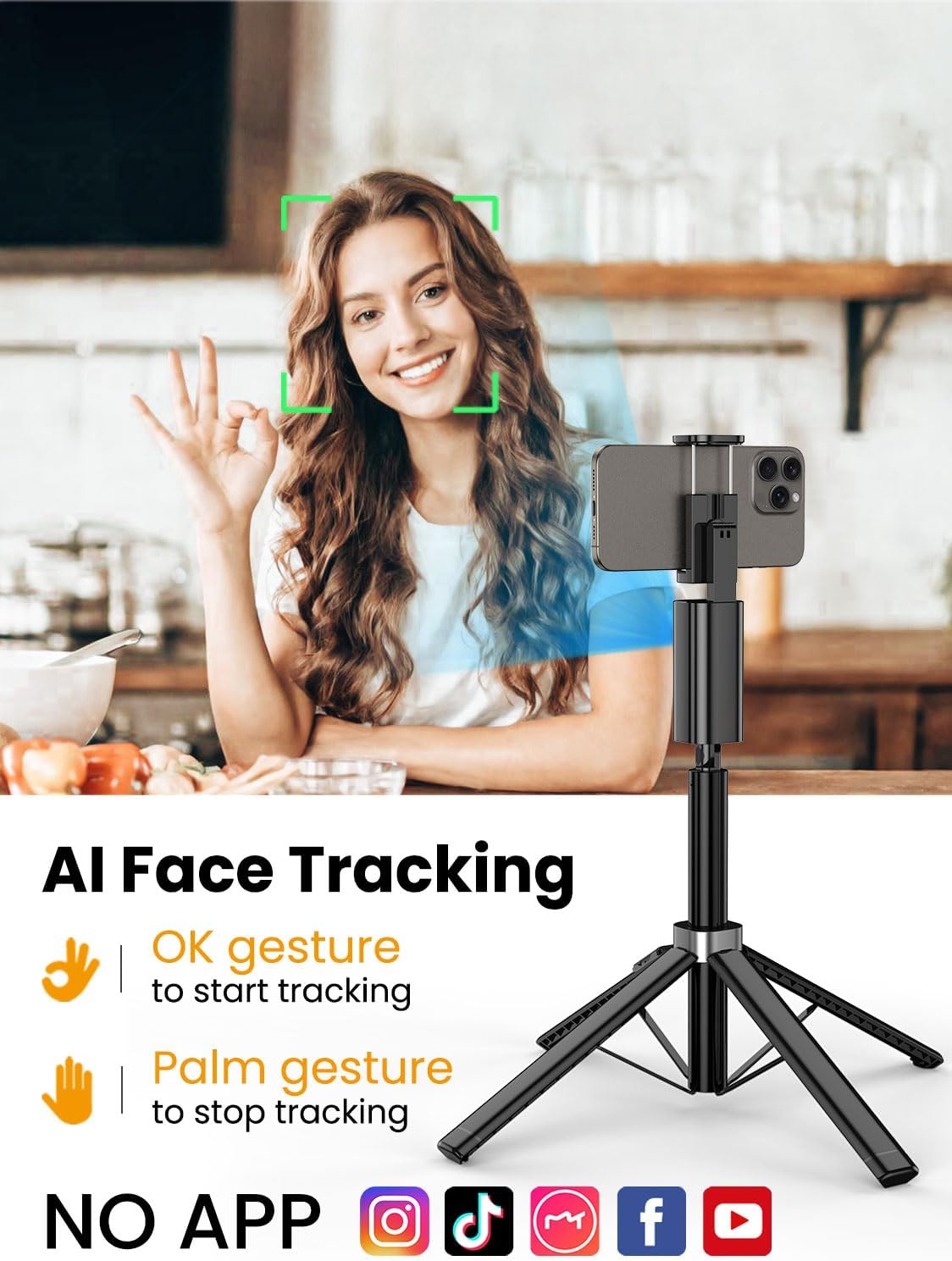
The Smart M3 features an integrated AI tracking camera that does not require an app. It automatically detects and follows faces.
- To Start Tracking: Make an "OK" gesture with your hand towards the AI tracking camera. The device will begin to rotate and follow your face.
- To Stop Tracking: Show your open palm to the AI tracking camera. The device will pause tracking.

6.2 Fifehezana lavitra
The detachable remote control allows you to operate your smartphone's camera from a distance of up to 10 meters (32 feet). Use it to trigger photos or start/stop video recording, ideal for group shots or solo content creation.

6.3 Extendable Pole
The built-in aluminum alloy extension pole can be adjusted to a maximum height of 57 inches, providing flexibility for various shooting scenarios and wider fields of view.

6.4 Multi-Angle Shooting
The Smart M3 offers extensive adjustability for capturing unique perspectives:
- Loha mihodina 360°: Allows for panoramic shots and seamless tracking.
- 270° Tilt Adjustment: Adjust the vertical angle of your smartphone.
- 360° Balanced Handle: Provides additional rotational flexibility.

6.5 Fomba fampiasa
The Smart M3 can be used in three primary modes:
- Desktop Stand: Compact mode for stable placement on flat surfaces.
- Extended Selfie Mode: Use the extended pole for wider selfie shots.
- Floor Tripod Mode: Fully extend the pole and legs for stable, elevated recording.

7. Fikojakojana
- Diovy amin'ny lamba malefaka sy maina ilay fitaovana. Aza mampiasa mpanadio abrasive na solvents.
- Tehirizo ao amin'ny toerana mangatsiaka sy maina ny tripod rehefa tsy ampiasaina.
- Ensure the remote control is securely stored in its slot to prevent loss.
8. Famahana olana
- Tsy mandeha ny fitaovana: Hamarino tsara fa feno tsara ny bateria-n'ny fitaovana amin'ny alalan'ny tariby USB-C nomena.
- AI Face Tracking not working: Check for sufficient lighting. Ensure your face is clearly visible to the AI tracking camera. Avoid rapid movements that might cause the tracker to lose focus.
- Remote Control not connecting: Verify that the remote's battery is functional and that Bluetooth is enabled on your smartphone. Re-pair the remote if necessary.
- Tripod instability: Ensure the four legs are fully extended and placed on a flat, stable surface. Avoid using in strong winds.
9. Famaritana
| endri-javatra | famaritana |
|---|---|
| Ny refin'ny vokatra | 1.77 x 1.57 x 57 santimetatra |
| Lanja entana | 1.08 kilao (0.49 kilao) |
| vatoaratra | 1 Lithium Ion bateria ilaina (tafiditra) |
| mpanamboatra | AOCHUAN |
| Marika | AOCHUAN |
| loko | Mainty |
| Fitaovana mifanentana | finday avo lenta |
| KEVITRA | VIRATY |
| Haavo ambony indrindra | 57 santimetatra |
| Tripod Head Type | Pan Heads |
| Number of Leg Sections | 4 |
| Aforitra Habe | 12.41 santimetatra |
10. Warranty sy fanohanana
For warranty information and customer support, please refer to the contact details provided on the product packaging or visit the official AOCHUAN website. Tehirizo ny tapakila fividiananao ho an'ny fitakiana fiantohana.