Sava lalana
This manual provides detailed instructions for the installation, operation, and maintenance of your Imou Cruiser SC 4G 5MP Outdoor IP Camera. This camera features UHD 3K resolution for detailed images, 4G LTE connectivity for independent operation without Wi-Fi, four spotlights that emit white or infrared light, and two red and blue indicator lights to enhance alarm visibility. Please read this manual thoroughly before use and retain it for future reference.
Information momba ny fiarovana
- Ataovy azo antoka ny famatsiana herinaratra voltage matches the camera's requirements to prevent damage.
- Install the camera in a location where it is protected from extreme weather conditions, unless specifically designed for such environments.
- Fadio ny mametraka ny fakantsary eo akaikin'ny loharano mafana na amin'ny tara-masoandro mivantana mandritra ny fotoana maharitra.
- Aza manandrana mamongotra na manova ny fakantsary. Alefaso amin'ny mpiasa mahay ny serivisy rehetra.
- Arovy tsy ho azon'ny ankizy ny fakantsary sy ireo kojakojany.
Fonosana fonosana
Azafady, jereo ny votoatin'ny fonosana rehefa misokatra. Raha misy entana tsy hita na simba dia mifandraisa amin'ny mpivarotra anao.
- Imou Cruiser SC 4G 5MP Camera
- Power Adapter
- Modely mitaingina
- Kitapom-batsy
- Connector tsy tantera-drano
- Torolalana fanombohana haingana
Vita ny vokatraview
Familiarize yourself with the main components of your Imou Cruiser SC 4G 5MP camera.
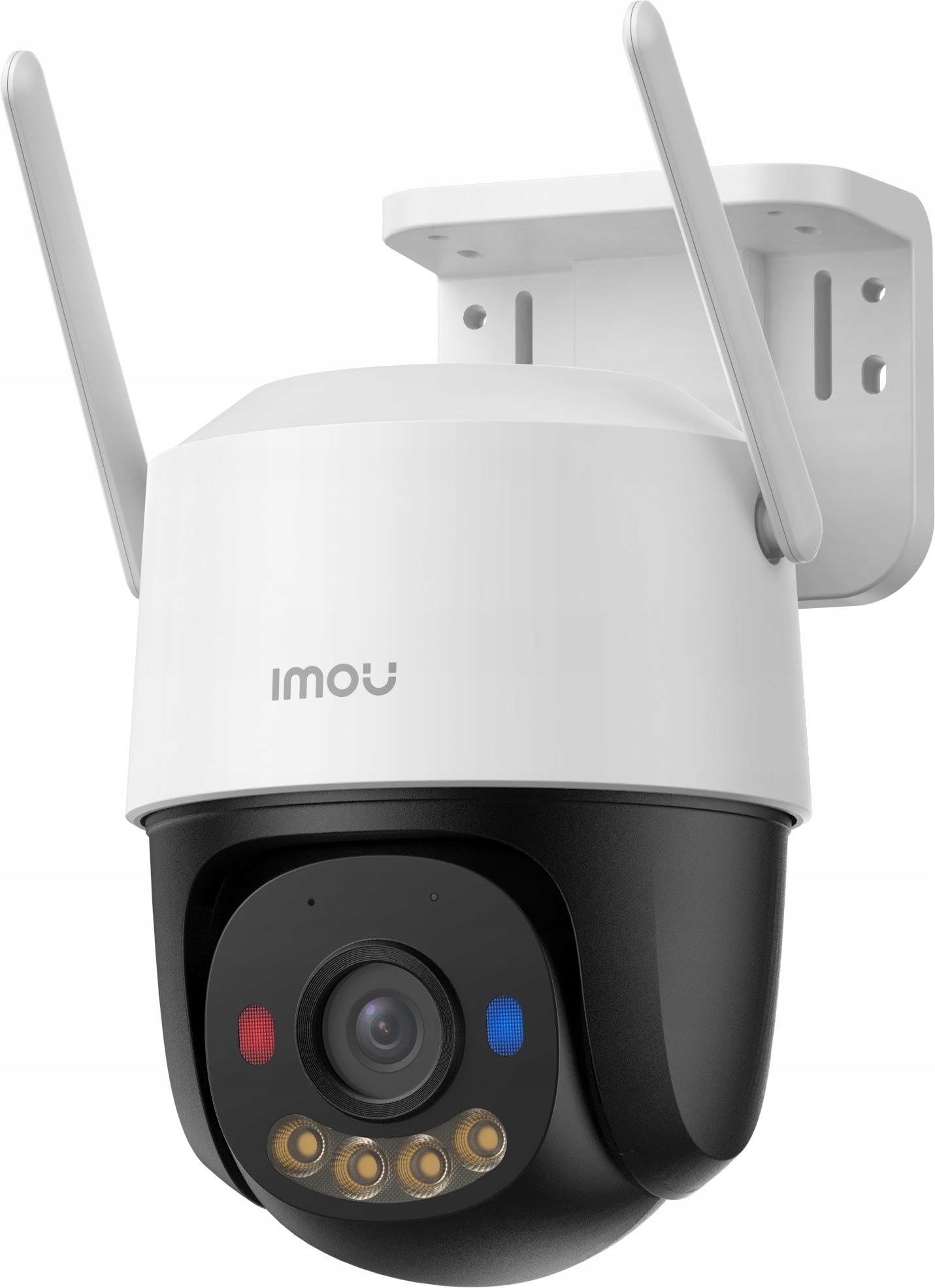
Sary 1: Imou Cruiser SC 4G 5MP Outdoor IP Camera. This image shows the front view of the camera, highlighting its lens, spotlights, and overall design.
The camera features a high-resolution lens, four integrated spotlights (for both white light and infrared illumination), two prominent red and blue alarm indicator lights, a built-in microphone, a speaker for two-way audio, a SIM card slot for 4G connectivity, a reset button, and a power input port.
Hametraka
1. Miomana amin'ny fametrahana
- Choose a suitable outdoor location with good 4G signal reception.
- Ataovy azo antoka fa matanjaka tsara ny velaran'ny fakan-tsary mba hanohanana ny lanjan'ny fakantsary.
2. Fametrahana karatra SIM
- Locate the SIM card slot on the camera (refer to the Quick Start Guide for exact location).
- Insert a standard 4G LTE SIM card into the slot, ensuring correct orientation.
- Secure the waterproof connector cover if applicable.
3. Power On
- Ampifandraiso amin'ny seranan-tsambo fampidirana herinaratra ny fakantsary.
- Plug the power adapter into a power outlet. The camera will begin to power on and initialize.
4. App Setup (Imou Life App)
- Download the 'Imou Life' app from your smartphone's app store (iOS or Android).
- Misorata anarana amin'ny kaonty Imou na midira raha efa manana ianao.
- Tsindrio ny kisary '+' eo amin'ny zoro ambony havanana amin'ny fampiharana mba hanampiana fitaovana vaovao.
- Skanera ny kaody QR hita eo amin'ny fakantsary na ny fonosany.
- Follow the on-screen prompts to complete the device setup.
5. Fametrahana ara-batana
- Ampiasao ny môdely fametrahana omena hanamarihana ny toerana misy ny visy eo amin'ny rindrina na ny valindrihana.
- Manaova lavaka mpanamory ary ampidiro vatofantsika amin'ny rindrina raha ilaina.
- Secure the camera mounting base with the provided screws.
- Ahitsio ny zoro fakan-tsary araka izay ilaina mba hahazoana fandrakofana tsara indrindra.
fandidiana
1. Miaina View
- Open the Imou Life app and select your camera from the device list.
- The live video feed will appear, allowing you to monitor your property in real-time.
2. Recording & Playback
- The camera supports continuous recording or event-triggered recording (e.g., motion detection).
- ny view voarakitra footage, access the playback feature within the Imou Life app. You can browse by date and time.
3. Motion Detection & Alarm
- Configure motion detection sensitivity and detection zones in the app settings.
- When motion is detected, the camera can trigger an alarm, activate the spotlights, and flash the red and blue indicator lights to deter intruders.
- You will receive notifications on your smartphone when an alarm is triggered.
4. Lahateny roa
- Raha mbola velona view, tap the microphone icon in the Imou Life app to speak through the camera's speaker.
- Ny mikrôfôna tafiditra ao amin'ny fakantsary dia ahafahanao mandre feo avy ao amin'ny toerana misy ny fakantsary.
5. Fomba Fahitana Amin'ny Alina
- The camera automatically switches to infrared (IR) night vision in low light conditions, providing clear black and white images.
- You can also configure the camera to use its white light spotlights for full-color night vision when motion is detected or on a schedule.
fikarakarana
1. Fanadiovana
- Diovy tsy tapaka amin'ny lamba malefaka sy maina ny fakantsary mba hahazoana antoka ny kalitaon'ny sary mazava tsara.
- Fafao ny fakantsary casing sy adamp cloth as needed. Do not use harsh chemicals or abrasive cleaners.
2. Fanavaozana firmware
- Periodically check for firmware updates via the Imou Life app.
- Keeping your camera's firmware updated ensures optimal performance, security, and access to new features.
3. Fitantanana fitahirizana
- If using a local storage card (e.g., microSD), ensure it is functioning correctly and has sufficient space.
- Manage cloud storage subscriptions and settings through the Imou Life app.
Fanamboarana
- Q: Camera is not powering on.
- A: Check if the power adapter is securely connected to both the camera and the power outlet. Ensure the outlet is functional.
- Q: No 4G connection.
- A: Verify that the SIM card is correctly inserted and activated. Check 4G signal strength in the camera's location. Contact your mobile carrier if necessary.
- Q: Cannot add device to the Imou Life app.
- A: Ensure your smartphone has a stable internet connection. Reset the camera by pressing the reset button for 10 seconds and try adding it again. Make sure you are scanning the correct QR code.
- Q: Poor image quality.
- A: Clean the camera lens. Ensure there are no obstructions in front of the lens. Check network conditions; a weak 4G signal can affect streaming quality.
- Q: Motion detection is not working or is too sensitive.
- A: Adjust the motion detection sensitivity and detection zones in the Imou Life app settings. Ensure the camera's firmware is up to date.
fepetra arahana
| Marika | Imou |
| Laharana modely | modely134 |
| vahaolana | UHD 3K (5MP) |
| fifandraisana | 4G LTE (independent of Wi-Fi) |
| jiro | 4 (emit white or infrared light) |
| Jiro fanairana | 2 (red and blue indicator lights) |
| Anisan'izany ny singa | Delivered as a kit |
| Isan'ny singa | 1 |
Warranty sy fanohanana
For warranty information and technical support, please refer to the warranty card included with your product or visit the official Imou website. You can also contact Imou customer service through the Imou Life app for assistance.