1. Fampidirana
This manual provides essential information for the safe and effective operation of your ION Audio Retro Glow Boombox. This device combines classic audio playback with modern connectivity, featuring an AM/FM radio, cassette player/recorder, Bluetooth 5.3, USB, and SD card playback capabilities. Please read this manual thoroughly before use and retain it for future reference.
2. Information momba ny fiarovana
- Aza asiana rano na hamandoana ilay fitaovana.
- Fadio ny mametraka ny fitaovana eo akaikin'ny loharano mafana na amin'ny tara-masoandro mivantana.
- Hamarino tsara ny ventilation; aza sakanana izay fisokafan'ny rivotra.
- Mampiasà fametahana/fanampiana voafaritry ny mpanamboatra ihany.
- Esory ny fitaovana mandritra ny oram-baratra na rehefa tsy ampiasaina mandritra ny fotoana maharitra.
- Alefaso amin'ny mpiasan'ny serivisy mahafeno fepetra ny serivisy rehetra.
3. Inona no tafiditra
Rehefa avy mamaha ny entana dia ataovy izay hahazoana antoka fa eo daholo ireo entana voatanisa etsy ambany ary ao anatin'ny toe-javatra tsara:
- ION Audio Retro Glow Boombox
- Cable herinaratra
- Torolàlana haingana
4. Vokatra mihoatraview
The Retro Glow Boombox features a translucent housing with multi-colored LED lights that synchronize with music. It includes dual full-range speakers for robust audio output.
Front Panel

Sary 1: Eo anoloana view of the Retro Glow Boombox, showcasing the cassette deck, radio tuner, and illuminated dual speakers.
Top Controls

Sary 2: antsipirihany view of the top panel, including volume, bass, treble controls, cassette function buttons (Pause, Stop/Eject, F.FWD, REW, Play, REC), and mode selectors (Tape, Aux, Radio, Bluetooth/USB/SD).
Side Panel and Rear
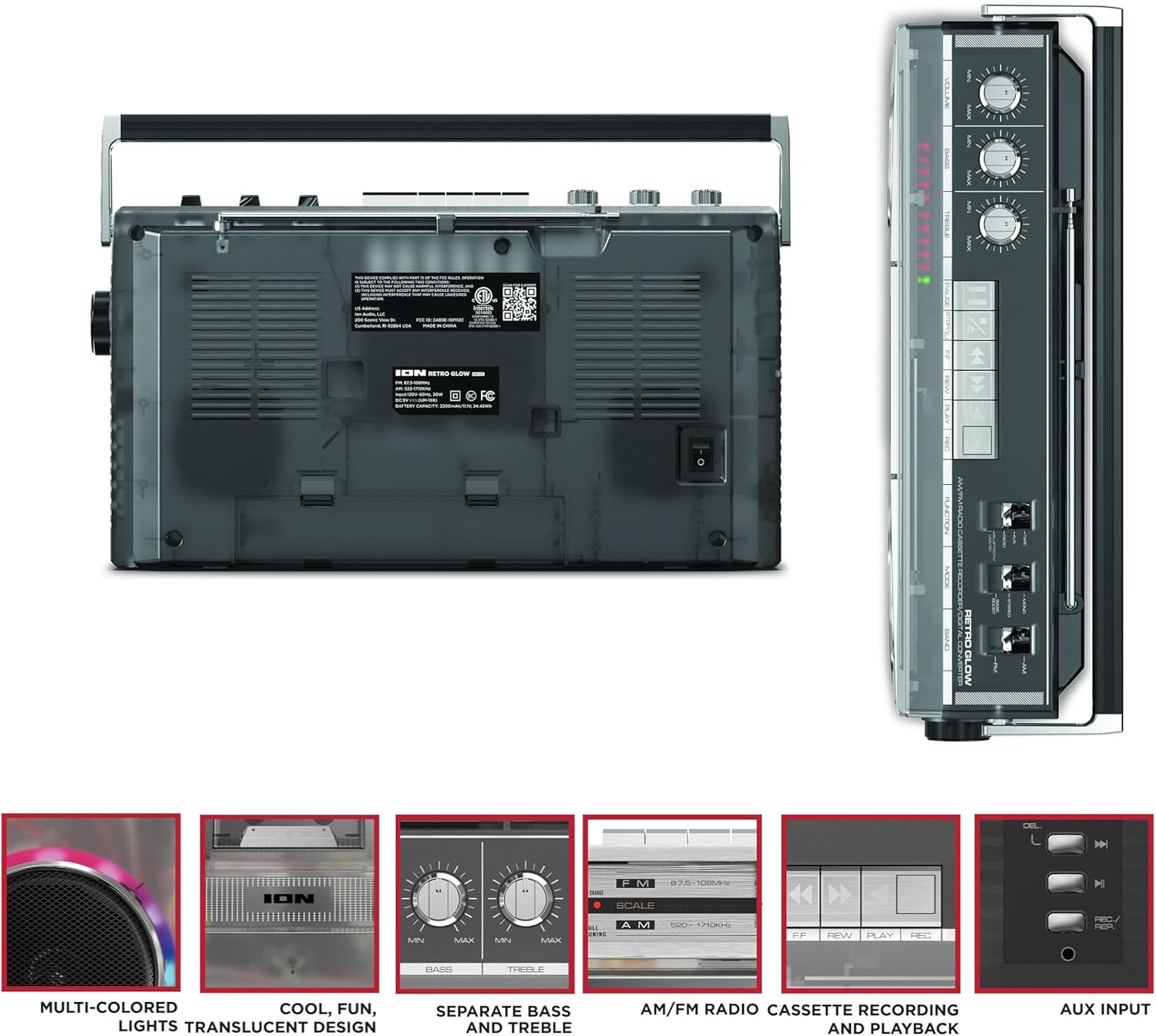
Figure 3: Side panel illustrating the USB port, SD card slot, and playback control buttons. The rear panel includes the power input and battery compartment.
5. Fametrahana
Powering the Boombox
The Retro Glow Boombox can be powered via the included AC power cable or by batteries for portable use.
- Herin'ny AC: Connect the power cable to the AC input on the rear of the unit and then to a wall outlet.
- Herin'ny bateria: Open the battery compartment on the rear and insert the required batteries (type and quantity specified in specifications).

Sary 4: aoriana view of the boombox, highlighting the power input and the battery compartment for portable operation.
6. Torolàlana miasa
Hetsika ankapobeny
- Herim-batana / maty: Use the power switch to turn the unit on or off.
- Fanaraha-maso ny feo: Adjust the 'VOLUME' knob on the top panel to increase or decrease the sound level.
- Fanaraha-maso ny feo: Use the 'BASS' and 'TREBLE' knobs to customize the audio output to your preference.
- Jiro LED: The multi-colored LED lights around the speakers dance in sync with the music. Refer to the Quickstart Guide for specific controls to change light modes or turn them off.
Radio Functionality
- Switch the 'FUNCTION' selector to 'RADIO'.
- Select 'AM' or 'FM' using the 'BAND' switch.
- Ahinjiro ny antenne teleskopika mba hahazoana ny fandraisana FM tsara indrindra. Ho an'ny AM, avadiho ny fitaovana mba hahazoana ny fandraisana tsara indrindra.
- Use the 'TUNING' knob to scan for stations.
Cassette Player/Recorder
- Playback: Press the 'STOP/EJ' button to open the cassette door. Insert a cassette tape and close the door. Press 'PLAY' to begin playback.
- Fandraketana: To record from the radio, built-in microphone, or an external source (via Aux input), ensure a blank cassette is inserted. Select the desired source using the 'FUNCTION' switch. Press the 'REC' button (often simultaneously with 'PLAY') to start recording.
- Mandrosoa haingana / miverina: Use the 'F.FWD' and 'REW' buttons for tape navigation.
Bluetooth Connectivity
- Switch the 'FUNCTION' selector to 'BLUETOOTH/USB/SD'. The unit will enter pairing mode.
- On your Bluetooth-enabled device, search for 'Retro Glow Boombox' and select it to pair.
- Once paired, you can stream audio wirelessly to the boombox.
Famerenana karatra USB sy SD
- Insert a USB drive or SD card into the respective slot on the side panel.
- Switch the 'FUNCTION' selector to 'BLUETOOTH/USB/SD'. The unit should automatically detect and begin playing audio files avy amin'ny haino aman-jery nampidirina.
- Use the playback control buttons (play/pause, skip forward/backward) on the side panel to manage your audio.
Fampidirana fanampiny
- Connect an external audio device (e.g., smartphone, MP3 player) to the 'AUX' input using a 3.5mm audio cable (not included).
- Switch the 'FUNCTION' selector to 'AUX'. Audio from your external device will play through the boombox speakers.
7. Fikojakojana
- Fanadiovana: Mampiasà lamba malefaka sy maina hanadiovana ny ivelany amin'ilay fitaovana. Aza mampiasa mpanadio na solvents mikikisana.
- Fikarakarana ny Cassette Deck: Regularly clean the tape heads and pinch rollers with a cotton swab lightly dampafangaro amin'ny alikaola isopropyl mba hahazoana antoka ny kalitaon'ny feo tsara indrindra sy hisorohana ny fahasimban'ny kasety.
- fitahirizana: When not in use, store the boombox in a cool, dry place away from direct sunlight and extreme temperatures.
8. Famahana olana
Tsisy Hery
- Ensure the power cable is securely connected to both the unit and a working power outlet.
- If using batteries, check if they are inserted correctly and are not depleted.
Tsy misy feo
- Check the volume level on the boombox and the connected audio source (if applicable).
- Ensure the correct function mode (Radio, Tape, Bluetooth, USB/SD, Aux) is selected.
- For cassette playback, verify the tape is inserted correctly and the heads are clean.
Olana fampiarahana Bluetooth
- Make sure the boombox is in Bluetooth pairing mode.
- Ensure your Bluetooth device is within range (typically 30 feet or 10 meters).
- Andramo ny manasaraka sy mampiaraka indray ilay fitaovana.
9. Famaritana
| Ny refin'ny vokatra | 9.25 x 16.25 x 5.25 santimetatra |
| Lanja entana | 8.93 kg |
| Teknolojia fifandraisana | Bluetooth 5.3, USB, SD Card, Aux Input |
| Karazana mpandahateny | Stereo, Full-Range |
| Loharanon-kery | AC Power Cable, Rechargeable Battery (approx. 10-hour life) |
| Endri-javatra manokana | AM/FM Radio, Cassette Player/Recorder, Multi-colored LED Lights, Retro VU Meters, Separate Bass and Treble Controls |
10. Warranty sy fanohanana
For warranty information or technical support, please refer to the Quickstart Guide included with your product or visit the official ION Audio website. Keep your purchase receipt as proof of purchase may be required for warranty claims.


