1. Fampidirana
This manual provides comprehensive instructions for the installation, operation, maintenance, and troubleshooting of your NIVIAN Professional WiFi SuperHD Surveillance Camera Kit. This system is designed to provide reliable and efficient security monitoring for your home or business.
Please read this manual carefully before using the product to ensure proper setup and optimal performance. Keep this manual for future reference.
2. Vokatra mihoatraview
The NIVIAN CCTV Kit is a professional 2K SuperHD WiFi surveillance system featuring 6 IP cameras and a 10-channel Network Video Recorder (NVR) with a pre-installed 1TB hard drive. Key features include:
- 2K SuperHD Image Resolution: Manome horonan-tsary mazava sy feno fotage (3MP).
- AI Human Detection: Intelligent motion detection to reduce false alarms.
- Audio roa-lalana: Mikrofonina sy fanamafisam-peo tafiditra ao anatiny ho an'ny fifandraisana amin'ny fotoana tena izy.
- Dual Night Vision: Infrared mode for discreet monitoring and white LED mode for full-color night vision activated by motion.
- WiFi-6 Long Range Connectivity: Stable wireless connection up to 250 meters with repeater function.
- Fakan-tsary IP66 tsy mety amin'ny toetr'andro: Metaly maharitra casing suitable for outdoor use.
- Fandraketana matihanina: Continuous or event-based recording to the included 1TB hard drive.
- HDMI Output: Mifandraisa amin'ny efijery na fahitalavitra mba hahazoana mivantana viewing.
- EseeCloud App: Remote access and control from mobile devices.
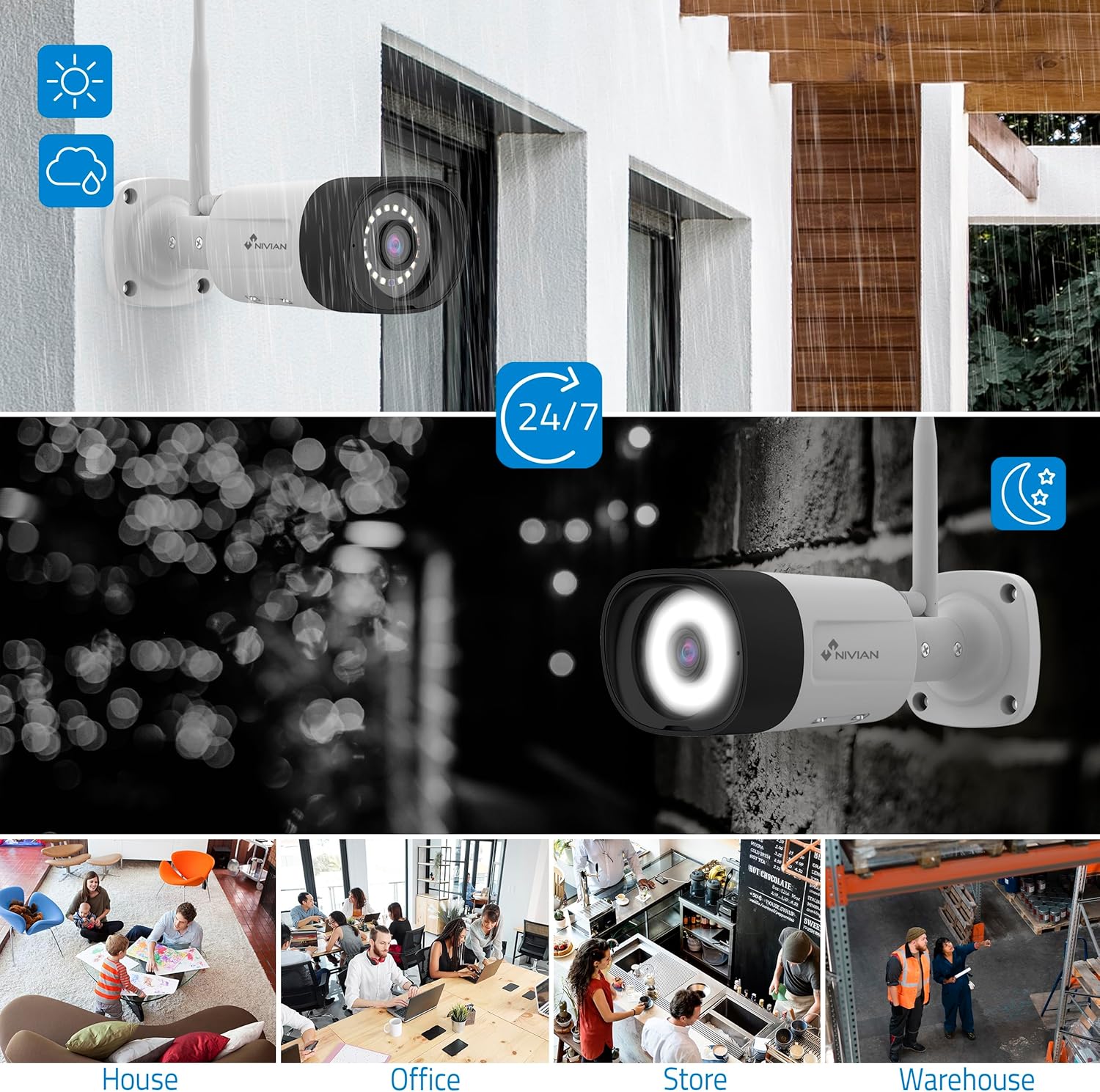
Image: NIVIAN CCTV Camera with day and night vision capabilities, showing weatherproof design and application in various environments like house, office, store, and warehouse.

Image: Comparison of 1080p Full HD video quality versus 2K Super HD video quality, demonstrating enhanced detail with 2K resolution.
3. Ny votoatin'ny fonosana
Hamarino fa ao anatin'ny fonosanao ny entana rehetra:
- 1x 10-Channel NVR (Network Video Recorder) with 1TB Hard Drive
- 6x NIVIAN 2K SuperHD WiFi IP Cameras
- Adaptatera herinaratra ho an'ny NVR sy fakantsary
- USB Mouse
- Cable Ethernet
- Fametrahana visy sy plugs
- Quick Start Guide (jereo ity boky ity ho an'ny torolalana amin'ny antsipiriany)
4. Fametrahana
4.1. NVR Installation
- Ampifandraiso ny NVR:
- Ampifandraiso amin'ny faladia herinaratra ny NVR amin'ny fampiasana ny adaptatera herinaratra omena.
- Connect the NVR to a monitor or TV via the HDMI port for local viewing.
- Ampifandraiso amin'ny seranana USB an'ny NVR ny totozy USB.
- For internet access, connect the NVR to your router using the Ethernet cable.
- Herim-batana: Turn on the NVR. Follow the on-screen prompts for initial setup, including language selection and network configuration.
4.2. Fametrahana fakan-tsary
- Toerana fametrahana: Choose suitable locations for your cameras, ensuring they have a clear field of view and are within range of the NVR's WiFi signal. The IP66 rating allows for outdoor installation.
- Power the Cameras: Connect each camera to a power outlet using its dedicated power adapter.
- Pairing (Automatic): The cameras are pre-paired with the NVR. Once powered on, they should automatically connect to the NVR's WiFi network. You will see the camera feeds appear on the connected monitor.
- Signal Repetition Function: If a camera is too far from the NVR, you can use another camera as a repeater to extend the WiFi range up to 250m. Refer to the NVR's on-screen menu for configuring this feature.

Image: Diagram illustrating various connection options for the NIVIAN CCTV system, including direct WiFi-6 connection to NVR, HDMI output to a monitor, and NVR connection to a router via LAN for remote access via Eseecloud app. Also shows signal repetition function.
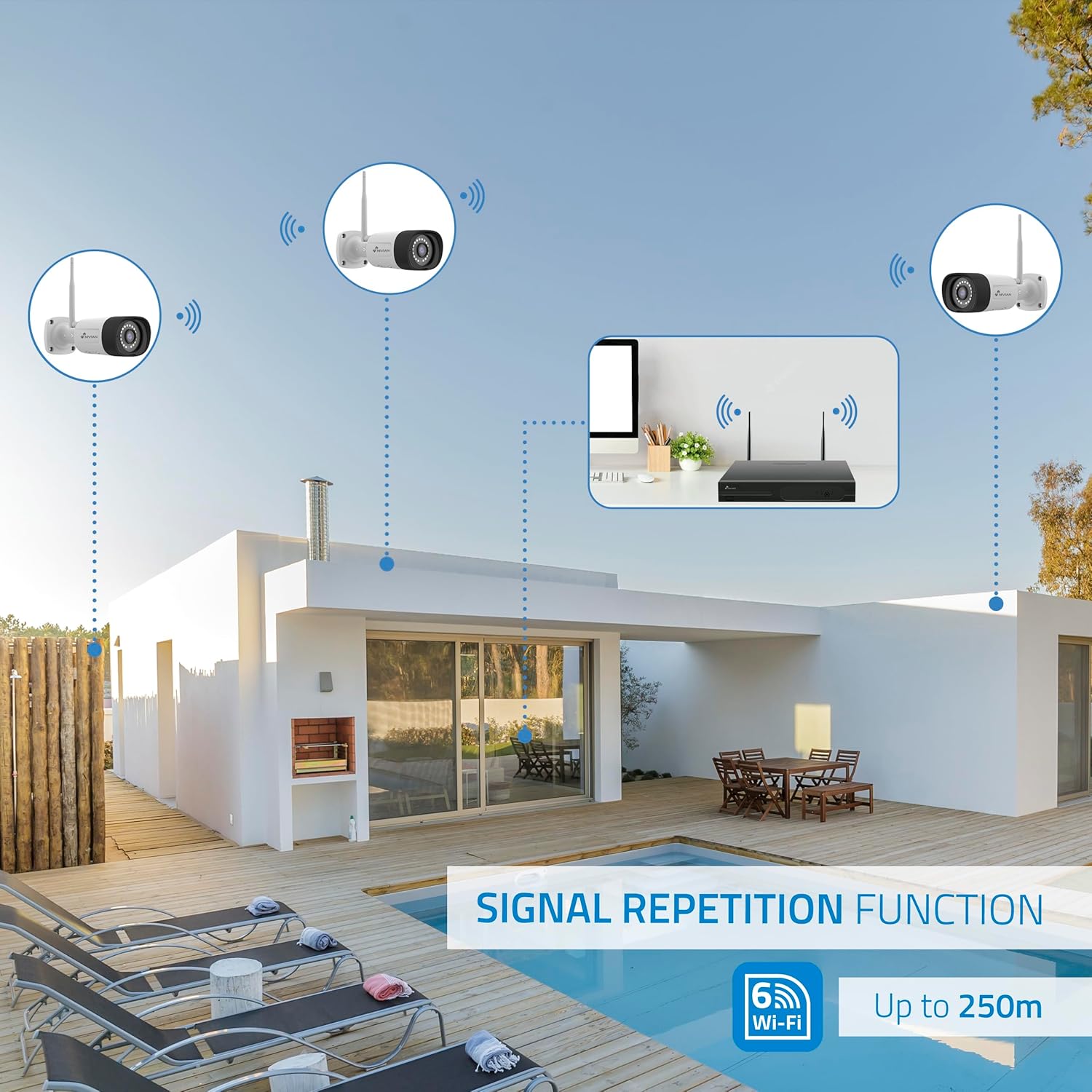
Image: Diagram showing the signal repetition function of the NIVIAN WiFi CCTV system, where cameras can extend the WiFi range up to 250 meters from the NVR.
4.3. EseeCloud App Setup
- Misintona fampiharana: Download the "EseeCloud" app from your mobile device's app store (available for iOS, Android).
- Register kaonty: Sokafy ny app ary misoratra anarana kaonty vaovao na midira raha efa manana izany ianao.
- Ampio fitaovana: Follow the in-app instructions to add your NVR system. This typically involves scanning a QR code displayed on the NVR's monitor or entering the device ID manually.
- mitokana Viewing: Rehefa ampiana dia azonao atao view live feeds, access recordings, and configure settings remotely.

Image: Smartphone screen displaying the EseeCloud app interface for managing the security system, showing live camera feeds and control options, with NIVIAN cameras and a laptop in the background.
5. Torolàlana miasa
5.1. Miaina View
Access live camera feeds through the NVR connected to a monitor or via the EseeCloud mobile app. The NVR interface allows you to switch between single-camera view ary tambajotra fakantsary maro view.
5.2. Fandraisana an-tsoratra
- Fanamarihana mitohy: The system is configured for continuous recording by default to the 1TB hard drive.
- Fandraisana an-tsoratra ny fihetsiketsehana: Configure cameras to record only when motion is detected. This can be scheduled via the NVR settings or EseeCloud app.
- H.265+ Codec: The system uses H.265+ video compression to optimize storage space while maintaining video quality.
5.3. Playback
Access voarakitra footage through the NVR's playback menu or the EseeCloud app. You can search recordings by date, time, and event type (e.g., motion detection).
5.4. Fitihana ny olombelona amin'ny alalan'ny artifisialy
The cameras feature advanced AI human detection to differentiate human movement from other objects, significantly reducing false alarms. When human motion is detected, the system can trigger recordings, send notifications, and activate the white LED night vision for color footage.

Image: NIVIAN camera detecting a person at night, with the white LED light activated for color night vision, and a mobile notification indicating motion detection.
5.5. Roa-Lalana Audio
Use the EseeCloud app to utilize the two-way audio feature. This allows you to listen to audio from the camera's location and speak through the camera's built-in speaker.
5.6. Fomba Fahitana Amin'ny Alina
- Fomba infrarouge (IR): Provides black and white video in low-light conditions for discreet surveillance.
- White LED Mode: When motion is detected in low light, the camera's white LEDs activate, providing full-color video and acting as a deterrent.
6. Fikojakojana
- Fanadiovana fakan-tsary: Diovy tsy tapaka amin'ny fakantsary malefaka, damp lamba mba hahazoana antoka fa mazava tsara ny kalitaon'ny sary. Aza mampiasa akora simika mahery vaika.
- Fanavaozana ny mikirao praogramanao: Check for firmware updates for the NVR and cameras through the EseeCloud app or NVR settings. Keep your system updated for optimal performance and security.
- Fitantanana ny kapila mafy: The 1TB hard drive will automatically overwrite the oldest recordings when full. If you need to preserve specific footage, back it up to an external device.
- Fanamarinana famatsiana herinaratra: Hamarino tsara fa mifandray tsara ary tsy misy simba ny adaptatera herinaratra rehetra.
7. Famahana olana
7.1. No Camera Feed
- Jereo ny hery: Ensure the camera is powered on and its adapter is working.
- Famantarana WiFi: Verify the camera is within the NVR's WiFi range. Use the signal repetition function if necessary.
- Avereno ampiarahina ny fakantsary: If issues persist, try re-pairing the camera with the NVR through the NVR's menu.
7.2. Kalitao ratsy amin'ny sary
- Lens madio: Clean the camera lens for any dirt or smudges.
- Jiro: Ensure adequate lighting for optimal image quality, especially at night.
- Fanelingelenana WiFi: Reduce potential WiFi interference by moving the camera or NVR, or by using the signal repetition function.
7.3. Remote Access Issues (EseeCloud App)
- Fifandraisana amin'ny Internet: Ensure both your NVR and mobile device have a stable internet connection.
- NVR Network Settings: Verify the NVR is correctly connected to your router and has internet access.
- Dikan'ny fampiharana: Ensure your EseeCloud app is updated to the latest version.
7.4. Hard Drive Full / Recording Issues
- Jereo ny fitahirizana: Verify the hard drive status in the NVR settings.
- Fandaharana fandraisam-peo: Hamarino tsara fa voalamina tsara ny fandaharam-potoanan'ny fandraketana.
- Fahasalaman'ny kapila mafy: If issues persist, the hard drive may need to be checked or replaced.
8. Famaritana
| Marika | NIVIAN |
| Laharana modely | NV-KIT830W-8CAM |
| Haben'ny vokatra (L x W x H) | 23 x 12 x 8 cm; 6.2 kg |
| Teknolojia fifandraisana | Wireless (WiFi-6) |
| Fanapahan-kevitra momba ny firaketana horonantsary | 2K (3MP) |
| Isan'ny fantsona | 10 (NVR) |
| Isan'ny fakan-tsary | 6 |
| Fahaizana fitahirizana | 1 TB Hard Drive (included) |
| Fakan-tsary Features | IP Cameras SuperHD with PTZ, Night Vision, AI Human Detection, Two-Way Audio |
| Frame Rate | 15 fps, 24 fps, 30 fps |
| Fitaovana mifanentana | Television (via HDMI) |
| Karazam-plug | Wall Mount |
| Firenena niaviany | CHINE |
9. Warranty sy fanohanana
NIVIAN offers technical support to all customers. If you have any questions, suggestions, or encounter any issues with your WiFi surveillance camera kit, please do not hesitate to contact us.
You can reach us through Amazon messages or via any official NIVIAN brand channel. Please refer to your purchase documentation for specific warranty terms and contact details.


