Sava lalana
Thank you for choosing the Cygnett ChargePro Fast Charging Power Bank 20K. This manual provides essential information for the safe and efficient use of your new power bank. Please read these instructions carefully before use and retain them for future reference.
Fonosana fonosana
- Cygnett ChargePro Fast Charging Power Bank 20K
- USB-C to USB-C Charging Cable (may vary by region)
- User Manual
Vita ny vokatraview
The Cygnett ChargePro 20K is a high-capacity portable power bank designed for fast charging of various devices. It features multiple output ports and a digital display to indicate battery status.

This image displays the Cygnett ChargePro Power Bank 20K in Midnight, highlighting its compact design, digital display, and various ports.
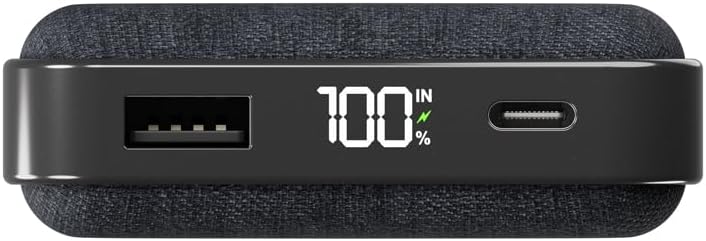
A antsipirihany view of the power bank's top edge, illustrating the USB-A output, the digital percentage display, and the USB-C port for both input and output.
Lafin-javatra fototra:
- 30W famandrihana haingana: Delivers rapid power to compatible devices.
- Fahaizana 20,000mAh: Provides multiple charges for smartphones and other gadgets.
- Dual USB-C Ports: For versatile input and output.
- Port USB-A: Additional output for various devices.
- Fampisehoana nomerika: Mampiseho ny isan-jaton'ny bateria sisatage.
Hametraka
Fametrahana voalohany ny Power Bank
Before first use, it is recommended to fully charge your Cygnett ChargePro Power Bank. This ensures optimal performance and battery longevity.
- Connect the provided USB-C cable to one of the USB-C ports on the power bank.
- Ampifandraiso amin'ny charger USB mifanaraka amin'ny rindrina (tsy tafiditra) ny ilany amin'ny tariby USB-C.
- Ny fampisehoana nomerika dia hampiseho ny fivoaran'ny fiampangana. Voaloa tanteraka ny banky herinaratra rehefa mampiseho 100% ny fampisehoana.
Torolàlana miasa
Fametrahana ny fitaovanao
The ChargePro Power Bank can charge up to three devices simultaneously using its USB-C and USB-A ports.
- Identify the appropriate charging cable for your device (USB-C to USB-C, USB-A to USB-C, USB-A to Lightning, etc.).
- Ampifandraiso amin'ny fitaovanao ny tendrony iray amin'ny tariby famandrihana.
- Connect the other end of the charging cable to an available USB-C or USB-A output port on the power bank.
- Your device should begin charging automatically. The power bank's digital display will show its remaining charge.

This image demonstrates the power bank actively charging a smartphone, connected by a USB-C cable, with the phone indicating a full charge.
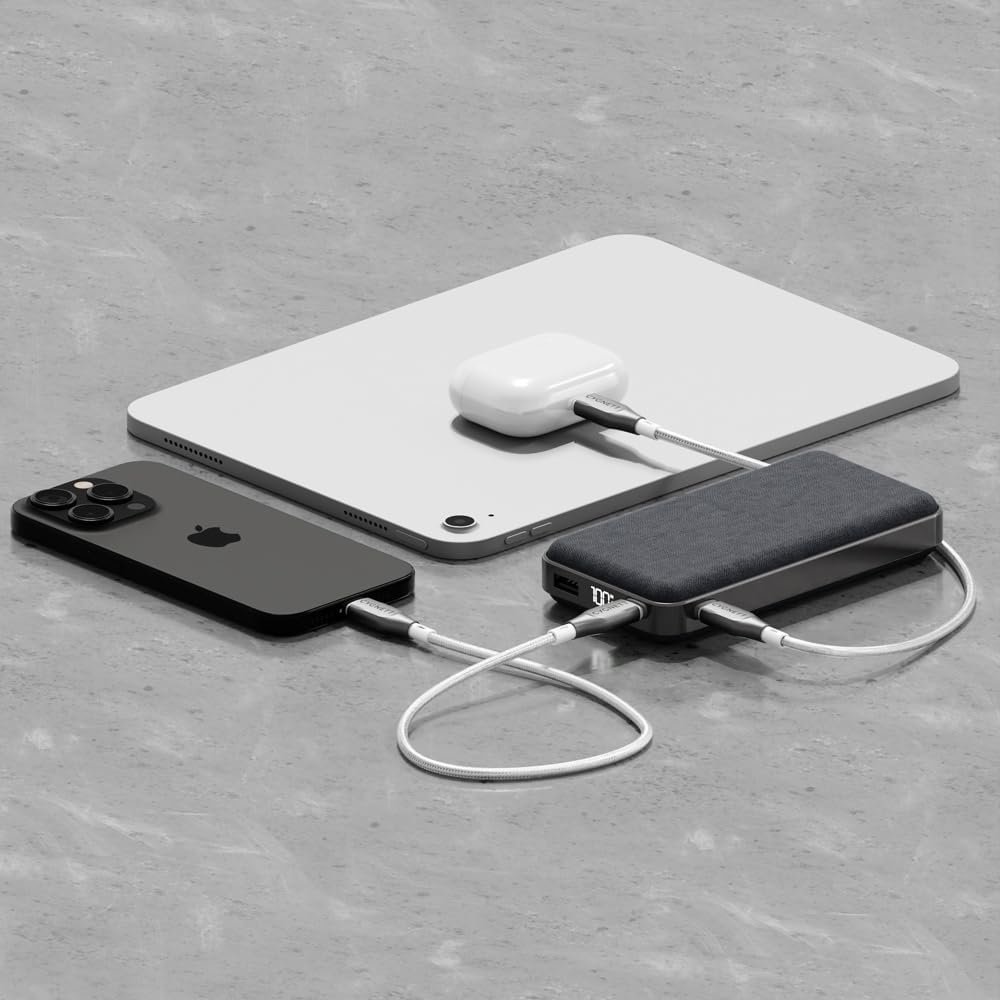
An illustration of the power bank's multi-device charging capability, showing it connected to an iPhone, an iPad, and a pair of wireless earbuds.
Fahatakarana ny fampisehoana nomerika
The integrated digital display shows the exact percentage of remaining battery life in the power bank. This allows you to monitor its charge level and know when it needs to be recharged.
Fikojakojana sy fikarakarana
- Fanadiovana: Mampiasà lamba malefaka sy maina hanadiovana ny power bank. Fadio ny mampiasa akora simika mahery vaika na fitaovana mikikitra.
- fitahirizana: Tehirizo ao amin'ny toerana mangatsiatsiaka sy maina lavitry ny tara-masoandro mivantana sy ny hafanana tafahoatra ny banky herinaratra.
- Fahasalamana bateria: Mba hihazonana ny fahasalaman'ny batterie dia fenoy feno sy esorina ny banky herinaratra farafahakeliny indray mandeha isaky ny telo volana raha tsy ampiasaina tsy tapaka.
- Aza mitete (Avoid Drops): Arovy amin'ny fianjerana sy ny fifandonana ny fitaovana, izay mety hanimba ny singa anatiny.
Fanamboarana
- Power Bank tsy mi-charge:
Ensure the USB-C cable is securely connected to both the power bank and the wall charger. Verify that the wall charger is functioning correctly and provides sufficient power (e.g., 30W compatible). Try a different cable or charger. - Fitaovana tsy mi-charge amin'ny Power Bank:
Check that the charging cable is securely connected to both the power bank and your device. Ensure the power bank has sufficient charge (check the digital display). Try a different cable or port on the power bank. Some devices may require specific charging protocols; ensure compatibility. - Famandrihana miadana:
Ensure you are using a fast-charging compatible cable and that your device supports fast charging. If charging multiple devices, the output power may be distributed, potentially slowing down individual device charging. - Tsy mandeha ny fampisehoana nomerika:
Attempt to charge the power bank to see if the display reactivates. If the issue persists, contact customer support.
fepetra arahana
| Anarana modely | ChargePro |
| Laharana modely | CY5181PBCHE, CY5182PBCHE, CY5183PBCHE |
| Fahaizana bateria | 20,000mAh |
| Karazana mpampitohy | USB Type C, USB Type A |
| Endri-javatra manokana | 30W fast charging for phones & tablets, Approved for carry-on, Charge 3 devices simultaneously, Pre-charged & ready for use out of the box, Up to 4.1 phone charges* |
| BOKYtage | 3.7 Volts |
| Ny refin'ny vokatra | 14 x 7 x 3 cm |
| Lanja entana | 200 g |
| Color | Mamatonalina |
*Based on iPhone 15 Pro.
Information momba ny fiarovana
- Aza esorina, sokafana, na tetehina ny power bank.
- Aza atao amin'ny hafanana na afo ny power bank. Aza tehirizina amin'ny tara-masoandro mivantana.
- Aza atao short-circuit ny power bank.
- Do not expose the power bank to mechanical shock.
- In case of a battery leak, do not allow the liquid to come into contact with skin or eyes. If contact has been made, wash the affected area with copious amounts of water and seek medical advice.
- Arovy amin'ny ankizy ny banky herinaratra.
- Ensure proper disposal of the power bank according to local regulations.
Warranty sy fanohanana
Cygnett products are designed and manufactured to the highest quality standards. For information regarding warranty coverage, technical support, or to register your product, please visit the official Cygnett webtranonkala na mifandraisa amin'ny sampan-draharahan'ny serivisy ho an'ny mpanjifa. Tazomy azafady ny porofon'ny fividiananao mba hahazoana antoka.


