1. Fampidirana
The NEDIS WIFICI12CWT SmartLife Indoor Wi-Fi Camera is designed for home surveillance, offering 3MP 1296p Full HD video quality. It features infrared night vision, intelligent motion detection, and two-way audio communication. This camera is compatible with Onvif standards and integrates seamlessly with the SmartLife application for remote access and control. Video recordings can be stored on a microSD card (up to 128 GB) or via an optional cloud storage service. This manual provides essential information for the proper installation, operation, and maintenance of your camera.
2. Inona no ao anaty boaty
- 1x NEDIS WIFICI12CWT Camera
- 1x Power Adapter
- 1x USB Type-C Cable
- 1x Boky Torolàlana
3. Vokatra mihoatraview
Familiarize yourself with the components of your NEDIS WIFICI12CWT camera.

This image displays the front of the NEDIS WIFICI12CWT camera, highlighting its key functionalities such as Wi-Fi connectivity, control via a mobile application, voice control compatibility, infrared night vision, and 3MP Full HD resolution for clear video.
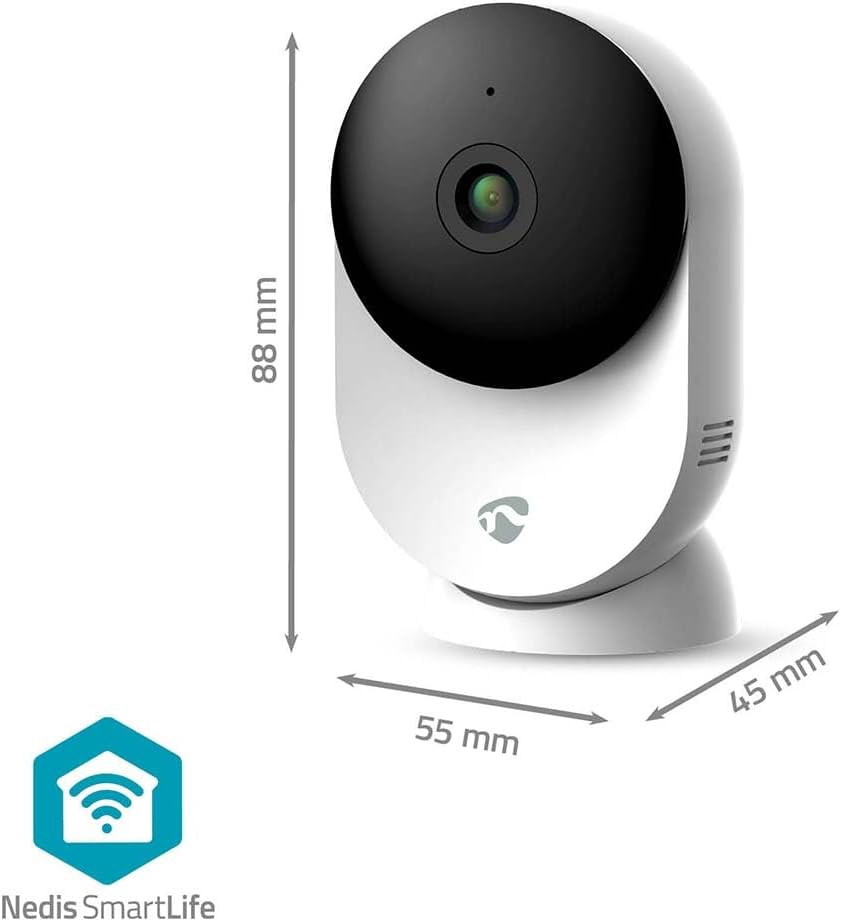
Ity sary ity dia manome mazava view of the NEDIS WIFICI12CWT camera along with its physical dimensions: 88 mm in height, 55 mm in width, and 45 mm in depth, aiding in placement planning.

Ny aoriana view of the camera is shown, highlighting the speaker grille for two-way audio and the 'PUSH' button, which typically serves as a reset or pairing button.
singa fototra:
- Lens fakan-tsary: Maka video footage.
- LED famantarana: Shows camera status (e.g., power, connection).
- Microphone: Ho an'ny fampidirana feo sy fifandraisana roa.
- Mpandahateny: Ho an'ny famoahana feo sy fifandraisana roa.
- Power Port (USB Type-C): Mifandray amin'ny adaptatera herinaratra.
- bokotra Reset: Used for factory reset or pairing mode.
- Kardan'ny MicroSD Card: Ho an'ny fitahirizana horonan-tsary eo an-toerana.
4. Fametrahana
Follow these steps to set up your NEDIS WIFICI12CWT camera:
- Ampidino ny fampiharana SmartLife: Hitady ny "SmartLife" in your mobile device's app store (iOS or Android) and install it.
- Hamorona kaonty: Open the SmartLife app and register for a new account or log in if you already have one.
- Power on the Camera: Connect the USB Type-C cable to the camera's power port and plug the power adapter into an electrical outlet. The camera will power on, and the LED indicator will typically blink, indicating it's ready for pairing.
- Ampio fitaovana: In the SmartLife app, tap the "+" icon (usually in the top right corner) to add a new device. Select "Security & Video Surveillance" then "Smart Camera (Wi-Fi)" or similar.
- Mifandray amin'ny Wi-Fi: Follow the on-screen instructions in the app. Ensure your mobile device is connected to a 2.4 GHz Wi-Fi network. The camera does not support 5 GHz Wi-Fi. You may need to scan a QR code displayed on your phone with the camera lens.
- Fametrahana tanteraka: Once the camera connects successfully, you can name it and begin using it.

A user is shown interacting with the NEDIS WIFICI12CWT camera through the SmartLife mobile application on a smartphone, illustrating the remote viewing capability and ease of control.
5. Fampandehanana ny fakan-tsary
velona View:
Open the SmartLife app and select your camera from the device list to access the live video feed. You can view your space in real-time from anywhere.
Fikarohana hetsika:
The camera features intelligent motion detection. When motion is detected, the camera can send instant notifications to your smartphone via the SmartLife app. You can adjust sensitivity settings within the app.
Fahitana alina:
Equipped with infrared LEDs, the camera automatically switches to night vision mode in low-light conditions, providing clear black-and-white video up to 10 meters.
Audio roa-lalana:
Use the built-in microphone and speaker for two-way communication. Tap the microphone icon in the app to speak, and listen through the camera's speaker.

A couple is depicted using a tablet to monitor a baby, showcasing the camera's ability to provide live video feed and two-way audio communication, useful for calming a child or general baby surveillance.
Firaketana sy fitahirizana:
- Karatra MicroSD: Insert a microSD card (up to 128 GB, not included) into the designated slot for local storage of recordings. The camera supports continuous recording or event-triggered recording.
- Cloud Storage: Optional cloud storage services may be available through the SmartLife app for secure off-site storage of your video footage.
Pan/Tilt Functionality:
The camera features motorized pan and tilt capabilities, allowing for 360° horizontal and vertical tracking. Control the camera's viewing direction directly from the SmartLife app to cover a wider area.

This image shows the camera placed in a room, with graphical overlays emphasizing its 110-degree viewing angle, intelligent movement detection, and dual-band 2.4/5 GHz Wi-Fi connectivity for flexible placement.
6. Fikojakojana
Fanadiovana:
To clean the camera, gently wipe the exterior with a soft, dry cloth. Do not use liquid cleaners or aerosols, as they may damage the device.
Fanavaozana ny mikirao praogramanao:
Periodically check the SmartLife app for available firmware updates. Keeping your camera's firmware up-to-date ensures optimal performance and security.
7. Famahana olana
- Tsy mandeha ny fakan-tsary: Ataovy azo antoka fa mifandray tsara amin'ny fakantsary sy amin'ny faladia elektrika miasa ny adaptatera herinaratra.
- Tsy afaka mifandray amin'ny Wi-Fi:
- Hamarino tsara fa 2.4 GHz ny tambajotra Wi-Fi-nao. Tsy mahazaka tambajotra 5 GHz ny fakantsary.
- Jereo raha marina ny tenimiafina Wi-Fi-nao.
- Ataovy azo antoka fa ao anatin'ny elanelan'ny router Wi-Fi-nao ny fakan-tsary.
- Try resetting the camera by pressing and holding the reset button for several seconds until the LED indicator changes.
- No recording to microSD card:
- Ensure the microSD card is inserted correctly.
- Check if the microSD card is formatted correctly (usually FAT32). You may need to format it via the app.
- Verify that recording settings are enabled in the SmartLife app.
- Ratsy kalitaon'ny sary:
- Diovy amin'ny lamba malefaka sy maina ny fakantsary.
- Ensure adequate lighting in the environment, or that night vision is functioning correctly in dark conditions.
- Check your internet connection speed, as a slow connection can affect streaming quality.
8. Famaritana
| endri-javatra | famaritana |
|---|---|
| Anarana modely | Ampahany WIFICI12CWT |
| Fanapahan-kevitra momba ny firaketana horonantsary | 1296p (3MP) |
| Wireless Communication Technology | Wi-Fi (2.4GHz) |
| Viewamin'ny Angle | 110 degre |
| Fari-pahitana amin'ny alina | 10 metatra |
| Fampidirana herinaratra | 5 Volts |
| Fanjifana herinaratra | 4.5 Watt-ora |
| refy (L x W x H) | 45 x 55 x 88 mm |
| lanja | 161g ny |
| KEVITRA | Acrylonitrile Butadiene Styrene (ABS) |
| Endri-javatra manokana | Two-way audio, Motion detector, Cry detection, Sound-triggered recording, HD resolution, Night vision |
| Fampiasana tontolo iainana | an-trano |
| Fitaovana mifanentana | Smartphone, Tablet |
| Karazana Controller | Android, iOS |
9. Information momba ny fiarovana
- This product is designed for indoor use only. Do not expose it to rain or moisture.
- Use only the provided power adapter to prevent damage to the device.
- Arovy amin'ny tara-masoandro mivantana, ny hafanana ary ny saha andriamby mahery ny fakantsary.
- Aza manandrana manala na manamboatra ny fakantsary samirery. Mifandraisa amin'ny mpiasan'ny serivisy mahafeno fepetra mba hahazoana fanampiana.
- Arovy amin'ny ankizy sy ny biby fiompy.
10. Warranty sy fanohanana
For warranty information and technical support, please refer to the documentation included with your product or visit the official NEDIS website. You can also contact NEDIS customer service for further assistance.


