Vita ny vokatraview
The Teslong USB-C Borescope Inspection Camera is a versatile tool designed for inspecting hard-to-reach areas. Featuring an 8-LED light system and a flexible, waterproof snake scope, it offers clear visuals for various applications. Compatible with iPhone 15 and Android phones via USB-C, it provides a convenient plug-and-play experience without the need for Wi-Fi or complex setups.

Image: The Teslong Endoscope Camera connected to a smartphone, showing its application in inspecting pipes.
Inona no ao anaty boaty
- NTC30LD85L10 USB C Endoscope
- Adaptatera tselatra
- Accessories (Magnet, Hook, Mirror)
- User Manual

Image: The complete package contents, including the coiled endoscope cable, user manual, and accessory attachments.
Endri-javatra fototra
- Ultra-Long 33FT Cable: The extended 15M/50ft probe with an IP67 waterproof camera expands visual reach for challenging, hard-to-reach areas.
- Fifandraisana iraisam-pirenena: Features a USB-C plug design with a Lightning adapter for seamless connection to iPhone 15, Android smartphones, and Android tablets. No Wi-Fi or complex setups required.
- Fanazavana azo zahana: Equipped with 8 high-brightness adjustable LED lights to provide unparalleled clarity in dark environments.
- Flexible & Waterproof Design: The semi-rigid cable molds into any shape, and its IP67 waterproof rating ensures suitability for wet environments.
- Fampiasana maro: Ideal for plumbing, automotive repairs, home DIY, and inspecting elusive spaces.

Image: Visual representation of the 33ft flexible cable's versatility, demonstrating its use with various tools for extended reach in DIY projects.

Image: The endoscope camera head with its 8 adjustable LED lights, emphasizing its IP67 waterproof rating and illumination capabilities.
Setup Guide
- Download the "Xscope" App: Hitady ny "Xscope" on Google Play Store (for Android) or Apple App Store (for iOS) and install the application on your smartphone or tablet.
- Fanomezana alalana: After installation, open the app. When prompted, click "Allow" to grant the app necessary permissions to access your device's camera and photos/videos.
- Mampifandray ny endoscope: Plug the USB-C connector of the endoscope camera directly into your compatible smartphone or tablet. If using an iPhone with a Lightning port, attach the provided Lightning adapter first, then plug in the endoscope.
- Start Inspection: Once connected, the app should automatically detect the endoscope. You can then start using the camera for inspection.

Image: Illustrates the USB-C compatibility of the endoscope with modern smartphones and tablets, including iPhone 15 and Android devices.

Image: Shows the simple plug-and-play operation of the endoscope, emphasizing that no Wi-Fi, Bluetooth, or external charging is needed.
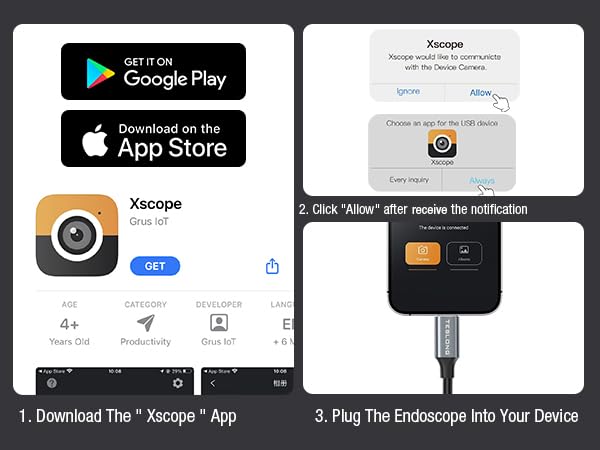
Image: A step-by-step visual guide on how to download the Xscope app, grant necessary permissions, and connect the endoscope to your device.
Torolàlana miasa
Once the endoscope is connected and the Xscope app is running, you can control various functions directly from your device's screen.
- Fihodinana sary: Rotate the image 90 degrees for optimal viewamin'ny angles.
- Color/Black and White Mode: Switch between color and black and white display modes.
- Fomba fisarahana ecran: Utilize split screen for comparative viewing.
- Fijery fitaratra: Mirror the screen for easier viewfamelabelarana na famelabelarana.
- Albums: Access sy review sary sy horonan-tsary nalaina.
- Zoom: Pinch with two fingers on the screen to zoom in or out (1X, 1.5X, 2X).
- Photo/Video Switch: Easily toggle between photo and video capture modes.
- maka: Press the dedicated button within the app to take photos or record videos.
- Fanitsiana famirapiratana LED: Use the physical control wheel on the cable to adjust the brightness of the 8 LED lights.

Image: The Xscope app interface, detailing controls for image manipulation, capture, and album access.

Image: The useful accessories provided with the endoscope, including a magnet, hook, and mirror, which attach to the camera head for enhanced functionality.
fikarakarana
- Fanadiovana ny Lens: After each use, especially in dirty or wet environments, gently wipe the camera lens with a soft, dry cloth. For stubborn dirt, a slightly damp cloth can be used, followed by drying. Ensure no moisture remains on the lens.
- Cable Care: Coil the cable neatly after use to prevent kinks and damage. Avoid sharp bends or excessive force when manipulating the cable.
- fitahirizana: Store the endoscope in a cool, dry place, away from direct sunlight and extreme temperatures. Keep it in its original packaging or a protective case to prevent dust accumulation and physical damage.
- Fanampiana fikarakarana: Clean the magnet, hook, and mirror attachments as needed. Ensure they are dry before storing.
Fanamboarana
| OLANA | Antony mety hitranga | vahaolana |
|---|---|---|
| No image on screen / App not detecting camera |
|
|
| Ny jiro LED tsy mandeha na manjavozavo |
|
|
| Manjavozavo na tsy mazava ny sary |
|
|
fepetra arahana
- Laharana modely: NTC30L
- Karazana Lens: Lens tokana
- Diameter fakan-tsary: 8.5mm
- fanapahan-kevitra: 1280*960
- Jiro fakan-tsary: 8 Jiro LED azo zahana
- View zoro: 79°
- Fitaovana mifanentana: For all smartphone or tablet devices powered by USB-C (Android 8.0+ / iOS 12.0+)
- Naoty tsy tantera-drano: IP67
- Distance Focal: 30-100mm (1.2-4.0 santimetatra)
- Halavan'ny tariby: 33FT (10 meters)
- loko: Mainty
- Mpanamboatra: Teslong
Warranty sy fanohanana
Teslong products are designed for durability and performance. For any questions, technical support, or warranty claims, please refer to the contact information provided in the included User Manual or visit the official Teslong website.
Azafady, tehirizo ny porofon'ny fividiananao ho an'ny fiantohana.
For additional resources and FAQs, you may visit the Fivarotana Teslong ao amin'ny Amazon.


