1. Fampidirana
Thank you for choosing the CYCPLUS T3 Smart Bike Trainer. This manual provides essential information for the safe and efficient operation, setup, and maintenance of your trainer. The T3 is designed to offer a realistic and immersive indoor cycling experience with precise resistance control and accurate data tracking.
Azafady vakio tsara ity boky torolalana ity alohan'ny hampiasana azy ary tehirizo mba hojerena amin'ny ho avy.
2. Information momba ny fiarovana
- Ensure the trainer is placed on a stable, level surface to prevent tipping.
- Keep children and pets away from the trainer during operation.
- Do not touch moving parts while the trainer is in use.
- Always wear appropriate cycling attire, including cycling shoes, when using the trainer.
- Disconnect power when not in use or before cleaning and maintenance.
- Do not expose the trainer to water or excessive moisture.
- Use only the provided power adapter (if applicable) or a compatible one.
3. Inona no ao anaty boaty
Rehefa manokatra ny fonosana dia hamarino azafady fa misy ny singa rehetra:
- CYCPLUS T3 Smart Bike Trainer Unit
- Cassette (pre-installed or separate, depending on model variant)
- Power Adapter (for Plug-in Mode)
- Quick Release Skewer (for compatible bikes)
- Thru-Axle Adapters (for compatible bikes)
- User Manual (ity antontan-taratasy ity)
4. Fametrahana
4.1 Famoahana sy Fametrahana voalohany
Carefully remove the trainer from its packaging. The T3 is designed for easy storage and deployment.

Figure 4.1: The CYCPLUS T3 Trainer in its folded stage, demonstrating its small footprint and portability (left), and in its expanded stage, highlighting the innovative X-base design for enhanced stability during use (right). Net weight is 19.4 kg.
4.2 Bike Compatibility and Mounting
The T3 trainer is compatible with a wide range of road bikes. Ensure your bike's frame and cassette are compatible before mounting.
- Frame mifanentana:
- 5*130/5*135 (Quick release)
- 12*142/12*148 (Thru-axle)
- Cassette Compatibility:
- Shimano 8-12 speed cassette
- SRAM 8-11 speed cassette
- SRAM XDR 12 speed cassette (XDR hub needed)

Figure 4.2: Demonstrating bike attachment to the T3 trainer, highlighting its compatibility with various frame types and cassette speeds.
To mount your bike:
- Remove the rear wheel from your bicycle.
- Align your bike's rear dropouts with the trainer's axle.
- Secure the bike using the appropriate quick release skewer or thru-axle adapter. Ensure it is firmly seated and tightened.
- Check that the bike's chain is properly engaged with the trainer's cassette.
5. Operating the CYCPLUS T3 Trainer
5.1 Power Modes: Plug-in vs. Unplugged
The T3 trainer offers versatile power options to suit your training environment.

Figure 5.1: The T3 trainer operating in Plug-in Mode. When connected to an external power source, the motor actively simulates downhill experiences by eliminating system drag.

Figure 5.2: The T3 trainer operating in Unplugged Mode. This self-powered feature allows for training anywhere without the need for an electrical outlet.
5.2 Connecting to Applications (Smart Interaction)
The CYCPLUS T3 trainer supports ANT+ FE-C and Bluetooth Smart wireless communication protocols, allowing seamless connection with popular cycling applications.

Figure 5.3: The T3 trainer connected to a cycling simulation application, providing an interactive training experience.
hifandray:
- Ensure your trainer is powered on (if using Plug-in Mode) or generating power (if using Unplugged Mode).
- Open your preferred cycling application (e.g., Zwift, TrainerRoad, Rouvy).
- Navigate to the device pairing or sensor connection menu within the app.
- Select the CYCPLUS T3 trainer from the list of available devices via ANT+ or Bluetooth.
- Confirm the connection. The app should now display real-time data from your trainer.
5.3 Using the CYCPLUS App for Personalized Settings
The dedicated CYCPLUS app allows you to customize training parameters and design your own courses. Hitady ny "CYCPLUS" in your device's app store (App Store for iOS, Google Play for Android).

Figure 5.4: The CYCPLUS mobile application interface, offering personalized settings and custom course design.
Through the app, you can also upgrade the trainer's firmware to ensure optimal performance and access new features.
6. Fikojakojana
6.1 Fanadiovana
Regular cleaning helps maintain the trainer's performance and longevity.
- Wipe down the trainer with a soft, damp lamba isaky ny fampiasana mba hanalana hatsembohana sy vovoka.
- Aza mampiasa mpanadio na solvents, fa mety hanimba ny famaranana izany.
- Ensure no moisture enters the internal components.
6.2 Fitehirizana
When not in use, the T3 trainer can be folded for compact storage.
- Store the trainer in a dry, cool place, away from direct sunlight and extreme temperatures.
- Ensure the trainer is clean and dry before storing.
7. Famahana olana
| OLANA | Antony mety hitranga | vahaolana |
|---|---|---|
| Trainer not detected by app. | Bluetooth/ANT+ off; Trainer not powered/active; App permissions. | Ensure device Bluetooth/ANT+ is on. Check trainer power/activity. Restart app/device. Check app permissions. |
| Famakiana herinaratra tsy marina. | Trainer not calibrated; Firmware outdated. | Perform a spin-down calibration via the cycling app or CYCPLUS app. Update firmware using the CYCPLUS app. |
| Feo tsy mahazatra mandritra ny fandidiana. | Loose components; Chain/cassette misalignment; Foreign object. | Check all bolts and connections. Ensure bike is properly mounted and chain is aligned. Inspect for debris. |
| Tsy miova ny fanoherana. | App control issue; Trainer malfunction. | Verify app is sending resistance commands. Restart trainer and app. If problem persists, contact support. |
8. Famaritana
| endri-javatra | antsipirihany |
|---|---|
| Anarana modely | T3 |
| Marika | CYCPLUS |
| Bike Type Compatibility | Road Bike |
| Mekanisma fanoherana | BLDC Motor Drive (Magnetic) |
| Hery ambony indrindra | 2000 W |
| Torque ambony indrindra | 110 NM |
| Maximum Incline Simulation | 27% |
| Power Accuracy | < 1% error |
| fifandraisana | ANT+ FE-C, Bluetooth Smart |
| Compatibility kasety | Shimano 8-12 speed, SRAM 8-11 speed, SRAM XDR 12 speed (XDR hub needed) |
| Frame Compatibility | 5*130/5*135 (QR), 12*142/12*148 (Thru-axle) |
| KEVITRA | Fiara vy |
| Refy (Nohalehibeazina) | Approx. 699mm (L) x 520mm (W) x 547mm (H) |
| lanja | 19.4 kg (Net) |
| Fanaparitahana hafanana | Copperplate within stator, built-in dual fans |
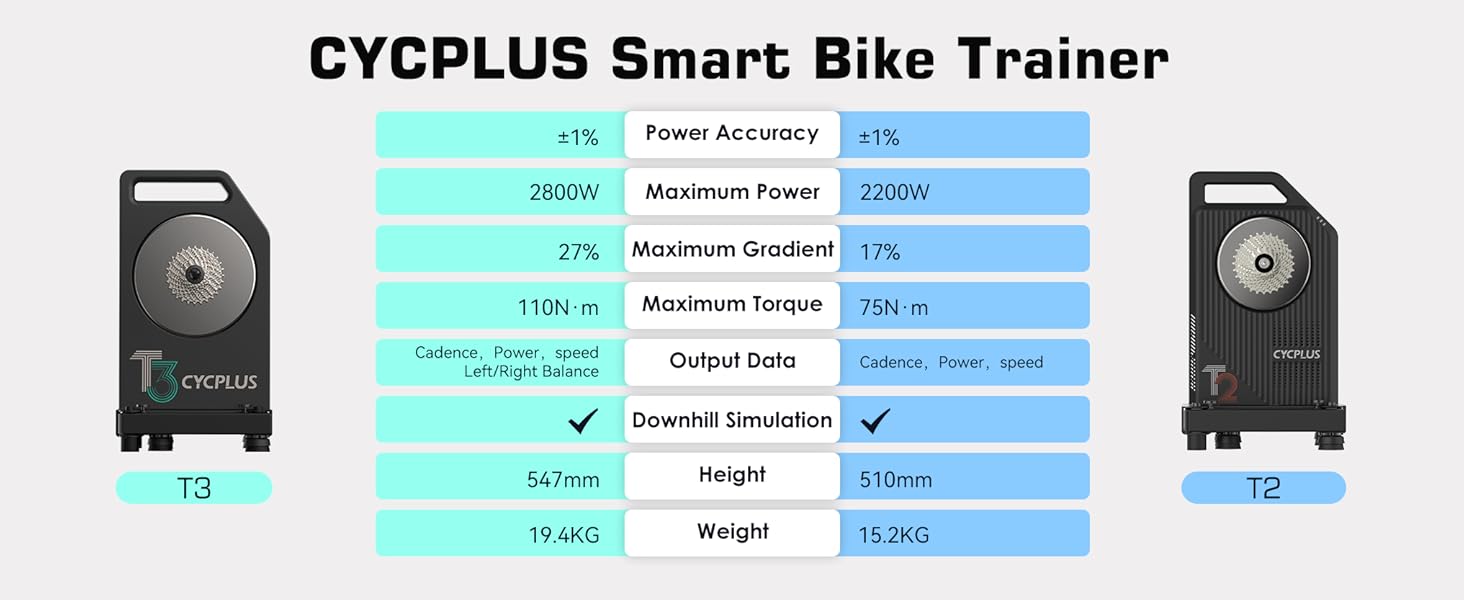
Figure 8.1: Detailed specifications of the CYCPLUS T3 Smart Bike Trainer, including key performance metrics and physical attributes.
9. Fanohanana ny mpanjifa
CYCPLUS is committed to ensuring your satisfaction. If you encounter any difficulties or problems with your T3 Smart Bike Trainer, our customer service team is readily available to provide assistance and support.
For support, please visit the official CYCPLUS website or contact our customer service team through the contact information provided on our webtranonkala na ny sehatra fividiananao.
Please have your model number (T3) and purchase details ready when contacting support.


