1. Fampidirana
This manual provides detailed instructions for the installation, operation, and maintenance of the Aigo B760L D4 Motherboard. Please read this manual thoroughly before installing or using the product to ensure proper functionality and to prevent damage.
2. Information momba ny fiarovana
Tandremo hatrany ireto fepetra fiarovana manaraka ireto:
- Disconnect power before installing or removing any components.
- Tazomy amin'ny sisiny ny motherboard mba tsy hikasika ireo singa saro-pady.
- Use an anti-static wrist strap to prevent electrostatic discharge (ESD) damage.
- Ensure proper ventilation within the computer case to prevent overheating.
- Aza atao amin'ny hamandoana na mari-pana tafahoatra ny motherboard.
3. Ny votoatin'ny fonosana
Hamarino fa misy ny entana rehetra ao anaty fonosana:
- Aigo B760L D4 Motherboard
- User Manual (ity antontan-taratasy ity)
- Tariby SATA (mety miovaova ny isany)
- Ampinga I / O
- Driver CD/USB (if included)
4. Vokatra mihoatraview
The Aigo B760L D4 is an M-ATX motherboard designed for Intel LGA 1700 processors, featuring the Intel B760 chipset. It supports DDR4 memory and offers a range of connectivity options.
4.1 Rindrambaiko motherboard
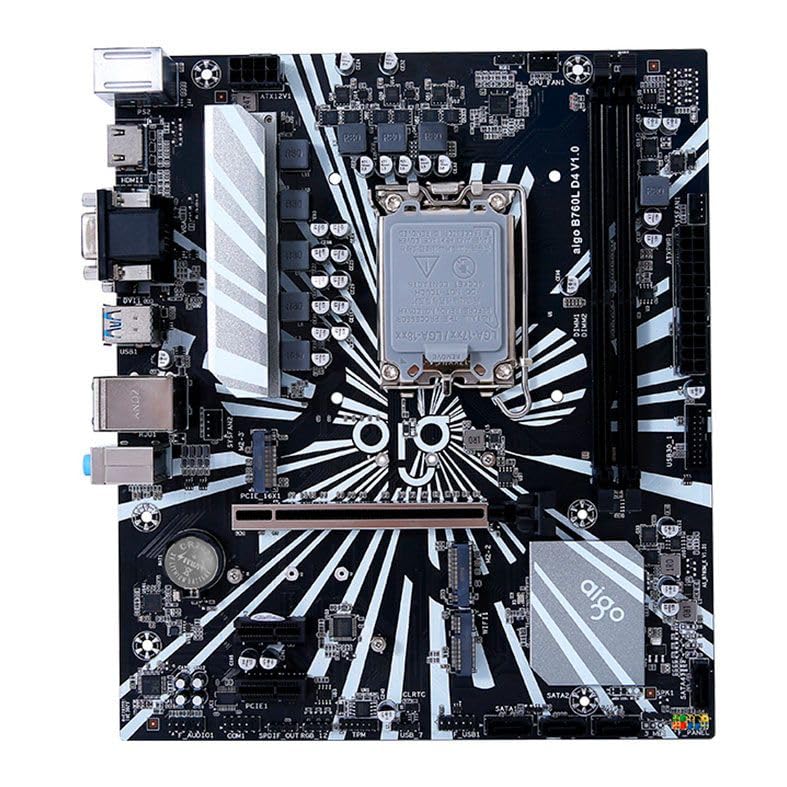
Sary 1: Tapitraview of the Aigo B760L D4 Motherboard alongside its retail packaging.

Sary 2: Ambony midina view of the Aigo B760L D4 Motherboard, highlighting component placement.

Sary 3: Angled view of the Aigo B760L D4 Motherboard, showing the CPU socket and memory slots.
4.2 Panel I/O aoriana

Figure 4: Rear I/O panel of the Aigo B760L D4 Motherboard, displaying various connectivity ports.
Ny takelaka I/O aoriana dia misy:
- 1 x PS/2 Keyboard and Mouse port
- 2 x USB 2.0 seranana
- 4 x USB 3.0 seranana
- 1 x HDMI seranana
- 2 x DVI ports
- 1 x VGA port
- 1 x RJ45 LAN port
- Audio jacks (Line In, Line Out, Mic In)
5. Fametrahana
5.1 Fametrahana ny CPU
- Tadiavo ny socket CPU LGA 1700 eo amin'ny motherboard.
- Sokafy ny lefa eo amin'ny socket CPU ary atsangano ny load plate.
- Ampifanaraho tsara amin'ny socket ny CPU, ary ataovy izay hahazoana antoka fa mifanaraka amin'ny marika eo amin'ny socket ny marika telozoro eo amin'ny CPU.
- Apetraho moramora ao anaty "socket" ny CPU nefa tsy terena.
- Close the load plate and secure it with the lever.
5.2 Installing DDR4 Memory
The motherboard supports up to 64GB of DDR4 memory across two slots, with speeds from 2133 MHz to 3200 MHz in dual-channel configuration.
- Sokafy ireo clip eo amin'ny andaniny roa amin'ny slot DIMM.
- Ampifanaraho amin'ny toerana ny môdio fahatsiarovana, ary ataovy izay hahazoana antoka fa mifanaraka amin'ny lakile ao anatin'ilay toerana ny elanelana eo amin'ny môdio.
- Tsindrio mafy ny andaniny roa amin'ny môdio fahatsiarovana mandra-piraikitra tsara ireo clip.
5.3 Installing Storage Devices
The motherboard features 4 x SATA 3.0 ports and 2 x M.2 NVME Dual-Protocol slots.
5.3.1 SATA Drives
- Connect one end of a SATA data cable to a SATA port on the motherboard.
- Ampifandraiso amin'ny kapila mafy SATA na SSD-nao ny ilany amin'ny tariby data SATA.
- Connect a SATA power cable from your power supply to the drive.
5.3.2 M.2 NVME Drives
- Locate an M.2 slot on the motherboard.
- Esory ny visy fampiatoana M.2.
- Insert the M.2 NVME drive into the slot at a 30-degree angle.
- Gently push the drive down and secure it with the standoff screw.
5.4 Hery mampifandray
Connect the 24-pin ATX power connector and the 8-pin ATX 12V power connector from your power supply to the corresponding ports on the motherboard.
5.5 Installing Expansion Cards
The motherboard includes 1 x PCIe x16 slot and 1 x PCIe x1 slot.
- Align your expansion card (e.g., graphics card) with the appropriate PCIe slot.
- Tsindrio mafy mandra-pipetraky ny karatra tsara ao anaty lavaka.
- Secure the card with a screw to the computer case.
6. Fiasana
6.1 Fametrahana voalohany ny BIOS sy ny fanombohana azy
After assembling your system, connect a monitor, keyboard, and mouse. Power on the system. During startup, press the designated key (usually do or F2) to enter the BIOS/UEFI setup utility. Here you can configure boot order, system time, and other advanced settings.
6.2 Fametrahana Rafitra fandidiana
The Aigo B760L D4 Motherboard supports Windows 10 and Windows 11 operating systems. Insert your OS installation media (USB drive or DVD) and follow the on-screen instructions to install the operating system.
6.3 Fametrahana mpamily
After OS installation, install the necessary drivers for the chipset, audio, LAN, and other integrated components. These drivers are typically provided on a CD/USB with the motherboard or can be downloaded from the manufacturer's website.
7. Fikojakojana
- Keep it clean Regularly clean dust from inside your computer case using compressed air. Dust accumulation can lead to overheating.
- Fanavaozana BIOS: Jereo tsindraindray ny mpanamboatra website for BIOS/UEFI updates. Updates can improve stability, compatibility, and performance. Follow update instructions carefully.
- Fanavaozana mpamily: Havaozy hatrany ny mpamily anao mba hahazoana antoka fa mahomby tsara indrindra sy mifanaraka amin'ny rindrambaiko sy fitaovana vaovao.
- Fanaraha-maso ny tontolo iainana: Operate the system in a cool, dry, and well-ventilated environment.
8. Famahana olana
8.1 Tsy misy hery
- Ensure the power supply is connected correctly to the motherboard (24-pin and 8-pin ATX 12V).
- Hamarino raha ao amin'ny toerana "ON" ny bokotra famatsiana herinaratra.
- Verify that the power button on the case is correctly connected to the motherboard's front panel header.
8.2 Tsy misy fampisehoana
- Ensure the monitor is connected to the correct video output (either integrated graphics or a dedicated graphics card).
- Avereno apetraka ny karatra grafika sy ny môdely fahatsiarovana.
- Andramo ampiasaina ny "booting" raha mbola misy "memory module" iray ihany no napetraka.
8.3 Tsy fandriam-pahalemana / Fianjerana amin'ny rafitra
- Jereo ny mari-pana ao amin'ny CPU sy GPU mba hahazoana antoka fa tsy mafana loatra izy ireo.
- Verify that all power connectors are securely attached.
- Ampiasao ireo fitaovana fitiliana fahatsiarovana mba hijerena raha misy olana amin'ny RAM.
- Ensure BIOS is updated to the latest stable version.
9. Famaritana
| endri-javatra | famaritana |
|---|---|
| Marika | Aigo |
| MODELY | AIGO-B760L-D4 |
| Chipset | Intel B760 |
| CPU Socket | LGA 1700 |
| Memory Slots | 2 x DDR4 DIMM slots |
| Fahafahana Fahatsiarovana Ambony Indrindra | 64GB |
| Fanohanana ny hafainganam-pandehan'ny fahatsiarovana | 2133 ~ 3200 MHz (Dual Channel) |
| Audio Interface | 1 x HDMI, 2 x DVI, 1 x VGA |
| SATA Slots | 4 x SATA 3.0 |
| M.2 Slots | 2 x M.2 NVME Dual-Protocol |
| Port USB (vohoka) | 2x USB 2.0, 4x USB 3.0 |
| Fanitarana Slots | 1 x PCIe x1, 1 x PCIe x16 |
| Fanohanana ny rafitra fandidiana | Windows 10/11 |
| PS/2 Port | 1 x PS/2 Keyboard and Mouse |
| Dingana herinaratra | 8-phase |
| Power Connectors | ATX 24-pin 1, ATX 12V 8-pin 1 |
| WiFi Interface | 1 x WiFi interface (PCIe compatible) |
| Seranan-tsambo LAN | 1 x RJ45 |
| lafiny | 24.4 x 21 cm (M-ATX) |
10. Warranty sy fanohanana
For warranty information and technical support, please refer to the documentation provided with your purchase or visit the official Aigo website. Tehirizo ny porofon'ny fividiananao ho an'ny fitakiana fiantohana.


