1. Fampidirana
This manual provides essential information and instructions for the proper use and maintenance of your Casio G-Shock GMDB300-1 Step Tracker Digital Watch. Please read this manual thoroughly before using the watch to ensure optimal performance and longevity.
The Casio G-Shock GMDB300-1 is designed as a robust sports-oriented timepiece, featuring a step tracker and smartphone connectivity to support an active lifestyle. Its key resin components, including the case, bezel, and band, are crafted from bio-based resin, reflecting a commitment to environmental responsibility.

Image 1: The Casio G-Shock GMDB300-1 Step Tracker Digital Watch in black with light blue accents.
2. Fametrahana
2.1 Initial Power-On and Time Setting
Upon first use or after a battery change, the watch may require initial setup. Follow these steps:
- Ensure the watch is exposed to light to charge the solar battery.
- Tsindrio ary hazòny ny HIATRIKA button (top left) until the city code starts flashing.
- Ampiasao ny MODE (bottom left) and fanombohana bokotra (ambany havanana) hisafidianana ny kaody tanàna misy anao.
- mpanao gazety HIATRIKA again to confirm and exit the setting mode. The time will automatically adjust based on the selected city.
2.2 Smartphone Link Setup
The GMDB300-1 can be linked with a smartphone for enhanced functionality and data management.
- Download the official Casio G-SHOCK Connected app from your smartphone's app store.
- Alefaso ny Bluetooth amin'ny findainao.
- Eo amin'ny famantaranandro, tsindrio ary mihazona ny CONNECT button (middle left) until the Bluetooth icon appears and flashes.
- Open the G-SHOCK Connected app and follow the on-screen instructions to pair your watch.
- Once paired, the watch time will synchronize with your smartphone, and tracked data can be managed within the app.
3. Torolàlana miasa
3.1 Navigating Modes
Tsindrio ny MODE bokotra (ambany havia) mba hivezivezena amin'ireo fomba famantaranandro samihafa:
- Fomba fitahirizana fotoana: Mampiseho ny ora, daty ary andro amin'ny herinandro ankehitriny.
- Step Tracker Mode: Shows daily step count and progress towards goals.
- Fomba famantaranandro: Mba handrefesana ny fotoana efa lasa.
- Fomba fameram-potoana: A countdown timer function.
- Fomba fanairana: Set and manage daily alarms.
- Fomban'ny fotoana eran-tany: View times in different time zones.
3.2 Step Tracker Function
The built-in accelerometer automatically counts your steps. The watch displays your total daily steps and progress towards a set goal. Detailed activity logs can be viewed via the G-SHOCK Connected app.
- In Step Tracker Mode, press fanombohana (bottom right) to view daily step data.
- Ampiasao ny MODE SY fanombohana buttons to navigate through different step data views (e.g., daily, weekly, monthly).
3.3 Jiro aoriana (Mpanazava)
Tsindrio ny fahazavana button (bottom center) to illuminate the display for easy reading in low-light conditions. The illumination duration can be configured in the watch settings or via the smartphone app.

Sary 2: A antsipirihany view of the Casio G-Shock GMDB300-1 watch face, highlighting its digital display and various indicators.
4. Endri-javatra fototra
- Bio-based Resin Construction: The watch incorporates bio-based resin in its case, bezel, and band, contributing to reduced environmental impact. This material maintains the renowned G-SHOCK durability and shock resistance.
- Rohy ho an'ny finday avo lenta: Seamlessly connect your watch to the G-SHOCK Connected app on your smartphone via Bluetooth. This allows for automatic time adjustment, easy watch setting configuration, and management of life log data, including step counts and calorie burn.
- Dingana Tracker: An integrated 3-axis accelerometer accurately counts your steps throughout the day. Set daily step goals and monitor your progress directly on the watch display or through the connected app.
- 200-Metra fanoherana ny rano: Designed for robust use, the watch is water-resistant up to 200 meters, making it suitable for swimming, snorkeling, and other water activities.
- fanoherana ny fahatairana: True to its G-SHOCK heritage, the GMDB300-1 features a shock-resistant structure that protects against impacts and vibrations, ensuring reliability in demanding environments.
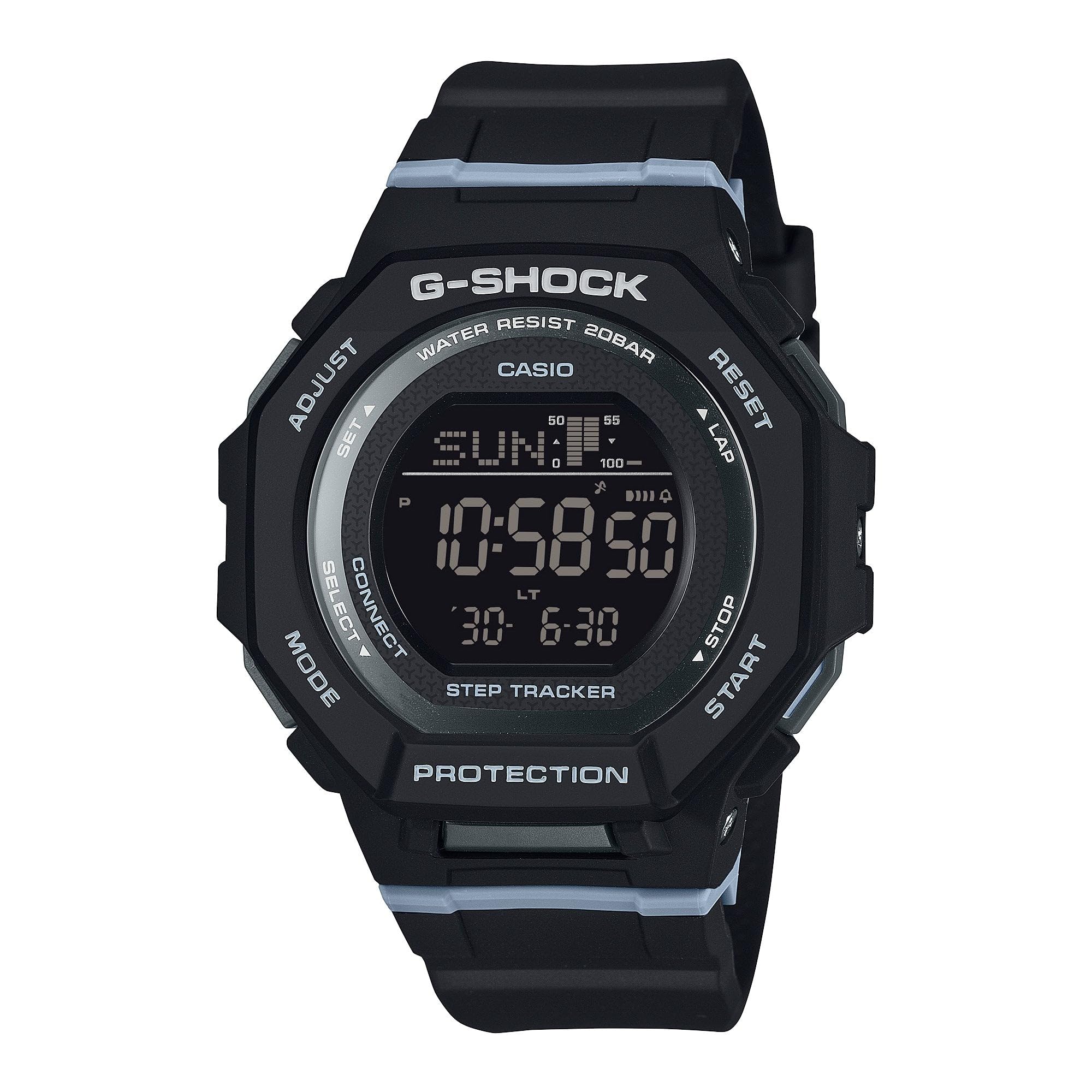
Image 3: The Casio G-Shock GMDB300-1 watch worn by an individual, showcasing its design and fit.
5. Fikojakojana
5.1 Fanadiovana ny famantaranandronao
Mba hihazonana ny endrika sy ny fiasan'ny famantaranandronao:
- Fafao amin'ny lamba malefaka sy maina ny famantaranandro mba hanesorana ny loto sy ny hamandoana.
- Ho an'ny loto mafy loha, ampiasao lamba malefakaampAfangaro amin'ny rano sy savony tsy miandany malefaka. Fadio ny akora simika na ranoka solvent mahery vaika.
- Rehefa avy tratran'ny rano masira dia kobanina tsara amin'ny rano madio ny famantaranandro ary maina tanteraka.
5.2 Fitandremana amin'ny fanoherana ny rano
While water-resistant, observe the following:
- Do not operate watch buttons while submerged in water.
- Aza avela ho tratran'ny rano mafana na etona ny famantaranandro, satria mety hanimba ny tombo-kase izany.
- If the watch is exposed to extreme temperature changes, condensation may appear inside the crystal. This should clear up quickly. If it persists, consult an authorized service center.
5.3 Battery Charging (Solar Powered)
This watch is equipped with a solar charging system. Ensure regular exposure to light to keep the battery charged. Avoid prolonged storage in dark places.
- Place the watch where its face is exposed to bright light.
- The charging time varies depending on the light intensity.
- Refer to the battery level indicator on the display to monitor charge status.
6. Famahana olana
6.1 Tsy mety ny fotoana
- Jereo ny toerana misy ny tanàna fonenana: Ensure your home city is correctly set. Incorrect city settings can lead to incorrect time display.
- Rohy ho an'ny finday avo lenta: Verify that the watch is successfully paired and connected to the G-SHOCK Connected app for automatic time synchronization.
- Fanitsiana tanana: If automatic adjustment fails, manually set the time and date as described in the
Documents mifandraika - GMDB300-1

Casio G-SHOCK GBA-800 G-SQUAD: Mpiara-miasa aminao amin'ny fanatanjahan-tena marani-tsaina
Jereo ny Casio G-SHOCK GBA-800 G-SQUAD, famantaranandro mifandray amin'ny finday avo lenta natao hanatsarana ny fanazaran-tenanao isan'andro. Anisan'ny endri-javatra ny fanaraha-maso ny dingana mandeha ho azy, ny fameram-potoana azo amboarina, ny fiasan'ny stopwatch, ary ny fehin-tànana mifanaraka tsara amin'ny vatana. Mijanòna mifandray sy mazoto amin'ny alàlan'ny fampidirana ny fampiharana G-SHOCK Connected.
Casio EQB-500 Connected Watch User Guide
A comprehensive user guide for the Casio EQB-500 connected watch, detailing its features, setup, operation, and specifications for seamless smartphone integration.
Инструкция к часам Casio G-SHOCK (Модуль 5623) sy международная гарантия
Полное руководство пользователя и информация о международной гарантии для часов Casio G-SHOCK (Модуль 5623) лот, iRu. инструкции по эксплуатации, настройке функций, Bluetooth-подключению и устранению неполадок.
Torolàlana momba ny fampiasana CASIO 3475: Ny mpiara-miasa aminao amin'ny famantaranandro marani-tsaina
Ity torolàlana momba ny fampiasana ity dia manazava amin'ny antsipiriany ny famantaranandro marani-tsaina CASIO 3475, izay mirakitra ny fanaraha-maso GPS, ny tahan'ny fitempon'ny fo, ny famakafakana ny fahasalamana, ny fifandraisana amin'ny finday, ary ireo endri-javatra fiofanana mandroso.
Casio G-Shock Database: Faharetana sy famaritana
Tsidiho ny Casio G-Shock Database ho an'ny antsipiriany feno momba ny famantaranandro mahatohitra sy rano. Mitadiava famaritana, endri-javatra ary heritage an'ny tsipika G-Shock malaza.
Torolàlana momba ny fampiasana Casio 3482: Boky Torolàlana feno ho an'ny mpampiasa
Ity torolàlana momba ny fampiasana ity dia manome toromarika amin'ny antsipiriany ho an'ny famantaranandro Casio Operation Guide 3482, izay mandrakotra ny fametrahana, ny endri-javatra, ny fiasa ary ny famahana olana. Mianara ny fomba fitetezana ny fomba fiasa, ny fanitsiana ny fotoana, ny fampiasana ny fiasa fiofanana, ny fitantanana ny fampandrenesana sy ny maro hafa.