TONGA SOA
Thank you for choosing the BYTECH BICONIC True Wireless Earbuds. This manual provides essential information on how to set up, operate, maintain, and troubleshoot your new earbuds. Please read this manual thoroughly before use to ensure optimal performance and longevity of your device.
Torolàlana manan-danja momba ny fiarovana
- Aza apetraka amin'ny hafanana tafahoatra, ny hamandoana, na ny ranon-javatra ny sofina na ny vata famandrihana.
- Fadio ny milatsaka, miantraika, na mamongotra ny fitaovana.
- Aza mampiasa mpanadio mikikitra na akora simika mahery vaika hanadiovana ny écouteur na ny fonony.
- Listen at moderate volume levels to prevent hearing damage. Prolonged exposure to loud sounds can cause irreversible hearing loss.
- Arovy amin'ny ankizy sy ny biby fiompy.
- Dispose of the device responsibly according to local regulations. Do not dispose of with household waste.
Inona no tafiditra
Azafady, jereo ny votoatin'ny fonosana mba hahazoana antoka fa misy ny entana rehetra:
- BYTECH BICONIC True Wireless Earbuds (Left and Right)
- Charging Case
- Charging Cable
- User Manual
Vita ny vokatraview
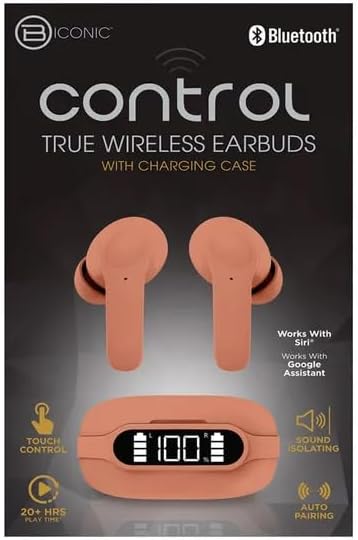
Familiarize yourself with the components of your BYTECH BICONIC True Wireless Earbuds.

Hanomboka
Fametrahana ny Earbuds sy Case
The BYTECH BICONIC earbuds come with a rechargeable battery in both the earbuds and the charging case. Ensure both are fully charged before first use.
- Place the earbuds into the charging case, ensuring they are correctly seated in their respective slots (L for left, R for right).
- Connect the provided charging cable to the charging port on the case and the other end to a USB power source (e.g., computer USB port, wall adapter).
- The digital display on the charging case will show the battery level. Allow sufficient time for a full charge.
- Rehefa feno tanteraka dia tapaho ny tariby fiampangana.
Pairing Bluetooth
Araho ireto dingana ireto mba hampifandraisana ny écouteur-nao amin'ny fitaovanao misy Bluetooth:
- Ataovy azo antoka fa voaloa ny sofina ary ao anaty vata fampangatsiahana.
- Open the charging case. The earbuds will automatically enter pairing mode, and an indicator light on the earbuds will flash.
- Ao amin'ny fitaovanao (finday avo lenta, takelaka, sns.), mandehana any amin'ny fikirana Bluetooth ary alefaso ny Bluetooth.
- Hitady ny available devices. You should see "BYTECH BICONIC" or a similar name appear in the list.
- Select "BYTECH BICONIC" to connect. Once connected, a voice prompt will confirm the successful pairing, and the indicator lights on the earbuds will stop flashing.
- Ny earbuds dia hifandray ho azy amin'ny fitaovana ampiarahana farany rehefa esorina amin'ny fonony, raha toa ka alefa amin'ny fitaovana ny Bluetooth.
Torolàlana miasa
Touch Controls
The BYTECH BICONIC earbuds feature intuitive touch controls for easy management of your audio and calls.
| Action | asa |
|---|---|
| Peho tokana (Earbud havia/kavanana) | Alefaso/Atsaharo ny mozika, Valio/Atsaharo ny antso |
| Tap indroa (Earbud havanana) | Track manaraka |
| Tap indroa (Earbud havia) | Track taloha |
| Tap telo (Earbud havia/kavanana) | Ampidiro ny Voice Assistant (Siri/Google Assistant) |
| Tsindrio ela (Sofina havia/havanana) | Mandà ny antso |
Mamelona sy miala
- Herim-batana: Ny earbuds dia mandeha ho azy rehefa esorina amin'ny vata fampangatsiahana.
- Mamono hery: Avereno ao anaty vata fampangatsiahana ny sofina ary atokàny ny sarony. Ho faty ho azy izy ireo ary hanomboka hameno.
Fikojakojana sy fikarakarana
Proper care will extend the life of your BYTECH BICONIC True Wireless Earbuds.
- Fanadiovana: Use a soft, dry, lint-free cloth to clean the earbuds and charging case. Do not use liquids or aerosol cleaners.
- fitahirizana: Rehefa tsy ampiasaina dia tehirizo ao anaty vata fampangatsiahana foana ny sofina mba hiarovana azy sy hitazonana azy ho voaloa.
- Avoid Conditions Extreme: Do not expose the device to extreme heat, cold, or direct sunlight.
- fanoherana ny rano: These earbuds are not waterproof. Avoid contact with water or excessive moisture.
Fanamboarana
Raha sendra olana amin'ny écouteur-nao ianao dia jereo ireto vahaolana mahazatra ireto:
| OLANA | vahaolana |
|---|---|
| Earbuds tsy mitambatra | Ataovy azo antoka fa voaloa ny sofina. Vonoy ary velomy ny Bluetooth amin'ny fitaovanao. Adino ny fitaovana amin'ny fikandrana Bluetooth ary avereno ampiarahana. |
| Sofina iray ihany no miasa | Place both earbuds back into the charging case, close the lid, wait a few seconds, then take them out again. Ensure both are charged. |
| Tsy misy feo | Check volume levels on both your device and the earbuds. Ensure earbuds are properly connected. Try playing different audio. |
| Cas de charge tsy misy charge | Ataovy azo antoka fa mifandray tsara amin'ny boaty sy ny loharanon-kery ny tariby famandrihana. Andramo mampiasa seranana USB na adaptatera herinaratra hafa. |
Famaritana ara-teknika
Detailed specifications for your BYTECH BICONIC True Wireless Earbuds:
| endri-javatra | antsipirihany |
|---|---|
| Laharana modely | BC-AU-BE-144-TN |
| Teknolojia fifandraisana | Wireless (Bluetooth) |
| Form Factor | In-Ear (Intraurales) |
| loko | Kafe |
| Endri-javatra manokana | Rechargeable Battery, Touch Control, Sound Isolating, Auto Pairing |
| Anisan'ny singa | Cable |
| Estimated Play Time | 20+ Hours (with charging case) |
Fampahalalana momba ny fiantohana sy ny fanohanan'ny mpanjifa
BYTECH products are designed and manufactured to the highest quality standards. For information regarding warranty coverage, please refer to the warranty card included with your purchase or visit the official BYTECH website.
If you require further assistance or have questions not covered in this manual, please contact BYTECH customer support through their official channels. Please have your model number (BC-AU-BE-144-TN) and purchase details ready when contacting support.


