1. Fampidirana
The PREXISO 3 X 360° Green Laser Level is a versatile tool designed for various leveling and alignment tasks in construction, tile installation, home renovation, and other DIY projects. This manual provides essential information for safe and effective use of your laser level.
2. Torolàlana momba ny fiarovana
FAMPITANDREMANA: TARONGAN'NY LASER
- Do not stare into the laser beam. This is a Class II laser product with a maximum output of < 1mW.
- Do not remove or deface any product labels on the device.
- Halaviro ny maso mivantana amin'ny taratra laser.
- Aza mampiasa ny fitaovana manodidina ny ankizy na mamela ny ankizy hampiasa ny fitaovana.
- Aza apetraka amin'ny toerana mety hahatonga ny olona hibanjina ny taratra laser, na fanahy iniana na tsy nahy.
- Do not use on reflective surfaces such as shiny steel, glass, or polished metal, as the shiny surface could reflect the beam back at the operator.
- Vonoy foana ny fitaovana laser rehefa tsy ampiasaina.
- Aza manandrana manova ny fahombiazan'ny fitaovana laser amin'ny fomba rehetra. Izany dia mety miteraka loza mitatao amin'ny taratra laser.
- Use only accessories that have been designed for use with other laser tools.
- Exercise caution when operating outdoors, as laser visibility may be reduced.
3. Ny votoatin'ny fonosana
Hamarino fa ny entana rehetra voatanisa etsy ambany dia tafiditra ao anatin'ny fonosanao:
- 1 x PREXISO 3 X 360° Green Laser Level
- 1 x 37-1/2 inch Tripod
- 1 x Iron Plate (for wall mounting)
- 1 x Magnetic Pivoting Base
- 1 x Type-C Charging Cable
- 1 x kitapo portable
- 1 x Operator's Manual

Image: PREXISO 3 X 360° Green Laser Level and accessories.
4. Famaritana
| singa fototra | famaritana |
|---|---|
| tamin'ny laser | 510-530 nm, Class II laser, maximum laser output < 1mW |
| Operating Range (typically) | 82ft (25m) under 100LUX indoor environment |
| Fahamarinana (matetika) | ±3/16" @32ft (±3mm @10m) |
| Ny haavon'ny tena | ±4° (±1.5°) |
| Tombanana ny faharetan'ny bateria | >3.5h (Li-ion battery) |
| Temperature miasa tsara indrindra | 14°F hatramin'ny 104°F (-10°C hatramin'ny 40°C) |
| mari-pana fitahirizana | -4°F hatramin'ny 140°F (-20°C hatramin'ny 60°C) |
| vatoaratra | Batterie Lithium-ion rechargeable |
| KEVITRA | Aluminum, metaly |
| Lanja entana | 4.75 kilao (2.16 kilao) |
5. Fametrahana
5.1 Fametrahana sy fiampangana bateria
- Locate the battery compartment on the laser level.
- Insert the rechargeable lithium-ion battery, ensuring correct polarity.
- Connect the provided Type-C charging cable to the charging port on the laser level and to a suitable USB power source.
- The battery can be charged separately or while inside the laser tool.
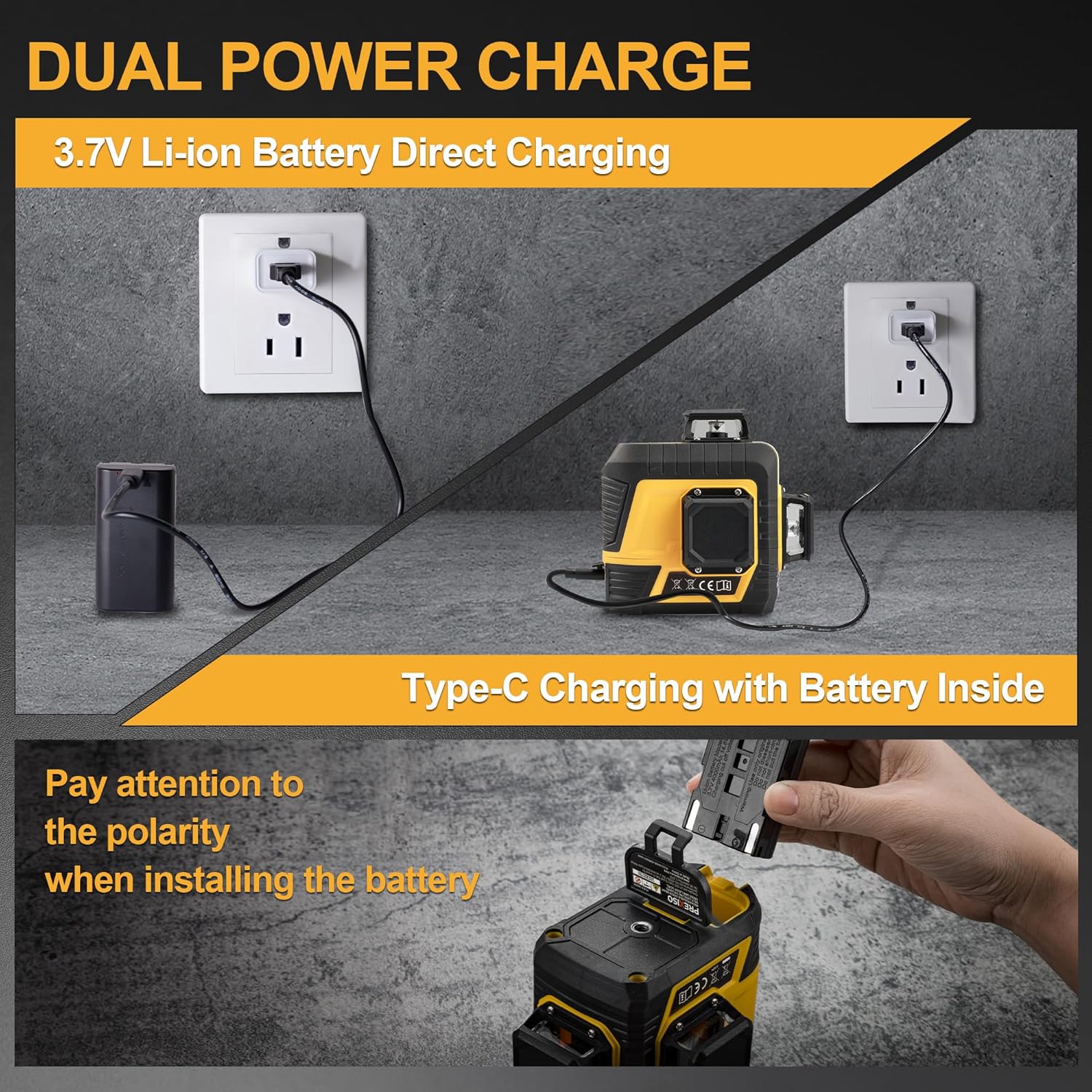
Image: Dual Power Charge methods for the PREXISO laser level.
5.2 Safidy fametrahana
The PREXISO laser level offers multiple mounting solutions:
- Fametrahana ny tripod: The laser level features a 1/4"-20 thread on its base, allowing it to be securely mounted onto the included tripod. The tripod can extend up to 37-1/2 inches and offers pan, tilt, and height adjustments.
- andriamby bracket: The included magnetic pivoting base allows the laser level to be affixed to metal surfaces. This bracket also features 1/4"-20 mount threads for tripod compatibility.
- Iron Plate: For non-magnetic surfaces, the iron plate can be screwed to a wall, providing a metal surface for the magnetic bracket to attach to.

Image: Strong Magnetic Bracket and Wall Mount Plate.
6. Fomba fiasa
The laser level features a sliding switch on the side to power on/off and lock/unlock the pendulum, and a power button on top to cycle through laser modes.

Image: Bright Green Laser Diode with labeled components.
6.1 Fomba fampitomboana ny tena
- Slide the side switch to the "ON" position to unlock the pendulum and activate self-leveling mode.
- The tool will automatically level itself if it is within ±4° of horizontal.
- If the surface tilt exceeds 4 degrees, the laser lines will blink as an alarm, indicating it is out of level.

Image: Self-Leveling Automatic Mode operation.
6.2 Manual/Lock Mode
- Slide the side switch to the "OFF" position to lock the pendulum.
- Press and hold the power button on top for 3 seconds to turn on the laser in manual mode.
- In this mode, the self-leveling feature is disabled, allowing you to project lines at any desired angle.
- Short press the power button to switch between horizontal, vertical, or cross modes.

Image: Self-Leveling Mode vs. Manual/Lock Mode.

Image: Manual Mode for angled lines.
6.3 Switching Laser Lines
The PREXISO laser level features 3 x 360° full green laser layouts (one horizontal and two vertical). In either self-leveling or manual mode, short press the power button to cycle through the available laser line combinations:
- 1 x 360° tsipika mitsivalana
- 2 x 360° Vertical lines
- All 3 x 360° lines (cross mode)

Image: 3-Plane High Visibility Cross Laser with 4 Laser Line Modes.

Image: 4 Mode Line Combination.
6.4 Mode Pulse
The laser level features a pulse mode for use with an optional laser receiver (sold separately). In receiver mode, the laser lines flash at a very high frequency, making them detectable by the receiver, which is useful in bright conditions or over longer distances. When pulse mode is active, the laser lines may appear less visible to the human eye.
To activate/deactivate pulse mode, press the receiver mode button (G) on the keypad.
7. Fampiharana
The PREXISO 3 X 360° Green Laser Level is suitable for a wide range of indoor and outdoor applications, including but not limited to:
- Fanorenana: Establishing level and plumb lines for framing, wall layouts, and foundation work.
- Fametrahana taila: Ensuring straight and even tile lines on floors and walls.
- Home Renovation: Installing cabinets, shelves, pictures, and decorative elements with precision.
- Electrical & Plumbing: Aligning electrical wiring, pipes, and conduits.
- Staircase & Railing Installation: Projecting angled lines for accurate stair stringer and railing placement in manual mode.

Image: Green beam 3 Plane Laser for high visibility and precise alignment.

Image: Multiple Ways of Using the laser level.
8. Fikojakojana
- Keep the laser level clean and free from dust and debris. Use a soft, dry cloth to clean the laser light aperture.
- Store the device in its portable bag in a cool, dry place when not in use.
- Regularly charge the lithium-ion battery to maintain its performance and lifespan.
- Aza atsoboka ao anaty rano na ranon-javatra hafa ilay fitaovana.
9. Famahana olana
- Laser lines blinking: If the laser lines are blinking rapidly in self-leveling mode, the device is tilted beyond its ±4° self-leveling range. Adjust the position of the laser level until the lines become solid.
- No laser lines: Ensure the battery is charged and properly inserted. Check that the side switch is in the "ON" position for self-leveling mode or that the power button has been held for 3 seconds for manual mode.
- Mihena ny fahitana: In bright ambient light or outdoors, the visibility of the green laser lines may be reduced. Consider using pulse mode with an optional laser receiver for improved detection.
10. Warranty sy fanohanana
For warranty information or technical support, please refer to the official PREXISO webtranokala na mifandray amin'ny serivisy mpanjifany. Tehirizo ny tapakila fividiananao ho porofon'ny fividianana.


