Sava lalana
This manual provides comprehensive instructions for the operation, maintenance, and troubleshooting of your SEDSEY Smart Watch. Please read this manual carefully before using the device to ensure proper functionality and to maximize your user experience.

Figure 1: SEDSEY Smart Watch (Orange Silver variant) with active display and flashlight feature.
Hametraka
1. Fametrahana ny fitaovana
Before first use, fully charge your smart watch. Connect the magnetic charging cable to the charging points on the back of the watch and plug the USB end into a compatible power adapter (not included) or a computer USB port.
- Fotoana famandrihana: Eo amin'ny 2 ora eo ho eo raha feno ny famandrihana.
- Battery Life: Up to 15 days of working time, or 30 days standby time.

Figure 2: Smart Watch with LED Flashlight and Battery Information.
2. Fametrahana fampiharana sy fampiarahana
To unlock the full features of your smart watch, download and install the FitCloudPro fampiharana amin'ny smartphone-nao.
- Scan the QR code in the watch manual (if provided) or search for "FitCloudPro" in your smartphone's app store (compatible with Android 4.4+ and iOS 8.0+).
- Sokafy ny fampiharana FitCloudPro ary araho ny torolàlana eo amin'ny efijery mba hamoronana kaonty na hidirana.
- Alefaso ny Bluetooth amin'ny findainao.
- In the FitCloudPro app, navigate to the device pairing section and select your SEDSEY Smart Watch from the list of available devices. Confirm the pairing request on both your watch and smartphone.
Torolàlana miasa
1. Fikarohana fototra
The smart watch features a 1.43" AMOLED HD display. Swipe across the screen to access different functions and menus. Use the physical buttons on the side for power, back, and quick access to features like the flashlight.

Figure 3: 1.43" AMOLED Display Features.
2. Fanaovana sy fandraisana antso
The smart watch supports Bluetooth calls. Once paired with your mobile phone, you can dial, receive, and reject calls directly from your wrist using the built-in high-quality speaker and microphone.
- miantso: Access the dial pad on the watch or select a contact from your synced phonebook.
- Mandray: When a call comes in, the watch will vibrate and display the caller ID. Tap to answer or reject.

Figure 4: Bluetooth Call and Smart Notification Features.
3. Fampandrenesana marani-tsaina
Receive notifications for calls, messages, and app alerts (e.g., Twitter, Facebook, Skype, WhatsApp) directly on your watch. Ensure notification permissions are enabled in the FitCloudPro app and your phone settings.
4. Fanaraha-maso ara-pahasalamana
The smart watch features upgraded sensors for continuous health monitoring.
- Fanaraha-maso ny tahan'ny fo: Fanaraha-maso ny tahan'ny fitempon'ny fo amin'ny fotoana tena izy mandritra ny andro.
- Fanaraha-maso ny torimaso: Tracks your sleep patterns and provides comprehensive analysis.
- Fanaraha-maso hetsika: Accurately tracks steps, calories burned, distance, and activity time.
View detailed health data and trends within the FitCloudPro app.

Figure 5: Health Monitoring Features.
5. Fomba fanatanjahantena
The watch supports over 100 sports modes, including walking, running, hiking, cycling, and more. Select your desired mode before starting an activity to record specific data.
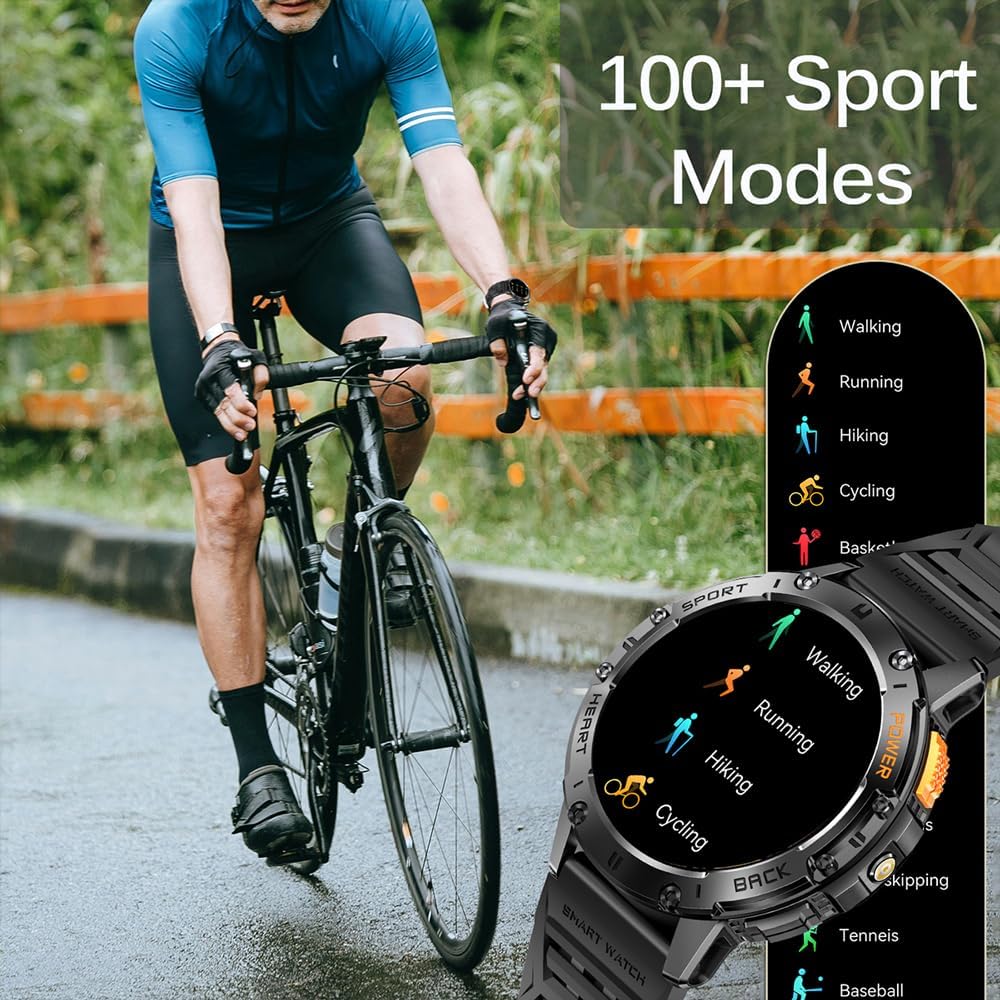
Figure 6: 100+ Sports Modes.
6. Jiro fanilo
Activate the built-in LED flashlight for convenience in low-light conditions. This feature is useful for outdoor adventures, night running, or short-term home lighting.
7. Customizable Watch Faces
Personalize your watch with over 200 watch faces available through the FitCloudPro app. You can also customize watch faces with your own images.
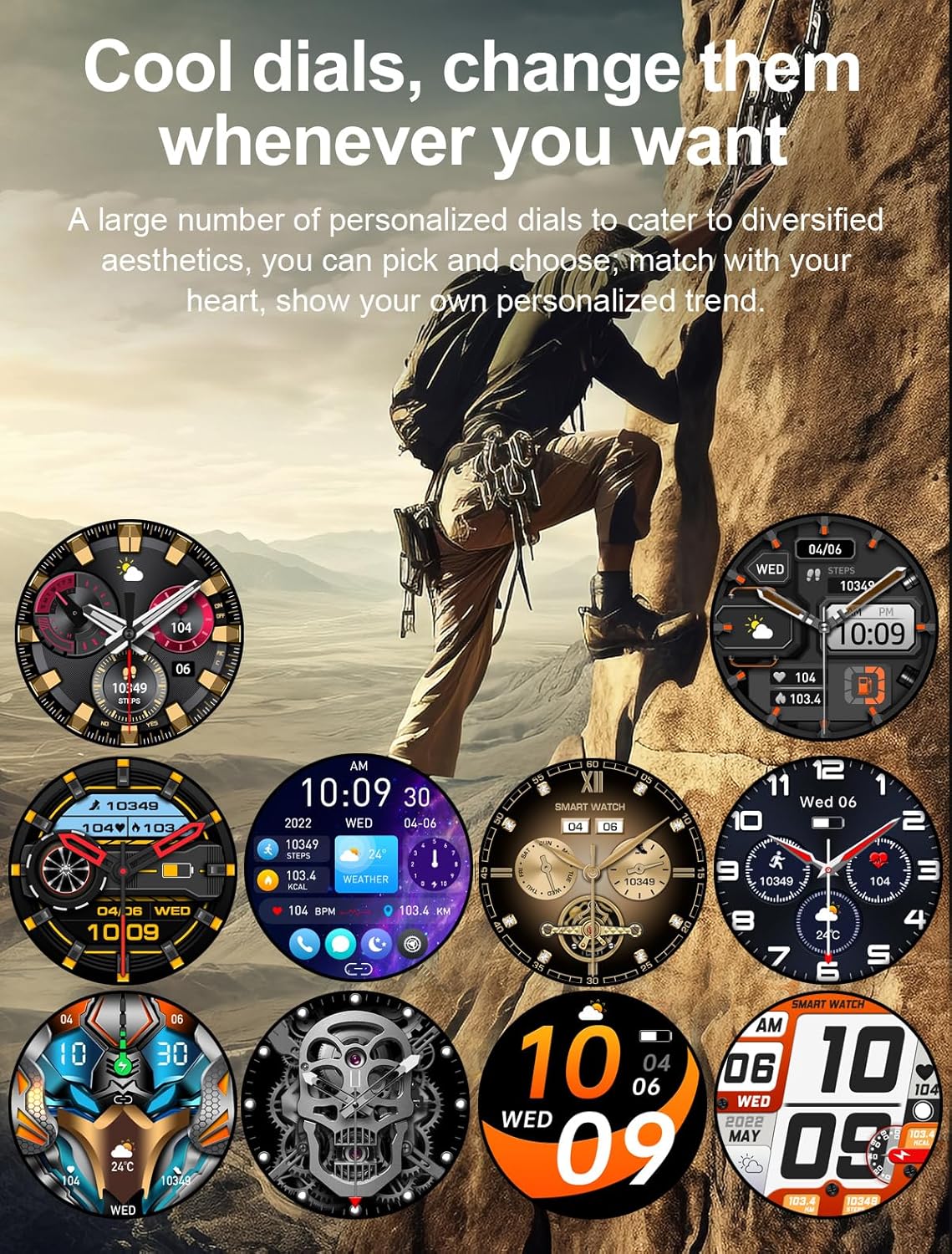
Figure 7: Customizable Watch Faces.
8. Endri-javatra hafa
- AI Voice Assistant
- 7-day Weather Forecast
- fanisan'ora
- Famantaranandro fanairana
- Fanaraha-maso mozika
- Fanaraha-maso fakan-tsary
- Fampahatsiahivana mipetrapetraka
fikarakarana
1. Fanadiovana
Regularly clean your smart watch and wrist strap with a soft, dry cloth. If necessary, use a slightly damp lamba ary avy eo maina tsara. Fadio ny mampiasa akora simika mahery vaika na fitaovana marokoroko.
2. Ny fanoherana ny rano
The watch is IP68 waterproof, meaning it can withstand hand washing and rain. However, it is tsy suitable for diving, saunas, or hot showers. Avoid prolonged submersion in water.

Figure 8: IP68 Waterproof and Additional Features.
3. fitahirizana
Tehirizo ao amin'ny toerana mangatsiaka sy maina ny famantaranandro, lavitry ny tara-masoandro mivantana sy ny mari-pana tafahoatra rehefa tsy ampiasaina mandritra ny fotoana maharitra.
Fanamboarana
- Jereo tsy mandeha: Ataovy azo antoka fa feno ny famantaranandro. Ampifandraiso amin'ny charger mandritra ny 10 minitra farafahakeliny.
- Tsy afaka mampiaraka amin'ny telefaona:
- Ataovy azo antoka fa mandeha ny Bluetooth amin'ny findainao sy ny famantaranandro.
- Ataovy azo antoka fa ao anatin'ny sahan'ny Bluetooth amin'ny findainao ny famantaranandro.
- Avereno indray ny famantaranandro sy ny findainao.
- Fafao ny cache Bluetooth amin'ny findainao (raha ilaina) ary andramo ampifandraisina indray.
- Fampandrenesana tsy voaray:
- Check notification permissions in the FitCloudPro app.
- Ensure app notifications are enabled in your phone's system settings.
- Hamarino tsara fa mifandray tsara amin'ny alàlan'ny Bluetooth ny famantaranandro.
- Data momba ny fahasalamana tsy marina:
- Ataovy azo antoka fa anaovana tsara eo amin'ny hato-tananao ny famantaranandro, tsy malalaka loatra na tery loatra.
- Diovy ny faritra sensor ao ambadiky ny famantaranandro.
- Note that health data is for reference only and not for medical diagnosis.
fepetra arahana
| endri-javatra | antsipirihany |
|---|---|
| miseho | 1.43" AMOLED HD (460*460 resolution) |
| Fahaizana bateria | 530mAh |
| Time Charging | Approx. 2 ora |
| Fiainana bateria | 15 days (working), 30 days (standby) |
| Rating tsy tantera-drano | IP68 |
| fifandraisana | Bluetooth |
| Fifanarahana amin'ny rafitra fandidiana | Android 4.4+ / iOS 8.0+ |
| Anaran'ny fampiharana | FitCloudPro |
| Case Material | Zinc Alloy (Military-grade tested) |
| lafiny | 48mm (diameter), 12.9mm (thickness) |
| Wrist Strap Size | 150-260mm |

Sary 9: Ny refin'ny vokatra.
MANAMPY
For any questions or assistance, please contact our customer service. We provide 7/24 service to ensure your satisfaction.
Please refer to your purchase documentation or the FitCloudPro app for specific contact details.