1. Fampidirana
Thank you for choosing the Spacekey QIG-D01 Dehumidifier. This manual provides essential information for the safe and efficient operation of your new appliance. Please read it thoroughly before use and retain it for future reference. This dehumidifier is designed to reduce excess moisture in areas up to 850 square feet, such as basements, bedrooms, bathrooms, RVs, and closets, improving air quality and comfort.

Sary 1: Eo anoloana view of the Spacekey QIG-D01 Dehumidifier, showing its white and black design with a digital display and visible water tank.

Figure 2: Visual representation of the dehumidifier's effectiveness in reducing room humidity.

Figure 3: Common issues resolved by maintaining optimal humidity levels with the dehumidifier.
2. Torolàlana manan-danja momba ny fiarovana
Mba hampihenana ny mety hisian'ny afo, fahatairana amin'ny herinaratra, na ratra, araho foana ireto fepetra fototra ireto:
- Vakio ny toromarika rehetra alohan'ny hampiasana ny fitaovana.
- Aza miasa ny dehumidifier amin'ny tady na plug simba.
- Ataovy azo antoka fa miorina tsara ny fivoahan'ny herinaratra.
- Aza sakanana ny fidirana na fivoahana rivotra.
- Arovy amin'ny rano sy ranon-javatra hafa ny fitaovana.
- Esory ny dehumidifier alohan'ny hanadiovana na hanaovana fikojakojana.
- Aza avela hampiasa ny fitaovana tsy misy fanaraha-maso ny ankizy.
- This appliance is equipped with a 45° tip-over protection feature. If the unit is tilted beyond 45 degrees, it will automatically shut off to prevent damage or spills.

Figure 4: Illustration of the dehumidifier's 45° tip-over protection, demonstrating automatic shutdown for safety.
3. Vokatra mihoatraview
3.1 Components and Design Features
- Main Unit misy Control Panel
- Water Tank (3.0L / 106 oz capacity)
- Sivana rivotra azo sasana
- Tady herinaratra
- Integrated Handles for portability
- Visual Water Tank for easy monitoring
- 45° Tip-over Protection
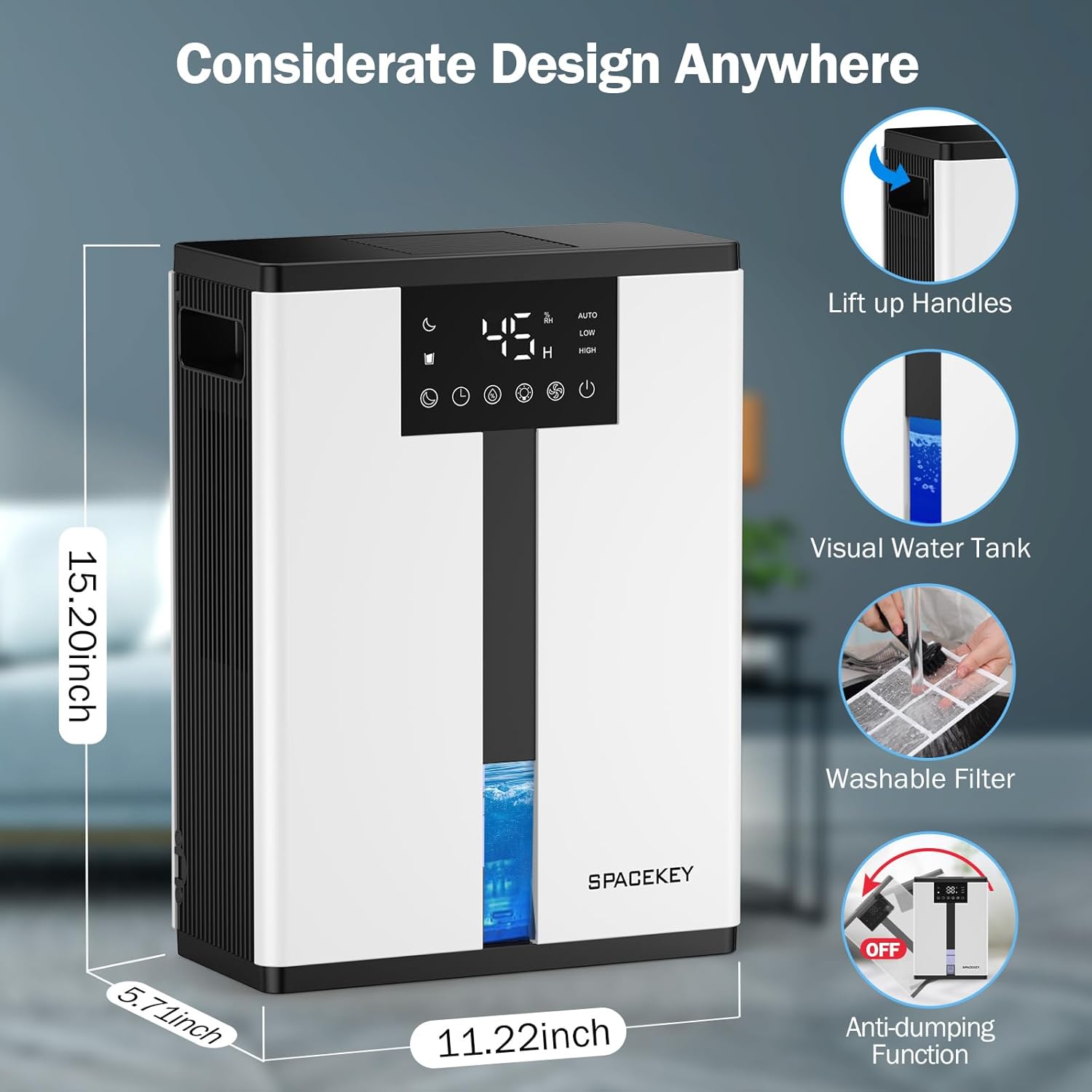
Figure 5: Key design elements and dimensions of the Spacekey QIG-D01 Dehumidifier.
3.2 Advanced Dehumidification Technology
The Spacekey QIG-D01 utilizes semiconductor condensation technology with dual fans and dual semiconductor condensers for enhanced efficiency in moisture removal.
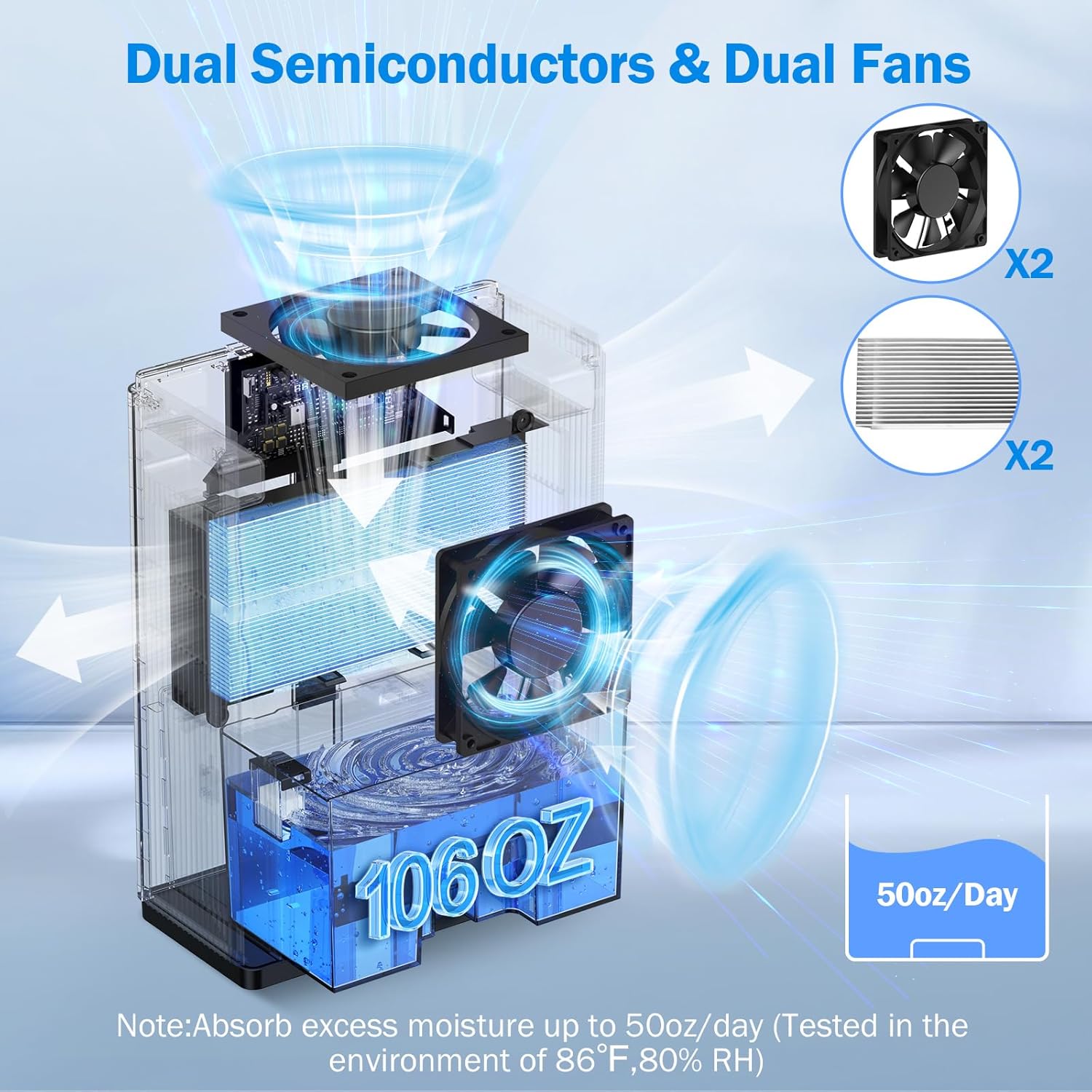
Sary 6: anatiny view of the dual semiconductor and dual fan system for efficient dehumidification.
3.3 Panel fanaraha-maso
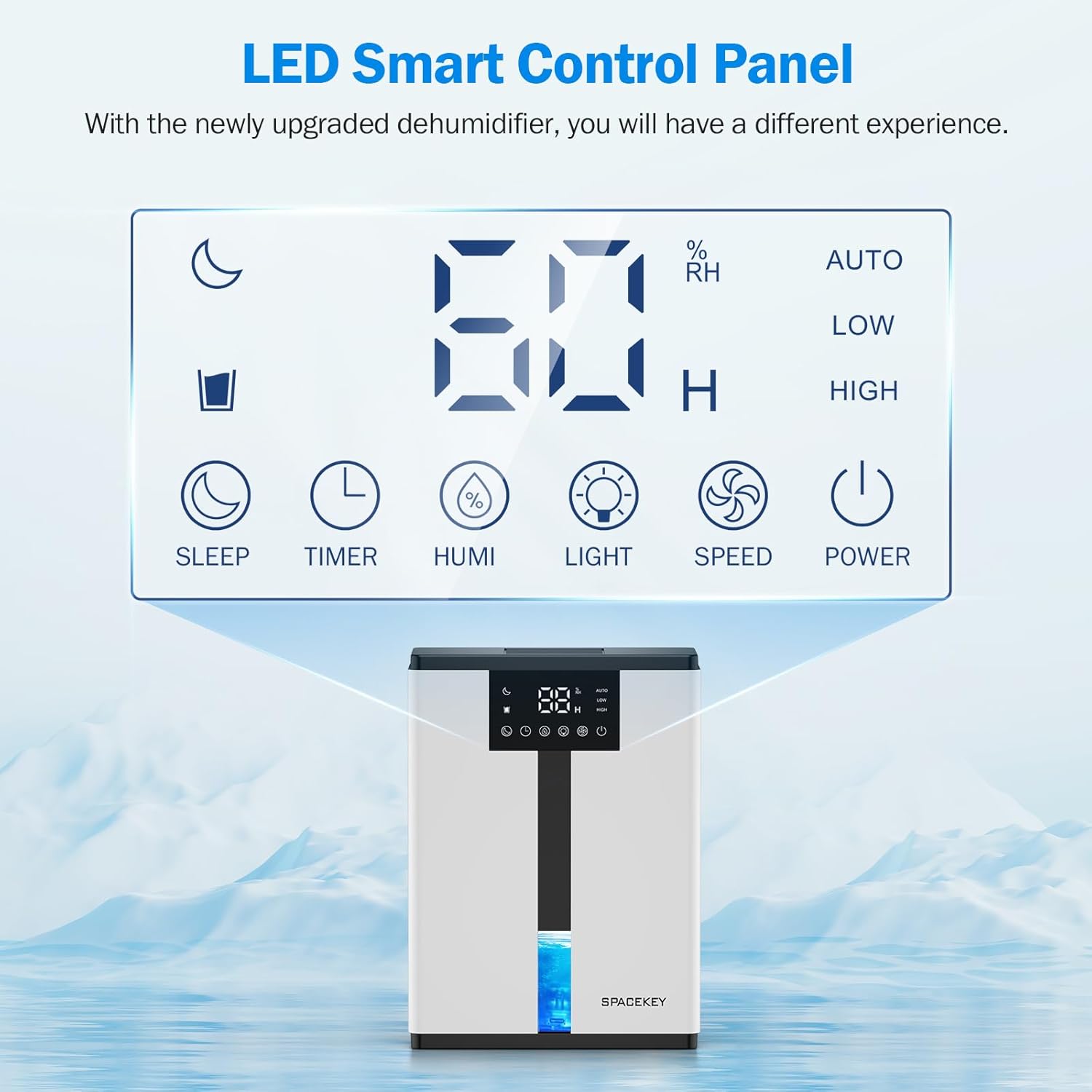
Figure 7: The LED Smart Control Panel, displaying current humidity and various function buttons.
The intuitive LED display shows real-time humidity. Buttons include:
- Mode torimaso: Activates quiet operation and can be used with colorful lights.
- Timer: Sets operating duration (2H, 4H, 6H, 8H, 12H).
- HUMI: Adjusts target humidity (45%, 55%, 65%, or continuous '00').
- MAZAVA: Controls the 7-color ambient light.
- HAINGANA: Selects fan speed (Auto, Low, High).
- HERY: Miverina / mamono ny singa.
4. Torolàlana fananganana
- Vahao: Esory tsara ny dehumidifier amin'ny fonony.
- Fametrahana: Place the unit on a flat, stable surface in the desired location. Ensure there is at least 8 inches (20 cm) of space around the air inlets and outlets for proper airflow.
- Fampifandraisana herinaratra: Ampidiro amin'ny fivoahana elektrika efa misy tany ny tariby.
- Fanamarinana voalohany: Ensure the water tank is correctly inserted and empty before starting operation.

Figure 8: Recommended placement areas for the dehumidifier, highlighting its suitability for various indoor environments.
5. Torolàlana miasa
5.1 Power On/off
Tsindrio ny fahefana bokotra hamelomana na hamonoana ny dehumidifier.
5.2 Fametrahana ny haavon'ny hamandoana
Tsindrio ny HUMI button to cycle through desired humidity levels: 45%, 55%, 65%. The unit will operate until the set humidity is reached, then pause. If set to '00', the unit will operate continuously.

Figure 9: Setting the target humidity level using the HUMI button.
5.3 Fanitsiana ny hafainganan'ny mpankafy
Tsindrio ny HAINGANA button to select between Auto, Low, and High fan speeds. Auto mode adjusts fan speed based on current humidity.
5.4 Famantarana asa
Tsindrio ny fameram-potoana button to set an operating duration of 2, 4, 6, 8, or 12 hours. The unit will automatically turn off after the set time.

Figure 10: Using the Timer function to set the operating duration.
5.5 Sleep Mode & Colorful Lights
Tsindrio ny torimaso button to activate sleep mode for ultra-quiet operation (approx. 30dB). Press the fahazavana button to cycle through 7 colorful ambient lights or select a static color. This feature can be used independently or in conjunction with sleep mode.
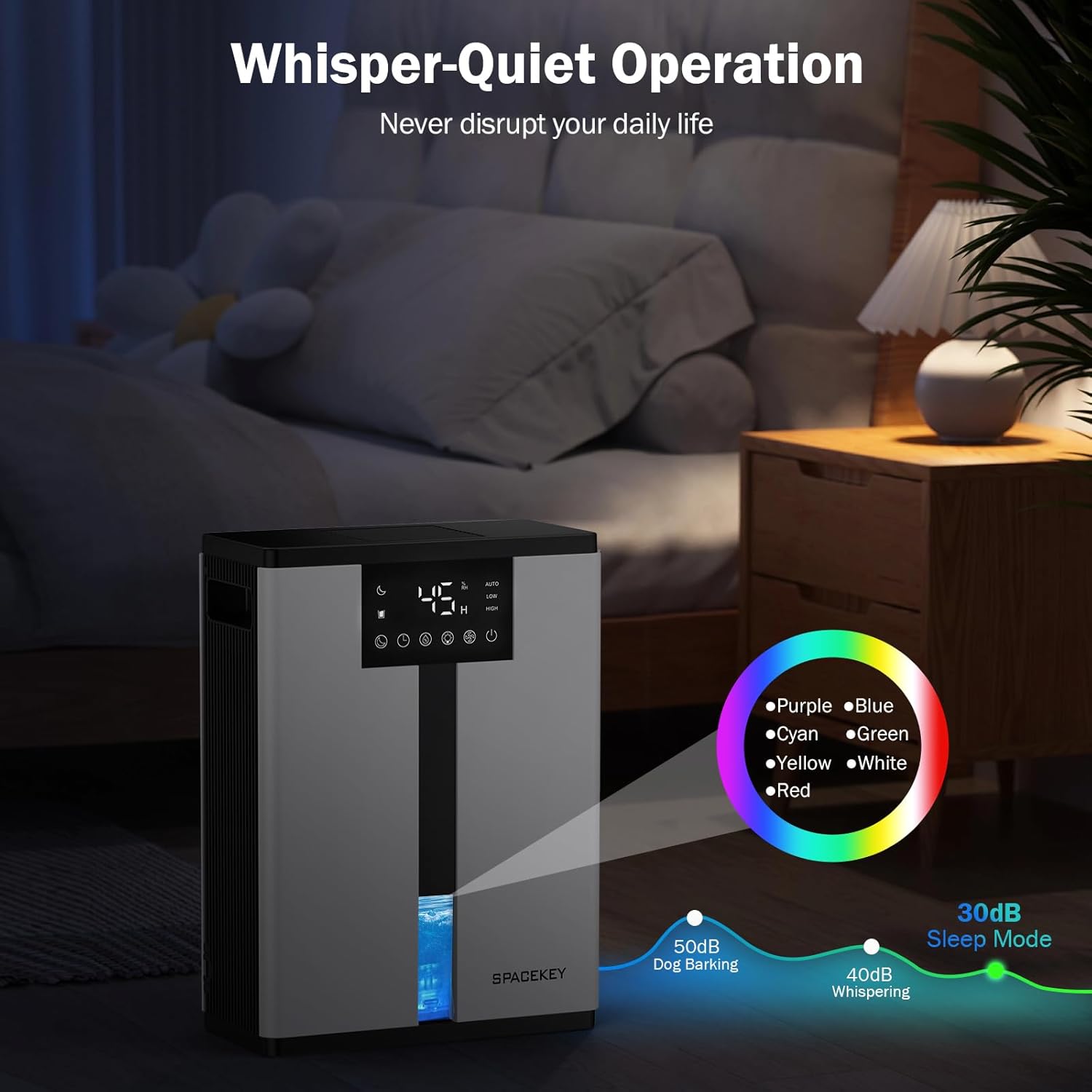
Figure 11: Dehumidifier in Sleep Mode with ambient lighting for a peaceful environment.
5.6 Fijanonana mandeha ho azy
The dehumidifier will automatically shut off and flash a red light with an audible beep when the water tank is full. Empty the water tank to resume operation.
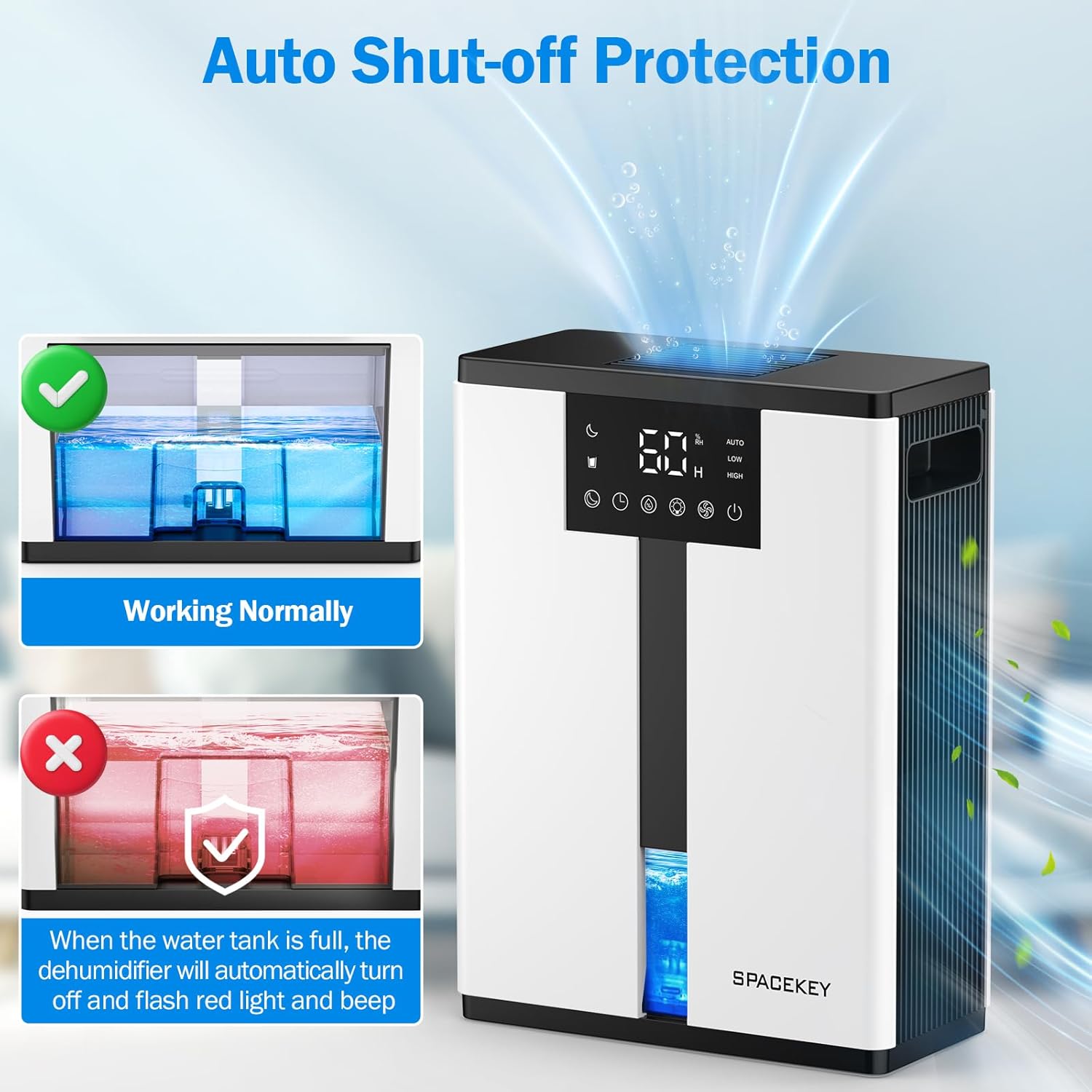
Figure 12: Automatic shut-off mechanism when the water tank is full.
6. Fikojakojana
6.1 Fandroana ny Tobin-drano
- Esory moramora ny fitoeran-drano avy eo anoloan'ilay fitaovana.
- Esory ny saron'ny tanky.
- Araraka ny rano voaangona.
- Replace the lid and reinsert the water tank firmly into the dehumidifier.

Figure 13: Step-by-step guide to emptying the water tank.
6.2 Fanadiovana ny sivana rivotra
The washable filter should be cleaned regularly (every 2-4 weeks, depending on usage) to maintain optimal performance.
- Esory ny dehumidifier.
- Esory ny sivana avy ao ambadiky ny fitaovana.
- Sasao amin'ny rano mandeha ny sivana mba hanesorana ny vovoka sy ny potipoti-javatra.
- Avelao ho maina tanteraka ny sivana alohan'ny hampidirana azy indray.
- Aza miasa ny dehumidifier raha tsy misy ny sivana.

Figure 14: Instructions for removing and washing the air filter.
6.3 Fanadiovana ny ivelany
Fafao ny ivelany amin'ny dehumidifier amin'ny malefaka, damp lamba. Aza mampiasa mpanadio abrasive na solvents.
7. Famahana olana
| OLANA | Antony mety hitranga | vahaolana |
|---|---|---|
| Tsy mandeha ny dehumidifier. | No power; power cord not plugged in; water tank full or incorrectly inserted. | Hamarino ny fifandraisana amin'ny herinaratra; esory ny rano ary avereno ampidirina tsara ny fitoeran-drano. |
| Tsy misy rano voangona na tsy dia mampihena ny hamandoana. | Room humidity is already low; air filter is clogged; ambient temperature is too low; unit size is too small for the space. | Ensure humidity is above target; clean air filter; operate in recommended temperature range; consider unit placement or additional units for larger spaces. |
| Mitabataba ny unit. | Fan speed is set to High; unit is not on a flat surface. | Switch to Low or Sleep mode; ensure unit is on a stable, flat surface. |
| Red light flashing and beeping. | Feno ny fitoeran-drano. | Empty the water tank and reinsert it. |
8. Famaritana
| endri-javatra | antsipirihany |
|---|---|
| Anarana modely | QIG-D01 |
| Marika | Spacekey |
| Fahaiza-manafoana | Up to 50 oz (approx. 3 pints) per 24 hours (at 86°F, 80% RH) |
| Haben'ny Tanky rano | 3.0 Liters (106 Fluid Ounces) |
| Faritra sarona | Mahatratra 850 metatra toradroa |
| Fanjifana herinaratra | 70 Watts (not more than 1.68 kWh/Day) |
| Ambaratonga tabataba | Approx. 30dB (in Sleep Mode) |
| Refy (D x W x H) | 5.71" D x 11.22" W x 15.2" H |
| Lanja entana | 8.91 kg |
| Endri-javatra manokana | Automatic Shutoff, Intelligent Humidity Control, 4 Fan Speeds, Timer, 7 Colorful Lights, 45° Tip-over Protection, Washable Filter |
9. Warranty sy fanohanana ny mpanjifa
Spacekey offers the following support for your dehumidifier:
- Famerenana 30 andro: For any dissatisfaction.
- 2-Year Replacement: Ho an'ny lesoka na tsy fahatomombanan'ny vokatra.
- Serivisy mpanjifa mandritra ny androm-piainany: Dedicated support for any questions or issues.
If you have any questions or require assistance, please do not hesitate to contact Spacekey customer support. We aim to reply within 24 hours.


Sary 15: Tapitraview of Spacekey's customer support and warranty policies.


