1. Fampidirana
This manual provides essential information for the proper use and maintenance of your Realme 12 Plus 5G RMX3867 smartphone. Please read this guide thoroughly before operating your device to ensure optimal performance and longevity. Keep this manual for future reference.
2. Lisitry ny fonosana
Upon opening the package, verify that all items listed below are present and in good condition. If any items are missing or damaged, please contact your retailer.

Image: Contents of the Realme 12 Plus 5G RMX3867 retail box. Includes the phone, phone case, quick guide, detachable camera decoration replacement guide, safety guide, screwdriver, two screws, USB cable, and SIM card ejector.
- Realme 12 Plus 5G RMX3867 Smartphone
- Case finday
- Torolàlana haingana
- Detachable Camera Decoration Replacement Guide
- Torolàlana momba ny fiarovana
- Screwdriver
- Vitsy (x2)
- USB Cable
- Ejector karatra SIM
Note: Some accessories, such as the detachable camera decoration, may come in a separate package or require assembly. Refer to the specific guides provided.

Image: Contents of the Detachable Camera Decoration Protective Cover Set. Includes a packaging box, detachable deco case (x1), two screws, and a phone case (x1).
3. Fametrahana
3.1. Fametrahana karatra SIM
- Tadiavo ny lovia karatra SIM eo amin'ny sisin'ny fitaovanao.
- Insert the provided SIM card ejector tool into the small hole next to the tray.
- Tosika moramora mandra-pipoitra ny lovia.
- Place your Nano-SIM card(s) into the tray with the gold contacts facing down. Ensure the card is correctly oriented according to the tray's diagram.
- Ampidiro amim-pitandremana ao amin'ny telefaona ilay lovia mandra-pikitika amin'ny toerany.

Sary: Ambany view of the Realme 12 Plus 5G RMX3867, showing the USB-C port, speaker grille, microphone, and SIM card tray slot.
3.2. Mamelona/Mamono
- Hamelona: Press and hold the Power button (located on the right side of the device) until the realme logo appears.
- Mamono: Press and hold the Power button until the power options menu appears. Tap "Power off" and confirm.
- Hanomboka indray: Press and hold the Power button until the power options menu appears. Tap "Restart" and confirm.

Sary: Side view of the Realme 12 Plus 5G RMX3867, highlighting the power button and volume rocker on the right edge of the device.
3.3. Fametrahana voalohany
The first time you power on your device, you will be guided through the initial setup process. This includes:
- Mifidy ny fiteninao.
- Mifandray amin'ny tambajotra Wi-Fi.
- Fametrahana ny kaontinao Google.
- Configuring screen lock (PIN, pattern, password, fingerprint, face unlock).
- Transferring data from an old device (optional).
4. Fampandehanana ny fitaovanao
4.1. Fikarohana fototra
- Fihetsehana mikasika: Your device supports various touch gestures for navigation, including tap, swipe, pinch-to-zoom, and long press.
- Efijery voalohany: The central hub for your apps and widgets. Swipe left or right to access additional screens.
- Panel fampahafantarana: Swipe midina avy eny an-tampon'ny efijery raha te hidirana fampahafantarana sy fanovana haingana.
- App Drawer: Swipe miakatra avy any amin'ny faran'ny efijery mankany view fampiharana napetraka rehetra.

Sary: Front view of the Realme 12 Plus 5G RMX3867, displaying its large screen with a punch-hole camera cutout at the top center.
4.2. Fakan-tsary Functions
The Realme 12 Plus 5G RMX3867 features a powerful 200MP main camera. To access the camera, tap the Camera icon on your home screen or app drawer.
- Fomba sary: Switch between various modes like Photo, Portrait, Night, Pro, and more.
- Fandraketana horonantsary: Record high-quality videos. Adjust resolution and frame rate in settings.
- Fikirana: Access camera settings to customize features such as HDR, AI enhancements, and grid lines.
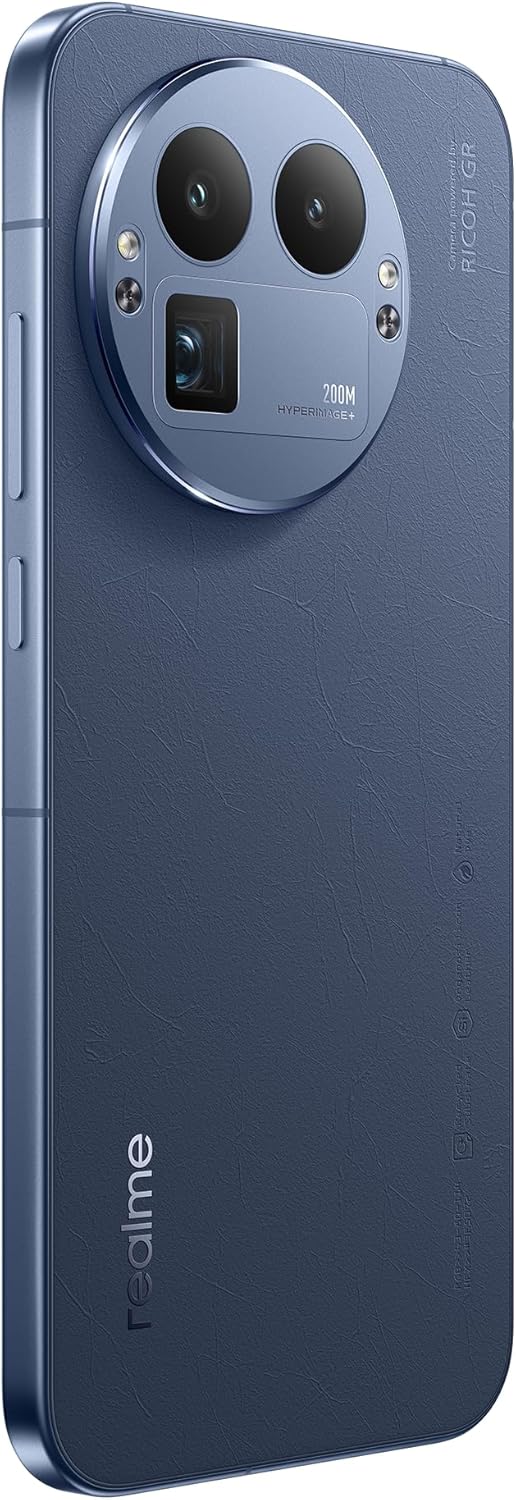
Sary: aoriana view of the Realme 12 Plus 5G RMX3867, showcasing the prominent circular camera module with multiple lenses and a "200M HYPERIMAGE+" label.
4.3. fifandraisana
- Tambajotra 5G: Your device supports 5G connectivity for faster mobile data speeds. Ensure your SIM card and plan support 5G.
- Wifi: Mifandraisa amin'ny tambajotra tsy misy tariby mba hidirana amin'ny aterineto. Mandehana any amin'ny Fikirana > Wi-Fi mba hitantanana ny fifandraisana.
- Bluetooth: Pair with Bluetooth devices like headphones, speakers, or car systems. Go to Settings > Bluetooth.
- USB-C: Ampiasao ny seranan-tsambo USB-C amin'ny famandrihana sy famindrana angona.
4.4. Toetran'ny fiarovana
- Fingerprint Sensor: Unlock your device quickly and securely using the in-display fingerprint sensor. Register your fingerprints in Settings > Security & Privacy > Fingerprint.
- Face Unlock: Use facial recognition to unlock your phone. Set up Face Unlock in Settings > Security & Privacy > Face.
- Lock Screen: Choose from PIN, pattern, or password for basic screen security.
5. Fikojakojana
5.1. Manadio ny fitaovanao
- Mampiasà lamba malefaka sady tsy misy loko hamafa ny efijery sy ny vatan'ny telefaona.
- Fadio ny mampiasa akora simika mahery vaika, akora abrasive na tifitra aerosol.
- Ho an'ny setroka mafy loha, kely dampen ilay lamba misy rano na fanadiovana ecran natao manokana ho an'ny fitaovana elektronika.
5.2. Fanavaozana rindrambaiko
Regularly check for and install software updates to ensure your device has the latest features, security patches, and performance improvements. Go to Settings > About device > Up to date to check for updates.
5.3. Fikarakarana bateria
- Fadio ny hafanana tafahoatra, satria mety hanimba ny fiainan'ny batterie.
- Ampiasao ihany ny charger sy ny tariby tany am-boalohany na ny kojakoja mifanaraka aminy voamarina.
- Do not let the battery drain completely frequently. It is generally recommended to keep the battery level between 20% and 80%.
6. Famahana olana
6.1. Olana sy Vahaolana iraisana
| Olana | vahaolana |
|---|---|
| Tsy mandeha ny fitaovana | Ataovy azo antoka fa voaloa ny bateria. Tsindrio ary hazòny ny bokotra Hery mandritra ny 10-15 segondra farafahakeliny. |
| Apps mianjera na mangatsiaka | Close the app and reopen it. Clear the app's cache (Settings > Apps > [App Name] > Storage > Clear cache). Restart the device. |
| Faharetan'ny bateria | Check background app usage. Reduce screen brightness. Disable unnecessary features like GPS or Bluetooth when not in use. |
| Tsy afaka mifandray amin'ny Wi-Fi | Restart your router and phone. Forget the network and reconnect. Ensure Wi-Fi is enabled on your device. |
6.2. Famerenana ny orinasa
If you encounter persistent issues, a factory reset may resolve them. fampitandremana: Hamafa ny angona rehetra ao amin'ny findainao ny famerenana amin'ny laoniny ny findainao. Ataovy tahiry ny angona manan-danja alohan'ny hanohizana.
- Mandehana any amin'ny Settings> System> Reset safidy.
- Tap "Erase all data (factory reset)".
- Hamafiso ny fanapahan-kevitrao ary ampidiro ny PIN/tenimiafinao raha asaina ianao.
- Hanomboka indray ny fitaovana ary hanomboka ny dingana famerenana.
7. Famaritana
Below are the key technical specifications for the Realme 12 Plus 5G RMX3867:
| endri-javatra | antsipirihany |
|---|---|
| Marika | realme |
| Anarana modely | Realme 12 Plus 5G (RMX3867) |
| Rafitra fikirakirana | Android |
| Fahaizana fitahirizana fahatsiarovana | 256 GB |
| RAM Memory Habe napetraka | 12 GB |
| Modely CPU | Snapdragon |
| Hafaingan'ny CPU | 1200 MHz |
| Haben'ny efijery | 6.4 santimetatra |
| Karazana fampisehoana | AMOLED |
| vahaolana | 1440x2560 |
| Fanapahan-dahatsary mahomby | 200 MP |
| Teknolojia finday | 5G |
| Fahaizana bateria | 7000 Miliamp ORA |
| Fiainana antonony ny bateria | 21 ora |
| Fampidiran'ny fifandraisan'ny olombelona | Efijery kasihina |
| Laharana modely | GT 8 Pro (Note: Product title is Realme 12 Plus 5G RMX3867) |
Note: Some specifications may vary slightly based on region or specific product variant. The model number in the product title is RMX3867, while some specifications list 'GT 8 Pro'. Please refer to your device's packaging for the most accurate model information.
8. Warranty sy fanohanana
Your Realme 12 Plus 5G RMX3867 device comes with a limited warranty. Please refer to the warranty card included in your product packaging for detailed terms and conditions, including warranty period and coverage.
For technical support, service, or further inquiries, please visit the official realme support website or contact their customer service. Contact information can typically be found on the realme official website or in the "Safety Guide" included with your device.
Tehirizo ny porofon'ny fividiananao ho an'ny fitakiana fiantohana.


