1. Vokatra mihoatraview
The waveshare Industrial USB to TTL Serial Adapter Cable is a robust converter designed for data communication between a PC or other devices and TTL logic level devices such as microcontrollers and sensors. It features an original FT232RNL chip for stable and compatible high-speed communication.

Image 1: The waveshare Industrial USB to TTL Serial Adapter Cable, showcasing its USB connector and the multi-colored jumper wires for TTL connections.
This adapter supports 3.3V/5V voltage level switching, includes built-in self-recovery fuse, ESD, and IO protection diode circuits, ensuring reliable and safe operation. Its compact design makes it ideal for serial port debugging of industrial equipment and direct connection to devices like the Raspberry Pi 5.
Lahatsary 1: Nifarana ny ofisialyview of the Waveshare USB-TTL Converter, highlighting its features and applications.
2. Torolàlana fananganana
The waveshare USB to TTL Serial Adapter Cable is designed for plug-and-play compatibility with various operating systems including Windows 7/8/8.1/10/11, Mac, Linux, and Android. Drivers for the FT232RNL chip are typically installed automatically by your operating system. If not, they can be downloaded from the FTDI website.
2.1. Connecting to Raspberry Pi 5
This adapter is suitable for UART debugging on Raspberry Pi devices. You can connect it using two primary methods:
- Via SH1.0 3PIN cable: Connect to the Raspberry Pi 5 UART Debug Connector.
- Via Separated 4PIN Header: Connect to the Raspberry Pi 40PIN GPIO UART Interface.

Image 2: Visual guide demonstrating two methods for connecting the USB to TTL adapter to a Raspberry Pi 5 for UART debugging.
2.2. Pinout Definition and Voltage Level Switching
The adapter features a TTL serial port with a 3.3V/5V level translation circuit, allowing you to switch the communication level as needed for your target device. The pinouts are clearly defined:
- VCC: 3.3V or 5V output, configured by a switch on the adapter.
- GND: Fifandraisana amin'ny tany.
- TXD: Transmit Data. Connects to the MCU.RXD (signal direction: MCU.RX <-- FT232 <-- PC.TX).
- RXD: Receive Data. Connects to the MCU.TXD (signal direction: MCU.TX --> FT232 --> PC.RX).
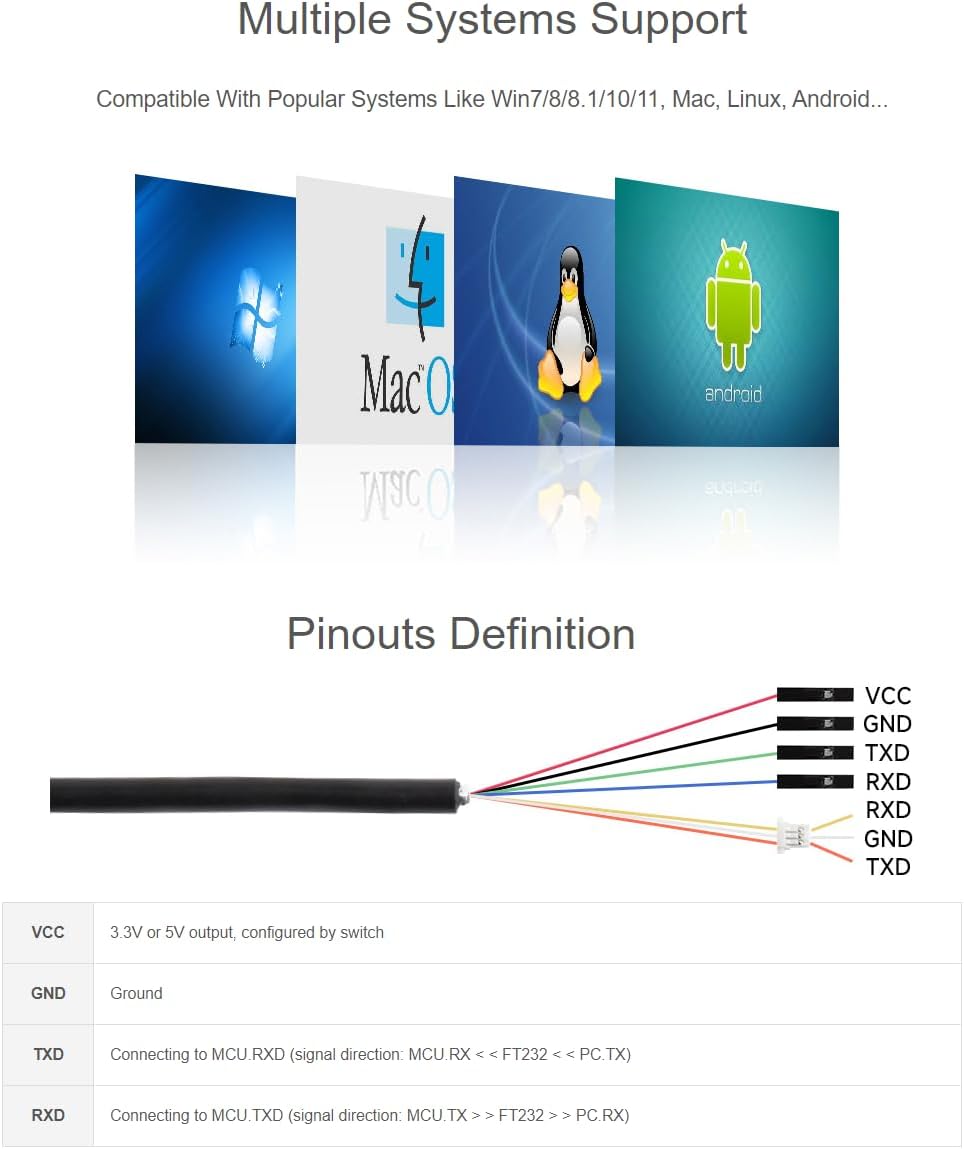
Image 3: Detailed diagram illustrating the pinout definitions (VCC, GND, TXD, RXD) and the 3.3V/5V operating level switch on the adapter.
3. Fampandehanana ny fitaovana
Once connected to your computer's USB port and your target device, the adapter will begin operation. The onboard LED indicators provide visual feedback on the device's status.
3.1. Tondro LED
The adapter features three LED indicators for easy monitoring of its operating status:
- PWR (Tondro Hery): Turns on when there is a USB connection and voltage dia hita.
- TXD (Transmit Indicator): Turns on while the USB port is sending data.
- RXD (Receive Indicator): Turns on while the device port is sending data back.

Sary 4: akaiky view of the adapter highlighting the PWR, TXD, and RXD LED indicators, along with the 3.3V/5V operating level switch.

Image 5: The waveshare USB to TTL adapter connected to a laptop, demonstrating a typical usage scenario.
4. Fikojakojana
The waveshare USB to TTL Serial Adapter Cable features a robust plastic case with a sandblasting process finish, designed for long-lasting durability. To ensure optimal performance and longevity:
- Ataovy madio sy tsy misy vovoka sy potipoti-javatra ny fitaovana.
- Fadio ny mampibaribary ny fitaovana amin'ny hafanana tafahoatra na ny hamandoana.
- Handle the cable and connectors gently to prevent damage.
5. Famahana olana
If you encounter issues with your USB to TTL Serial Adapter Cable, consider the following:
- No Power Indicator (PWR LED off): Ensure the USB cable is securely connected to both the computer and the adapter. Try a different USB port or computer.
- No Data Transmission (TXD/RXD LEDs not blinking): Verify that the TXD and RXD pins are correctly connected to your target device's RXD and TXD pins, respectively. Check the voltage level switch (3.3V/5V) to ensure it matches your device's requirements. Confirm that the drivers are correctly installed on your operating system.
- Olana amin'ny fifandraisana: Ensure your target device is powered on and functioning correctly. Check for any loose connections in the jumper wires.
For persistent issues, please refer to the 'Warranty and Support' section for technical assistance.
6. Famaritana ara-teknika
Below are the detailed specifications for the waveshare Industrial USB to TTL Serial Adapter Cable:

Image 6: A table detailing the product specifications, including chip scheme, data rate, and port types.
| endri-javatra | antsipirihany |
|---|---|
| Marika | waveshare |
| Anarana modely | USB TO TTL (D) Serial Adapter Cable |
| Karazana mpampitohy | USB |
| Karazana tariby | USB |
| Fitaovana mifanentana | Personal Computer, Microcontrollers, Sensors, Raspberry Pi 5 |
| Endri-javatra manokana | High Speed, 3.3V/5V Voltage Level Switching, FT232RNL Chip, Self-recovery Fuse, ESD Protection, IO Protection |
| Fampiasana soso-kevitra | Serial Port Debugging for Raspberry Pi and Industrial Equipments |
| loko | Mainty |
| Mpampifandray lahy sy vavy | Lahy-to-Vehivavy |
| Isan'ny Pins | 4 |
| Maximum Voltage | 5 Volts |
| Fitaovana ivelany | plastika |
| Lanja entana | 2.11 ounces (0.06 kilao) |
| Ny haben'ny fonosana | 6.26 x 4.33 x 1.26 santimetatra |
| ASIN | B0CYGL421W |
| UPC | 788046388596 |
| Daty misy voalohany | 19 martsa 2024 |
6.1. Outline Dimensions
Image 7: Diagram showing the outline dimensions of the USB to TTL adapter in millimeters.
7. Warranty sy fanohanana
waveshare provides technical support for this product. If you encounter any problems or have questions regarding the setup, operation, or functionality of your Industrial USB to TTL Serial Adapter Cable, please contact waveshare customer service directly. Please have your product model and purchase information ready when contacting support.


