Sava lalana
This user manual provides essential information for setting up, operating, maintaining, and troubleshooting your VIBOX I-45 Gaming PC. Please read this manual thoroughly before using your new computer to ensure optimal performance and longevity.
1. Fametrahana
1.1 Famoahana baoritra sy votoaty fonosana
Carefully remove all components from the packaging. Ensure all items listed below are present. Retain the packaging for future transport or service needs.
- VIBOX I-45 Gaming PC (VTX-4 Black Tower)
- Cable herinaratra
- Wi-Fi Network Adapter (300 Mbps)
- Antontan-taratasy (ity boky torolalana ity)
1.2 Fampifandray ny periferika
Before powering on your PC, connect all necessary peripherals.
- Manara-maso: Connect your monitor to the graphics output port (HDMI or DisplayPort) on the rear of the PC. Ensure the monitor is also connected to a power source.
- Kitendry sy totozy: Ampifandraiso amin'ireo seranana USB misy ny fitendry sy ny totozy.
- Tambajotra: For wired internet, connect an Ethernet cable to the LAN port. For wireless internet, ensure the included Wi-Fi adapter is installed or connected.
- Audio: Connect speakers or a headset to the audio output jacks.
- Hery: Connect the power cable to the PC's power input and then to a wall outlet.

Figure 1.2.1: Rear I/O Ports for connecting peripherals.
1.3 Initial Boot and Windows 11 Setup
After connecting all peripherals, press the power button on the front of the PC. The system will boot into Windows 11 Home. Follow the on-screen instructions to complete the initial setup, including language selection, network connection, and user account creation.

Figure 1.3.1: Windows 11 Home Operating System.
2. Torolàlana miasa
2.1 Power On/off sy Restart
- Herim-batana: Tsindrio ny bokotra herinaratra hita eo amin'ny tontonana anoloana.
- Hidio: Tsindrio ny bokotra Start ao amin'ny Windows, dia mifidiana Power > Shut down.
- Haverina velomina: Tsindrio ny bokotra Start ao amin'ny Windows, dia mifidiana Power > Restart.
2.2 Windows 11 Home Features
Your VIBOX I-45 comes pre-installed with Windows 11 Home, offering several features designed to enhance your computing experience:
- DirectStorage: Enables faster game loading times.
- AutoHDR: Automatically enhances visuals for improved graphics.
- Xbox Game Pass Integration: Seamless access to a library of games.
- Optimized CPU Performance: Enhanced performance for various tasks.
2.3 Fanaraha-maso ny Jiro RGB
The VTX-4 case features Hex RGB Infinity 120mm fans. You can customize the lighting effects and colors using the dedicated RGB change button on the top panel or through compatible software if available.

Figure 2.3.1: Customizable RGB Fans.
3. Fikojakojana
3.1 Cleaning Your PC
Regular cleaning helps maintain performance and extends the lifespan of your computer.
- ivelany: Ampiasao malefaka, damp cloth to wipe down the exterior surfaces. Avoid harsh chemicals.
- Fanalana vovoka: Periodically use compressed air to clear dust from fan vents and internal components. Ensure the PC is powered off and unplugged before cleaning.
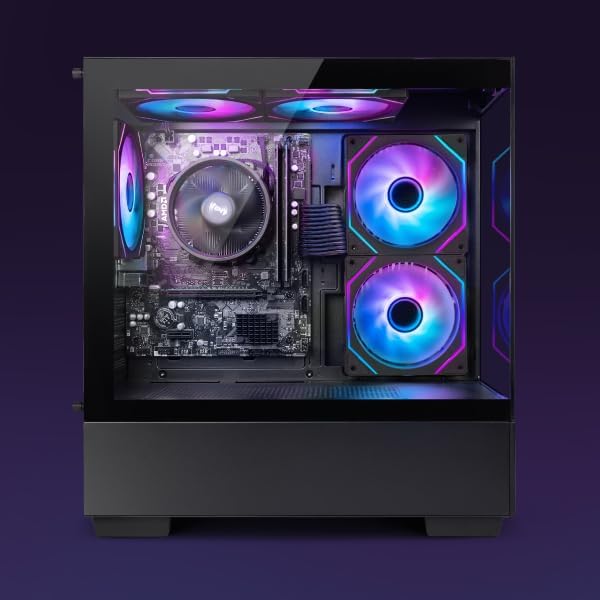
Figure 3.1.1: Internal components of the VIBOX I-45 PC.
3.2 Fanavaozana rindrambaiko
Havaozy hatrany ny rafitra fiasanao sy ny mpamily mba hahazoana antoka ny fiarovana, ny fitoniana ary ny fahombiazana tsara indrindra.
- Fanavaozana Windows: Windows 11 automatically checks for updates. You can manually check by going to Settings > Windows Update.
- Fanavaozana mpamily: Regularly check the VIBOX support webmpanamboatra toerana na singa websites (AMD for CPU/GPU) for the latest drivers.
3.3 System Backup
Ataovy tahiry tsy tapaka ao amin'ny kapila ivelany na fitahirizana rahona ny angon-drakitrao manan-danja mba hisorohana ny fahaverezan'ny angon-drakitra.
4. Famahana olana
This section addresses common issues you might encounter. For more complex problems, please contact VIBOX support.
4.1 Tsy misy hery
- Ensure the power cable is securely connected to both the PC and the wall outlet.
- Hamarino fa miasa ny fivoahan'ny rindrina amin'ny alàlan'ny fampidirana fitaovana hafa.
- Check the power supply switch on the rear of the PC (if present) is in the 'On' position.
4.2 Tsy misy fampisehoana eo amin'ny efijery
- Confirm the monitor is powered on and correctly connected to the PC's graphics output port.
- Hamarino tsara fa voafantina eo amin'ny efijery ny loharano fampidirana marina.
- Try a different display cable if available.
4.3 Fampisehoana miadana
- Akatona ny fampiharana tsy ilaina mandeha ao ambadika.
- Check for and install any pending Windows or driver updates.
- Run a disk cleanup and defragmentation (for HDD, not typically needed for SSD).
- Scan ny malware na viriosy.
4.4 Olana mifandray amin'ny tambajotra
- Wifi: Ensure the Wi-Fi adapter is properly installed and drivers are up to date. Check your router and internet connection.
- Ethernet: Verify the Ethernet cable is securely connected to both the PC and the router/modem. Check router status.
- Restart your router/modem and PC.
5. Famaritana
| endri-javatra | famaritana |
|---|---|
| Marika | VIBOX |
| Laharana modely | I-45 |
| loko | VTX-4 Black |
| Rafitra fikirakirana | Windows 11 Home |
| processeur | AMD Ryzen 3 3200G (4 Cores, 3.6 GHz Base, up to 4.0 GHz Max) |
| Saripika | Integrated Radeon Vega 8 Graphics (2GB Shared Memory) |
| ram | 16 GB DDR4 (3200 MHz Dual Channel) |
| fitahirizana | 480 GB SSD |
| Max Memory Support | 128 GB |
| Wifi | 802.11n (300 Mbps adapter included) |
| Ports HDMI | 1 |
| USB 2.0 Ports | 3 |
| USB 3.0 Ports | 3 |
| refy (L x W x H) | 36 x 20 x 41 cm |
| Fitaovana mifanentana | Headset, Keyboard, Printer, Monitor, Mouse |
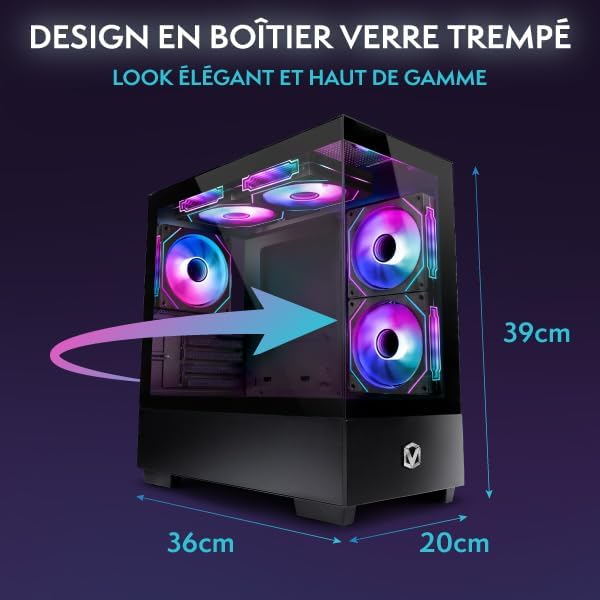
Figure 5.1.1: VIBOX I-45 PC Dimensions.
6. Fampahalalana momba ny fiantohana
Your VIBOX I-45 Gaming PC comes with a manufacturer's warranty covering:
- ampahany: 2 taona
- asa: Androm-piainana
Please retain your proof of purchase for warranty claims. For detailed terms and conditions, refer to the warranty card included with your product or visit the official VIBOX website.
7. Fanohanana
For technical assistance, troubleshooting beyond this manual, or warranty inquiries, please contact VIBOX customer support. You can find contact information on the official VIBOX Gaming webtranokala na amin'ny alàlan'ny mpivarotra anao.
Loharano an-tserasera:
- Tsidiho ny VIBOX Gaming Store on Amazon ho an'ny vaovao momba ny vokatra sy ny fanavaozana.


