1. Fampidirana
The XIAOMI Redmi Note 13 Pro 5G is a feature-rich smartphone designed for global use, offering advanced camera capabilities, a vibrant display, and robust performance. This manual provides essential information to help you set up, operate, and maintain your device effectively.
Key features include a flagship-level 200MP OIS anti-shake main camera, a 1.5K 120Hz AMOLED display, and support for 5G and 4G LTE global bands. The device is powered by the Snapdragon 7s Gen 2 Mobile Platform, ensuring smooth and efficient operation for various tasks.

Figure 1: Xiaomi Redmi Note 13 Pro 5G in various color options, showcasing its front display.
2. Inona no ao anaty boaty
Upon unboxing your XIAOMI Redmi Note 13 Pro 5G, you should find the following items:
- XIAOMI Redmi Note 13 Pro 5G Smartphone
- Fast Car charger
- SIM Tray Ejector
- USB Cable
- Wall adaptatera
3. Physical Overview
The Redmi Note 13 Pro 5G features a sleek design with a comfortable grip. Its dimensions are approximately 3.58 x 7.32 x 2.36 inches, and it weighs about 1.19 pounds (0.54 kilograms).
3.1 Fampisehoana
The device is equipped with a 6.67-inch AMOLED display, offering a refresh rate of up to 120Hz and a peak brightness of 1800 nits. The resolution is 2712x1220 pixels (446PPI), providing sharp and vibrant visuals. It features 12-bit color depth, a 5,000,000:1 contrast ratio, and 100% DCI-P3 color gamut. The screen is protected by Corning Gorilla Glass Victus and supports Dolby Vision.
3.2 Module fakan-tsary
The rear camera system includes a triple camera setup:
- Fakan-tsary 200MP lehibe: Features OIS (Optical Image Stabilization), f/1.65 aperture, 1/1.4” sensor size, and 7P lens for high-resolution photos and improved low-light performance.
- Fakan-tsary Ultra-wide 8MP: With f/2.2 aperture for capturing broader scenes.
- Fakan-tsary Macro 2MP: With f/2.4 aperture for detailed close-up shots.
The front camera is designed for selfies and video calls.
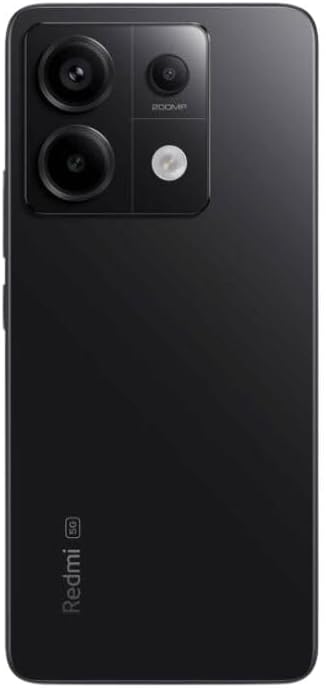
Sary 2: aoriana view of the Xiaomi Redmi Note 13 Pro 5G, showing the 200MP triple camera setup.
3.3 Ports and Sensors
The device includes a USB-C port for charging and data transfer, and a 3.5mm headphone jack. Integrated sensors include an in-screen fingerprint sensor, AI Face Unlock, ambient light sensor, accelerometer, electronic compass, IR blaster, and gyroscope.
4. Fametrahana
4.1 Fametrahana karatra SIM
- Tadiavo ny lovia karatra SIM eo amin'ny sisin'ny fitaovanao.
- Ampidiro ao anatin'ilay lavaka kely eo akaikin'ny lovia ny fitaovana famotsorana lovia SIM ary tsindrio mafy mandra-pipoitra ilay lovia.
- Place your nano-SIM card(s) into the designated slots on the tray. Ensure the gold contacts are facing down. The device supports Dual SIM (nano SIM + nano SIM or nano SIM + eSIM).
- Avereno ampidirina moramora ao anaty finday ny fitoeran-karatra SIM mandra-pikitikitika azy ho eo amin'ny toerany.
4.2 Fahefana voalohany sy fandrindrana ny Wizard
- Tsindrio ary tazony ny bokotra Hery (matetika eo amin'ny ilany havanana) mandra-piseho ny logo Xiaomi.
- Follow the on-screen instructions to select your language, region, and agree to the terms and conditions.
- Mifandraisa amin'ny tambajotra Wi-Fi mba hamitana ny fizotry ny fanamboarana sy hisintona ny fanavaozana ilaina.
- Sign in with your Google account and/or Xiaomi account to access services and restore backups.
- Set up your preferred security methods, such as PIN, pattern, password, fingerprint, or AI Face Unlock.
5. Fampandehanana ny fitaovana
5.1 Fitetezana Aseho
Navigate your device using intuitive touch gestures. Swipe, tap, pinch, and zoom to interact with apps and content. The 120Hz refresh rate ensures a smooth and fluid user experience. Unlock your device quickly and securely using the in-screen fingerprint sensor or AI Face Unlock.
5.2 Fampiasana fakan-tsary
Open the Camera app to capture photos and videos. Utilize the 200MP main camera for highly detailed images, the ultra-wide lens for expansive landscapes, and the macro lens for close-up photography. The camera supports 4K video recording at 30fps, 1080p at 30/60fps, and 720p at 30fps. Slow motion video is available at 1080p (120fps) and 720p (120/240fps).
5.3 Fampisehoana
The Redmi Note 13 Pro 5G is powered by the Snapdragon 7s Gen 2 Mobile Platform, built on 4nm process technology with an octa-core CPU up to 2.4GHz and Adreno GPU. This configuration, combined with 8GB of RAM and 256GB of internal storage, provides strong performance for multitasking, gaming, and demanding applications.
5.4 Audio
Enjoy immersive audio with dual speakers and Dolby Atmos support. The device also retains a 3.5mm headphone jack for wired audio connections.
6. Fikojakojana
6.1 Fanavaozana rindrambaiko
Hamarino sy asio fanavaozam-baovao tsy tapaka mba hahazoana antoka fa ny fitaovanao dia manana ny endri-javatra farany indrindra, ny paty fiarovana ary ny fanatsarana ny fampisehoana. Mandehana any Fikirana> Momba ny telefaona> version MIUI hanamarina ny fanavaozana.
6.2 Fikarakarana bateria
The 5000 mAh battery provides extended usage. To prolong battery life, avoid extreme temperatures, use the provided 67W fast charger, and manage background app usage. Avoid fully discharging the battery frequently.
6.3 Fanadiovana
Use a soft, lint-free cloth to clean your device. Avoid harsh chemicals or abrasive materials that could damage the screen or finish. Do not expose the device to excessive moisture.
6.4 Fitantanana fitahirizana
Miaraka amin'ny fitahirizana anatiny 256GB, manana ianao ample space for apps and media. Regularly review NY files and uninstall unused applications to optimize performance and free up space.
7. Famahana olana
Raha sendra olana amin'ny fitaovanao ianao dia andramo ireto dingana fototra momba ny famahana olana ireto:
- Tsy mamaly ny fitaovana: Tsindrio ary hazòny ny bokotra Hery mandritra ny 10-15 segondra eo ho eo hanerena ny famerenana indray.
- Olana mifandray amin'ny tambajotra: Check if your SIM card is properly inserted. Toggle Airplane Mode on and off. Restart your device. Verify Wi-Fi settings and router connection.
- App mianjera/mivaingana: Close the app and reopen it. Clear the app's cache and data (Settings > Apps > Manage apps > [App Name] > Clear data). Update the app to its latest version.
- Fanariana bateria: Jereo ao amin'ny Settings ny fampiasana bateria mba hamantarana ireo fampiharana mandany herinaratra. Ahena ny famirapiratry ny efijery, vonoy ireo endri-javatra tsy ilaina toy ny GPS na Bluetooth rehefa tsy ampiasaina.
- Fahombiazana miadana: Fafao ny cache, esory ny fampiharana tsy ampiasaina, ary ataovy izay hahazoana toerana fitahirizana ampy malalaka.
- Famerenana amin'ny orinasa: Ho vahaolana farany, raha mbola mitohy ny olana dia azonao atao ny mamerina amin'ny laoniny ny rafitra (factory reset). Fampitandremana: Hamafa ny angona rehetra amin'ny fitaovanao izany. Avereno ny angona manan-danja alohan'ny hanohizana. Mandehana any Fikirana> Momba ny finday> Famerenana amin'ny orinasa.
8. Famaritana
| endri-javatra | famaritana |
|---|---|
| Anarana modely | Redmi Note 13 Pro 5G |
| Laharana modely | 2312DRA50G |
| Marika | XIAOMI |
| Rafitra fikirakirana | Android 13.0 |
| Modely CPU | Snapdragon 7s Gen 2 Mobile Platform |
| Hafaingan'ny CPU | Hatramin'ny 2.4 GHz |
| RAM Memory Habe napetraka | 8 GB |
| Fahaizana fitahirizana fahatsiarovana | 256 GB |
| Haben'ny efijery mitsangana | 6.67 santimetatra AMOLED |
| vahaolana | 2712x1220 (446PPI) |
| Ny tahan'ny fanavaozana | Hatramin'ny 120Hz |
| Famirapiratana ambony indrindra | 1800 nits |
| Fakan-tsary lehibe | 200MP OIS |
| Fakan-tsary tena midadasika | 8MP |
| Macro Camera | 2MP |
| Famerenana ny herin'ny bateria | 5000 Miliamp ORA |
| fa mamaly ny | 67W Famandrihana haingana |
| Audio Jack | 3.5 mm |
| Wireless Carrier | Unlocked (USA Market: T-Mobile, Mint, Tello or any under T-Mobile network) |
| Ny refin'ny vokatra | 3.58 x 7.32 x 2.36 santimetatra |
| Lanja entana | 1.19 kilao (0.54 kilao) |
9. Warranty sy fanohanana
Your XIAOMI Redmi Note 13 Pro 5G is covered by a manufacturer's warranty. For detailed information regarding warranty terms, conditions, and duration, please refer to the warranty card included in your product packaging or visit the official XIAOMI support website.
For technical support, service requests, or further assistance, please visit the official XIAOMI website or contact their customer service. Keep your proof of purchase handy for any warranty claims.


