1. Fampidirana sy Fitohizanaview
This manual provides essential instructions for the safe and efficient use of your Maxcom MM135L Basic Mobile Phone. The MM135L is designed for straightforward communication, featuring a user-friendly interface, large keys, and a 1.77-inch screen. It supports 2G networks and includes dual SIM capability, an SOS button for emergencies, and convenient USB-C charging. Please read this manual thoroughly before operating the device.
2. Ny votoatin'ny fonosana
Hamarino fa misy ny entana rehetra ao anaty fonosana:
- Maxcom MM135L Mobile Phone
- Battery (Lithium-Ion, 600 mAh)
- USB Cable
- SIM Tray Ejector
- User Manual (ity antontan-taratasy ity)
3. Fametrahana fitaovana
Familiarize yourself with the physical components of your Maxcom MM135L phone.
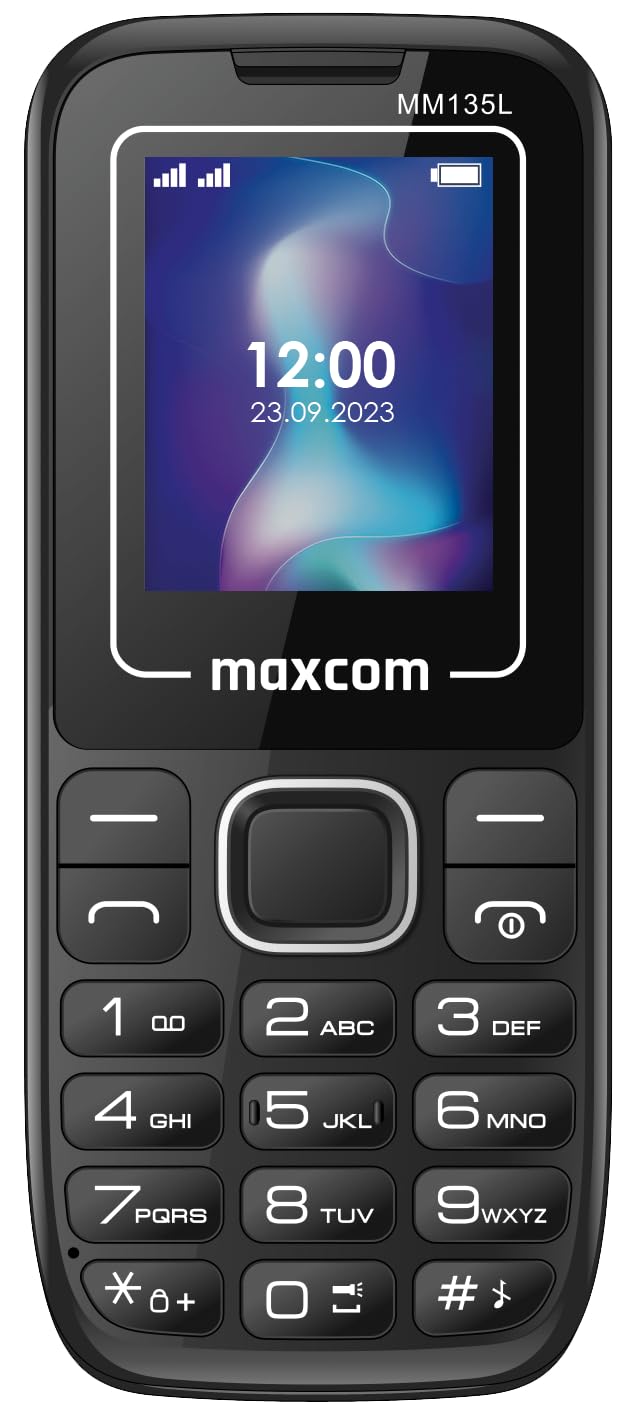
Sary 3.1: aoriana view of the Maxcom MM135L phone, showing the blue textured back cover, Maxcom logo, and speaker grille at the top.

Sary 3.2: Eo anoloana view of the Maxcom MM135L phone, displaying the screen, large numeric keypad, and call/end buttons.

Figure 3.3: Bottom edge of the phone, featuring the USB-C charging port and a 3.5mm headphone jack.

Figure 3.4: Top edge of the phone, highlighting the integrated flashlight.
singa fototra:
- Asehoy ny efijery: 1.77-inch LCD for clear text and call information.
- Keypad nomerika: Large, tactile buttons for easy dialing and texting.
- bokotra fiantsoana/farany: Dedicated buttons for managing calls.
- Fanalahidin'ny Fikarohana: Ho an'ny navigateur menu.
- Boky SOS: Located on the rear for emergency calls (refer to Figure 3.1).
- jiro: Integrated at the top of the device (refer to Figure 3.4).
- Seranan-tsambo USB-C: For charging the device (refer to Figure 3.3).
- Jack finday: 3.5mm port for audio accessories (refer to Figure 3.3).
4. Fametrahana
4.1 Fametrahana bateria
- Esory tsara ny fonony ao aorian'ny finday.
- Ampifanaraho amin'ny terminal ao amin'ny efitranon'ny bateria ny fifandraisan'ny bateria.
- Gently press the battery into place.
- Avereno apetraka ny fonony aoriana, ary ataovy izay hahazoana antoka fa mikitika tsara izy io.
4.2 Fametrahana karatra SIM
The Maxcom MM135L supports dual SIM cards.
- With the phone powered off and the back cover removed, locate the SIM card slots.
- Insert your SIM card(s) into the designated slot(s) with the gold contacts facing down, following the orientation indicated on the phone.
- Ensure the SIM card(s) are fully seated.
- Replace the back cover and battery.
4.3 Charging the Phone
The phone uses a USB-C port for charging.
- Connect the USB-C cable to the charging port at the bottom of the phone (refer to Figure 3.3).
- Ampifandraiso amin'ny adaptatera herinaratra USB mifanaraka amin'ny seranan-tsambo USB ny faran'ny tariby USB iray hafa.
- Ny famantarana ny bateria eo amin'ny efijery dia hampiseho ny toeran'ny fiampangana.
- Atsaharo ny charger rehefa feno ny bateria.
Fanamarihana: For optimal battery life, fully charge the phone before first use.
5. Torolàlana miasa
5.1 Power On/off
- Hamelona: Tsindrio ary hazòny ny Call/Power bokotra mandra-pahazava ny efijery.
- Mamono: Tsindrio ary hazòny ny Famaranana/Hery button until the power off options appear, then confirm.
5.2 Fanaovana sy fandraisana antso
- Hanao antso: Ampidiro amin'ny alalan'ny fitendry ny laharan-telefaona ary tsindrio ny ANTSO bokotra.
- Hamaly antso: Tsindrio ny ANTSO bokotra rehefa maneno ny finday.
- Hamarana ny antso: Tsindrio ny Tapitra bokotra.
5.3 Sending and Receiving Messages
- Navigate to the "Messages" menu using the navigation keys.
- Select "Create New Message" to compose an SMS.
- Enter the recipient's number and your message, then send.
- Received messages will appear in the "Inbox".
5.4 Using the SOS Button
The SOS button is located on the rear of the phone. It is designed for emergency situations.
- Mampihetsika: Press and hold the SOS button for several seconds.
- The phone will automatically sound an alarm and send emergency SMS messages to pre-set contacts.
- It will then automatically call the saved emergency contacts in a loop until a call is answered.
- Ensure emergency contacts are properly configured in the phone settings.
5.5 Asa amin'ny jiro
The built-in flashlight can be activated for convenience.
- Refer to the phone's specific settings or a dedicated side button for flashlight activation. Typically, a long press on a designated key or a side switch controls it.
6. Fikojakojana
- Fanadiovana: Mampiasà lamba malefaka sy maina hanadiovana ny fonon'ny telefaona. Fadio ny mpanadio ranon-javatra.
- Fikarakarana bateria: Aza apetraka amin'ny hafanana tafahoatra ny bateria. Fadio ny fanalana tanteraka ny bateria matetika.
- fitahirizana: Tehirizo ao amin'ny toerana mangatsiaka sy maina ny finday rehefa tsy ampiasaina mandritra ny fotoana maharitra.
- fanoherana ny rano: Tsy mahatohitra rano ity finday ity. Aza avela ho tratran'ny rano.
7. Famahana olana
| OLANA | Vahaolana mety |
|---|---|
| Tsy mandeha ny telefaona. | Ensure the battery is correctly installed and charged. Connect the charger and try again. |
| Tsy afaka manao na mandray antso. | Check if the SIM card is properly inserted and activated. Verify network signal strength. Contact your service provider if issues persist. |
| Batterie tsy mi-charge. | Ensure the USB-C cable and charger are securely connected and functional. Try a different charging cable or adapter. |
| Tsy mandeha ny bokotra SOS. | Verify that emergency contacts are saved in the phone's settings. Ensure the phone has network coverage. |
| Kalitao ratsy amin'ny antso. | Move to an area with better network reception. Check the speaker and microphone for obstructions. |
8. Famaritana
| endri-javatra | antsipirihany |
|---|---|
| Anarana modely | MM135L |
| Haben'ny efijery | 1.77 santimetatra |
| Karazana fampisehoana | LCD |
| vahaolana | 128x160 |
| Teknolojia finday | 2G |
| Fanohanana SIM | Dual SIM |
| Karazana bateria | Lithium-Ion |
| Fahaizana bateria | 600mAh |
| Charging Port | USB-C |
| refy (L x W x H) | 7 x 14 x 3.5 cm |
| lanja | 60 g |
| Endri-javatra manokana | SOS Button, Flashlight, Expandable Memory, Fast Charging Support |
9. Warranty sy fanohanana
For warranty information, technical support, or service inquiries, please refer to the warranty card included with your product or contact Maxcom customer service directly. Keep your proof of purchase for warranty claims.


