Sava lalana
Welcome to the user manual for your new ECHO RAINBOW PRO Smartwatch. This device is designed to seamlessly integrate into your daily life, offering advanced health monitoring, sports tracking, and smart connectivity features. With its elegant rose metal finish and interchangeable straps, it combines style with functionality. This manual provides essential information on setting up, operating, maintaining, and troubleshooting your smartwatch to ensure optimal performance and a satisfying user experience.
Information momba ny fiarovana
- Do not attempt to disassemble, repair, or modify the device. This may cause damage, fire, or electric shock.
- Arovy amin'ny mari-pana tafahoatra, tara-masoandro mivantana ary hamandoana avo ny fitaovana.
- Fadio ny fampiharihariana ny fitaovana amin'ny fiantraika mahery na fihovitrovitra.
- Ampiasao ihany ny tariby famandrihana sy adaptatera herinaratra mifanaraka amin'izany omena.
- Consult a medical professional before starting any new exercise regimen or if you have pre-existing health conditions, especially if relying on the health monitoring features. The health data provided by this device is for reference only and should not be used for medical diagnosis or treatment.
- If you experience skin irritation or discomfort while wearing the watch, discontinue use and consult a doctor.
Fonosana fonosana
Azafady, jereo ny boaty ho an'ireto zavatra manaraka ireto:
- ECHO RAINBOW PRO Smartwatch (with metal strap attached)
- 1 x Silicone Strap (interchangeable)
- Charging Cable
- User Manual (ity antontan-taratasy ity)

Image: The ECHO RAINBOW PRO Smartwatch in rose metal, shown with its pre-attached metal strap and a separate light pink silicone strap, highlighting the interchangeable design.

Image: The ECHO RAINBOW PRO Smartwatch body displayed alongside its detached light pink silicone strap and rose metal mesh strap, illustrating the modular design.

Image: The retail packaging for the ECHO RAINBOW PRO Smartwatch, showing the watch and its accessories through a clear window, with product features listed on the box.
Vita ny vokatraview
Familiarize yourself with the components of your ECHO RAINBOW PRO Smartwatch.
- Aseho: High-resolution touchscreen for interactive use.
- Bokotra/Satroboninahitra eo anilany: Used for power on/off, screen wake/sleep, and navigating menus.
- Sensors: Located on the back of the watch for health monitoring (heart rate, SpO2, blood pressure, ECG).
- Strap Attachment Points: Allows for easy changing of straps.
- Mametraka fifandraisana: Magnetic contacts on the back for charging.

Sary: A antsipirihany view of the ECHO RAINBOW PRO Smartwatch's display, showcasing a watch face with a mechanical gear design, current time, date, temperature, and health metrics.

Sary: A side profile view of the ECHO RAINBOW PRO Smartwatch, highlighting its slim design and the functional side button/crown.
Hametraka
1. Fametrahana ny Smartwatch
Alohan'ny fampiasana voalohany, fenoy ny smartwatch anao.
- Ampifandraiso amin'ny fifandraisana famandrihana ao andamosin'ny famantaranandro ny tariby famandrihana andriamby.
- Plug the USB end of the cable into a USB power adapter (not included) or a computer's USB port.
- The watch display will show a charging indicator. A full charge typically takes about 2 hours.
2. Attaching/Changing Straps
Your ECHO RAINBOW PRO Smartwatch comes with interchangeable straps, allowing you to customize its look.
- To remove a strap, locate the quick-release pin on the underside of the strap near the watch body.
- Slide the pin inwards to detach the strap from the watch.
- To attach a new strap, insert one end of the pin into the watch lug.
- Slide the quick-release pin inwards and align the other end with the opposite lug hole. Release the pin to secure the strap. Gently pull on the strap to ensure it is properly locked in place.

Image: Two ECHO RAINBOW PRO Smartwatches are shown side-by-side, one fitted with the rose metal mesh strap and the other with the light pink silicone strap, demonstrating the versatility of interchangeable bands.
3. Mampifanaraka amin'ny Smartphone
To unlock the full potential of your smartwatch, pair it with your smartphone via the dedicated app.
- Download ny App: Hitady ny the "ECHO Fit" app (or similar, check packaging for exact name) on your smartphone's app store (Google Play Store for Android, Apple App Store for iOS). Install the app.
- Alefaso ny Bluetooth: Ataovy azo antoka fa alefa amin'ny findainao ny Bluetooth.
- Sokafy ny App: Launch the ECHO Fit app and follow the on-screen instructions to create an account or log in.
- Ampio fitaovana: In the app, navigate to the "Device" or "Add Device" section. The app will search for nearby smartwatches.
- Fidio ny fiambenanao: Select "ECHO RAINBOW PRO" from the list of found devices. A pairing request may appear on your watch and phone. Confirm the pairing on both devices.
- Fametrahana tanteraka: Once paired, the app will guide you through initial settings such as personal information, notification preferences, and health goals.
Fampandehanana ny Smartwatch-nao
Fikarohana fototra
- Efijery mifoha: Press the side button or raise your wrist.
- Fihetsehana amin'ny efijery fikasihana:
- Swipe Up/Down: Scroll through menus or notifications.
- Swipe Left/Right: Access quick widgets or different functions.
- Tap: Select an item or confirm an action.
- Press and Hold: Customize watch faces (from home screen).
- Side Button Function:
- Short Press: Return to home screen, or go back in a menu.
- Long Press: Power on/off, or access a shortcut menu (e.g., restart).
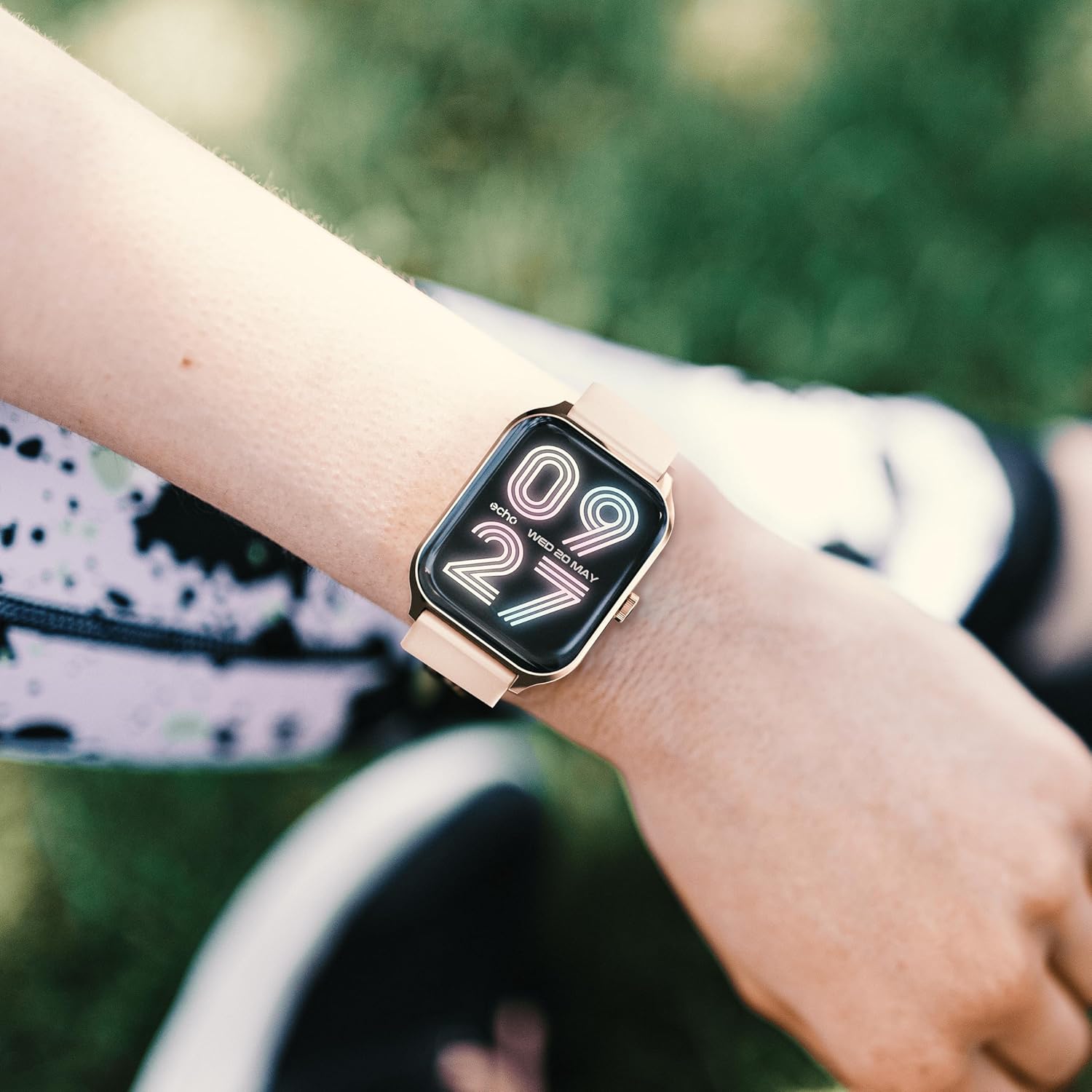
Image: The ECHO RAINBOW PRO Smartwatch worn on a wrist, displaying a digital watch face with the current time and date.

Image: A close-up of the ECHO RAINBOW PRO Smartwatch's screen, showing a clear digital time display along with battery status, step count, and temperature.
Fanaraha-maso ara-pahasalamana
Your smartwatch is equipped with advanced sensors to help you monitor your health.
- Ny tahan'ny fo: Access the heart rate function on your watch or through the app. Ensure the watch is snug on your wrist for accurate readings.
- Tosi-drà: Follow the instructions on the watch screen or app for taking a blood pressure measurement.
- Ra oksizenina (SpO2): Measure your blood oxygen saturation levels. Remain still during the measurement.
- ECG (Electrocardiogram): Use the ECG function as directed by the app to record your heart's electrical activity.
Zava-dehibe: The health data provided by this device is for reference only and should not be used for medical diagnosis or treatment. Always consult a qualified medical professional for any health concerns.
Activity and Sports Modes
Track your daily activity and specific workouts.
- Pedometer: Manara-maso ho azy ny dinganao, ny halavirana ary ny kaloria may nandritra ny andro ny famantaranandro.
- Fomba fanatanjahantena: Select from various sports modes (e.g., running, cycling, walking) to track specific workout data like duration, heart rate zones, and calories.
- Personalized Goals: Set daily activity goals within the companion app to stay motivated.
Fanaraha-maso ny torimaso
Wear your smartwatch to bed to monitor your sleep patterns. The app will provide detailed analysis of your sleep stages (deep, light, REM) and sleep quality.
Fanaraha-maso ny tsingerin'ny fadimbolana
For female users, the app offers menstrual cycle tracking. Input your cycle data into the app to receive predictions and insights.
Smart Connectivity
Stay connected without constantly checking your phone.
- Fampandrenesana: Receive call, message, and app notifications directly on your wrist. Customize notification settings in the app.
- Fanaraha-maso Smartphone: Control certain smartphone functions, such as music playback or camera shutter, directly from your watch.
Fiainana bateria
The ECHO RAINBOW PRO Smartwatch offers an extended battery life, typically requiring a recharge only every 5 days, depending on usage. To maximize battery life:
- Ahena ny famirapiratry ny efijery.
- Disable continuous heart rate monitoring (if continuous monitoring is enabled).
- Turn off unnecessary notifications.
fikarakarana
Manadio ny Smartwatch-nao
- Fafao amin'ny lamba malefaka tsy misy volo ny efijerin'ny famantaranandro sy ny vatany. Raha ilaina,ampkobanina kely amin'ny rano ny lamba.
- For the metal strap, use a soft brush to gently clean between links. For the silicone strap, wash with mild soap and water, then rinse thoroughly.
- Hamarino tsara fa maina tsara ny famantaranandro alohan'ny hamandrihana na hanaovana azy.
- Avoid using harsh chemicals, abrasive cleaners, or solvents, as these can damage the watch's finish.
Water Resistance
The ECHO RAINBOW PRO Smartwatch is designed to be resistant to splashes and sweat. It is suitable for daily use and light exercise. However, it is not recommended for swimming, showering, or diving. Prolonged exposure to water or use in high-pressure water environments may cause damage.
Fanamboarana
| OLANA | Antony mety / Vahaolana |
|---|---|
| Tsy mirehitra ny famantaranandro. | Battery might be depleted. Charge the watch for at least 30 minutes. If it still doesn't turn on, try a different charging port or adapter. |
| Tsy afaka mifandray amin'ny smartphone. |
|
| Inaccurate health readings. |
|
| Tsy voaray ny fampahafantarana. |
|
| Fohy ny fiainana bateria. |
|
fepetra arahana
| endri-javatra | antsipirihany |
|---|---|
| Laharana modely | e40c8026-5752-4c6b-9f6c-f5735f7e9eaf |
| Karazana bateria | 1 Lithium-ion (tafiditra) |
| Ny fiainana bateria mahazatra | Hatramin'ny 5 andro (miankina amin'ny fampiasana) |
| Ny haben'ny fonosana | 18.1 x 10.6 x 3.5 cm |
| Lanja entana | 20 grams (watch body only, approximate) |
| mpanamboatra | Samsung (as per product data) |
| Firenena nihaviana | CHINE |
| fifandraisana | Bluetooth (compatible with all smartphones) |
| Health Sensors | ECG, Blood Pressure, Blood Oxygen (SpO2), Heart Rate, Sleep Tracker, Pedometer |
| Included Straps | 1 Metal Strap, 1 Silicone Strap |
Warranty sy fanohanana
For warranty information and customer support, please refer to the warranty card included in your product packaging or visit the official ECHO website.
If you encounter any issues not covered in this manual, please contact our customer service team for assistance.
- Fanohanana an-tserasera: www.echo.com/support (exampny rohy, azafady jereo ny antontan-taratasy momba ny vokatra tena izy)
- Fanohanana mailaka: support@echo.com (exampny mailaka)


