1. Fampidirana
This manual provides essential information for the safe and efficient operation of your Ulefone Armor Pad 2 Rugged Tablet. Please read this manual thoroughly before using the device to ensure proper functionality and to prevent damage. Keep this manual for future reference.
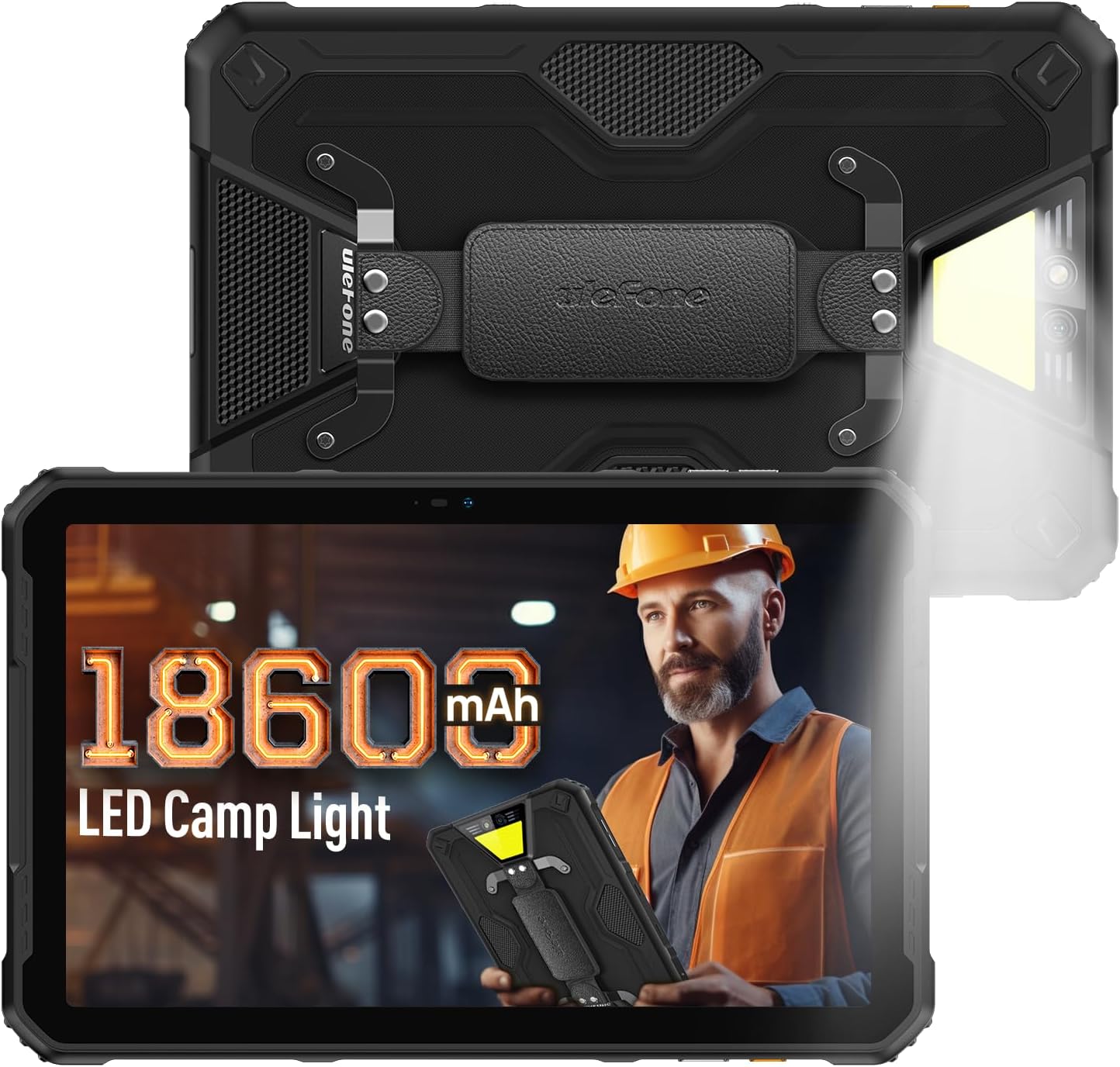
Figure 1: Ulefone Armor Pad 2 Rugged Tablet. This image displays the tablet from both front and back angles, highlighting its robust design and integrated campamin'ny hazavana.
2. Ny votoatin'ny fonosana
Hamarino fa misy ny entana rehetra ao anaty fonosana:
- 1 x Ulefone Armor Pad 2 Tablet
- 1 x AC Power Charger
- 1 x USB Type-C 2.0 Charging Cable
- 1 x Fehin-tanana
- 1 x Screwdriver
- 8 x Screws (for hand strap attachment)
- 1 x Protective Film (Pre-installed)
- 1 x SIM fanjaitra
- 1 x User Manual (ity antontan-taratasy ity)
Video 1: Armor Pad 2 Unboxing Video. This video demonstrates the unboxing process and shows all included accessories.
3. Fametrahana fitaovana
Familiarize yourself with the physical components and ports of your Armor Pad 2 tablet.

Sary 2: Tapitraview of Ulefone Armor Pad 2 features. This image highlights various components such as the camera, camping light, uSmart connector, and buttons.
- Fakan-tsary eo anoloana: 16MP ho an'ny antso an-tsary sy selfie.
- Aseho: 11-inch 2K display with Corning Gorilla Glass 5.
- Bokotra hery: Located on the side, typically integrated with the fingerprint sensor.
- Botom-peo: Amboary ny haavon'ny feo.
- lakile manokana: Programmable button for quick access to functions (e.g., PTT, flashlight).
- Port USB Type-C: Ho an'ny fiampangana sy famindrana angona.
- 3.5mm Audio Jack: Ho an'ny écouteur.
- Slot karatra SIM/TF: Supports dual Nano SIM cards and one TF card.
- Fakantsary aoriana: Fakan-tsary lehibe 48MP.
- Campamin'ny hazavana: 750 lumens LED light with multiple modes.
- uSmart Expansion Connector: For connecting compatible external accessories.
- Fanamafisam-peo Stereo Roa Sosona: Front-facing for clear and balanced audio.
4. Fametrahana
4.1 Herin'ny voalohany
- Press and hold the Power Button (usually on the side) until the Ulefone logo appears.
- Araho ny bitsika eo amin'ny efijery hamita ny fanamboarana voalohany, ao anatin'izany ny fifantenana fiteny, ny fifandraisana Wi-Fi, ary ny fananganana kaonty Google.
4.2 Fametrahana karatra SIM/TF
- Tadiavo ny slot karatra SIM/TF eo amin'ny sisin'ny takelaka.
- Use the provided SIM needle to gently eject the card tray.
- Place your Nano SIM cards and/or TF card into the tray according to the diagram on the tray. Ensure correct orientation.
- Carefully reinsert the card tray into the slot until it clicks into place.
4.3 Fametrahana ny takelaka
- Ampifandraiso amin'ny seranan-tsambo fiampangana ny takelaka ny tariby USB Type-C.
- Connect the other end of the cable to the AC Power Charger.
- Plug the AC Power Charger into a wall outlet.
- Ny famantarana famandrihana eo amin'ny efijery dia hampiseho ny satan'ny famandrihana.
- For optimal charging, use the provided Ulefone charger and cable.

Figure 3: Battery and Charging Features. This image illustrates the tablet's large 18600mAh battery capacity, 33W fast charging capability, and support for reverse charging.
5. Fampandehanana fototra
5.1 Power On/off
- Herim-batana: Press and hold the Power Button until the device vibrates and the screen lights up.
- Mamono hery: Press and hold the Power Button for a few seconds, then select "Power off" from the options on the screen.
- Haverina velomina: Press and hold the Power Button for a few seconds, then select "Restart" from the options.
5.2 Fihetsehana amin'ny efijery tactile
Navigate your tablet using standard Android gestures:
- Peho: Misafidiana singa iray na manaova asa iray.
- Mikasika sy mihazona: Midira amin'ny menio contextual na tariho ireo zavatra.
- Swipe: Mandehana amin'ny efijery, lisitra, na atiny.
- Pinch-to-Zoom: Zoom in na out of sary ary web pejy.
5.3 Custom Key Functions
The custom key on the side of the tablet can be programmed for various shortcuts:
- Access settings to assign single-click, double-click, and long-press actions.
- Common assignments include Push-to-Talk (PTT), flashlight, or quick camera launch.
5.4 Fomba fampiasana fonon-tanana
Activate Glove Mode in settings to enable touchscreen responsiveness while wearing gloves, ideal for outdoor or industrial environments.
6. Endri-javatra fototra
6.1 Endrika matanjaka
The Armor Pad 2 is built to withstand harsh conditions:
- IP68/IP69K Rated: Certified for water and dust resistance.
- Nahazo mari-pahaizana MIL-STD-810H: Meets military standards for durability against drops, shocks, and extreme temperatures.
- Corning Gorilla Glass 5: Enhanced scratch and drop resistance for the display.

Figure 4: Ruggedness features. This image demonstrates the tablet's water, dust, and drop resistance, highlighting its IP68/IP69K and MIL-STD-810H certifications.
6.2 Fampisehoana
Experience clear visuals on the 11-inch 2K display:
- Habe: 11-inch.
- fanapahan-kevitra: 2K (2000x1200 pixels).
- Famirapiratana: 500 nits for visibility in various lighting conditions.

Figure 5: 11-inch 2K Display. This image showcases the vibrant display protected by Corning Gorilla Glass 5.
6.3 Fampisehoana
The tablet is powered by a MediaTek Helio G99 processor, ensuring smooth operation:
- Processeur: MediaTek Helio G99 (8-core, 2.2GHz, 6nm).
- RAM: Up to 16GB (8GB physical + 8GB virtual).
- Fitehirizana anatiny: 256GB.
- Fitehirizana azo itarina: Up to 2TB via TF card.
- Rafitra fikirakirana: Android 13.

Figure 6: Performance specifications. This image details the MediaTek Helio G99 chipset, RAM, and ROM capabilities of the tablet.
6.4 Cameras
Capture moments with the integrated cameras:
- Fakantsary aoriana: 48MP.
- Fakan-tsary eo anoloana: 16MP.

Figure 7: Camera capabilities. This image shows examples of photos taken with the 48MP rear and 16MP front cameras.
6.5 Fifandraisana
Stay connected with a range of communication options:
- Cellular: 4G Dual SIM Dual Standby (Note: Not compatible with AT&T, Cricket).
- Wifi: Wi-Fi 6 for faster wireless connections.
- Bluetooth: Bluetooth 5.2.
- Fikarohana: GPS + GLONASS + Galileo + BeiDou.
- NFC: Ho an'ny fandoavam-bola tsy misy fifandraisana sy fifanakalozana data.
6.6 Audio
Enjoy immersive sound with:
- Stereo Dual Speakers: Front-facing for clear and balanced audio.
- 3.5mm Audio Jack: Ho an'ny écouteur misy tariby.
6.7 Campamin'ny Fahazavana
The integrated 750 lumens LED camping light provides versatile illumination:
- Famirapiratana: 750 lumens, 383 lighting beads, 5.5 watts.
- Fomba: 3 lighting modes (e.g., Lighting, Sharp Light, SOS).
- Ambaratonga famirapiratana: 3 adjustable levels.
- Activated via a physical button for quick access.

Figure 8: 750LM Camping Light. This image shows the tablet's powerful integrated LED light in use during a camptoe-javatra mitranga.
6.8 uSmart Expansion Connector
Ulefone's exclusive uSmart Expansion offers fast and stable connections to professional tools with plug-and-play convenience. Compatible expansion devices (e.g., endoscope, 1000x microscope) require additional purchases.
Video 2: Ulefone Armor Pad 2 Rugged Tablet Overview. This video demonstrates various features including the uSmart Expansion Connector.
7. Fikojakojana
- Fanadiovana: Ampiasao malefaka, damp cloth to clean the tablet. Avoid harsh chemicals or abrasive materials. Ensure all port covers are securely closed before cleaning with liquids.
- Fiarovana amin'ny rano/vovoka: Always ensure all port covers (USB, audio jack, SIM slot) are firmly sealed to maintain IP68/IP69K water and dust resistance.
- Fikarakarana bateria: Avoid exposing the tablet to extreme temperatures. For long-term storage, charge the battery to approximately 50-70%.
- Fiarovana amin'ny efijery: The tablet comes with a pre-installed protective film. For additional protection, consider using a tempered glass screen protector.
8. Famahana olana
| OLANA | Antony mety hitranga | vahaolana |
|---|---|---|
| Tsy mandeha ny tablette. | Low battery or system crash. | Charge the tablet for at least 30 minutes. If still unresponsive, press and hold the Power Button for 10-15 seconds to force restart. |
| Tsy mamaly ny écran touche. | Software glitch or screen damage. | Restart the tablet. If the issue persists, perform a factory reset (backup data first). If physical damage is suspected, contact support. |
| Tsy afaka mifandray amin'ny Wi-Fi. | Incorrect password, router issue, or tablet Wi-Fi module issue. | Verify Wi-Fi password. Restart router and tablet. Try connecting to other Wi-Fi networks. |
| Poor call quality or no signal. | Weak network signal, incorrect SIM installation, or carrier issue. | Move to an area with better signal. Reinstall SIM card. Contact your mobile carrier for network status. |
| Tablet is slow or freezes. | Too many apps running, low storage, or outdated software. | Close unnecessary apps. Clear cache. Free up storage. Check for system updates. |
9. Famaritana
| endri-javatra | antsipirihany |
|---|---|
| MODELY | Ulefone Armor Pad 2 |
| lafiny | 10.94 x 7 x 0.55 santimetatra |
| lanja | 2.24 kg |
| Rafitra fikirakirana | Android 13 |
| processeur | MediaTek Helio G99 (8-core, 2.2GHz) |
| ram | Hatramin'ny 16GB (8GB ara-batana + 8GB virtoaly) |
| Fitehirizana anatiny | 256GB |
| Fitehirizana azo itarina | Up to 2TB (TF card) |
| miseho | 11-inch 2K (1280 x 800 pixels, 500 nits, Corning Gorilla Glass 5) |
| Fakan-tsary aoriana | 48MP |
| Camera Front | 16MP |
| Fahaizana bateria | 18600mAh |
| fa mamaly ny | 33W Fast Charging, Reverse Charging (OTG) |
| Faharetana | IP68/IP69K, MIL-STD-810H Certified |
| fifandraisana | 4G Dual SIM, Wi-Fi 6, Bluetooth 5.2, NFC |
| Fikarohana | GPS, GLONASS, Galileo, BeiDou |
| Endri-javatra manokana | 750LM Camping Light, uSmart Expansion Connector, Custom Key, PTT, Digital Toolbox, Fingerprint Sensor, Glove Mode, Stereo Dual Speakers |
10. Warranty sy fanohanana
Ulefone products come with a standard manufacturer's warranty. For detailed warranty information, technical support, or service inquiries, please visit the official Ulefone webtranokala na mifandray mivantana amin'ny serivisy mpanjifany. Tehirizo ny tapakila fividiananao ho porofon'ny fividianana ho an'ny fitakiana fiantohana.
Official Ulefone Webtranokala: www.ulefone.com


