1. Fampidirana
Thank you for choosing the Defender Enjoy S200 Portable Bluetooth Speaker. This manual provides essential information for setting up, operating, and maintaining your speaker to ensure optimal performance and longevity. Please read this manual thoroughly before use.
The Defender Enjoy S200 is a versatile portable speaker featuring Bluetooth 5.3 connectivity, True Wireless Stereo (TWS) pairing, an integrated FM radio, and MP3 playback capabilities via USB flash drive or microSD card. It also includes an LED light and supports hands-free calling. Designed for portability, it offers up to 9 hours of playback on a single charge and convenient USB Type-C charging.
2. Vokatra mihoatraview
2.1 Lafin-javatra fototra
- Bluetooth 5.3: Ho an'ny fandefasana feo tsy misy tariby maharitra sy mahomby.
- True Wireless Stereo (TWS): Connect two Enjoy S200 speakers for a stereo sound experience.
- Fomba filalaovana maro: Bluetooth, FM Radio, USB Flash Drive, MicroSD Card (up to 32GB).
- Jiro LED Integrated: Provides visual ambiance.
- Antso tsy misy tanana: Mirofona anatiny ho an'ny antso an-telefaona.
- Fiainana maharitra bateria: Hatramin'ny 9 ora filalaovana mozika mitohy.
- USB Type-C famandrihana: Seranan-tseranana famandrihana maoderina sy mety.
- Famolavolana portable: Compact and lightweight with a carrying strap.
2.2 Ny votoatin'ny fonosana
- Defender Enjoy S200 Portable Bluetooth Speaker
- Tariby fametahana Type-C
- Torolalana fanombohana haingana
- Fitondrana tady

Image: The Defender Enjoy S200 Portable Bluetooth Speaker, showcasing its compact design and front grille with an illuminated LED ring.

Image: An infographic highlighting key features such as multi-colored LED lighting, True Wireless Stereo (TWS) pairing, Bluetooth 5.3, MP3 player, FM receiver, and hands-free calling.
3. Fametrahana
3.1 Fametrahana ny Mpandahateny
- Locate the Type-C charging port on the back of the speaker.
- Connect the provided Type-C charging cable to the speaker and the other end to a USB power adapter (not included) or a computer's USB port.
- Hampiseho ny satan'ny famandrihana ny famantarana LED. Matetika maharitra 3-4 ora eo ho eo ny famandrihana feno.
- Tapaho ny tariby rehefa feno.
3.2 Mamelona/Mamono
- To power on, slide the ON/OFF switch located on the back of the speaker to the 'ON' position.
- Mba hamonoana ny herinaratra dia atsobohy amin'ny toerana 'OFF' ny bokotra ON/OFF.
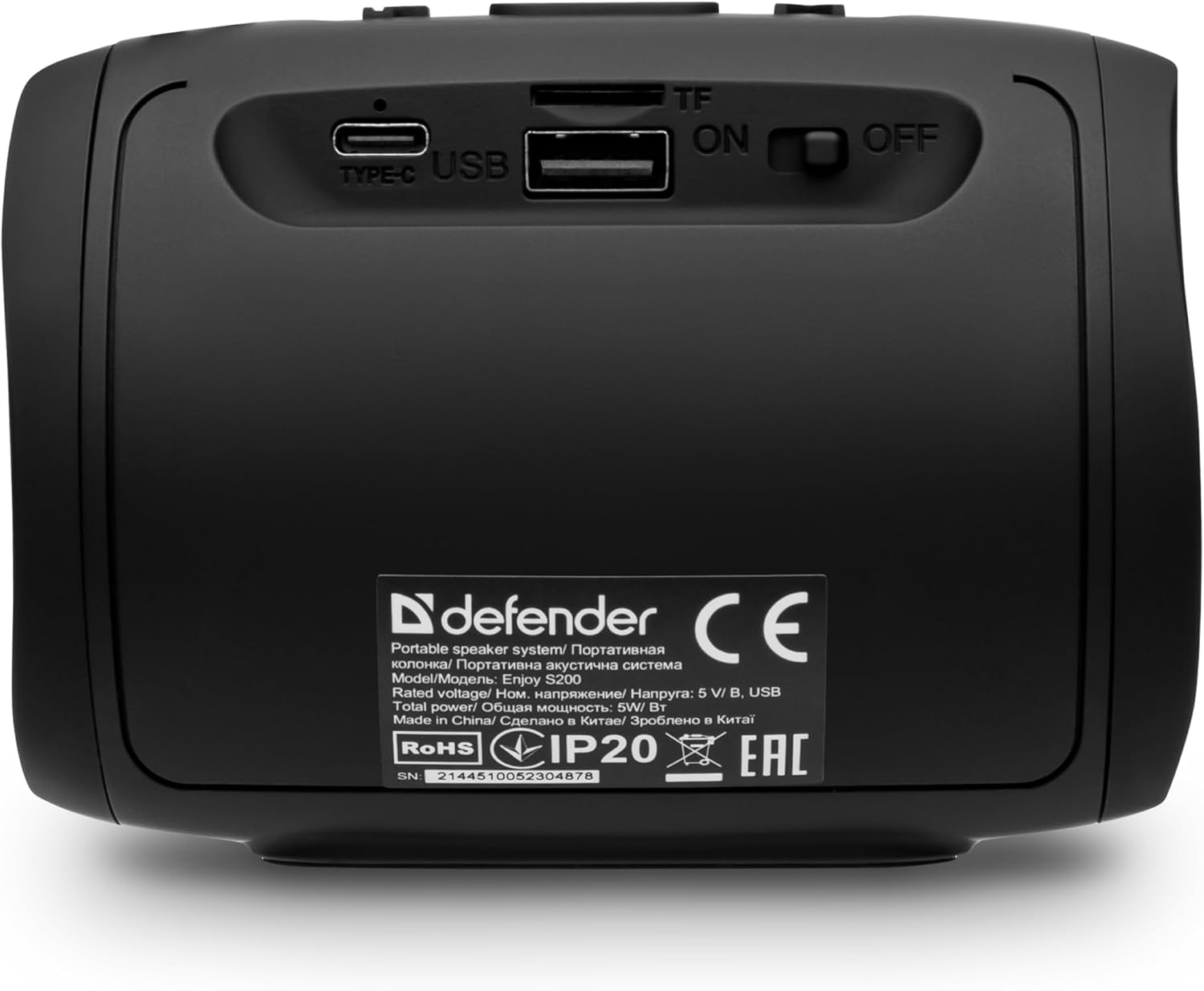
Sary: aoriana view of the Defender Enjoy S200 speaker, showing the Type-C charging port, USB port, TF (microSD) card slot, and the ON/OFF power switch.
3.3 Fanambadiana Bluetooth
- Hamarino tsara fa mandeha ny fanamafisam-peo ary ao amin'ny fomba fampiarahana Bluetooth (aseho amin'ny jiro LED mirehitra).
- Amin'ny fitaovanao (smartphone, tablette, sns.), avelao ny Bluetooth ary tadiavo ireo fitaovana misy.
- Select "Defender Enjoy S200" from the list of devices.
- Rehefa mifandray dia hamoaka feo fanamafisana ny fanamafisam-peo, ary hijanona tsy hiredareda ny LED.
3.4 True Wireless Stereo (TWS).
To pair two Defender Enjoy S200 speakers for stereo sound:
- Hamarino tsara fa samy mandeha ny fanamafisam-peo roa ary tsy mifandray amin'ny fitaovana Bluetooth.
- On one speaker (this will be the primary speaker), press and hold the TWS button (often indicated by a double-arrow icon) until you hear a pairing tone.
- The two speakers will automatically search and connect to each other. A confirmation tone will sound once connected.
- Now, connect your device to the primary speaker via Bluetooth as described in section 3.3. Audio will play in stereo through both speakers.

Image: A visual representation of two Defender Enjoy S200 speakers pairing wirelessly to create a True Wireless Stereo system, alongside icons for Bluetooth 5.3, MP3 player, FM receiver, and hands-free calling.
4. Torolàlana miasa
4.1 Button Functions (Refer to top panel controls)
- Bokotra hery: Long press to power on/off. Short press to play/pause in music mode, or answer/end calls.
- Vola ambony (+): Short press to increase volume. Long press for next track/station.
- Vola midina (-): Short press to decrease volume. Long press for previous track/station.
- Bokotra Mode (M): Short press to switch between Bluetooth, FM Radio, USB, and MicroSD modes.
- Bokotra fahazavana LED: Short press to cycle through LED light modes or turn off the LED.
4.2 Bluetooth Playback
After successful Bluetooth pairing (Section 3.3), open your music application on your device and begin playback. Use the speaker's volume buttons or your device's volume controls to adjust the audio level.
4.3 FM Radio Mode
- Press the 'M' (Mode) button until you hear the FM radio prompt.
- Long press the Play/Pause button to automatically scan and save available FM stations.
- Use the Volume Up (+) and Volume Down (-) buttons (long press) to navigate between saved stations.
Famerenana amin'ny USB/MicroSD 4.4
- Insert a USB flash drive or a microSD card (up to 32GB) containing MP3 audio files into the respective port on the back of the speaker.
- Press the 'M' (Mode) button until the speaker automatically switches to USB or MicroSD mode and begins playback.
- Use the speaker's control buttons for play/pause, next track, and previous track.
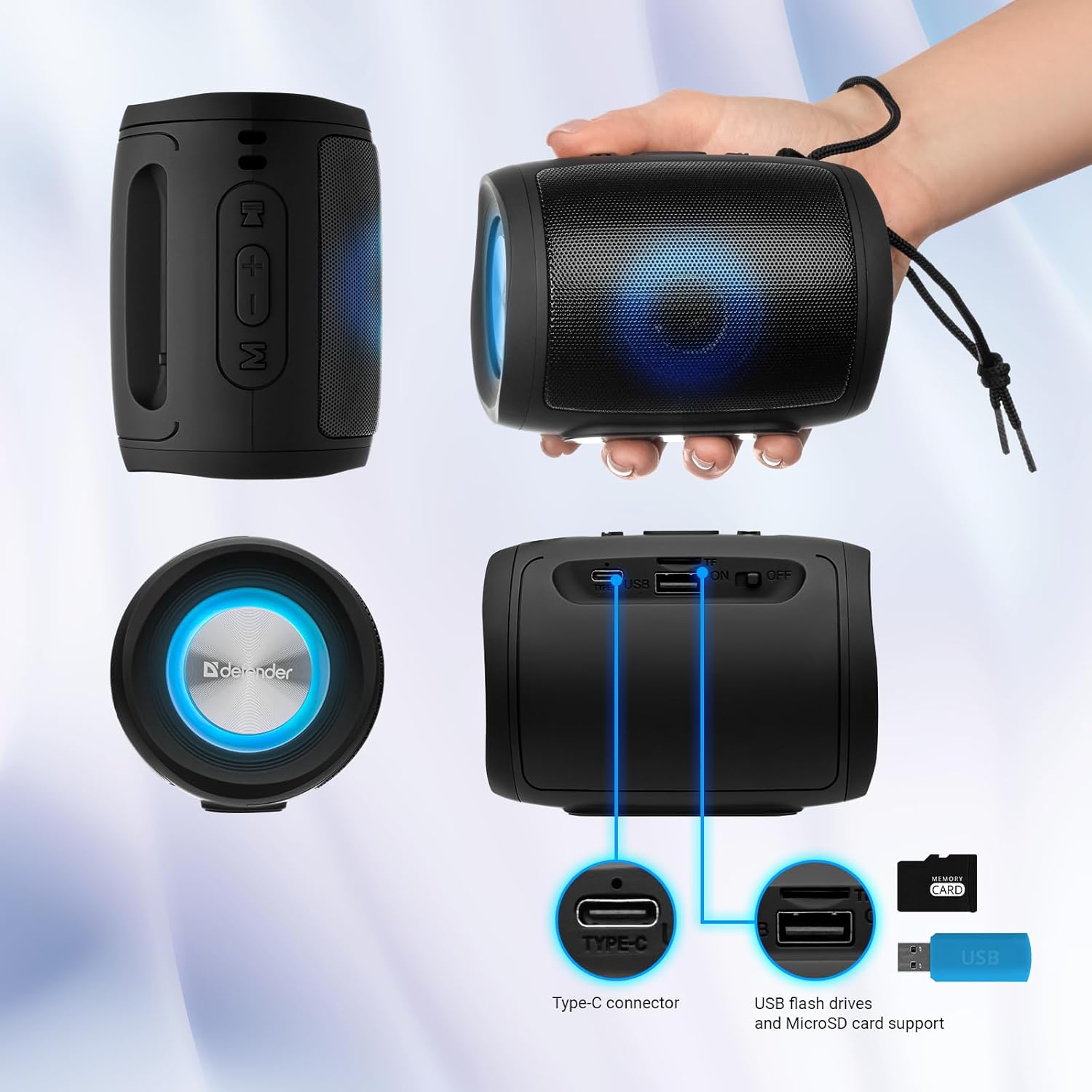
Image: A detailed diagram illustrating the Type-C connector, USB flash drive port, and MicroSD card slot on the Defender Enjoy S200 speaker.
4.5 Antso an-tanana tsy misy tànana
When connected to your smartphone via Bluetooth, the speaker's built-in microphone allows for hands-free calls.
- Valio ny antso: Tsindrio fohy ny bokotra Play/Pause.
- Hamarana ny antso: Tsindrio fohy ny bokotra Play/Pause.
- Mandà ny antso: Tsindrio lava ny bokotra Play/Pause.
5. Fikojakojana
- Fanadiovana: Mampiasà lamba malefaka sy maina hanadiovana ny velaran'ny fanamafisam-peo. Aza mampiasa mpanadio na solvents mikikisana.
- fitahirizana: Tehirizo ao amin'ny toerana mangatsiatsiaka sy maina ny mpandahateny lavitry ny tara-masoandro mivantana sy ny hafanana tafahoatra.
- fanoherana ny rano: The speaker has an IP20 rating, meaning it is protected against solid objects larger than 12.5mm but has no protection against water. Avoid exposure to rain, splashes, or immersion in water.
- Fikarakarana bateria: Mba hanalavana ny androm-piainan'ny bateria dia fenoy tanteraka ny fanamafisam-peo alohan'ny hampiasana azy voalohany ary avereno ampiasaina farafahakeliny indray mandeha isaky ny telo volana raha tsy ampiasaina matetika.
6. Famahana olana
- Tsy misy hery: Ensure the speaker is charged. Connect the Type-C cable and allow it to charge for a few minutes before attempting to power on again.
- Tsy misy feo: Check the volume levels on both the speaker and your connected device. Ensure the speaker is in the correct mode (Bluetooth, FM, USB, MicroSD).
- Olana fampiarahana Bluetooth: Ensure the speaker is in pairing mode. Turn off Bluetooth on your device and turn it back on. Try unpairing and re-pairing the speaker. Move closer to the speaker to ensure you are within the 10-meter range.
- FM Radio Reception Poor: Ensure you are in an area with good signal. The charging cable can sometimes act as an antenna; try connecting it for improved reception.
- USB/MicroSD Not Playing: Ataovy azo antoka ny feo files are in a compatible format (e.g., MP3). Check that the USB drive or microSD card is inserted correctly and is not corrupted.
7. Famaritana
| Anarana modely | Ankafizo ny S200 |
| Laharana modely | 65200 |
| Marika | Mpiaro |
| Teknolojia fifandraisana | Bluetooth 5.3, USB |
| Wireless Communication Technology | Bluetooth, Radio Frequency |
| Karazana mpandahateny | Multimedia |
| Haben'ny mpandahateny | 2 santimetatra |
| Famoahana herinaratra | 5 Watts |
| Audio Output Mode | Stereo |
| Loharanon-kery | Battery Powered (1 Lithium-ion bateria misy) |
| Endri-javatra manokana | Integrated Microphone, USB Port, Portable Bluetooth, LED Light, FM Radio, MicroSD Card Support, TWS |
| Haben'ny vokatra (L x W x H) | 8 x 11 x 8 cm |
| lanja | 330 grama |
| Faritra faratampony | 10 metatra |
| IP Rating | IP20 |
8. Warranty sy fanohanana
8.1 Fampahalalana momba ny fiantohana
Ny antsipirian'ny antoka manokana dia mazàna omena miaraka amin'ny antontan-taratasin'ny fividiananao na ao amin'ny taratasy ofisialin'ny mpanamboatra. website. Please refer to these resources for information regarding warranty coverage and duration.
8.2 Fanohanana ny mpanjifa
For technical assistance, troubleshooting beyond this manual, or inquiries about your Defender Enjoy S200 speaker, please contact Defender Global customer support. Contact information can usually be found on the product packaging, the manufacturer's webtranonkala, na ny rosia nividiananao.


