1. Fampidirana
Thank you for choosing the Havit H2038U RGB Wired Gaming Headset. This manual provides essential information for setting up, operating, and maintaining your headset. Please read it carefully to ensure optimal performance and longevity of your product.
fampahalalana manan-danja momba ny fiarovana:
- Fadio ny mihaino amin'ny feo avo be mandritra ny fotoana maharitra mba hisorohana ny fahasimban'ny fandrenesana.
- Aza atao amin'ny mari-pana tafahoatra, hamandoana tafahoatra, na zavatra manimba ny headset.
- Arovy amin'ny rano sy ranoka ny écouteur.
- Aza manandrana manala na manova ny headset. Hanafoana ny fiantohana izany.
2. Vokatra mihoatraview
2.1 Ny votoatin'ny fonosana
- Havit H2038U RGB Wired Gaming Headset
- Microphone azo esorina
- User Manual (ity antontan-taratasy ity)
2.2 Singa ao amin'ny écouteur
The Havit H2038U headset features a comfortable over-ear design with soft earcups and an adjustable headband. It includes a detachable microphone for clear communication and integrated RGB lighting for an enhanced gaming experience.

Sary 2.1: anoloana view of the Havit H2038U RGB Wired Gaming Headset. This image displays the white over-ear headphones with RGB lighting elements on the earcups and the adjustable headband.
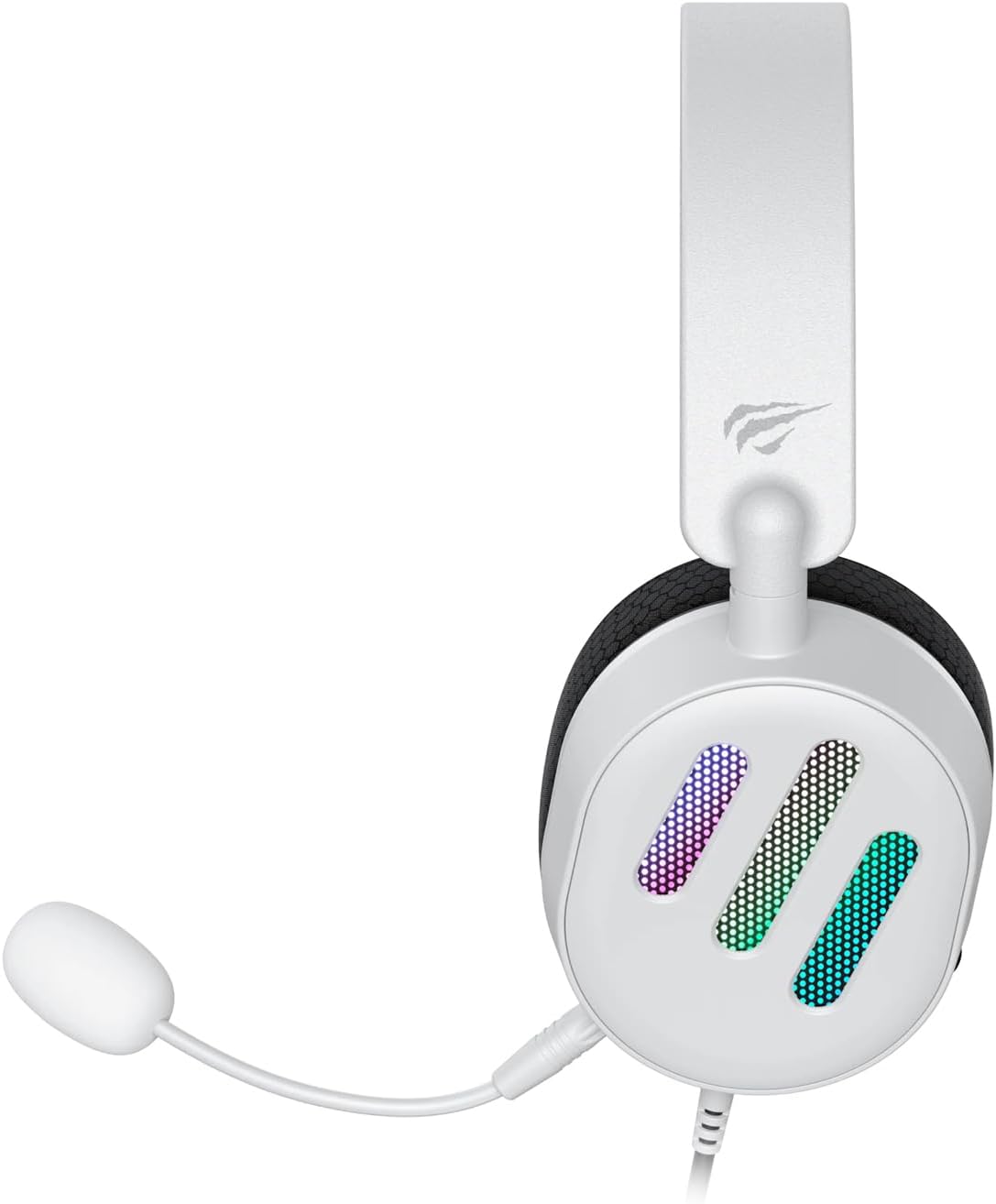
Sary 2.2: sisiny view of the Havit H2038U RGB Wired Gaming Headset, showing the detachable microphone connected to the left earcup. The volume control wheel is also visible on the earcup.

Sary 2.3: Top view of the Havit H2038U RGB Wired Gaming Headset, highlighting the adjustable headband and the soft, breathable earcups.
3. Fametrahana
The Havit H2038U headset utilizes a dual-connection system for full functionality: a 3.5mm jack for audio and a USB connection for RGB lighting and virtual 7.1 surround sound.

Sary 3.1: Akaiky view illustrating the detachable microphone connection (3.5mm jack) and the USB connection for the Havit H2038U headset. This image also indicates 360-degree sound direction and 7.1 USB connectivity.
- Mampifandray ny mikrô: Insert the detachable microphone into the 3.5mm microphone jack located on the left earcup until it clicks into place. Ensure it is securely connected.
- Connect for Audio: Plug the 3.5mm audio jack from the headset into the corresponding audio output port on your computer, gaming console, or mobile device.
- Connect for RGB Lighting and 7.1 Surround Sound: Plug the USB connector from the headset into an available USB port on your computer or gaming console. This connection powers the RGB lighting and enables the virtual 7.1 surround sound feature.
- Amboary ny mety amin'ny écouteur: Adjust the headband to ensure a comfortable and secure fit over your ears. The earcups should fully enclose your ears for optimal sound isolation.
- System Configuration (for PC):
- Audio Output: Go to your operating system's sound settings and ensure the Havit H2038U is selected as the default playback device.
- Fidirana mikrofona: In the sound settings, select the Havit H2038U as the default recording device.
- 7.1 Feon'ny manodidina: If applicable, install any necessary drivers from the Havit official website to enable and configure the virtual 7.1 surround sound feature.
4. Torolàlana miasa
4.1 Fanaraha-maso ny volume
The headset features an integrated volume control wheel, typically located on the left earcup or inline on the cable. Rotate the wheel to increase or decrease the audio volume.
4.2 Fampiasana mikrôfôna
The detachable microphone can be positioned for optimal voice pickup. Adjust its flexible arm to bring the microphone close to your mouth, ensuring clear communication. For privacy, you may mute the microphone using software settings on your device if no physical mute button is present on the headset.
4.3 Jiro RGB
The RGB lighting on the earcups is powered via the USB connection. Once connected, the lighting will activate automatically. Specific control options for lighting patterns or colors may be available through dedicated software, if provided by Havit.

Sary 4.1: The Havit H2038U RGB Wired Gaming Headset displayed with its active RGB lighting feature, showcasing the illuminated earcups.
4.4 Feo Manodidina Virtoaly 7.1
When connected via USB, the headset supports virtual 7.1 surround sound. This feature enhances spatial audio awareness in games and media. Ensure relevant drivers are installed and configured through your system's sound settings or Havit's software for optimal experience.

Sary 4.2: An illustrative image demonstrating the virtual 7.1 surround sound capability of the Havit H2038U headset, enhancing immersive audio experiences.
5. Fikojakojana
5.1 Fanadiovana
- Use a soft, dry cloth to wipe the exterior surfaces of the headset.
- Ho an'ny sofina, fafao moramora amin'ny servieta kelyamp lamba ary avela ho maina tanteraka amin'ny rivotra alohan'ny hampiasana azy.
- Aza mampiasa akora simika mahery vaika, solvents, na fanadiovana maloto.
5.2 Fitehirizana
When not in use, store the headset in a clean, dry place, away from direct sunlight and extreme temperatures. Avoid tangling the cables to prevent damage.
6. Famahana olana
| OLANA | Antony mety hitranga | vahaolana |
|---|---|---|
| Tsy misy feo avy amin'ny headset | 3.5mm jack not fully inserted; incorrect audio output selected; volume too low. | Ensure 3.5mm jack is fully connected. Check system sound settings to select Havit H2038U as default playback device. Increase volume using the headset's control wheel and system volume. |
| Microphone tsy mandeha | Microphone not fully inserted; incorrect input device selected; microphone muted. | Ensure microphone is securely attached. Check system sound settings to select Havit H2038U as default recording device. Unmute microphone in software settings. |
| Tsy mandeha ny jiro RGB | USB cable not connected; faulty USB port. | Ataovy azo antoka fa tafiditra tsara ao amin'ny seranana USB miasa ny tariby USB. Andramo seranana USB hafa. |
| 7.1 Surround Sound not active | USB cable not connected; drivers not installed/configured. | Ensure the USB cable is connected. Install and configure necessary drivers from the Havit official website. |
7. Famaritana
| endri-javatra | famaritana |
|---|---|
| MODELY | H2038U |
| Teknolojia fifandraisana | Wired (3.5mm Jack + USB) |
| Efitrano endrika endrika | Over sofina |
| Impedance | 24 ohm |
| Famaliana matetika | 20 Hz - 20 KHz |
| fahatsapana | 114 dB |
| Karazana fanaraha-maso | Volume Control, Push Button |
| KEVITRA | plastika |
| Lanja entana | 550 g |
| Ny refin'ny vokatra | 11.2 x 21.9 x 28.5 cm |
| loko | White |
| Endri-javatra manokana | RGB Lighting, Detachable Microphone, Virtual 7.1 Surround Sound |
8. Warranty sy fanohanana
Havit products are designed for reliability and performance. For information regarding warranty coverage, technical support, or service, please refer to the warranty card included with your product or visit the official Havit website. Tehirizo ny tapakila fividiananao ho porofon'ny fividianana ho an'ny fitakiana fiantohana.
Antsipiriany ifandraisana:
- Official Havit Webtranokala: www.havit.com (Jereo azafady raha misy faritra websites for specific support)


