1. Fampidirana
The Zebronics Astra 30 is a portable Bluetooth speaker designed for a versatile audio experience. It features 14W output, dual 52mm drivers, dual passive radiators for enhanced bass, and multiple connectivity options including Bluetooth v5.3, FM radio, AUX, USB, and mSD card support. This manual provides instructions for setting up, operating, and maintaining your speaker.
2. Ny votoatin'ny fonosana
Azafady, jereo ny fonosana ho an'ireto zavatra manaraka ireto:
- Speaker - 1 unit
- Charging cable - 1 unit
- User manual - 1 unit
3. Vokatra mihoatraview
Fantaro ny singa sy ny fanaraha-maso ataon'ny mpandahateny.

Sary 3.1: anoloana view of the Zebronics Astra 30 speaker, showcasing its sleek black design and speaker grille.
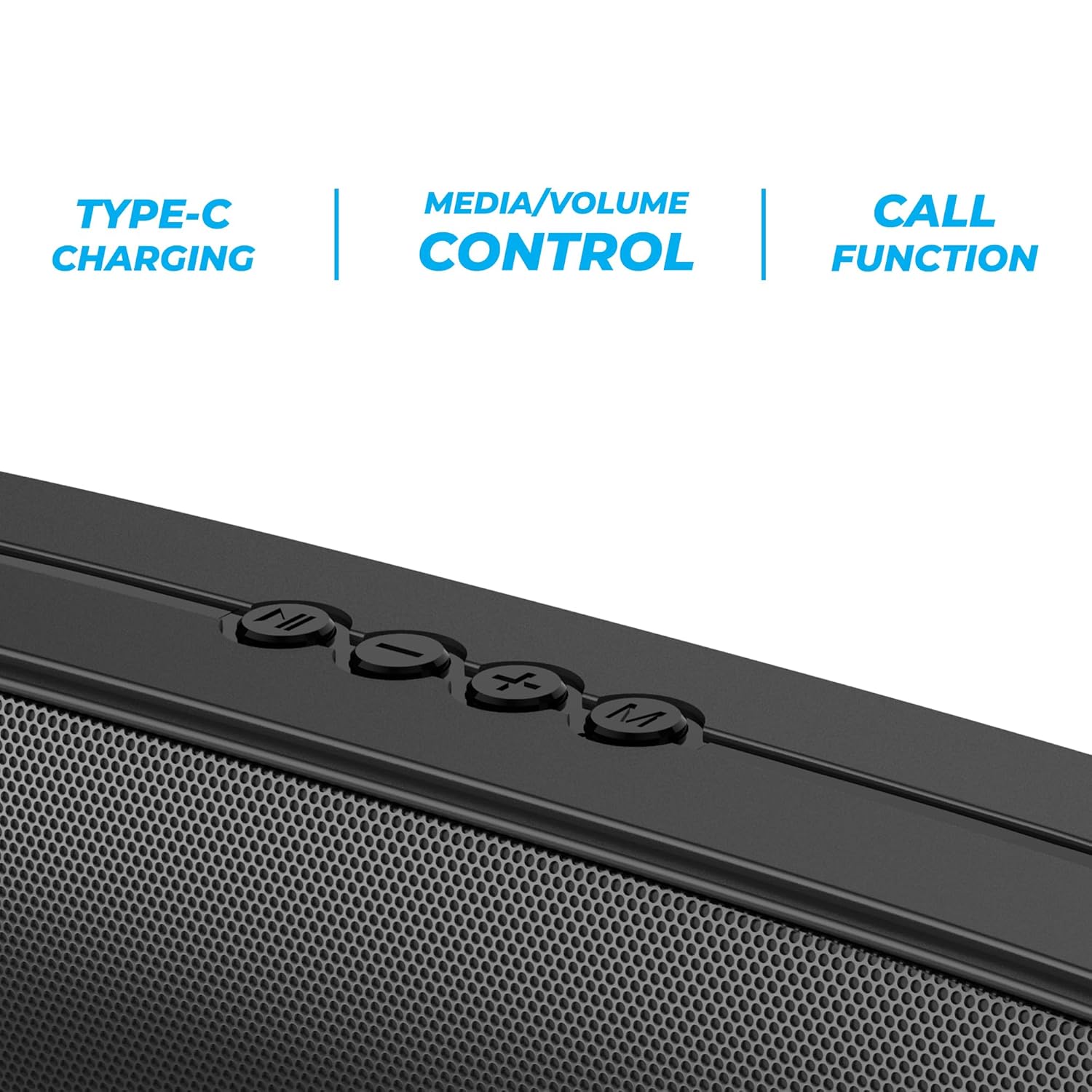
Sary 3.2: Close-up of the control panel buttons on the top of the speaker, including power, volume, and mode controls.

Sary 3.3: aoriana view of the speaker showing the multi-connectivity ports: USB, Micro SD slot, AUX input, and Type-C charging port.
4. Fametrahana
4.1 Fametrahana ny Mpandahateny
Before initial use, fully charge the speaker. The Zebronics Astra 30 features a built-in rechargeable battery with Type-C charging.
- Ampifandraiso amin'ny seranana famandrihana eo amin'ny fanamafisam-peo ny tariby famandrihana Type-C omena.
- Ampifandraiso amin'ny adaptatera herinaratra USB (tsy tafiditra) na port USB an'ny solosaina ny faran'ny tariby hafa.
- The charging indicator will illuminate during charging and turn off once fully charged.
A full charge takes approximately 4 hours and provides up to 12 hours of playback time at 50% volume.

Sary 4.1: Illustration indicating the speaker's 12-hour playback capability on a single charge.
4.2 Mamelona/Mamono
To power on or off the speaker, press and hold the power button located on the control panel until you hear an audible prompt or see the indicator light change.
5. Torolàlana miasa
5.1 Fanambadiana Bluetooth
The Zebronics Astra 30 uses Bluetooth v5.3 for wireless audio streaming.
- Alefaso ny fanamafisam-peo. Hiditra ho azy amin'ny fomba fampifandraisana Bluetooth izy io, asehon'ny jiro LED mirehitra.
- Alefaso ny Bluetooth amin'ny findainao, takelakao, na fitaovana hafa.
- Hitady ny "ZEB-ASTRA 30" in the list of available Bluetooth devices.
- Select "ZEB-ASTRA 30" to connect. Once paired, the speaker will confirm with an audible tone, and the LED will stop flashing.
- Raha asaina tenimiafina dia midira "0000".
5.2 Asa True Wireless Stereo (TWS)
Connect two Zebronics Astra 30 speakers for a true wireless stereo experience.
- Ensure both ZEB-ASTRA 30 speakers are powered on and not connected to any Bluetooth device.
- On one of the speakers (this will be the primary speaker), press and hold the TWS button (often combined with the Mode button) until you hear a pairing tone.
- Hifandray ho azy ireo fanamafisam-peo roa. Rehefa mifandray dia handre feo fanamafisana ianao.
- Now, connect your device to the primary speaker via Bluetooth as described in Section 5.1. Audio will play in stereo through both speakers.

Sary 5.1: Visual representation of two Zebronics Astra 30 speakers connected via TWS for stereo sound.
5.3 FM Radio Mode
Mba hampiasana ny radio FM tafiditra ao anatiny:
- Hery amin'ny mpandahateny.
- Press the 'M' (Mode) button to switch to FM radio mode.
- To auto-scan and save available FM stations, press and hold the Play/Pause button. The speaker will scan and store stations automatically.
- Use the Previous/Next track buttons to navigate between saved stations.
- For optimal reception, ensure the charging cable is connected as an antenna.
5.4 Fomba fidirana AUX
Connect external audio devices using the AUX input:
- Hery amin'ny mpandahateny.
- Tsindrio ny bokotra 'M' (Mode) raha hifindra amin'ny fomba AUX.
- Ampifandraiso amin'ny seranana AUX amin'ny mpandahateny ny tendrony iray amin'ny tariby audio 3.5mm (tsy tafiditra).
- Connect the other end to the audio output of your device (e.g., smartphone, MP3 player).
- Handefa feo amin'ny alalan'ny fanamafisam-peo avy amin'ny fitaovanao mifandray izao ny fitaovana.
5.5 USB and Micro SD Card Playback
Milalao feo files directly from a USB pen drive or Micro SD card:
- Hery amin'ny mpandahateny.
- Insert a USB pen drive (up to 32GB) or a Micro SD card into the respective slot.
- Ho hitan'ny fanamafisam-peo ho azy ny fitaovana fitahirizana ary hanomboka handefa feo izy files. If not, press the 'M' (Mode) button to switch to USB or SD card mode.
- Use the Play/Pause and Previous/Next track buttons to control playback.
5.6 Fampiasa antso
Rehefa mifandray amin'ny finday avo lenta amin'ny alàlan'ny Bluetooth ny fanamafisam-peo dia azo ampiasaina amin'ny antso tsy misy tànana.
- Valio/Atsaharo ny antso: Tsindrio indray mandeha ny bokotra Play/Pause.
- Mandà ny antso: Tsindrio ary hazòny ny bokotra Play/Pause.
- Avereno antsoy ny isa farany: Tsindrio indroa ny bokotra Play/Pause.
5.7 Volume and Media Control
The speaker features integrated controls for audio playback:
- Fiakaram-peo: Tsindrio ny bokotra '+'.
- Mihena ny feo: Tsindrio ny bokotra '-'.
- Track manaraka: Tsindrio ary hazòny ny bokotra '+'.
- Làlana teo aloha: Tsindrio ary hazòny ny bokotra '-'.
- Play/Pause: Tsindrio ny bokotra Play/Pause.
6. Fikojakojana
- Diovy amin'ny lamba malefaka sy maina ny fanamafisam-peo. Aza mampiasa akora simika mahery vaika na mpanadio mikikitra.
- Arovy amin'ny mari-pana tafahoatra, ny tara-masoandro mivantana ary ny hamandoana ny fanamafisam-peo.
- Fadio ny fandatsahana na ny fanerena ny mpandahateny amin'ny fiantraikany mahery vaika.
- Tehirizo ao amin'ny toerana mangatsiatsiaka sy maina ny mpandahateny rehefa tsy ampiasaina mandritra ny fotoana maharitra.
- The speaker is rated as waterproof. However, avoid submerging it in water for prolonged periods. Ensure the port cover is securely closed to maintain water resistance.
7. Famahana olana
| OLANA | Vahaolana mety |
|---|---|
| Tsy mandeha ny fanamafisam-peo. | Hamarino tsara fa feno tsara ny bateria. Ampifandraiso amin'ny loharanon-kery ny fanamafisam-peo amin'ny alàlan'ny tariby Type-C. |
| Tsy afaka mampiaraka amin'ny alalan'ny Bluetooth. |
|
| Tsy misy feo na feo ambany. |
|
| Ratsy ny fandraisana radio FM. | Ensure the Type-C charging cable is connected to act as an antenna. Try repositioning the speaker. |
| Tsy nahomby ny fampiarahana TWS. |
|
8. Famaritana
| endri-javatra | antsipirihany |
|---|---|
| Anarana modely | ZEB-ASTRA 30 |
| Hery mivoaka | 14 Watts |
| Haben'ny mpamily | Dual 52mm |
| Bluetooth Version | v5.3 |
| Safidy fifandraisana | Bluetooth, FM, AUX, USB, Micro SD |
| USB/Micro SD Max Capacity | 32GB |
| Fiainana bateria | Hatramin'ny 12 ora (amin'ny 50% volume) |
| Time Charging | 4 ora |
| Karazana famandrihana | Type-C |
| Water Resistance | Tsy tantera-drano |
| Haben'ny vokatra (D x W x H) | 5.7 x 35.4 x 6.5 santimetatra |
| Lanja entana | 645g ny |
| Impedance | 3 ohm |
| Famaritana fanamafisam-peo | 75 dB |

Sary 8.1: Graphic highlighting the 14W RMS output and dual 52mm drivers of the Zebronics Astra 30 speaker.
9. Warranty sy fanohanana
The Zebronics Astra 30 speaker comes with a Garantie voafetra 1 taona manomboka amin'ny datin'ny fividianana. Tazomy ny rosia fividiananao mba hahazoana antoka ny amin'ny garantie.
For technical support, service, or warranty inquiries, please contact Zebronics customer service. Contact details can typically be found on the official Zebronics webtoerana na eo amin'ny fonosan'ny vokatrao.
Manufacturer: Zebronics India Private Limited
Address: 13/7, Smith Road, Royapettah, Chennai-600002


