Sava lalana
The OLIGHT Oclip is a versatile and compact wearable clip-on light designed for various activities. It features both white and red LED light sources, offering multiple modes for different lighting needs. Its lightweight and durable design, combined with convenient charging and attachment options, makes it suitable for outdoor adventures, daily tasks, and safety signaling.

Image: The OLIGHT Oclip, a compact clip-on light in black with blue accents, featuring its main LED and integrated clip.
Fonosana fonosana
Hamarino azafady fa ao anatin'ny fonosanao ny entana rehetra:
- OLIGHT Oclip Wearable Light
- Cable USB Type-C Charging
- User Manual

Image: The OLIGHT Oclip light, its USB-C charging cable, and the instruction manual as typically found in the product packaging.
Hametraka
Fametrahana voalohany
Before first use, fully charge the Oclip light. Connect the provided USB Type-C cable to the charging port on the device and to a compatible USB power source. The battery indicator will show charging status.
- Tondro mena: Battery level is below 95% (charging).
- Tondro maitso: Battery level is 95% or above (fully charged).
Maharitra adiny 1.5 eo ho eo ny fiampangana feno.
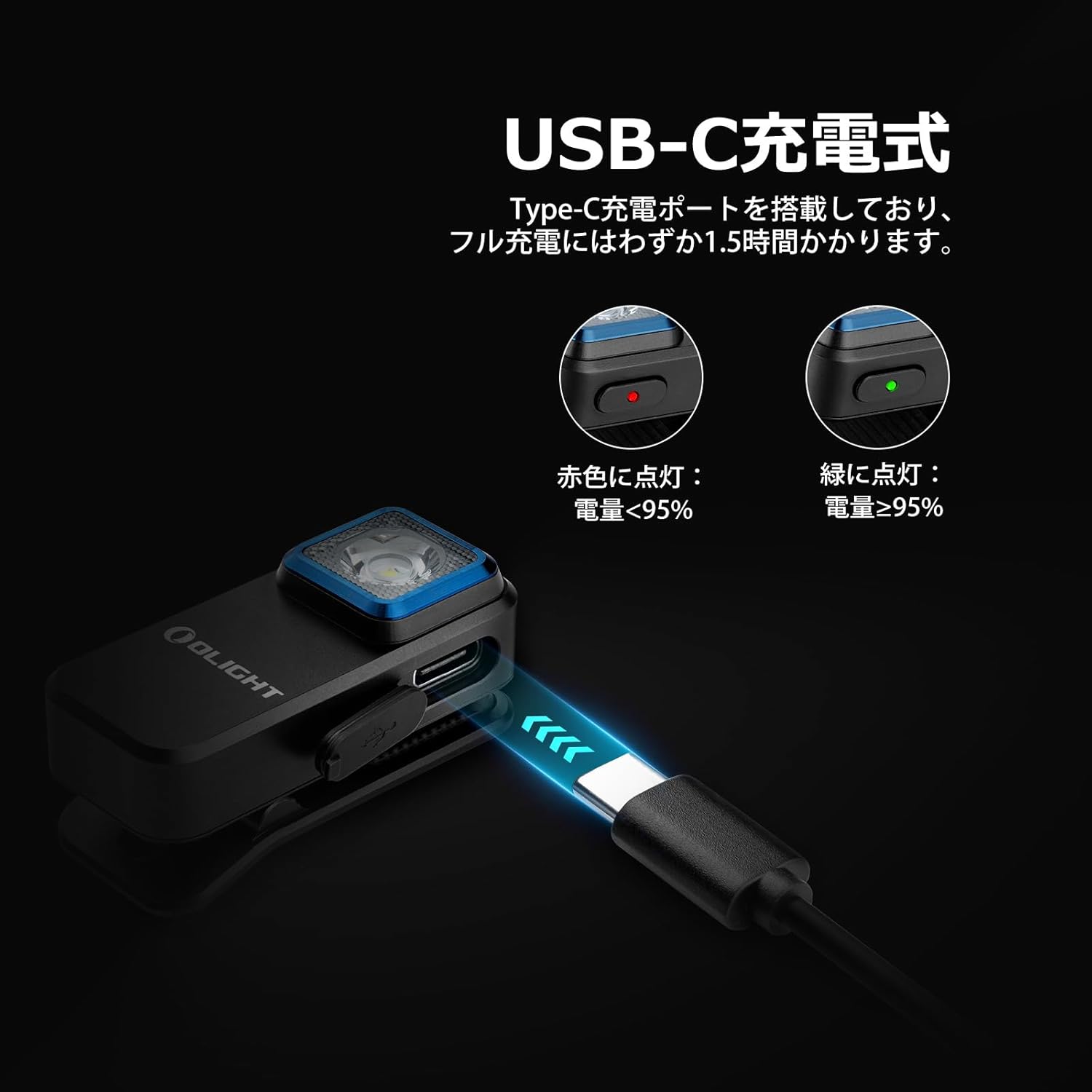
Image: The OLIGHT Oclip being charged via its USB-C port, with visual indicators for battery status (red for charging, green for charged).
Torolàlana miasa
Power On/off sy Fantenana Mode
- Herim-batana / maty: Press and hold the power button for approximately 1 second to turn the light on or off.
- Fomba Fahazavana Fotsy: When the light is on, single-click the power button to cycle through Moonlight, Low, Medium, and High white light modes.
- Fomba jiro mena: From any white light mode, double-click the power button to activate the constant red light mode. Double-click again to return to the previous white light mode.
- Fomba tselatra:
- White mitselatra: From any white light mode, triple-click the power button to activate white flashing mode (flashes every 3 seconds).
- Mitselatra mena: From constant red light mode, triple-click the power button to activate red flashing mode.

Image: Visual representation of the Oclip's different brightness levels for white light (Moonlight, Low, Medium, High) and the constant red light mode.
Famantarana ny haavon'ny bateria
The Oclip features a battery indicator light to show the remaining power:
- Maitso: 60% - 100% bateria sisa
- Voasary: 30% - 60% bateria sisa
- mena: 0% - 30% bateria sisa

Image: The Oclip's battery indicator light, illustrating the color-coded system for quick battery status checks.
Safidy Attachment
The Oclip offers multiple ways to attach and use the light:
- Clip-on: The integrated clip allows secure attachment to clothing (belts, pockets, collars), hats, backpack straps, or other fabric edges up to 14mm thick.
- andriamby: The Oclip can magnetically attach to iron or other metallic surfaces, providing hands-free illumination.
- mihantona: A dedicated hanging hole allows for attachment to keychains or lanyards.

Sary: Eksamples of the Oclip's compact size and how it can be clipped onto clothing or bags for convenient use.

Image: The Oclip demonstrating its magnetic attachment feature, adhering to a metal surface.

Image: A hand demonstrating the robust clip mechanism of the Oclip, highlighting its ability to securely attach to various thicknesses.
Fiarovana sy fahitana
The Oclip's red light and flashing modes enhance visibility, especially during nighttime activities:
- Jiro mena: Ideal for preserving night vision or as a subtle light source.
- Fomba tselatra: White and red flashing modes serve as effective warning or signal lights, increasing user safety during running, cycling, or other low-light conditions.

Image: The Oclip's red flashing mode in use during nighttime cycling, demonstrating its high visibility for safety.
Fampiasana Scenarios
The Oclip is suitable for a wide range of activities including:
- Running, jogging, and walking
- Campmandeha an-tongotra
- Night fishing
- Dog walking
- Asa fisafoana sy fikojakojana
- General outdoor and indoor illumination
Video: This video demonstrates various practical applications of the OLIGHT Oclip, showing how it can be clipped onto clothing, backpacks, or used magnetically for hands-free lighting in different environments.
Video: This video illustrates the Oclip's versatility, showing it clipped to a hat for hands-free work, and demonstrating its white and red light modes for visibility and signaling.
fikarakarana
- Fanadiovana: Fafao ny jiro amin'ny malefaka, damp cloth to remove dirt or debris. Do not use abrasive cleaners or solvents.
- fanoherana ny rano: The Oclip is IPX5 water-resistant, meaning it can withstand splashes and light rain. Aza atsoboka ao anaty rano ilay fitaovana.
- fitahirizana: Tehirizo ao amin'ny toerana mangatsiaka sy maina ny jiro rehefa tsy ampiasaina mandritra ny fotoana maharitra.

Image: The Oclip demonstrating its IPX5 water resistance, shown with water droplets on its surface.
Fanamboarana
- Jiro tsy mandeha: Ensure the battery is charged. Connect the light to a USB-C power source and check the charging indicator.
- Light not changing modes: Ensure the light is powered on. Try pressing and holding the button to reset, then attempt mode changes again.
- Olana momba ny fiampangana: Verify the USB-C cable is securely connected to both the light and the power source. Try a different cable or power adapter if necessary.
fepetra arahana
| endri-javatra | antsipirihany |
|---|---|
| Marika | ALINA |
| Laharana modely | O-OCLIP-BK |
| lafiny | 4.85 x 2.1 x 2.3 cm |
| lanja | 60 g (anisan'izany ny bateria) |
| Loharanon-jiro | LED fotsy, LED mena |
| Max Output | 300 Lumens |
| Halavirana ambony indrindra amin'ny taratra | 70 metatra |
| Karazana famandrihana | USB Type-C |
| Time Charging | Approx. 1.5 ora |
| Water Resistance | IPX5 |
| Drop Resistance | 1.5 metatra |
| Clip Thickness Capacity | hatramin'ny 14 mm |
| KEVITRA | High-quality Aluminum Alloy |

Image: A detailed table outlining the various output modes, including brightness (lumens), runtime, and beam distance for the Oclip.
Warranty sy fanohanana
For warranty information or technical support, please refer to the official OLIGHT website or contact your authorized OLIGHT retailer. Keep your purchase receipt for warranty claims.
Manufacturer: OLIGHT
Seller: Olight® Direct JP


