Sava lalana
This manual provides detailed instructions for the setup, operation, and maintenance of your ATTACK SHARK M71 75% TKL Wireless Mechanical Keyboard. Please read this guide thoroughly to ensure proper use and to maximize your keyboard's performance and lifespan.

Image: The ATTACK SHARK M71 keyboard showcasing its 68% layout and key features like aluminum alloy body, three-mode connection, and RGB backlight.
Fonosana fonosana
Hamarino fa misy ny entana rehetra ao anaty fonosana:
- ATTACK SHARK M71 Wireless Mechanical Keyboard
- Cable Type-C
- 2.4G Wireless Receiver
- Keycap Puller / Switch Puller (Two-in-one tool)
- Complimentary 61 additional PBT OEM keycaps (different color layout)
- User Manual

Image: A visual representation of the items included in the ATTACK SHARK M71 keyboard package, including the keyboard, cables, and extra keycaps.
Video: Unboxing the Blueberry version of the M71 keyboard, showing the package contents and a demonstration of its typing sound.
Vita ny vokatraview
The ATTACK SHARK M71 is a 75% TKL wireless mechanical keyboard featuring a full aluminum CNC chassis, multi-mode connectivity, hot-swappable switches, and RGB lighting. Its compact design and robust construction are engineered for both gaming and productivity.
Lafin-javatra fototra:
- Full Aluminum CNC Body: Constructed from international standard 6063 aluminum alloy for durability and a premium feel.
- Fifandraisana amin'ny fomba telo: Supports Bluetooth 5.0/3.0, 2.4G wireless, and wired USB-C connections.
- Switches Hot-Swappable: Compatible with 3/5-pin switches, allowing for easy customization without soldering.
- Rafitra fametrahana gasket: Incorporates anti-static IPEX switch pads, PORON sound-absorbing cotton, and PET acoustic switch pads to enhance typing feel and reduce noise.
- RGB LED jiro: Features customizable RGB backlighting and a side LED light strip.
- Batterie 4600mAh: Provides extended wireless usage.
- PBT OEM Keycaps: Durable keycaps with GMK-like characters.
singa:
Familiarize yourself with the main components of your keyboard:
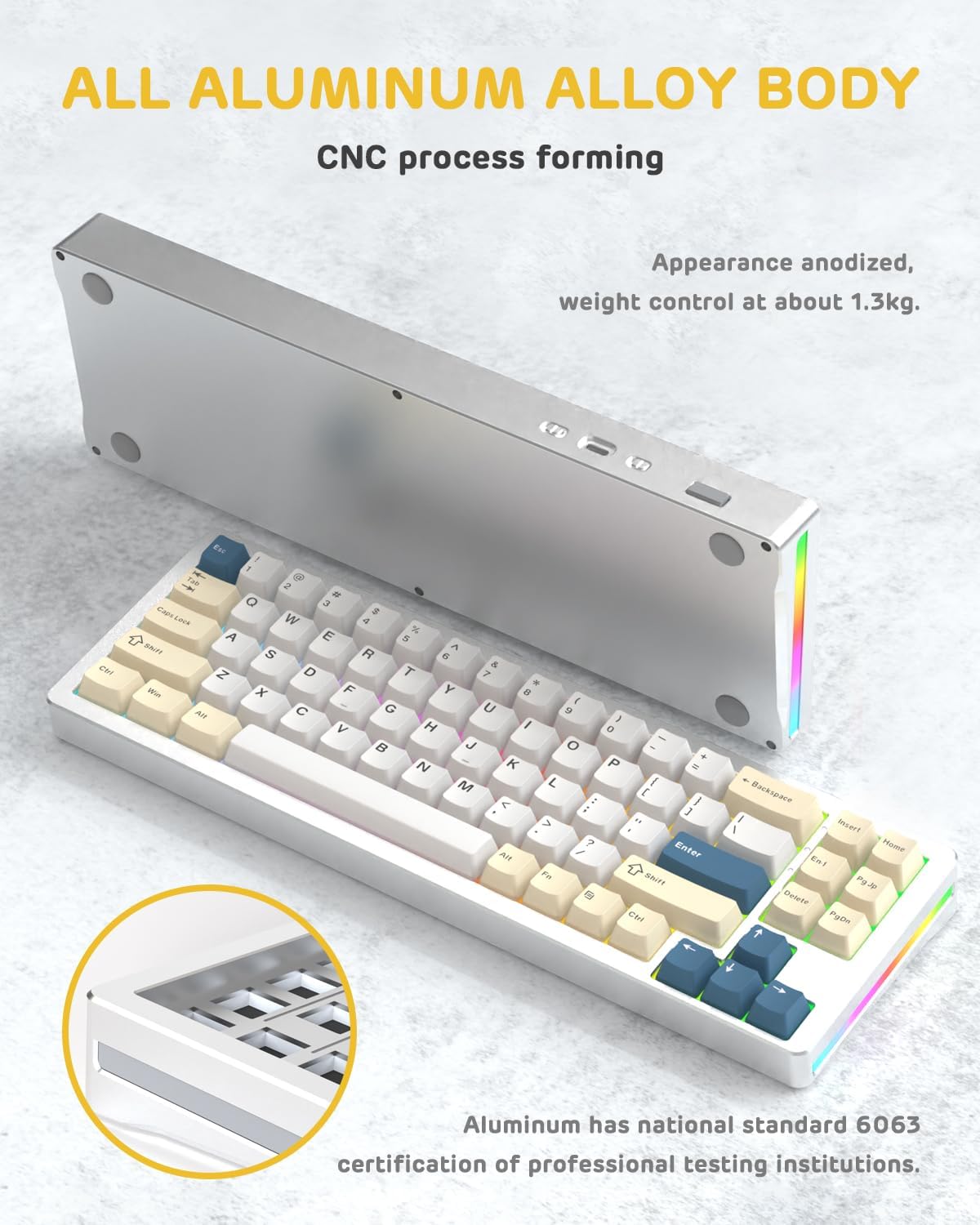
Sary: lafiny iray view of the M71 keyboard highlighting its full aluminum alloy body and CNC process forming.

Sary: Nisy nipoaka view illustrating the multi-layered gasket mount structure, including the PBT keycaps, aluminum alloy upper cover, customized switch body, PC positioning board, PORON filled cotton, anti-static IPEX switch underpad, PET singing pad, PCB board, PORON shaft seat cushion, PET sound backing pad, wing light strip, and aluminum alloy base.
Hametraka
1. Connectivity Modes:
The M71 keyboard supports three connection modes: Bluetooth, 2.4G wireless, and wired USB-C.
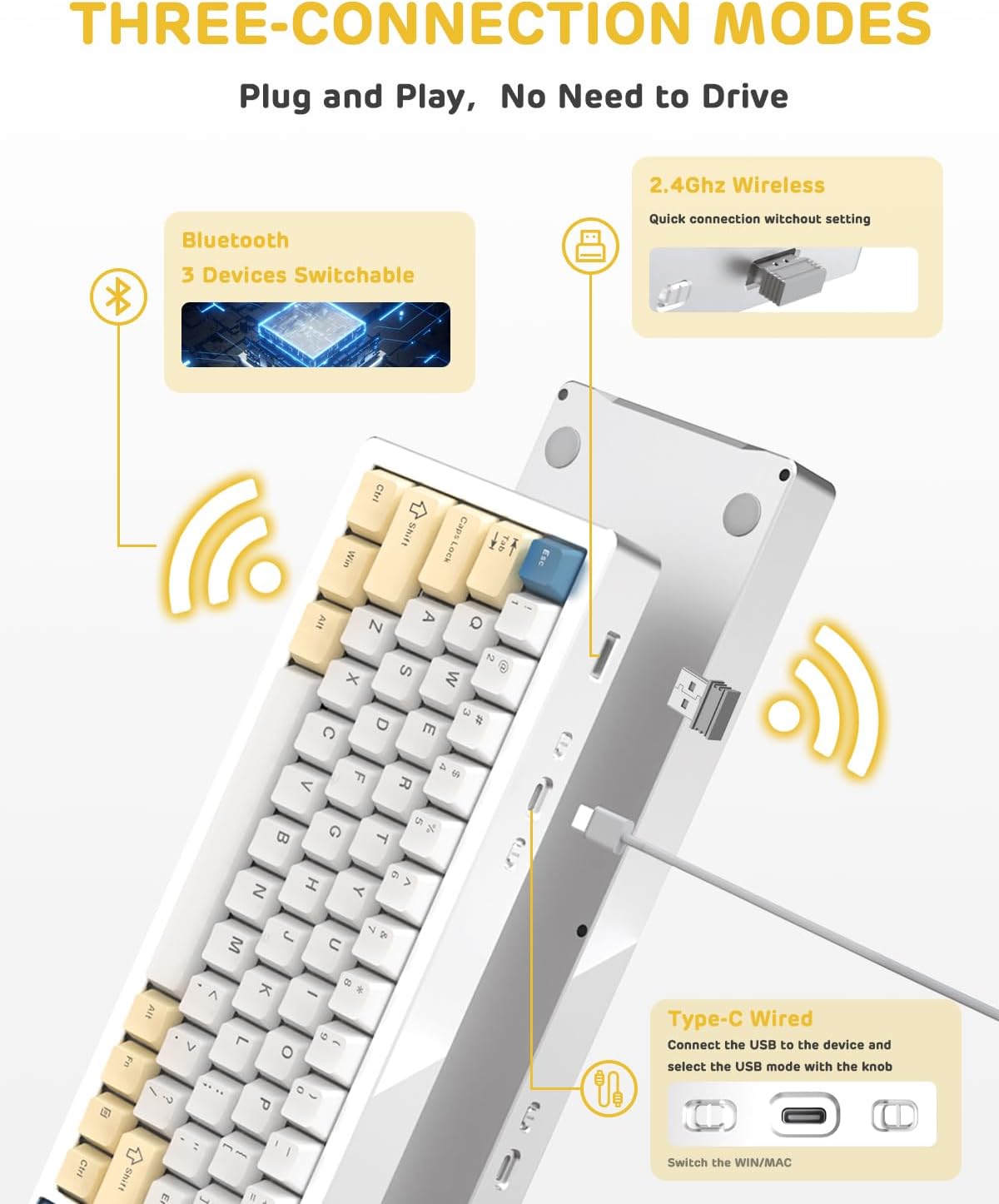
Image: A visual guide to the three connectivity options: Bluetooth for up to 3 devices, 2.4GHz wireless with a receiver, and wired Type-C connection.
Fifandraisana tariby:
- Connect the provided Type-C cable to the keyboard's USB-C port and to your computer's USB port.
- Ensure the mode switch on the keyboard is set to the wired (USB-C) position.
- Ho fantatry ny rafitrao ho azy ny fitendry.
2.4G Wireless fifandraisana:
- Locate the 2.4G wireless receiver (dongle) in the package.
- Ampidiro ao amin'ny seranana USB misy ao amin'ny solosainao ny mpandray 2.4G.
- Set the mode switch on the keyboard to the 2.4G wireless position.
- Ny kitendry dia tokony hifandray ho azy.
Fifandraisana momba ny Bluetooth:
- Set the mode switch on the keyboard to the Bluetooth position.
- Sokafy ny fikirana Bluetooth ao amin'ny solosainao na ny fitaovanao ary tadiavo ireo fitaovana vaovao.
- The keyboard should appear as "ATTACK SHARK M71" or similar. Select it to pair.
- The keyboard can connect to up to 3 Bluetooth devices. Use Fn + 1/2/3 hifindra eo amin'ny fitaovana mifanandrify.
2. Battery Charging and Status:
The M71 keyboard is equipped with a 4600mAh battery. To charge, connect the keyboard via the USB-C cable to a power source (e.g., computer USB port, USB wall adapter).

Image: A diagram showing how to check the battery level using Fn+ALT(R) and the visual indicators on the keyboard's side LED strip.
- To check the battery level in wireless mode, press Fn + ALT (Right). The side LED strip will indicate the charge level.
- Battery life is approximately 1-2 weeks with lighting enabled and up to 4 weeks with lighting disabled.
Torolàlana miasa
1. Multimedia Keys:
The keyboard features 12 multimedia keys accessible via the Fn fitambarana fanalahidy:
- Fn + F1-F12: Access various multimedia functions (e.g., volume control, play/pause, calculator, email).
- Fn + 1/2: Fehezo ny famirapiratry ny efijery.
2. Fanaraha-maso jiro RGB:
Customize the keyboard's RGB backlight and side LED strip:

Image: The M71 keyboard displaying its RGB backlight and side LED strip, along with a close-up of the PBT keycaps.
- Fn + Ctrl (Right): Switch between different side LED light strip modes.
- Fn + Tab: Toggle white light mode.
- Refer to the full user manual for additional lighting effect controls and customization options via the programmable software.
3. Programmable Software:
The keyboard supports a dedicated driver program for advanced customization. You can download the software from the official ATTACK SHARK website to personalize lighting effects, key assignments, and macros. The keyboard is compatible with Windows 2000/XP/Vista/7/8/10/11, Android, and iOS.
fikarakarana
1. Fanadiovana:
- Use a soft, dry cloth to wipe the keyboard surface.
- For deeper cleaning, remove keycaps using the provided keycap puller and use compressed air to clear debris from between switches.
- Fadio ny mampiasa akora simika mahery vaika na akora abrasive.
2. Hot-Swapping Switches:
The M71 keyboard features hot-swappable sockets, allowing you to change switches without soldering.

Sary: akaiky view of the hot-swappable White Jade linear switches on the M71 keyboard, demonstrating how they can be easily removed and replaced.
- Vonoy ny fitendry na esory amin'ny fitaovanao.
- Use the switch puller tool to carefully grip the switch and pull it straight up.
- Align the pins of the new switch with the holes on the PCB and press down gently until it clicks into place. Ensure pins are not bent.
- The PCB supports both 3-pin and 5-pin switches.
Video: A demonstration of the disassembly process for the M71 keyboard, showing how to remove keycaps and switches, revealing the gasket mount structure.
Fanamboarana
| Olana | Vahaolana mety |
|---|---|
| Tsy mamaly ny fitendry amin'ny fomba tsy misy tariby. |
|
| Tsy voasoratra anarana na tsy manoratra indroa ireo fanalahidy. |
|
| Tsy mandeha na tsy mety ny jiro RGB. |
|
| Olana amin'ny fampifandraisana Bluetooth. |
|
fepetra arahana
| endri-javatra | antsipirihany |
|---|---|
| MODELY | M71 |
| fisehon'ny | 75% TKL (71 keys) |
| fifandraisana | Bluetooth 5.0/3.0, 2.4G Wireless, USB-C Wired |
| Switches | Hot-swappable (3/5-pin compatible), Pre-lubed Linear White Jade Switch |
| Keycaps | PBT OEM Keycaps |
| Mounting Style | Gasket Mount |
| Fitaovana Chassis | Full Aluminum CNC (6063 alloy) |
| Fahaizana bateria | 4600mAh |
| Fanazavana | RGB Backlight, RGB LED Side Light Strip |
| mifanentana | Windows 2000/XP/Vista/7/8/10/11, Android, iOS, Mac |
| Ny refin'ny vokatra | 13.78" L x 4.53" W x 1.22" H |
| Lanja entana | 2.86 kg |
Warranty sy fanohanana
Raha mila fanazavana momba ny antoka sy ny fanohanana ara-teknika, jereo azafady ny tranonkala ofisialin'ny ATTACK SHARK. webtranokala na mifandray mivantana amin'ny serivisy mpanjifany. Tehirizo ny tapakila fividiananao ho porofon'ny fividianana ho an'ny fitakiana fiantohana.
Mpanamboatra: ATTACK SHARK
Mpivarotra: Ajazz US
Daty misy voalohany: 4 aogositra 2023


