Sava lalana
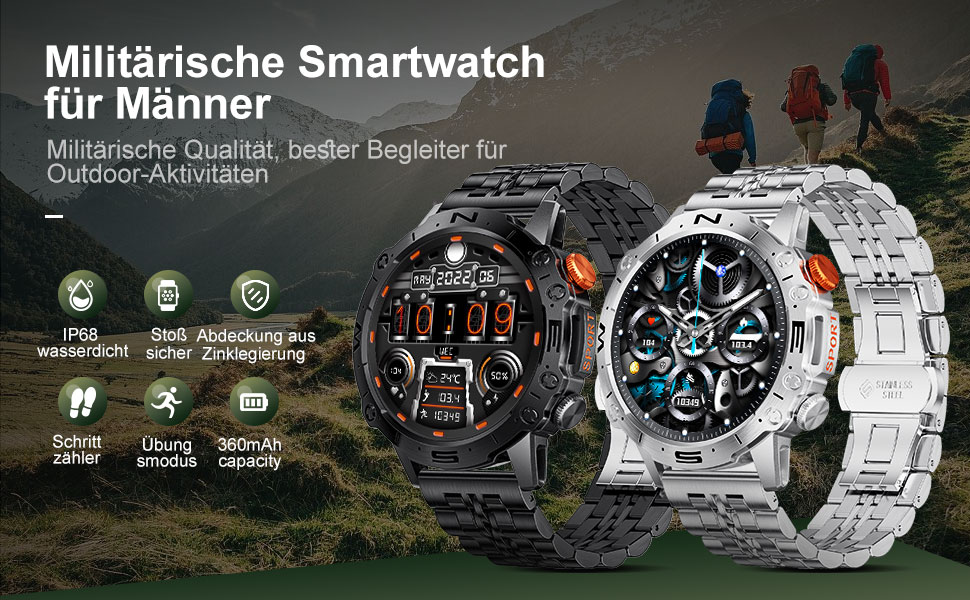
This manual provides detailed instructions for the setup, operation, and maintenance of your LIGE ST19-A Smartwatch. Designed for durability and functionality, this smartwatch features a 1.43-inch AMOLED touchscreen, Bluetooth calling, comprehensive health monitoring, and multiple sports modes. Please read this manual carefully to ensure proper use and to maximize your device's potential.
1. Fametrahana
1.1 Famandrihana ny Smartwatch
Before first use, fully charge your LIGE ST19-A Smartwatch. Use the provided magnetic charging cable.
- Connect the magnetic end of the charging cable to the charging contacts on the back of the smartwatch.
- Connect the USB end of the cable to a standard USB power adapter (5V/1A recommended) or a computer's USB port.
- The watch display will indicate charging status. A full charge typically takes 2-3 hours.
- Once fully charged, the watch offers approximately 3-7 days of working time and up to 30 days of standby time.
1.2 Fametrahana fampiharana sy fampiraisana fitaovana
To unlock the full functionality of your smartwatch, you need to install the companion application on your smartphone and pair the devices.
- Alefaso ny Bluetooth: On your smartphone, go to settings and ensure Bluetooth is turned on.
- Download ny App: Scan the QR code provided in the watch's packaging or search for "FitCloudPro" in your smartphone's app store (Google Play Store for Android, Apple App Store for iOS). Alternatively, you can visit ity rohy ity for download options.
- Mametraka ary Sokafy: Install the "FitCloudPro" app and open it.
- Ampio fitaovana: In the app, navigate to the "Device" or "Add Device" section. The app will search for available devices. Select "ST19-A" from the list to initiate pairing.
- Hamafiso ny fampiarahana: Follow the on-screen prompts on both your phone and smartwatch to confirm the pairing request.
- Alefaso ny fampahafantarana: Grant the necessary permissions for the app to display notifications from your phone on the smartwatch.
- Bluetooth Call Function: After successful connection, you can enable or disable the call function on the watch. If the connection is successful, you can add/answer calls and play music.

2. Torolàlana miasa
2.1 Fikarohana fototra
- Efijery kasihina: Swipe miankavia, miankavanana, miakatra, na midina hivezivezy amin'ny menus sy ny endri-javatra. Tsindrio raha hisafidy.
- Bokotra sisiny: The smartwatch features physical buttons for quick access to functions or to return to the home screen. Refer to the watch's interface for specific button assignments.
2.2 Bluetooth antso
Once paired with your smartphone, you can make and receive calls directly from your smartwatch.
- Fiantsoana: Access the dialer on your watch or select a contact from your synced phonebook.
- Mandray antso: When a call comes in, the watch will display the caller ID. You can answer or decline the call directly from your wrist.
- The watch includes a microphone and speaker for hands-free communication.

2.3 Fampandrenesana Smart
Receive instant notifications for incoming calls, text messages, and alerts from various social media applications directly on your wrist.
- Ensure notification permissions are granted in the "FitCloudPro" app for desired applications.
- Supported apps include Line, Messenger, Facebook, Twitter, Kakao Talk, Skype, and WhatsApp.

2.4 Fanaraha-maso ny Fahasalamana
The smartwatch provides 24-hour real-time monitoring of various health metrics.
- Fanaraha-maso ny tahan'ny fo: Tracks your heart rate continuously throughout the day.
- Fandrefesana tosi-drà: Manome fandrefesana ny tosi-drà.
- Fanaraha-maso oksizenina (SpO2): Mandrefy ny haavon'ny saturation oksizenina ao amin'ny ranao.
- Fanaraha-maso ny torimaso: Analyzes your sleep patterns, including deep sleep, light sleep, and wake times.
- Pedometer: Counts your daily steps, distance, and estimated calorie burn.
- Fanazaran-tena: Fanazaran-tena voatarika hanampy amin'ny fitantanana ny adin-tsaina.
Note: Health data provided by this device is for reference only and should not be used for medical diagnosis or treatment. Consult a medical professional for health concerns.

2.5 Fomba Fanatanjahantena
The smartwatch supports over 100 sports modes to track your workout data accurately.
- Select your desired sport mode from the watch's menu to begin tracking.
- The watch records data such as duration, distance, calories burned, and heart rate during your activity.
- Examples of supported activities include walking, running, cycling, swimming, and various gym exercises.

2.6 Endri-javatra fanampiny
- Fampisehoana toetrandro: Get real-time weather updates directly on your watch face.
- Fanaraha-maso mozika: Control music playback on your smartphone (play, pause, skip tracks) from your wrist.
- Always On Display (AOD): The 1.43-inch AMOLED screen supports an Always On Display feature, providing continuous time visibility.
- AI Voice Assistant: Interact with your smartwatch using voice commands for various tasks.


3. Fikojakojana
- Fanadiovana: Fafao tsy tapaka amin'ny lamba malefaka sy maina ny efijery fiambenana ary fehezo. Raha ilaina dia ampiasao d kelyamp lamba ary avy eo dia maina tsara. Fadio ny akora simika mahery vaika na fitaovana marokoroko.
- fanoherana ny rano: The LIGE ST19-A Smartwatch is IP68 rated, meaning it is resistant to dust and can withstand immersion in water up to 1.5 meters for 30 minutes. It is suitable for daily use, hand washing, and rain exposure. However, it is not recommended for hot showers, saunas, or diving, as steam and hot water can compromise the seals.
- Fikarakarana bateria: Mba hanalavana ny androm-piainan'ny bateria dia aza ampiasaina matetika ny famantaranandro. Ampidiro ny bateria rehefa ambany ny bateria. Tehirizo ao amin'ny toerana mangatsiaka sy maina ny famantaranandro rehefa tsy ampiasaina mandritra ny fotoana maharitra.
- Fadio ny hafanana tafahoatra: Do not expose the watch to extreme hot or cold temperatures, as this can damage the battery and internal components.
4. Famahana olana
| OLANA | Vahaolana mety |
|---|---|
| Tsy mandeha ny famantaranandro | Ataovy azo antoka fa feno ny famantaranandro. Ampifandraiso amin'ny charger mandritra ny 30 minitra farafahakeliny. |
| Tsy afaka mifandray amin'ny smartphone |
|
| Tsy nisy fampandrenesana voaray |
|
| Angon-drakitra ara-pahasalamana tsy marina |
|
| Fohy ny fiainana bateria |
|
5. Famaritana
| endri-javatra | antsipirihany |
|---|---|
| Anarana modely | ST19-A |
| Marika | LIGE |
| Haben'ny efijery | 1.43 santimetatra |
| Karazana fampisehoana | AMOLED Touchscreen |
| Teknolojia fifandraisana | Bluetooth |
| Fahaizana bateria | 360 mAh (Lithium-ion) |
| Fotoana fampiasana mahazatra | 3-7 andro |
| Fotoana mijoro | Approx. 30 andro |
| Water Resistance | IP68 (Dustproof, Water resistant up to 1.5m for 30 min) |
| Endri-javatra manokana | Voice Call, Music Player, Heart Rate Monitor, Activity Tracker, Blood Pressure Monitor, Blood Oxygen Monitor, Sleep Monitor, GPS (integrated) |
| mifanentana | Android, iOS |
| lanja | 290 g |
6. Warranty sy fanohanana
LIGE prioritizes customer satisfaction. Your LIGE ST19-A Smartwatch comes with the following support:
- Famerenana 30 andro: If any issues arise during use, you are eligible for a refund within 30 days of purchase.
- Serivisy fanamboarana 2 taona: A 2-year repair service is provided after the sale for manufacturing defects.
- For any problems or inquiries, please contact LIGE customer support. Your satisfaction is important to us.


