1. Torolàlana manan-danja momba ny fiarovana
Vakio tsara ny torolalana rehetra alohan'ny hampiasana ity fitaovana ity. Tehirizo ity boky ity mba hojerena amin'ny ho avy.
- Ity fitaovana ity dia natao ho an'ny fampiasana an-trano ihany.
- Aza atsoboka ao anaty rano na ranon-javatra hafa ny fitaovana.
- Keep the appliance away from water sources, especially when charging.
- Do not use the appliance if the cord or plug is damaged. Contact customer support for repair.
- Always ensure the appliance is switched off before cleaning or performing maintenance.
- Arovy tsy ho azon'ny ankizy. Tsy kilalao ity fitaovana ity.
- Aza mifandray amin'ny kojakoja mihetsika.
- Do not use the trimmer on irritated skin or open wounds.
- Only use the charging adapter supplied with the appliance.
2. Vokatra mihoatraview
The HTC AT-206A is a rechargeable hair trimmer designed for precise grooming tasks such as edging, outlining, dry shaving, and light shaping around areas like the neck, ears, and sideburns.

Image 2.1: HTC AT-206A Trimmer and its retail packaging, showing the device and included accessories.
singa:
- Trimmer Unit (HTC AT-206A)
- Charging Cable
- Borosy fanadiovana
- Lubricating Oil Bottle
- Fametahana fametahana
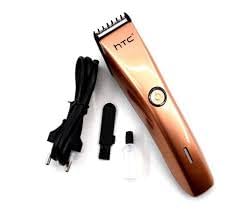
Image 2.2: The HTC AT-206A trimmer displayed with its charging cable, cleaning brush, oil bottle, and comb attachment.
3. Fametrahana sy fiampangana
3.1 Fametrahana voalohany
- Before first use, fully charge the trimmer for approximately 8-10 hours.
- Ataovy azo antoka fa tapaka ny trimmer.
- Connect the charging cable to the trimmer's charging port.
- Ampidiro amin'ny fivoahana elektrika sahaza ny adaptatera.
- The charging indicator light (if present) will illuminate to show charging is in progress.
- Once fully charged, disconnect the charger from the outlet and the trimmer.
3.2 Attaching the Comb Attachment
- Ataovy azo antoka fa tapaka ny trimmer.
- Align the comb attachment with the trimmer blade.
- Gently push the comb attachment onto the blade until it clicks into place.
- To remove, gently pull the comb attachment away from the blade.
4. Torolàlana miasa
4.1 Fampandehanana fototra
- Ataovy azo antoka fa voaloa ny trimmer.
- Press the power button to turn the trimmer on.
- Press the power button again to turn the trimmer off.
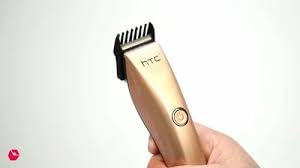
Image 4.1: The HTC AT-206A trimmer held in hand, demonstrating its ergonomic design for ease of use.
4.2 Teknôlôjia trimming
- For best results, use the trimmer on clean, dry hair.
- Hold the trimmer at a slight angle against the skin.
- Ahetsiketsika moramora sy tsy mitsaha-mitombo ny trimmer mifanohitra amin'ny lalan'ny fitomboan'ny volo.
- Use the comb attachment for longer hair lengths (0.5mm-13mm).
- For edging and outlining, use the trimmer without the comb attachment for a closer trim.
- Stretch the skin taut with your free hand to ensure a smooth surface for trimming.
5. Fikojakojana sy fanadiovana
Ny fanadiovana sy fikojakojana tsy tapaka dia hiantoka ny fahombiazana tsara indrindra ary hanalava ny androm-piainan'ny trimmer-nao.
5.1 Fanadiovana ny Blades
- Ensure the trimmer is switched off and disconnected from the charger.
- Use the provided cleaning brush to remove any loose hairs from the blades.
- For a more thorough clean, you may carefully detach the blade head (refer to specific instructions if provided with your model for blade removal).
- Do not rinse the entire trimmer under water unless explicitly stated as waterproof.
5.2 Manosotra menaka ny Blades
- After cleaning, apply 1-2 drops of the provided lubricating oil onto the blades.
- Turn the trimmer on for a few seconds to allow the oil to distribute evenly.
- Esory amin'ny lamba malefaka ny menaka be loatra.
- Oiling the blades regularly (e.g., after every few uses) helps maintain cutting efficiency and prevents rust.
5.3 Fitehirizana
Store the trimmer in a cool, dry place, away from direct sunlight and moisture. Ensure it is fully charged before storing for extended periods.
6. Famahana olana
If you encounter any issues with your trimmer, refer to the following common problems and solutions:
- Trimmer does not turn on:
Ensure the trimmer is fully charged. Check if the charging cable is properly connected and the power outlet is functional. - Poor trimming performance / pulling hair:
The blades may be dull or clogged with hair. Clean and oil the blades as described in the Maintenance section. Ensure the trimmer is adequately charged. - Tsy mahazaka ny bateria:
Ensure the trimmer is charged for the recommended duration. If the issue persists, the battery may need replacement. Contact customer support. - Feo na fihovitrovitra be loatra:
The blades might be misaligned or require oiling. Clean and oil the blades. If the problem continues, discontinue use and contact customer support.
7. Famaritana
| endri-javatra | famaritana |
|---|---|
| Laharana modely | AT-206A (SA-144) |
| Loharanon-kery | Batterie azo averina |
| Fitaovana Blade | Vy tsy misy harafesina (Vy) |
| Cutting Length Range | 0.5mm - 13mm (with comb attachment) |
| refy (L x W x H) | 18.7 x 4.9 x 11.2 cm |
| Fampiasana soso-kevitra | Dry Shaving, Edging, Light Shaping, Outlining (Neck, Ears, Sideburns, Face) |
| loko | Mainty |
| mpanamboatra | CHINE |
8. Warranty sy fanohanana
This product is covered by a standard manufacturer's warranty. Please refer to the product packaging or contact your retailer for specific warranty terms and conditions.
For technical support, troubleshooting assistance, or warranty claims, please contact the retailer or manufacturer directly. Keep your proof of purchase for any warranty-related inquiries.


