1. Fampidirana
This manual provides detailed instructions for the setup, operation, and maintenance of your KiiBoom Phantom 81 V2 Mechanical Gaming Keyboard. Please read this manual thoroughly before using the product to ensure optimal performance and longevity.

Image: The KiiBoom Phantom 81 V2 Mechanical Gaming Keyboard, showcasing its transparent design and RGB backlighting.
2. Ny votoatin'ny fonosana
Hamarino fa misy ny entana rehetra ao anaty fonosana:
- KiiBoom Phantom 81 V2 Mechanical Gaming Keyboard
- USB Cable
- Keycap Puller
- Switch Puller (often integrated with keycap puller)
- Extra Switches (typically 2)
3. Endri-javatra fototra
The KiiBoom Phantom 81 V2 keyboard incorporates several advanced features:
- 75% Firafitra: Endrika kely ahafahana mitazona ireo fanalahidy ilaina.
- Transparent Acrylic Frame: Durable and aesthetically unique.
- Endrika fametrahana gasket: Manatsara ny fahatsapana sy ny feo rehefa manoratra.
- PC Mounting Plate: Optimized for flexibility and sound profile.
- Full-key Hot-swappable PCB: Ahafahana manolo mora ny "switch" tsy mila manao "solder".
- South-facing RGB LEDs: Provides vibrant backlighting with reduced glare.
- Fifandraisana amin'ny fomba telo sosona: Supports Type-C Wired, Bluetooth 5.0, and 2.4GHz wireless connections.
- Batterie azo averina: 4000mAh capacity for extended wireless use.
- mifanentana: Fully compatible with Mac and Windows operating systems.

Sary: Vitaview graphic highlighting the KiiBoom Phantom 81 V2's main features including 75% layout, tri-mode, hot-swappable, gasket-mounted, PC plate, plate-mounted stabilizers, south-facing RGB, and acrylic design.

Image: A detailed exploded diagram illustrating the internal gasket structure of the KiiBoom Phantom 81 V2 keyboard, showing components like the metal knob, acrylic top case, switches, PC plate, sandwich cotton, switch pad, PCB, acrylic bottom case, metal nameplate, and keyboard pads.

Image: A close-up of the KiiBoom Phantom 81 V2 keyboard highlighting its transparent acrylic case and PC keycaps with an ASA profile, asehocasing the clear design.
4. Fametrahana
4.1 Fametrahana voalohany
Before first use, connect the keyboard to a USB power source using the provided USB-C cable. The keyboard will charge automatically. A full charge is recommended for optimal battery life.
4.2 Fomba fifandraisana
The Phantom 81 V2 supports three connection modes:
- Type-C Wired Mode: Connect the USB-C cable directly to your computer. Switch the mode selector on the back of the keyboard to "USB".
- Fomba Bluetooth 5.0:
- Switch the mode selector on the back of the keyboard to "BT".
- mpanao gazety fn+1, fn+2, na fn+3 hisafidy matihanina Bluetoothfile. The indicator light will flash, indicating pairing mode.
- On your device (computer, tablet, smartphone), search for Bluetooth devices and select "KiiBoom Phantom 81".
- Rehefa mifandray dia hijanona tsy hirehitra intsony ny jiro famantarana.
- 2.4GHz Wireless Mode:
- Switch the mode selector on the back of the keyboard to "2.4G".
- Ampidiro ao amin'ny seranana USB misy ao amin'ny solosainao ny mpandray USB 2.4GHz.
- mpanao gazety fn+4. The keyboard will automatically connect to the receiver. The indicator light will stop flashing once connected.

Image: A close-up of the KiiBoom Phantom 81 V2's side, showing the USB-C port and the physical switches for selecting between USB, Win/Mac, Bluetooth, and 2.4G wireless modes.
4.3 Fandrindrana ny rafitra miasa
The keyboard is compatible with both Windows and macOS. Use the dedicated switch on the back of the keyboard to select the appropriate operating system mode (WIN/MAC) for optimal key mapping.

Image: A visual representation of the KiiBoom Phantom 81 V2 keyboard being used with various operating systems, including macOS, Windows, and Android, indicating broad compatibility.
5. Torolàlana miasa
5.1 Fanaraha-maso ny jiro miverina RGB
The Phantom 81 V2 features south-facing RGB LEDs for customizable backlighting. Use the following key combinations to adjust the lighting effects:
- Fn + \ |: Toggle Backlight Mode
- Fn + DEL: Toggle Backlight Direction
- Fn + ↑: Famirapiratana +
- Fn + ↓: Brightness -
- Fn + →: Speed +
- Fn + ←: Speed -

Image: A diagram illustrating the key combinations for controlling the south-facing RGB backlights on the KiiBoom Phantom 81 V2 keyboard, including mode, direction, brightness, and speed adjustments.
5.2 Surrounding Sidelights Control
The keyboard also features customizable sidelights. Use the following key combinations to adjust them:
- Fn + P: Toggle Sidelight Mode
- Fn + B: Toggle Sidelight Color
- Fn + X: Sidelight Brightness +
- Fn + Z: Sidelight Brightness -
- Fn + V: Sidelight Speed +
- Fn + C: Sidelight Speed -

Image: A diagram illustrating the key combinations for controlling the surrounding sidelights on the KiiBoom Phantom 81 V2 keyboard, including mode, color, brightness, and speed adjustments.
5.3 Knob multifunctional
The knob located on the top right of the keyboard provides quick access to media controls and can be customized:
- Rotate clockwise: Volume +
- Rotate counter-clockwise: Volume -
- Press: Mangina/Atsaharo
- Long Press: Customizable Functions (refer to software for configuration)

Image: A close-up of the KiiBoom Phantom 81 V2's multifunctional knob, detailing its functions for volume control, mute, and customizable options.
5.4 Checking Battery Power
Raha hijery ny haavon'ny bateria amin'izao fotoana izao, tsindrio Fn + Backspace. The indicator lights will display the approximate battery percentage.

Image: A diagram showing how to check the battery power of the KiiBoom Phantom 81 V2 keyboard by pressing Fn+Backspace, with visual indicators for 20%, 50%, and 100% charge levels.
5.5 Switches azo ovaina haingana
The Phantom 81 V2 features a full-key hot-swappable PCB, allowing you to change mechanical switches without soldering. This keyboard is compatible with both 3-pin and 5-pin mechanical switches.
- Ampiasao ny fitaovana misintona ny sarony fanalahidy omena mba hanesorana moramora ny sarony fanalahidy tianao.
- Use the provided switch puller to gently grasp the switch from its top and bottom clips. Pull straight up to remove the switch from the PCB.
- Ampifanaraho amin'ireo lavaka eo amin'ny PCB ireo tsimatry ny switch vaovao. Ataovy mahitsy tsara ireo tsimatry mba tsy hiondrika.
- Tsindrio mafy amin'ny toerany ilay bokotra vaovao mandra-pikitikitikany.
- Avereno apetaka ny fonony fanalahidy.

Sary: akaiky view of the KiiBoom Phantom 81 V2 keyboard with a keycap and switch removed, demonstrating the hot-swappable PCB plate compatible with 3-pin or 5-pin mechanical switches.

Image: A hand using a switch puller tool to remove a switch from the KiiBoom Phantom 81 V2 keyboard, illustrating the hot-swappable feature.
Different switch types offer varying typing experiences:
- KiiBoom Pink Switch: Linear type, Actuation Force: 38±15gf, Bottom Force: 42±15gf, Total Travel: 3.80±0.2mm, Pre Travel: 1.6±0.4mm.
- KiiBoom Purple Switch: Linear type, Actuation Force: 45±15gf, Bottom Force: 55±15gf, Total Travel: 3.80±0.2mm, Pre Travel: 1.6±0.4mm.
- KiiBoom Crystal Switch: Linear type, Actuation Force: 55±15gf, Bottom Force: 60±15gf, Total Travel: 3.60±0.2mm, Pre Travel: 1.6±0.4mm.

Image: A close-up of KiiBoom Purple Switches, illustrating their transparent design.

Image: A close-up of KiiBoom Pink Switches, illustrating their transparent design.

Image: A close-up of KiiBoom Crystal Switches, illustrating their transparent design.
5.6 Fanamboarana Rindrambaiko
Advanced customization for key remapping, macro creation, and lighting effects can be achieved through the dedicated KiiBoom software. Please visit the official KiiBoom website to download the latest software version for your keyboard model.
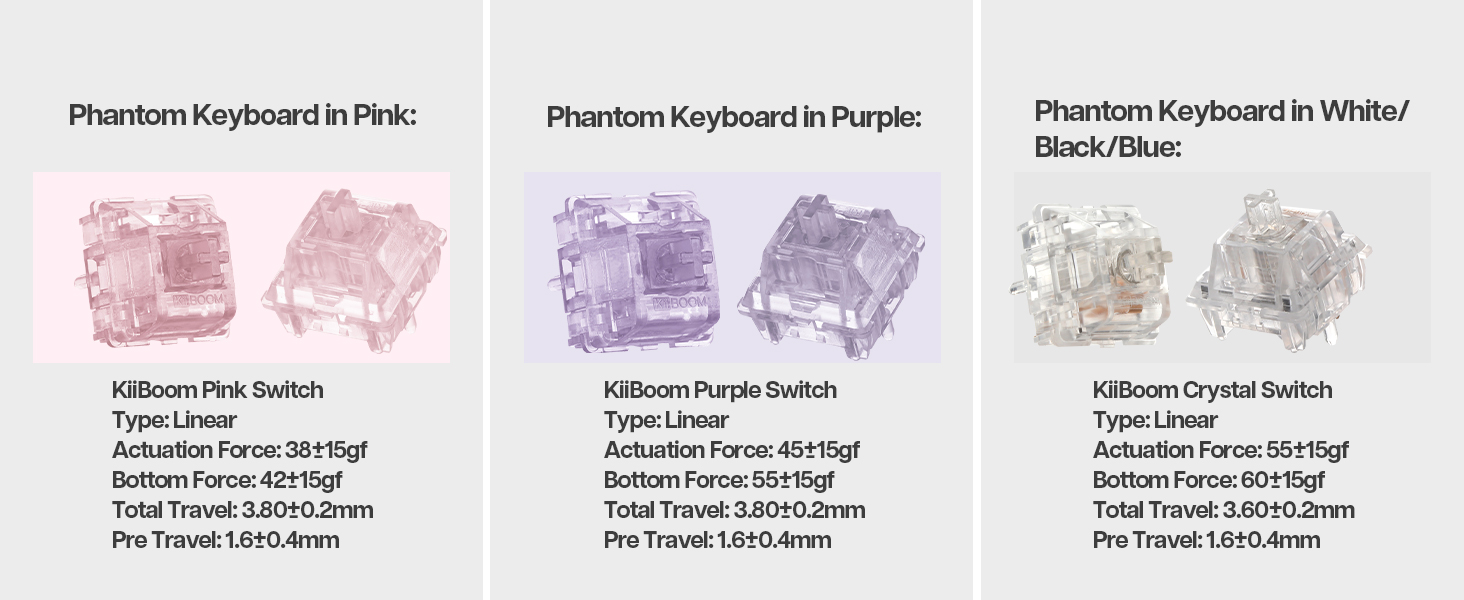
Image: A laptop screen displaying the KiiBoom software interface for customizing key settings, lighting, and other functions of the Phantom 81 V2 keyboard.
6. Fikojakojana
6.1 Fanadiovana
- Keycaps: Use the keycap puller to remove keycaps. Clean them with a mild soap solution and a soft cloth. Ensure they are completely dry before reattaching.
- Kitendry vatana: Mampiasà lamba malefaka sady tsy misy loko, dampened with water or a mild cleaning solution, to wipe the acrylic body. Avoid abrasive materials or harsh chemicals.
- Eo anelanelan'ny fanalahidy: Ampiasao rivotra voaporitra mba hanesorana ny vovoka sy ny poti-javatra eo anelanelan'ny switch.
6.2 Fikarakarana ankapobeny
- Avoid exposing the keyboard to extreme temperatures, direct sunlight, or high humidity.
- Do not spill liquids on the keyboard. If a spill occurs, immediately disconnect power and allow it to dry completely before attempting to use it again.
- Handle with care to prevent drops or impacts that could damage the transparent acrylic.
7. Famahana olana
| Olana | Vahaolana mety |
|---|---|
| Tsy mamaly ny fitendry amin'ny fomba tsy misy tariby. |
|
| Tsy mandeha na tsy mety ny jiro RGB. |
|
| Tsy voasoratra anarana na tsy manoratra indroa ireo fanalahidy. |
|
| Lany haingana ny bateria. |
|
8. Famaritana
| endri-javatra | antsipirihany |
|---|---|
| MODELY | Phantom 81 V2 |
| fisehon'ny | 75% |
| fifandraisana | 2.4Ghz Wireless, Bluetooth 5.0, USB-C Wired |
| Fahaizana bateria | 4000mAh (V2 version) |
| Backlighting | RGB mitodika mianatsimo |
| Hot-swappable | Yes, compatible with 3-pin/5-pin mechanical switches |
| Case Material | Acrylic |
| Fitaovana takelaka | Polycarbonate (PC) |
| Lanja entana | 4.53 kilao (eo ho eo. 2.05 kg) |
| Ny haben'ny fonosana | 16.61 x 10.91 x 2.91 santimetatra |
| Fitaovana mifanentana | Console filalaovana lalao, Solosaina finday, PC, Finday avo lenta, Tablety |
9. Warranty sy fanohanana
Raha mila fanazavana momba ny antoka sy ny fanohanana ara-teknika, jereo azafady ny KiiBoom ofisialy. webtranokala na mifandray mivantana amin'ny serivisy mpanjifany. Tehirizo ny porofon'ny fividiananao raha misy fitakiana fiantohana.
Official KiiBoom Webtranokala: KiiBoom Store on Amazon (for general brand information and potential support links).


