
1. Vokatra mihoatraview
The FERMAX Audio Duox Plus Veo Guard Unit Monitor 9320 is an advanced audio and video intercom system designed for security and communication within residential or commercial buildings. This unit serves as a central guard station monitor, enabling clear audio-visual communication with visitors and residents, and providing control over access points. Its intuitive touch and button controls ensure ease of use for security personnel.
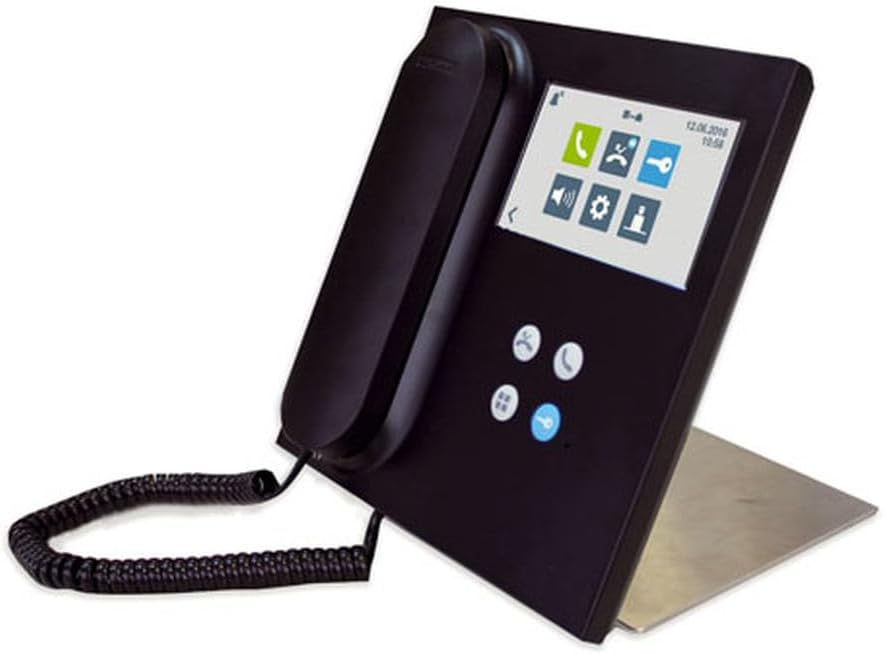
Figure 1: FERMAX Audio Duox Plus Veo Guard Unit Monitor 9320, showing the handset, screen, and control buttons.
2. Fametrahana sy fametrahana
2.1 Famoahana ny fonosana
Carefully remove all components from the packaging. Verify that all items listed in the packing list are present and undamaged. Retain the original packaging for future transport or storage.
2.2 Safidy fametrahana
The Veo Guard Unit Monitor 9320 supports both Door Mount SY ivelan'ny Tendrombohitra configurations. Choose a stable, flat surface for installation, ensuring adequate space for ventilation and cable management.
- Door Mount: Ideal for integration into existing door entry panels or custom enclosures.
- Tendrombohitra ivelany: Suitable for surface mounting on a desk or wall using the provided stand or mounting bracket.
2.3 Wiring sy fifandraisana
Connect the unit to the FERMAX Duox Plus system using the appropriate wiring diagrams provided in the separate installation guide. Ensure all connections are secure and correctly polarized to prevent damage. Power should only be applied after all connections are verified.
- Connect the Duox Plus bus lines (data and power).
- Connect the audio lines (if applicable for external speakers/microphones).
- Connect the power supply unit to a suitable electrical outlet.
2.4 Fampivoarana voalohany
Once all connections are made, plug in the power supply. The unit will perform a self-test and display the FERMAX logo, followed by the main interface. Allow a few moments for the system to initialize fully.
3. Torolàlana miasa
3.1 Fikarohana entin'ny mpampiasa
The monitor features a combination of mikasika screen and physical bokotra controls. The main screen displays various icons for different functions.
- Efijery kasihina: Tap icons or swipe to navigate menus and select options.
- Bokotra ara-batana: Use the dedicated buttons for common actions such as answering calls, opening doors, or navigating back.
3.2 Fanaovana sy fandraisana antso
To initiate a call, select the desired resident or apartment from the directory on the screen and press the call button. When a call is received, the monitor will ring and display the caller's video (if available). Lift the handset or press the answer button to establish communication.
3.3 Door Release Function
During an active call, press the dedicated door release button (often marked with a key icon) to unlock the connected entrance. Ensure the identity of the visitor is confirmed before releasing the door.
3.4 Rafitra rafitra
Access the settings menu via the gear icon on the main screen. Here you can adjust volume, screen brightness, language, and other system preferences. Refer to the detailed system manual for advanced configuration options.
4. Fikojakojana
4.1 Fanadiovana ny Unit
Hanadiovana ny efijerin'ny monitor sy ny casing, use a soft, lint-free cloth slightly dampened with water or a mild, non-abrasive cleaning solution. Avoid using harsh chemicals, solvents, or abrasive materials, as these can damage the surface. Ensure the unit is powered off before cleaning.
4.2 Fikarakarana ankapobeny
- Keep the unit away from direct sunlight, excessive heat, and moisture.
- Aza sakanana ny fisokafan'ny rivotra.
- Fadio ny fandatsahana na ampanaovina ilay fitaovana amin'ny fiantraika mahery vaika.
- Jereo tsy tapaka ny fifandraisan'ny tariby raha misy mivaha na simba.
5. Famahana olana
This section addresses common issues you might encounter with your FERMAX Audio Duox Plus Veo Guard Unit Monitor 9320.
| OLANA | Antony mety hitranga | vahaolana |
|---|---|---|
| No power/Screen is blank | Power cable disconnected; Power supply failure; System fault. | Check power cable connection. Ensure power outlet is functional. Contact technical support if issue persists. |
| No audio during calls | Volume too low; Handset not properly seated; Wiring issue. | Adjust volume in settings. Ensure handset is correctly placed. Verify audio wiring connections. |
| Cannot open door | Door release not activated; Wiring issue to door lock; Lock malfunction. | Ensure call is active and door release button is pressed. Check wiring to the door lock. Consult a qualified technician for lock issues. |
| Ecran fikasihana tsy mamaly | Olana vetivety amin'ny rindrambaiko; Fahasimban'ny efijery. | Restart the unit by disconnecting and reconnecting power. If unresponsive, contact support. |
For issues not listed here or if troubleshooting steps do not resolve the problem, please contact FERMAX technical support.
6. Famaritana ara-teknika
| endri-javatra | antsipirihany |
|---|---|
| MODELY | 9320 |
| Marika | FERMAX |
| Fomba fanaraha-maso | Tsindrio, bokotra |
| Karazana fametrahana | Door Mount, Outside Mount |
| Karazana mpandahateny | Computer, Outdoor |
| Isan'ny tarika | 1.0 Isa |
| Ny haben'ny fonosana | 10.71 x 9.41 x 2.56 santimetatra |
| Tsy tantera-drano | DISO |
| ASIN | B0C9K2RW3B |
| Daty misy voalohany | 27 jona 2023 |
7. Warranty sy fanohanana
7.1 Warranty amin'ny vokatra
The FERMAX Audio Duox Plus Veo Guard Unit Monitor 9320 is covered by a standard manufacturer's warranty. Please refer to the warranty card included with your product or visit the official FERMAX webtranonkala raha mila fanazavana fanampiny momba ny fepetra sy ny faharetan'ny garantie.
7.2 Fanohanana ara-teknika
For technical assistance, installation queries, or advanced troubleshooting, please contact FERMAX customer support. You can find contact information, FAQs, and additional resources on the official FERMAX webtranokala:
Visit FERMAX Official Webtoerana
When contacting support, please have your product model (9320) and ASIN (B0C9K2RW3B) readily available.


