1. Vokatra mihoatraview
The M5Stack Tough is an industrial-grade ESP32-based IoT development board kit designed for robust and reliable performance in harsh environments. It features a durable, dustproof, and water-resistant enclosure, a powerful dual-core processor, an integrated touch display, and versatile connectivity options.

Figure 1: M5Stack Tough Development Board Kit, showcasing its robust design with water resistance.
Lafin-javatra fototra:
- Faharetana ara-indostria: Designed to withstand harsh environments with full dustproof and water-resistant capabilities.
- Powerful Dual-Core Performance: Powered by the Espressif ESP32 dual-core processor, ensuring swift and efficient performance for demanding applications.
- Fampisehoana mitambatra: Features a 2.0-inch HD IPS capacitive multi-touch screen for intuitive interaction and data visualization.
- Fifandraisana matanjaka: Built-in Wi-Fi and versatile interfaces (RS485/I2C/GPIO/UART) provide seamless connectivity and expandability for various sensors and devices.
- Low Power Management: Incorporates advanced power management solutions, including RTC wake-up capabilities, for energy-efficient operation.
2. Ny votoatin'ny fonosana
Hamarino fa ny entana rehetra voatanisa etsy ambany dia tafiditra ao anatin'ny fonosanao:
- 1x M5Stack TOUGH unit
- 1x Type-C USB cable (1m)
- 1x 2.5mm hexagon wrench
- 1x 1.25-2P single head terminal line
- 1x 1.25-4P single head terminal line
- 1x Waterproof O-ring
- 1x HY2.0-4P connector

Figure 2: Contents of the M5Stack Tough kit, including the main unit, cables, and tools.
3. Fametrahana sy fampiasana voalohany
3.1 Fifandraisana ara-batana
- Fampifandraisana herinaratra: Connect the provided Type-C USB cable to the USB port on the M5Stack Tough unit and the other end to a 5V power source (e.g., computer USB port or USB power adapter). The device can also be powered via the RS485 interface (24V @ 1A).
- Fanombohana voalohany: Upon connecting power, the device's 2.0-inch IPS display should light up, indicating successful power-on.
- Fifandraisana ivelany: Utilize the M12 RS485 interface, I2C, GPIO, and UART interfaces for connecting external sensors, actuators, or other development modules as required by your application.
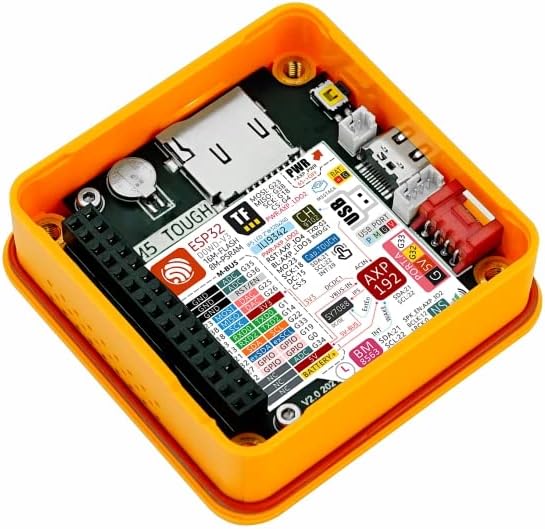
Figure 3: Internal components of the M5Stack Tough, highlighting the ESP32 module and various connection points.
3.2 Fametrahana rindrambaiko
The M5Stack Tough supports multiple development platforms, including UIFlow, Arduino, and ESP-IDF. For detailed programming guides and examples, refer to the official M5Stack documentation.

Figure 4: Steps to access online tutorials and documentation for M5Stack products.
To access tutorials and documentation:
- Visit the official M5Stack webtranokala: m5stack.com
- Click on "DOCUMENT" in the navigation menu.
- Hitady ny "Tough" or browse for your product.
- Scroll down to find the "Tutorial" section for specific guides and examples.
4. Fampandehanana ny fitaovana
The M5Stack Tough is designed for various industrial and IoT applications. Its 2.0-inch HD IPS capacitive multi-touch screen allows for direct interaction and data display. Programming the device determines its specific operational behavior.
4.1 Fifandraisana fototra
- Efijery kasihina: Interact with on-screen elements by tapping or swiping, depending on the programmed interface.
- Fijery angona: The display can be used to show real-time sensor data, system status, or control interfaces.
4.2 Fampiharana Eksampl'
The M5Stack Tough can be deployed in various scenarios, including:
- Fikarohana angona: Collecting and displaying data from various sensors in industrial or environmental monitoring.
- Timer Controller: Functioning as a programmable timer for industrial processes or fitness applications.
- IoT Controller: Acting as a central control unit for smart home or industrial IoT systems.

Figure 5: Illustrative applications of the M5Stack Tough in different environments.
5. Fikojakojana
The M5Stack Tough is designed for durability and requires minimal maintenance. Follow these guidelines to ensure its longevity:
- Fanadiovana: Ampiasao malefaka, damp cloth to clean the exterior. Avoid abrasive cleaners or solvents that could damage the enclosure or screen.
- Fiarovana ny tontolo iainana: While the device is dustproof and water-resistant, avoid prolonged immersion in water or exposure to extreme temperatures beyond its operating range. Ensure the M12 connector is properly sealed with the waterproof O-ring if used in wet environments.
- Fanavaozana ny mikirao praogramanao: Regularly check the official M5Stack website for firmware updates to ensure optimal performance and access to new features. Follow the provided instructions carefully for any update procedures.
- Fitantanana tariby: Ensure all connected cables are securely fastened and not under undue strain to prevent damage to the ports.
6. Famahana olana
This section addresses common issues you might encounter with your M5Stack Tough unit.
6.1 Tsy mandeha ny fitaovana
- Jereo ny loharanon-kery: Ensure the USB Type-C cable is securely connected to a functional 5V power source or that the RS485 interface is receiving 24V power.
- Cable Integrity: Inspect the USB cable for any visible damage. Try a different USB cable if available.
- Bokotra hery: Ensure the power button (if applicable, though not explicitly mentioned for Tough, common for M5Stack devices) is pressed.
6.2 Asehoy tsy mamaly
- Reboot fitaovana: Disconnect and reconnect the power to perform a hard reset.
- Olana firmware: If the display remains unresponsive after a reboot, it might indicate a software issue. Refer to the M5Stack documentation for instructions on reflashing the firmware.
- Fahavoazana ara-batana: Inspect the screen for any cracks or physical damage.
6.3 Connectivity Issues (Wi-Fi/RS485)
- Fanitsiana rindrambaiko: Verify that your code correctly initializes and configures the Wi-Fi or RS485 modules.
- Tontolo iainana tambajotra: For Wi-Fi, ensure the network is active and the credentials are correct. For RS485, check wiring and termination.
- fitsabahana: Minimize potential electromagnetic interference from other devices.
For more advanced troubleshooting or specific programming issues, consult the comprehensive documentation and community forums available on the official M5Stack website.
7. Famaritana
Detailed technical specifications for the M5Stack Tough ESP32 IoT Development Board Kit:
| endri-javatra | fikirana |
|---|---|
| processeur | Espressif ESP32-D0WDQ6-V3, 240MHz dual-core |
| Flash Memory | 16MB |
| PSRAM | 8MB |
| Fampidirana Voltage | USB (5V @ 500mA) / RS485 interface power input (24V @ 1A) |
| interface | Type-C x 1, Grove x 4 (RS485 / I2C / GPIO / UART interfaces) |
| miseho | 2.0" 320 x 240 ILI9342C full-color IPS LCD, max brightness 853 nits |
| Touch Controller | CHSC6540 |
| Fananganana mpandahateny | NS4168 16-bit I2S amplifier + 1W speaker |
| Karazana Wireless | Bluetooth, WiFi |
| Rafitra fikirakirana | Linux (supported development environments) |
| Lanja entana | 4.1 ounces (eo ho eo amin'ny 116g) |
| Haben'ny vokatra (LxWxH) | 2.99 x 2.28 x 1.64 santimetatra (76 x 58 x 41 mm) |
| loko | MAVO |
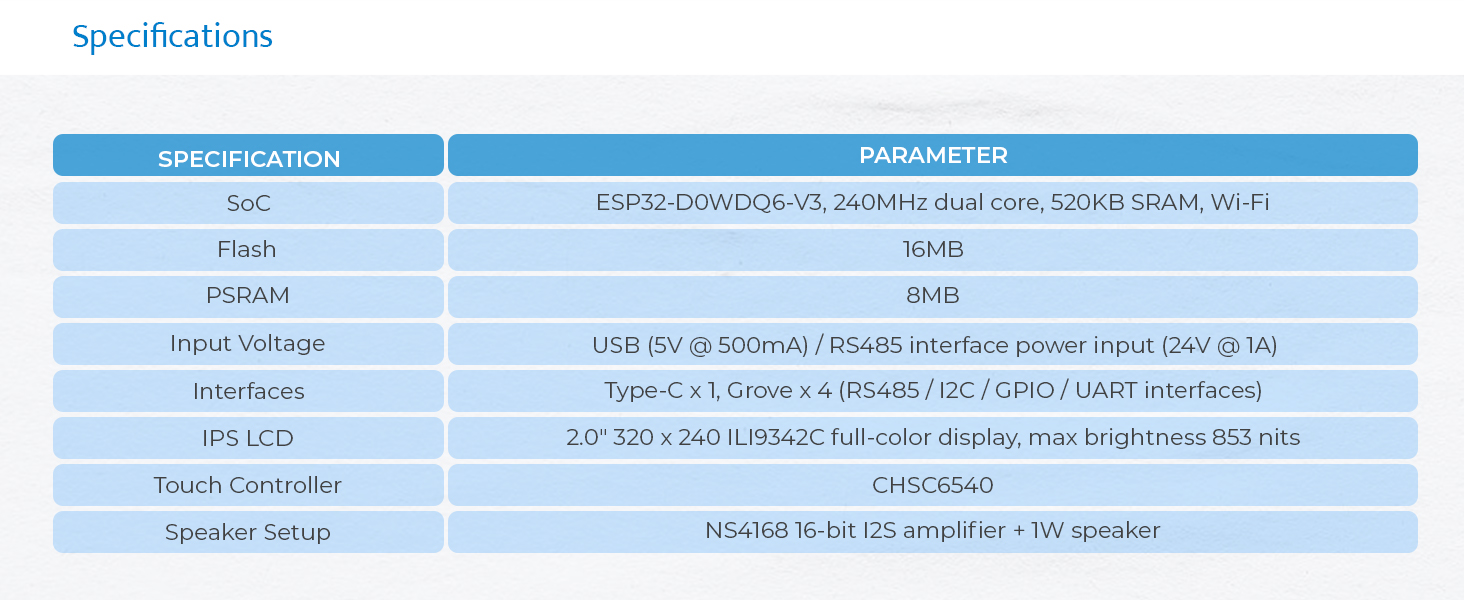
Figure 6: Visual representation of the M5Stack Tough's technical specifications.

Figure 7: Physical dimensions of the M5Stack Tough unit.

Figure 8: Weight of the M5Stack Tough unit.
8. Warranty sy fanohanana
8.1 Fampahalalana momba ny fiantohana
M5Stack products typically come with a standard manufacturer's warranty covering defects in materials and workmanship. For specific warranty terms and duration, please refer to the warranty card included with your product or visit the official M5Stack website's support section. Keep your proof of purchase for warranty claims.
8.2 Fanohanana ara-teknika
For technical assistance, programming inquiries, or advanced support, please utilize the following resources:
- Official M5Stack Webtranokala: m5stack.com - Provides extensive documentation, tutorials, and community forums.
- Forum fiaraha-monina: Engage with other developers and M5Stack experts for solutions and project ideas.
- Contact Support: If you cannot find a solution through documentation or forums, contact M5Stack customer support directly via their website.


