1. Fampidirana
Misaotra anao nividyasing the CANYON BSP-8 Bluetooth Speaker. This manual provides essential information for the safe and efficient use of your device. Please read it thoroughly before operation and retain it for future reference.
Lafin-javatra fototra:
- 10W Audio Output: Delivers clear and powerful sound.
- Bluetooth 5.2: For stable and energy-efficient wireless connection up to 10 meters.
- Jiro miverina RGB: Integrated lighting for enhanced ambiance.
- True Wireless Stereo (TWS): Connect two BSP-8 speakers for a full stereo sound experience.
- Safidy playback maro: Supports Bluetooth, AUX, USB, and MicroSD card inputs.
- Famolavolana portable: Compact size with a convenient hanger for easy transport.
- Fiainana maharitra bateria: Hatramin'ny 3 ora filalaovana amin'ny fiampangana tokana.
2. Information momba ny fiarovana
- Aza atao amin'ny hafanana tafahoatra, ny tara-masoandro mivantana, na ny hamandoana be ny mpandahateny.
- Fadio ny fandatsahana na ny fanerena ny mpandahateny amin'ny fiantraikany mahery vaika.
- Do not disassemble or attempt to repair the speaker yourself. Contact qualified service personnel.
- Keep the speaker away from water and other liquids. It is not waterproof.
- Ampiasao fotsiny ny tariby famandrihana omena na ny tariby Type-C voamarina rehefa mameno ny famandrihana.
- Ario ny bateria sy ny fanamafisam-peo araka ny lalàna eo an-toerana.
3. Ny votoatin'ny fonosana
- CANYON BSP-8 Bluetooth Speaker
- Cable USB Type-C Charging
- User Manual
4. Vokatra mihoatraview
Fantaro ny singa sy ny fanaraha-maso ataon'ny mpandahateny.
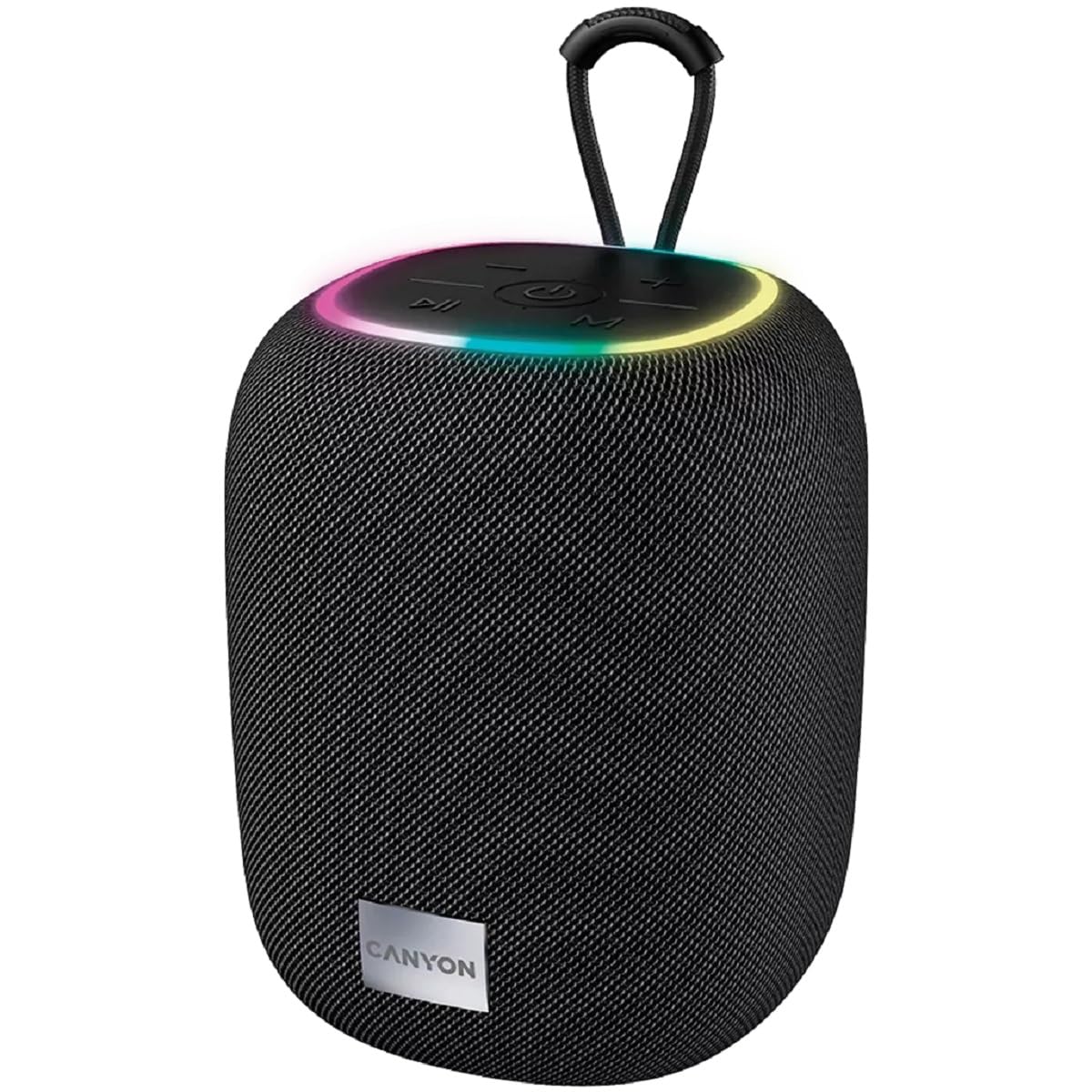
Sary 1: Ambony view of the CANYON BSP-8 speaker, showing the control buttons, RGB backlight, and integrated hanger.
Control Buttons (Top Panel):
- Bokotra hery: Tsindrio ary hazòny mba hampandeha/hamono. Tsindrio vetivety mba hilalao/hampiato.
- Bokotra Mampihena ny Feo / Hira teo aloha: Tsindrio vetivety mba hampihenana ny feo. Tsindrio ela mba hahitana ny hira teo aloha.
- Bokotra Ampitomboy ny Feo / Hira Manaraka: Tsindrio vetivety mba hampiakarana ny feo. Tsindrio ela mba hampiakarana ny hira manaraka.
- Button Mode (M): Short press to switch between Bluetooth, AUX, USB, and MicroSD modes.

Sary 2: aoriana view of the CANYON BSP-8 speaker, illustrating the various input ports including AUX, USB, TF (MicroSD) card slot, and DC5V Type-C charging port.
Input Ports (Rear Panel):
- Seranana AUX: Mba hampifandraisana ireo fitaovana audio ivelany amin'ny alalan'ny tariby audio 3.5mm.
- Port USB: Ho an'ny fandefasana feo avy amin'ny USB flash drive.
- TF Card Slot (MicroSD): Ho an'ny fandefasana feo avy amin'ny karatra MicroSD.
- DC5V (Type-C) Port: Mba hamenoana ny fanamafisam-peo.
5. Fametrahana
5.1 Fametrahana ny Mpandahateny
- Connect the provided USB Type-C cable to the DC5V port on the speaker.
- Ampifandraiso amin'ny adaptatera herinaratra USB (5V/1A no soso-kevitra) na amin'ny seranana USB an'ny solosaina ny ilany amin'ny tariby.
- Hirehitra ny jiro famantarana ny famandrihana. Ho faty na hiova loko izy io rehefa feno tanteraka ny famandrihana.
Note: For optimal battery life, fully charge the speaker before first use.

Image 3: Illustration showing the 1800 mAh battery capacity and up to 3 hours of playtime for the CANYON BSP-8 speaker.
5.2 Mamelona/Mamono
- Hamelona: Press and hold the Power button for approximately 3 seconds. You will hear an audible prompt.
- Mamono: Press and hold the Power button for approximately 3 seconds. You will hear an audible prompt.
5.3 Fanambadiana Bluetooth
- Alefaso ny fanamafisam-peo. Hiditra ho azy amin'ny fomba fampiarahana Bluetooth izy io, asehon'ny jiro LED mirehitra.
- Alefaso ny Bluetooth amin'ny findainao (smartphone, tablette, solosaina).
- Hitady ny available Bluetooth devices and select "CANYON BSP-8" from the list.
- Rehefa ampiarahina dia hijanona tsy hiredareda ny jiro LED, ary handre feo fanamafisana ianao.
Note: The speaker will automatically reconnect to the last paired device if it is within range and Bluetooth is enabled.

Image 4: Illustration highlighting the stable and energy-efficient Bluetooth 5.2 connection with an operating range of up to 10 meters.
5.4 True Wireless Stereo (TWS).
To connect two CANYON BSP-8 speakers for a stereo sound experience:
- Ensure both BSP-8 speakers are powered on and not connected to any Bluetooth device.
- On one speaker (this will be the primary speaker), double-press the Power button. It will enter TWS pairing mode.
- The two speakers will automatically search for and connect to each other. You will hear a confirmation sound once connected.
- Rehefa tafapetraka ny TWS dia ampifandraiso amin'ny fanamafisam-peo voalohany amin'ny alàlan'ny Bluetooth ny findainao araka ny voalaza ao amin'ny fizarana 5.3.
Note: TWS mode only works with two identical CANYON BSP-8 speakers.
6. Torolàlana miasa
6.1 Milalao Audio
- Mode Bluetooth: Rehefa vita soa aman-tsara ny fampifandraisana dia halefa amin'ny alalan'ny fanamafisam-peo ny feo avy amin'ny fitaovanao mifandray.
- AUX Mode: Connect a 3.5mm audio cable from your external audio device to the AUX port on the speaker. Press the 'M' button to switch to AUX mode.
- Mode USB: Insert a USB flash drive into the USB port. The speaker will automatically switch to USB mode and begin playing audio files. If not, press the 'M' button.
- Fomba karatra MicroSD: Insert a MicroSD card into the TF card slot. The speaker will automatically switch to MicroSD mode and begin playing audio files. If not, press the 'M' button.
6.2 Fanaraha-maso Playback
- Play/Pause: Tsindrio fohy ny bokotra Hery.
- Fiakaram-peo: Tsindrio vetivety ny bokotra Volume Up (+).
- Mihena ny feo: Tsindrio vetivety ny bokotra "Volume Down" (-).
- Track manaraka: Tsindrio lava ny bokotra Volume Up (+).
- Làlana teo aloha: Tsindrio lava ny bokotra Midina (-).
6.3 RGB Backlight
The speaker features an integrated RGB backlight on the top panel. The backlight activates automatically when the speaker is powered on. There are no specific controls for changing the RGB pattern or turning it off/on independently of the speaker's power state.