Sava lalana
Thank you for choosing the Epson EB-L210SF projector. This manual provides essential information for the safe and efficient use of your projector. Please read it thoroughly before operating the device and keep it for future reference.
The Epson EB-L210SF is a 3LCD Full-HD projector designed for clear and vibrant image projection. It features a laser light source for long-lasting performance.
Fampahalalana manan-danja momba ny fiarovana
- Laser fiarovana: Do not look directly into the projector lens when the laser light source is active. Avoid direct eye exposure to the laser beam.
- rivotra: Ensure adequate ventilation around the projector. Do not block ventilation openings. Overheating can cause damage.
- Loharano herinaratra: Use only the power supply specified for this projector.
- Fikarakarana: Handle the projector with care. Avoid dropping or subjecting it to strong impacts.
- Fanadiovana: Esory ny tariby herinaratra alohan'ny hanadiovana azy. Mampiasà lamba malefaka sy maina. Aza mampiasa mpanadio ranoka na aerosol.
Hametraka
1. Famoahana sy Fametrahana
Carefully remove the projector and all accessories from the packaging. Place the projector on a stable, level surface. Ensure there is sufficient space around the projector for proper ventilation.

Sary 1: Eo anoloana sy ilany view of the Epson EB-L210SF projector, showing the lens and ventilation grilles.
2. Hery mampifandray
- Connect the supplied power cord to the projector's AC inlet.
- Ampifandraiso amin'ny fivoahana elektrika miorim-paka ny tendrony hafa amin'ny tadin-jiro.
3. Fampifandraisana ireo loharano fidirana
The projector supports various input sources. Connect your device (computer, Blu-ray player, etc.) to the appropriate port on the projector's rear panel.

Figure 2: Rear panel of the projector, displaying various input and output ports including HDMI, Computer (VGA), Video, USB, and Audio connections.
- HDMI: Connect an HDMI cable from your device to one of the HDMI ports (HDMI 1 or HDMI 2).
- Solosaina (VGA): Connect a VGA cable from your computer to the Computer 1 or Computer 2 port. For audio, connect a separate audio cable to Audio 1 or Audio 2.
- Video: Connect composite video and audio cables to the Video and Audio (R/L) ports.
- USB: Use the USB-A port for connecting USB storage devices or the USB-B port for display over USB.
- LAN: Ampifandraiso amin'ny tariby Ethernet ny tambajotra mba hifehezana sy hanaraha-maso azy.
4. Hery voalohany sy fanitsiana sary
- Press the power button on the projector or remote control to turn on the device. The power indicator will illuminate.
- Ahitsio ny peratra mifantoka around the lens until the image is sharp and clear.
- Ampiasao ny lever zoom (if available) to adjust the image size.
- If the image appears trapezoidal, use the fanitsiana vato fototra feature (manual or automatic) to square the image. Refer to the Operating section for details on menu navigation.
Fampandehanana ny Projector
1. Mihoatra ny tontonana fanaraha-masoview
The control panel on top of the projector allows access to various functions and settings.
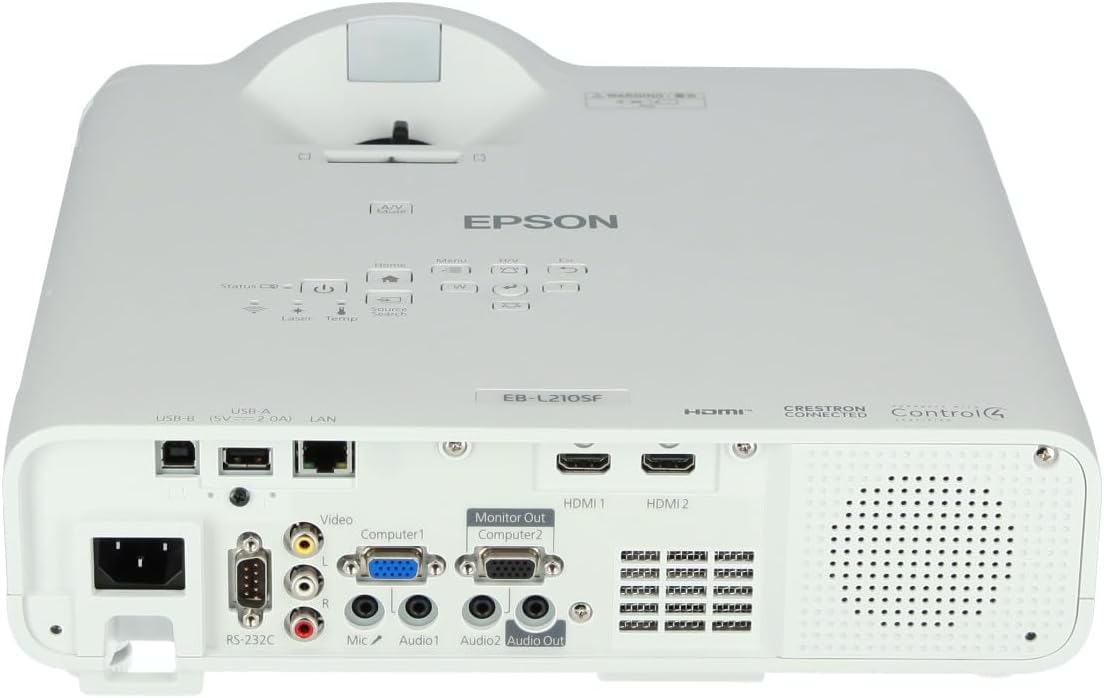
Sary 3: Ambony view of the projector, highlighting the control panel with buttons for power, menu, source selection, and navigation.
- Bokotra hery: Mamelona na mamono ny projector.
- Source Search: Mivezivezy amin'ireo loharano fidirana misy.
- bokotra Menu: Opens the on-screen display (OSD) menu.
- Navigation Buttons (Arrow keys): Ampiasaina hivezivezy amin'ny safidy menu.
- Bokotra miditra: Manamarina ireo safidy ao amin'ny menio.
- Esc Button: Mivoaka ny menio ankehitriny na miverina amin'ny efijery teo aloha.
- bokotra an-trano: Accesses the home screen or quick settings.
- A/V moana: Temporarily mutes audio and blanks the screen.
2. Fisafidianana Loharano Fidirana
Tsindrio ny Fikarohana loharano button on the control panel or remote control to cycle through the connected input sources (e.g., HDMI 1, HDMI 2, Computer 1, Video). The projector will automatically detect and display the active source.
3. Adjusting Image and Audio Settings
Tsindrio ny sakafo button to access the projector's on-screen display (OSD) menu. Use the navigation buttons to browse categories such as:
- Sary: Adjust brightness, contrast, color, tint, sharpness, and color temperature.
- Famantarana: Configure input signal settings, aspect ratio, and overscan.
- Fikirana: General projector settings like language, display options, and power management.
- Audio: Adjust volume, mute, and audio input selection.
Misafidiana safidy ary tsindrio Ampidiro to modify its value. Press Esc hivoaka ny sakafo.
fikarakarana
1. Manadio ny Projector
- ivelany: Wipe the projector's exterior with a soft, dry, lint-free cloth. For stubborn dirt, dampen the cloth slightly with water, then wipe dry.
- Lens: Gently wipe the lens with a lens cleaning cloth or lens paper. Avoid using abrasive materials or excessive force.
- Sivana rivotra: Regularly check and clean the air filter to prevent dust buildup, which can affect performance and cause overheating. Refer to the projector's on-screen menu for filter maintenance reminders.
2. Laser Light Source
The Epson EB-L210SF uses a laser light source, which offers a long operational life and does not require lamp replacement. No user maintenance is typically required for the laser light source itself.
Fanamboarana
Raha sendra olana amin'ny projector ianao dia jereo ireto olana sy vahaolana mahazatra ireto:
| OLANA | Antony mety / Vahaolana |
|---|---|
| Tsy misy sary navoaka |
|
| Manjavozavo na tsy mifantoka ny sary |
|
| Image is distorted (trapezoidal) |
|
| Tsy misy feo |
|
| Projector is not wireless | The Epson EB-L210SF is not inherently a wireless projector. Wireless functionality typically requires an optional external wireless adapter, which is sold separately. Please consult Epson's official website or your retailer for compatible wireless adapters. |
| Overheating warning (Temp indicator) |
|
fepetra arahana
| endri-javatra | antsipirihany |
|---|---|
| Laharana modely | V11HA75080 |
| Asehoy ny fanapahan-kevitra | 1920 x 1080 (HD feno) |
| Teknolojia fifandraisana | HDMI, VGA, USB, LAN |
| Ny refin'ny vokatra | 11.81 x 11.81 x 11.81 santimetatra |
| Lanja entana | 10.14 kg |
| Loharanon-jiro | tamin'ny laser |
| mpanamboatra | Epson |
| Fampiasana soso-kevitra | Fanaraha-maso |
| Endri-javatra manokana | Maivana |
| Ilaina ny bateria | 1 AAAA (for remote control, not included with projector unit) |
| Daty misy voalohany | 14 Novambra 2023 |
Warranty sy fanohanana
For detailed warranty information, please refer to the warranty card included with your product or visit the official Epson website. Ny fepetra sy fepetra momba ny fiantohana dia mety miovaova arakaraka ny faritra.
For technical support, product registration, or to download the latest drivers and software, please visit the official Epson support website or contact Epson customer service in your region. Contact information can typically be found on the Epson website.


