1. Fampidirana
This manual provides comprehensive instructions for the Maxcom Fit FW55 Aurum Pro Smartwatch. It covers essential information regarding product setup, operation, maintenance, and troubleshooting to ensure optimal performance and user experience. Please read this manual carefully before using your device.
2. Ny votoatin'ny fonosana
Azafady, hamarino fa ny entana rehetra voatanisa etsy ambany dia misy ao amin'ny fonosanao vokatra:
- Maxcom Fit FW55 Aurum Pro Smartwatch
- Charging Cable
- User Manual (ity antontan-taratasy ity)
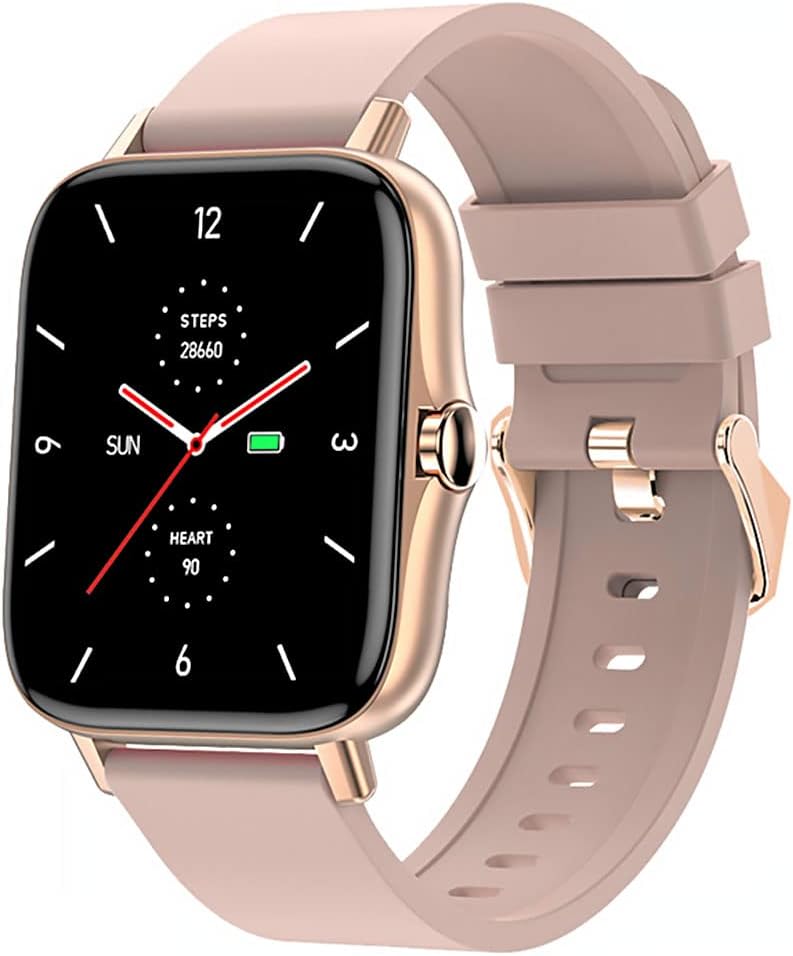
Image 1: Maxcom Fit FW55 Aurum Pro Smartwatch with a pink silicone band. The watch face displays steps, heart rate, and time.
3. Fametrahana
3.1. Fametrahana ny Smartwatch
Before initial use, fully charge your Maxcom Fit FW55 Aurum Pro Smartwatch. Connect the provided charging cable to the charging port on the back of the smartwatch and plug the other end into a standard USB power adapter (not included) or a computer's USB port. The watch display will indicate charging status.
- Hamarino tsara fa madio ireo tsimatra famandrihana ary mifanaraka tsara amin'ny fifandraisana famandrihana amin'ny famantaranandro.
- Maharitra adiny 2 eo ho eo ny fiampangana feno.
3.2. Mampifanaraka amin'ny Smartphone
To unlock the full functionality of your smartwatch, you need to pair it with your smartphone via Bluetooth.
- Download ny App: Hitady ny the official Maxcom Fit application in your smartphone's app store (iOS App Store or Google Play Store) and install it.
- Alefaso ny Bluetooth: Ataovy azo antoka fa alefa amin'ny findainao ny Bluetooth.
- Sokafy ny App: Launch the Maxcom Fit application on your smartphone.
- Ampio fitaovana: Follow the in-app instructions to add a new device. Select "FW55 Aurum Pro" from the list of available devices.
- Hamafiso ny fampiarahana: A pairing request may appear on both your smartphone and the smartwatch. Confirm the pairing on both devices.
Once successfully paired, the smartwatch will synchronize data with your phone, and you can customize settings through the app.
4. Fampiasana ny Smartwatch
4.1. Power On/off
- Herim-batana: Press and hold the side button for a few seconds until the Maxcom logo appears.
- Mamono hery: From the watch face, swipe down to access quick settings, or navigate to the 'Settings' menu. Select 'Power Off' and confirm. Alternatively, press and hold the side button and select 'Power Off'.
4.2. Fikarohana fototra
- Efijery kasihina: The FW55 Aurum Pro features a 1.7-inch touch screen for intuitive interaction.
- Swipe miakatra/midina: Scroll through notifications, menus, or quick settings.
- Swipe ankavia/ankavanana: Access different widgets or main functions (e.g., heart rate, activity data).
- Peho: Misafidiana singa iray na manamafy hetsika iray.
- bokotra sisiny: Press to return to the watch face or wake the screen. A long press may access power options.
4.3. Endri-javatra fototra
The Maxcom Fit FW55 Aurum Pro Smartwatch offers a range of features to support your daily activities and health monitoring:
- Fanaraha-maso hetsika: Manara-maso ny dingana vita, ny halavirana nodiavina ary ny kaloria may.
- Fanaraha-maso ny tahan'ny fo: Manome angon-drakitra momba ny tahan'ny fitempon'ny fo amin'ny fotoana tena izy.
- Fanaraha-maso ny torimaso: Manara-maso ny lamina sy ny kalitaon'ny torimaso.
- Fampandrenesana: Mandray fampandrenesana momba ny antso, hafatra ary fampandrenesana fampiharana avy amin'ny findainao mifandray.
- GPS: Integrated GPS for accurate outdoor activity tracking.
- Endriky ny fiambenana azo namboarina: Personalize your watch face through the companion app.

Image 2: Maxcom Fit FW55 Aurum Pro Smartwatch featuring a gold metal mesh band. The watch face displays digital time, steps, and heart rate.
5. Fikojakojana
Proper care and maintenance will extend the lifespan of your smartwatch.
- Fanadiovana: Regularly wipe the watch screen and body with a soft, dry, lint-free cloth. For stubborn dirt, slightly dampen ny lamba misy rano. Fadio ny mampiasa akora simika masiaka na akora abrasive.
- Fikarakarana andilany: Clean the watch strap according to its material. Silicone straps can be washed with mild soap and water. Metal straps may require specific cleaning agents.
- Avoid Conditions Extreme: Do not expose the smartwatch to extreme temperatures, direct sunlight for prolonged periods, or corrosive liquids.
- fanoherana ny rano: While the watch may have some water resistance, it is not suitable for diving or high-pressure water activities. Refer to the product specifications for detailed water resistance ratings.
6. Famahana olana
If you encounter issues with your Maxcom Fit FW55 Aurum Pro Smartwatch, try the following solutions:
- Jereo tsy mandeha: Ataovy azo antoka fa feno ny famantaranandro. Ampifandraiso amin'ny charger mandritra ny 30 minitra farafahakeliny.
- Tsy azo ampiarahana amin'ny smartphone:
- Ataovy azo antoka fa mandeha ny Bluetooth amin'ny findainao sy ny famantaranandro.
- Ataovy azo antoka fa ao anatin'ny faritra misy ny Bluetooth an'ny findainao ny famantaranandro.
- Avereno indray ny findainao sy ny smartwatch.
- Andramo ny manasaraka sy mampiaraka indray ilay fitaovana amin'ny alalan'ny fampiharana.
- Inaccurate data (steps, heart rate):
- Ataovy azo antoka fa tazonina tsara eo amin'ny hatotananao ny famantaranandro, eo amin'ny sakan'ny rantsantanana iray eo ambonin'ny taolanao.
- Diovy ny sensor ao ambadiky ny famantaranandro.
- Havaozy amin'ny dikan-teny farany indrindra ny fampiharana mpiara-miasa.
- Fampandrenesana tsy voaray:
- Check notification settings in the Maxcom Fit app.
- Ensure your phone's notification permissions are granted to the app.
- Verify that the watch is successfully paired and connected to your phone.
If problems persist, consult the Maxcom support webtranokala na mifandray amin'ny serivisy mpanjifa.
7. Famaritana
Below are the technical specifications for the Maxcom Fit FW55 Aurum Pro Smartwatch:
| endri-javatra | antsipirihany |
|---|---|
| Marika | Maxcom |
| Laharana modely | FW55 Aurum Pro |
| Haben'ny efijery | 1.7 santimetatra |
| Teknolojia fifandraisana | Bluetooth |
| Fenitra fifandraisana tsy misy tariby | Bluetooth |
| Fitaovana mifanentana | finday avo lenta |
| GPS | GPS mitambatra |
| endrika | Square |
| Kendrena mpihaino | Olon-dehibe Unisex |
| Anisan'ny singa | dovia |

Sary 3: Eo anoloana view of the Maxcom Fit FW55 Aurum Pro Smartwatch with a pink silicone band, highlighting the square display.
8. Warranty sy fanohanana
For warranty information and customer support, please refer to the documentation included with your purchase or visit the official Maxcom website. Tehirizo ny porofon'ny fividiananao ho an'ny fitakiana fiantohana.
For technical assistance or further inquiries, please contact Maxcom customer service through their official channels.


