Sava lalana
This manual provides comprehensive instructions for the installation, operation, and maintenance of your Natec Cabassu G2 Midi Tower PC Case. Please read this manual thoroughly before beginning installation to ensure proper setup and optimal performance.
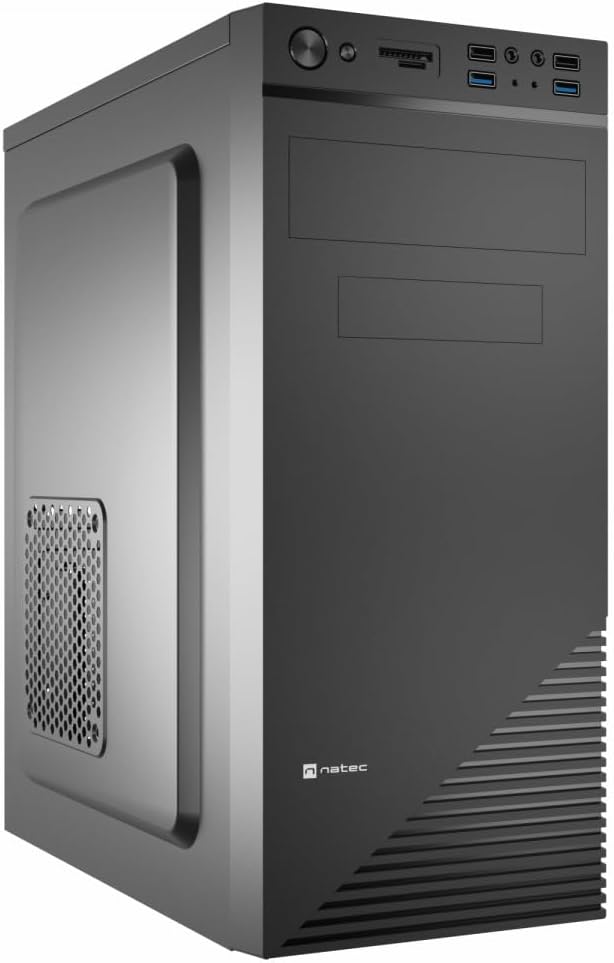
Figure 1: Natec Cabassu G2 Midi Tower PC Case. This image shows the front and left side of the black PC case, highlighting its sleek design and front panel layout.
Information momba ny fiarovana
- Esory amin'ny faladiany foana ny herinaratra alohan'ny hametrahana na hanesorana izay singa rehetra.
- Handle components with care to prevent damage from static electricity.
- Keep the case away from water, moisture, and extreme temperatures.
- Hamarino tsara ny rivotra mba hisorohana ny hafanana be loatra.
- Do not attempt to open the power supply unit.
Fonosana fonosana
Hamarino fa misy ny entana rehetra ao anaty fonosana:
- Natec Cabassu G2 Midi Tower PC Case
- Kitapo fanampiny (visy, tariby mifamatotra, fatorana)
- User Manual (ity antontan-taratasy ity)
Setup and Component Installation
1. Fanomanana ny raharaha
- Apetraho eo amin'ny toerana fisaka sy mafy orina ny fonony.
- Remove the side panels by unscrewing the thumbscrews at the rear and sliding the panels backward.

Sary 2: Atitany view of the Natec Cabassu G2 case with the side panel removed, illustrating the internal layout for component installation.
2. Fametrahana Motherboard
- Apetraho ao amin'ny fisokafana aorian'ny boaty ny ampinga I/O.
- Align the motherboard with the pre-installed standoffs. The Cabassu G2 supports Mini ITX, Micro ATX, and ATX motherboards.
- Ampifanaraho amin'ny visy omena ny motherboard.
3. Fametrahana famatsiana herinaratra
- Ny famatsiana herinaratra dia apetraka eo amin'ny farany ambany amin'ny boaty.
- Slide the power supply into its designated bay from the rear of the case.
- Secure it with screws from the rear.
4. Fametrahana ny kapila fitahirizana
- 2.5" Drives (SSDs/HDDs): The case features 3 x 2.5" drive bays. Mount drives using the provided screws in the designated locations.
- 3.5" Drives (HDDs): The case also supports 3.5" drives.
5. Fametrahana Karatra Fanitarana
- Remove the necessary expansion slot covers from the rear of the case (7 expansion slots available).
- Insert your graphics card or other expansion cards into the motherboard's PCIe slots.
- Ampifandraiso amin'ny visy ireo karatra.

Sary 3: aoriana view of the Natec Cabassu G2 case, detailing the I/O shield cutout, power supply opening, and seven expansion slots.
6. Fitantanana tariby
Route cables behind the motherboard tray where possible to improve airflow and aesthetics. Use the included cable ties to secure bundles.
7. Connecting Front Panel Cables
Connect the front panel cables (USB 2.0, USB 3.0, audio, power switch, reset switch, HDD LED, power LED) to the corresponding headers on your motherboard. Refer to your motherboard manual for exact pin assignments.

Figure 4: Close-up of the Natec Cabassu G2 front panel, showing 2x USB 2.0 ports, 2x USB 3.0 ports, audio jacks, and power/reset buttons.
Torolàlana miasa
Mamelona/Efa
- Herim-batana: Tsindrio ny bokotra herinaratra hita eo amin'ny tontonana anoloana.
- Mamono hery: Initiate shutdown through your operating system. For a forced shutdown, press and hold the power button for several seconds.
- Mamerina: Press the reset button on the front panel to restart the system.
Using Front Panel Ports
The front panel provides convenient access to:
- 2 x USB 2.0 seranana
- 2 x USB 3.0 seranana
- Audio input (microphone) and output (headphone) jacks
Connect compatible devices to these ports as needed.
fikarakarana
FANADIOVANA
- Diovy tsy tapaka amin'ny lamba malefaka ny ivelany amin'ny fonony.amp lamba. Halaviro ny mpanadio abrasive.
- Use compressed air to remove dust from fan filters and internal components. Ensure the system is powered off and unplugged before cleaning.
Sivana vovoka
The case may include removable dust filters. Periodically remove and clean these filters to maintain optimal airflow and cooling performance.
Fanamboarana
| OLANA | Antony mety hitranga | vahaolana |
|---|---|---|
| Tsy mandeha ny rafitra. | Power cables not connected properly. Faulty power supply. | Check all power connections (motherboard, CPU, GPU, power supply to wall). Ensure power supply switch is ON. |
| Front panel USB ports not working. | Front panel USB cables not connected to motherboard. | Verify that the USB 2.0 and USB 3.0 headers are correctly connected to the motherboard. |
| Excessive fan noise. | Dust accumulation. Loose fan. | Clean dust from fans and filters. Ensure all fans are securely mounted. |
fepetra arahana
| endri-javatra | antsipirihany |
|---|---|
| Anarana modely | Cabassu G2 |
| Laharana modely | S5624687 |
| Karazana tranga | Midi Tower |
| refy (LxWxH) | 19.69 x 19.69 x 11.02 santimetatra (50 x 50 x 28 cm) |
| lanja | 7.04 kilao (3.19 kg) |
| KEVITRA | Acrylonitrile Butadiene Styrene (ABS), Alloy Steel |
| Mifanaraka amin'ny motherboard | Mini-ITX, Micro-ATX, ATX |
| 2.5" Drive Bays | 3 |
| Fanitarana Slots | 7 |
| Seranan-tsambo I / O eo aloha | 2 x USB 2.0, 2 x USB 3.0, Audio In/Out |
| Fanohanana | 120mm (rear, pre-installed if applicable) |
| Fomba fampangatsiahana | Air |
| Famatsiana herinaratra | Tendrombohitra ambany |
Warranty Information
Natec products are covered by a manufacturer's warranty. Specific warranty terms and conditions may vary by region and retailer. Please refer to the warranty card included with your product or visit the official Natec website for detailed information regarding warranty coverage and claims.
MANAMPY
For technical assistance, troubleshooting, or further inquiries, please visit the official Natec support website or contact their customer service department. Contact information can typically be found on the product packaging or the official brand website.
Webtranokala: www.natec-zone.com (Eksample rohy, ny tena rohy mety miovaova)


