1. Fampidirana
This user manual provides essential information for the safe and efficient operation of your HYCHIKA 3.6V Cordless Electric Rechargeable Screwdriver Drill Set. Please read this manual thoroughly before first use and keep it for future reference.
The HYCHIKA 3.6V Cordless Electric Screwdriver is designed for various screwing and light drilling tasks around the home. It features a maximum torque of 6 N-m, a 6.35 mm quick-change chuck, and a versatile design that allows for both pistol and straight grip configurations.
2. Torolàlana momba ny fiarovana
Araho hatrany ireo fepetra fiarovana fototra rehefa mampiasa fitaovana elektrika mba hampihenana ny mety hisian'ny afo, ny fahatairana elektrika ary ny ratra.
- Fiarovana ny faritra fiasana: Ataovy madio sy mazava tsara ny faritra iasanao. Ny faritra mikorontana na maizina dia miteraka loza. Aza mampiasa fitaovam-pamokarana amin'ny atmosfera mipoaka, toy ny fisian'ny ranon-javatra mirehitra, entona, na vovoka.
- Fiarovana herinaratra: Fadio ny mikasika ny vatana amin'ny zavatra miraikitra amin'ny tany na amin'ny tany toy ny fantsona, radiator, fatana fandoroana ary vata fampangatsiahana. Aza atao amin'ny orana na ny toerana mando ny fitaovana elektrika.
- Fiarovana manokana: Always wear eye protection. Use safety glasses, goggles, or a face shield. Wear hearing protection when operating noisy tools. Dress properly; avoid loose clothing or jewelry.
- Fitaovana fampiasana sy fikarakarana: Aza terena ny fitaovana herinaratra. Ampiasao ny fitaovam-pamokarana marina ho an'ny fampiharanao. Esory amin'ny loharanon-jiro ny plug ary/na esory ny fonosana batterie alohan'ny hanaovana fanitsiana, fanovana kojakoja, na fitahirizana fitaovana herinaratra.
- Fampiasana sy fikarakarana batterie: Recharge only with the charger specified by the manufacturer. Do not use battery packs with any other power tools. When battery pack is not in use, keep it away from other metal objects.
3. Ny votoatin'ny fonosana
Hamarino fa ny entana rehetra voatanisa etsy ambany dia tafiditra ao anatin'ny fonosanao. Raha misy zavatra tsy hita na simba dia mifandraisa amin'ny fanohanana ny mpanjifa.
- 1 x HYCHIKA 3.6V Cordless Screwdriver
- 19 x Screwdriver Bits
- 1 x Extension Bar
- 1 x Charging Adapter
- 1 x User Manual

Figure 3.1: Contents of the HYCHIKA 3.6V Cordless Screwdriver package, including the screwdriver, various bits, and charging adapter.
4. Endriky ny vokatra sy ny singa
Familiarize yourself with the different parts of your cordless screwdriver.

Figure 4.1: Key components of the screwdriver, including the magnetic chuck, PUSH button, front LED light, On/Off switch, LED charger indicator, 3.5mm charger port, and forward & reverse button.
- Magnetic Chuck: 1/4 inch (6.35mm) quick-change chuck for easy bit installation and removal.
- Jiro LED eo anoloana: Illuminates the work area for improved visibility in dark environments.
- Ampifamadiho/famonoana: Activates and deactivates the screwdriver.
- Forward & Reverse Button: Controls the rotation direction for screwing and unscrewing.
- LED Charger Indicator: Provides status of battery charging.
- 3.5mm Charger Port: Connection point for the charging adapter.
- bokotra PUSH: Used to adjust the grip configuration from pistol to straight.
5. Fametrahana
5.1 Famandrihana ny bateria
The screwdriver is powered by a 3.6V 2000 mAh Lithium-Ion battery. Before first use, fully charge the battery.
- Connect the charging adapter to the 3.5mm charger port on the screwdriver.
- Plug the charging adapter into a standard electrical outlet.
- The LED charger indicator will illuminate during charging. Once fully charged, the indicator may change color or turn off depending on the model.
- Esory ny charger rehefa vita ny fiampangana.

Figure 5.1: The screwdriver connected to its charging adapter, indicating a full charge.
The screwdriver is designed to maintain full power output even when the battery is low, ensuring consistent performance until the battery is depleted.
5.2 Fametrahana Visy Fanesorana
The screwdriver features a 1/4 inch (6.35mm) magnetic quick-change chuck for easy bit installation.
- Safidio ny bit screwdriver mety amin'ny asanao.
- Insert the bit into the magnetic chuck until it is securely seated. The magnetic chuck will hold the bit firmly in place.
- To remove a bit, simply pull it out of the chuck. Bits with grooves are designed for easier removal.

Figure 5.2: Visual guide for inserting a bit into the magnetic chuck and removing it.
6. Torolàlana miasa
6.1 Adjusting Grip Configuration
The screwdriver can be used in two grip configurations: pistol grip or straight grip, for enhanced versatility and comfort.
- To change the grip, press and hold the "PUSH" button located at the top of the screwdriver.
- While holding the button, rotate the handle ninety degrees to switch between pistol and straight configurations.
- Release the "PUSH" button once the desired configuration is achieved. The handle will lock into place.
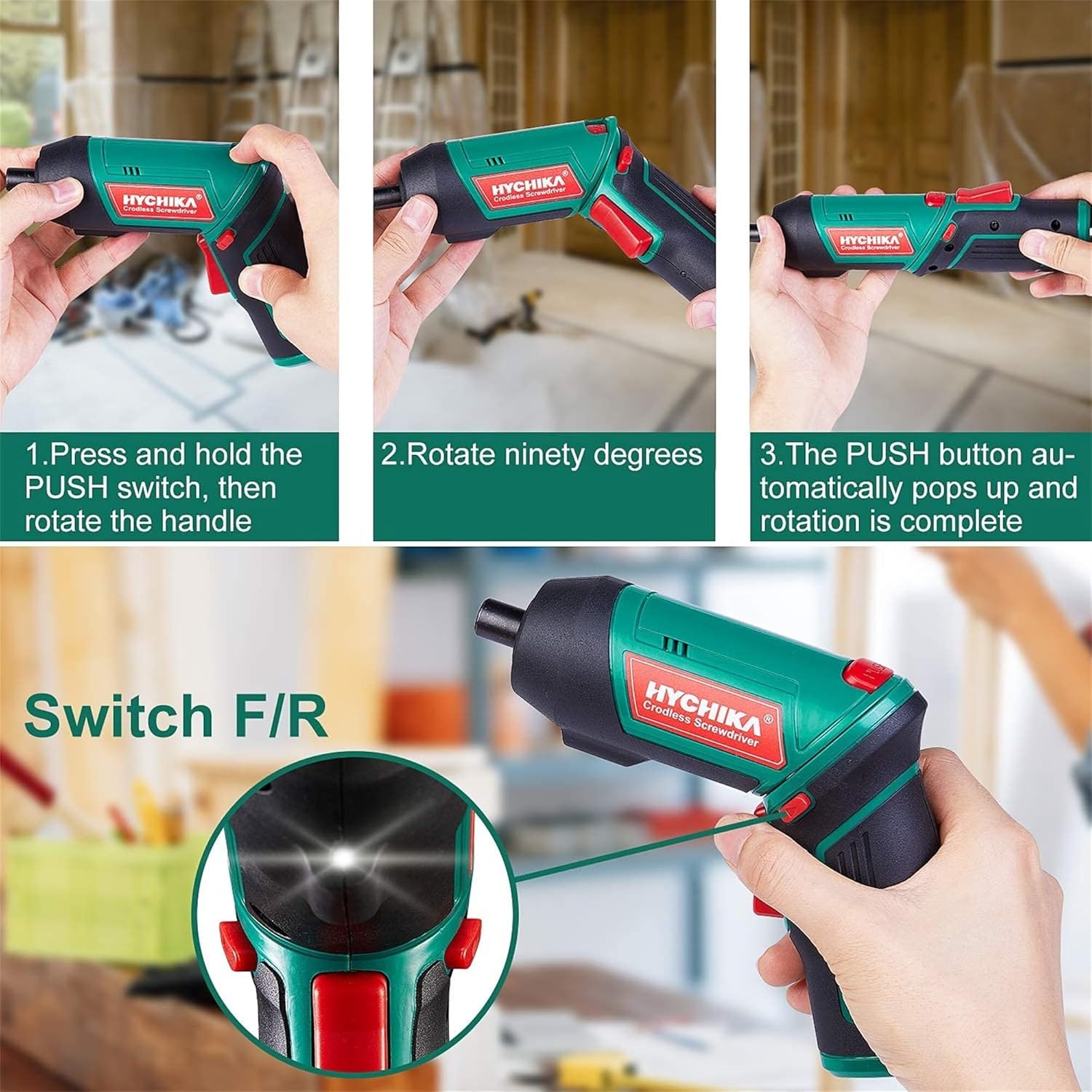
Figure 6.1: Demonstrates the process of transforming the screwdriver's grip by pressing the PUSH button and rotating the handle.
6.2 Fampiasana mandroso sy miverina
The forward/reverse button controls the direction of rotation for screwing and unscrewing.
- To drive screws (forward rotation), push the forward/reverse button to the left (when viewed avy ao ambadiky ny fitaovana).
- To remove screws (reverse rotation), push the forward/reverse button to the right.
- When the button is in the center position, the tool is locked, preventing accidental activation.
6.3 Fampiasana ny jiro LED miasa
The built-in LED light automatically illuminates when the screwdriver is in operation, providing visibility in dimly lit areas.

Figure 6.2: The integrated LED light provides clear illumination for working in dark environments.
7. Fikojakojana
Regular maintenance ensures the longevity and optimal performance of your screwdriver.
- Fanadiovana: Keep the ventilation openings clean and free from dust. Use a soft, damp lamba hanadiovana ny fitaovana casing. Aza mampiasa akora simika mahery vaika na fanadiovana maloto.
- Bit Care: Clean screwdriver bits after use. Store them in the provided case to prevent loss and damage.
- Fitehirizana bateria: If storing the tool for an extended period, ensure the battery is partially charged (around 50%) and store it in a cool, dry place. Recharge the battery every 3-6 months to maintain its health.
- Fanaraha-maso ankapobeny: Periodically check for any loose screws, damaged cords, or worn parts. Do not use the tool if any damage is observed.
8. Famahana olana
This section addresses common issues you might encounter with your screwdriver.
| OLANA | Antony mety hitranga | vahaolana |
|---|---|---|
| Tsy mandeha ny screwdriver. | Lany ny bateria. Eo amin'ny toerana afovoany (mihidy) ny bokotra mandroso/mihemotra. | Aloavy feno ny batterie. Atseho miankavia na miankavanana ny switch mandroso/mivadika. |
| Screwdriver loses power quickly. | Batterie tsy feno. Battery life degraded. | Ensure battery is fully charged before use. If battery life is significantly reduced, contact customer support for replacement options. |
| Bits are not held securely in the chuck. | Bit is not fully inserted. Maloto na simba i Chuck. | Push the bit firmly into the chuck until it clicks into place. Clean the chuck area. If damage is visible, contact customer support. |
Raha mbola mitohy ny olana rehefa avy nanandrana ireo vahaolana ireo dia mifandraisa amin'ny fanohanan'ny mpanjifa azafady.
9. Famaritana
| endri-javatra | famaritana |
|---|---|
| Marika | Overstock (HYCHIKA) |
| Laharana modely | c131a012-0da9-4306-aeab-b1d9ff5cd4b7 |
| BOKYtage | 3.6 Volts |
| Loharanon-kery | Battery Powered |
| Haingana | 180 RPM |
| Item Torque | 6 Newton Meters (6 N-m) |
| Karazana bateria | Lithium Ion |
| Fahaizana bateria | 2000mAh |
| Haben'ny Chuck | 1/4 mirefy (6.35mm) |
| KEVITRA | Plastic, Fingotra |
| loko | Maitso |
| UPC | 616859793583 |
10. Warranty sy fanohanana
Overstock offers lifetime after-sales service for this product. For any questions, concerns, or technical assistance, please contact our customer support team.
Please have your model number (c131a012-0da9-4306-aeab-b1d9ff5cd4b7) and purchase information ready when contacting support.


