Boky Torolàlana ho an'ny Mpampiasa ny Telefaonina Poly Edge E220 IP Desk
Ny torolàlana momba ny fametrahana sy fampiasana ny Poly Edge E220 IP Desk Phone-nao.
1. Fampidirana
Ny Poly Edge E220 dia finday IP azo ampiasaina amin'ny birao maoderina, manolotra endri-javatra fifandraisana mandroso. Manohana andalana hatramin'ny 16 misy fanalahidy andalana 4 izy io ary misy Bluetooth tafiditra ao anatiny mba hampifandraisana tsara ny finday sy ny headset. Ity boky torolalana ity dia manome torolàlana amin'ny antsipiriany momba ny fametrahana, ny fampiasana ary ny fikojakojana ny fitaovanao.
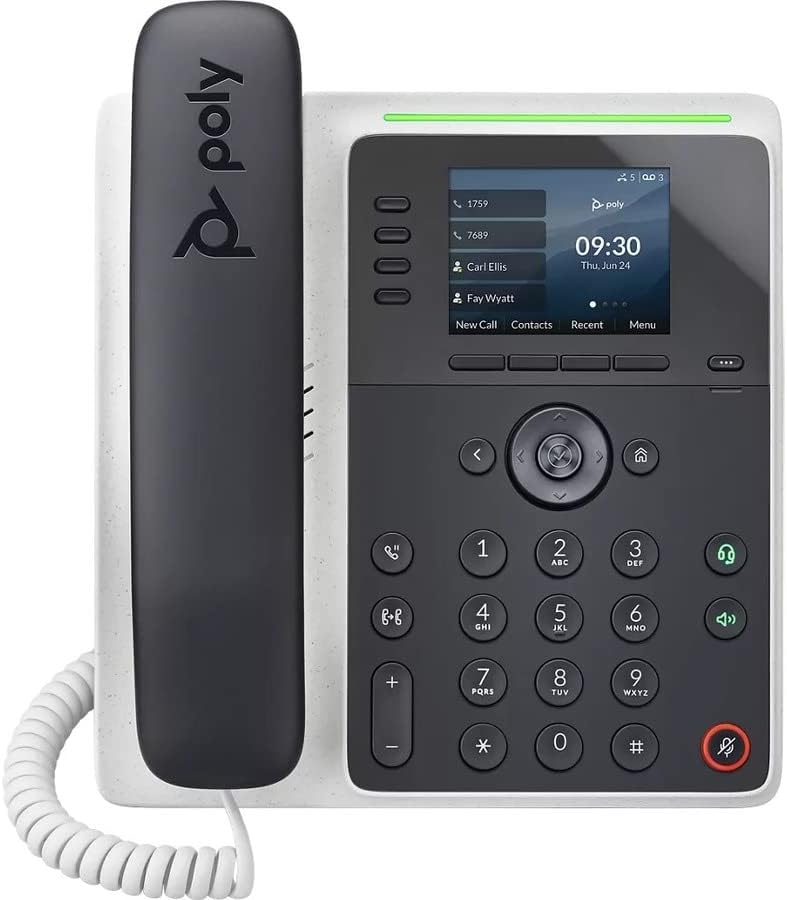
Sary: Front view an'ny Poly Edge E220 IP Desk Phone, asehoyasing ny efijery, ny fitendry ary ny findainy.
2. Inona no ao anaty boaty
Azafady mba hamarino tsara fa tafiditra ao anaty fonosanao ireto singa manaraka ireto:
- Finday birao Poly Edge E220 IP
- Handset
- Tady Coil Handset
- Tariby Ethernet Cat5E
- Fametrahana rindrina mitambatra (efa miraikitra na misaraka)
- Base Stand
Fanamarihana: TSY tafiditra ato amin'ity vokatra nohavaozina ity ny famatsiana herinaratra ary tsy maintsy alaina misaraka raha tsy misy Power over Ethernet (PoE).
3. Toetran'ny vokatra
- Fanalahidy 4-Andalana: Manohana andalana hatramin'ny 16 ho an'ny fitantanana antso azo ovaina.
- Bluetooth mitambatra: Mamela ny fampifandraisana tsy misy tomika amin'ny finday sy ny écouteur Bluetooth.
- Fampisehoana avo lenta: Manome fahitana mazava tsara ny fampahalalana momba ny antso sy ny fitetezana ny menio.
- Feo HD: Manome kalitao feo ambony kokoa ho an'ny resaka mazava kokoa.
- Fampiasana andalana maro: Tantano miaraka ireo antso mavitrika maromaro.
- Fahaizana antso amin'ny fihaonambe: Manohana ny fihaonambe amin'ny lafiny telo.
4. Fametrahana sy fametrahana
4.1 Fametrahana ny finday
- Ampifandraiso ny fitoeran-javatra fototra: Ampifanaraho amin'ny lavaka ao andamosin'ny finday ny kiheba eo amin'ny fitoeran-javatra fototra. Ampidiro eo amin'ny toerany ny fitoeran-javatra mandra-pikitsoka tsara.
- Ampifandraiso ny finday: Ampidiro ao amin'ny finday ny tendrony iray amin'ny tady boribory ary ny tendrony iray kosa ao amin'ny seranan-tsambon'ny finday eo amin'ny ilan'ny fitaovana finday.
4.2 Fampifandraisana ny tariby
Tadiavo ireo seranana eo amin'ny lamosina sy ny ilan'ny fitaovana finday.

Sary: Side view an'ny Poly Edge E220 IP Desk Phone, izay manasongadina ireo seranana fifandraisana isan-karazany sy ny fitoerany azo amboarina.
- Fifandraisana tambajotra: Ampifandraiso amin'ny seranan-tsambo LAN amin'ny finday ny tendrony iray amin'ny tariby Ethernet Cat5E ary ny tendrony iray kosa amin'ny switch na router tambajotra. Raha manome Power over Ethernet (PoE) ny tambajotrao, dia hirehitra ho azy ny finday.
- Fifandraisana herinaratra (raha tsy misy PoE): Raha tsy misy PoE dia ampifandraiso amin'ny seranan-jiro amin'ny finday ny adaptatera herinaratra sahaza azy (tsy tafiditra) ary avy eo amin'ny faladiany.
- Fifandraisana amin'ny écouteur azo isafidianana: Raha mampiasa headset misy tariby ianao dia ampifandraiso amin'ny seranana headset natokana ho azy.
4.3 Herin'ny voalohany
Rehefa mifandray dia hirehitra ny finday ary hanomboka ny fizotran'ny fanombohana. Mety haharitra fotoana fohy izany. Hampiseho ny logo Poly ny efijery, arahin'ny fikirakirana tambajotra sy ny sata fisoratana anarana. Raha asaina ianao dia ampidiro ny mombamomba anao amin'ny tambajotra na mifandraisa amin'ny mpitantana ny IT anao raha mila fanampiana amin'ny fametrahana.
5. Torolàlana miasa
5.1 Fanaovana sy fandraisana antso
- Hanao antso: Raiso ny finday, tsindrio ny bokotra "Hafatra", na tsindrio ny bokotra andalana iray. Antsoy ny laharana ary tsindrio ny bokotra "Dial" na andraso hifandraisana ny antso.
- Hamaly antso: Raiso ny finday, tsindrio ny bokotra fanamafisam-peo, na tsindrio ny bokotra tsipika mirehitra.
- Hamarana ny antso: Avereno apetraka ny finday, na tsindrio ny bokotra End Call.

Sary: Lehilahy iray miantso an-telefaona mampiasa ny Poly Edge E220 IP Desk Phone ao amin'ny tontolo birao matihanina.
5.2 Mampiasa Bluetooth
Ny Poly Edge E220 dia ahafahanao mampifandray ny findainao na ny headset Bluetooth anao mba hahazoana fahaiza-miovaova kokoa.
- Alefaso ny Bluetooth: Mandehana any amin'ny menio an'ny telefaona, safidio ny Settings, dia ny Bluetooth, ary ataovy azo antoka fa mandeha ny Bluetooth.
- Manambatra fitaovana: Apetraho amin'ny "pair mode" ny fitaovanao Bluetooth (finday na écouteur). Ao amin'ny finday, safidio ny 'Ampio fitaovana vaovao' na 'Jereo fitaovana'. Safidio amin'ny lisitra ny fitaovanao ary araho ny toromarika eo amin'ny efijery mba hamitana ny fampiarahana.
- Mampifandray: Rehefa mifandray dia tokony hifandray ho azy ny fitaovanao rehefa ao anatin'ny elanelana azo ampiasaina. Azonao atao ny mampifandray/manapaka tanana amin'ny menio Bluetooth.

Sary: Vehivavy miasa eo amin'ny birao, mampiasa ny Poly Edge E220 IP Desk Phone eo akaikin'ny solosainy finday, mampiseho ny fampidirana azy io ao amin'ny toeram-piasana maoderina.
5.3 endri-javatra mandroso
- Tazony: Mandritra ny antso, tsindrio ny bokotra "Hazòny" mba hampiatoana ny antso. Tsindrio indray izany mba hanohy.
- hamindra: Mandritra ny antso, tsindrio ny bokotra Transfer, antsoy ny laharana vaovao, ary tsindrio indray ny Transfer mba hamitana.
- Fihaonambe: Mandritra ny antso an-tariby mavitrika, tsindrio ny bokotra Conference, antsoy ny laharan'ny antoko fahatelo, ary tsindrio indray ny Conference mba hanatevin-daharana ny antoko rehetra.
- mailaka: Tsindrio ny bokotra Voicemail raha hijery ny hafatrao amin'ny voicemail.
6. Fikojakojana
Mba hahazoana antoka fa haharitra ela sy hahomby tsara ny findainao Poly Edge E220 IP Desk, araho ireto torolalana momba ny fikojakojana ireto:
- Fanadiovana: Mampiasà lamba malefaka, maina ary tsy misy volo mba hanadiovana ny velaran'ny finday sy ny efijery. Ho an'ny marika mafy loha, dia asio kelyampSasao amin'ny rano ny lamba. Fadio ny mampiasa akora simika mahery vaika, mpanadio mikikisana, na famafazana aerosol.
- Tontolo iainana: Tazomy ao amin'ny toerana maina ny finday, lavitry ny tara-masoandro mivantana, ny hafanana be loatra ary ny hamandoana.
- Fitantanana tariby: Hamarino tsara fa voalamina tsara ny tariby rehetra ary tsy terena mba hisorohana ny fahasimban'ny seranana na ny tariby.
- Fanavaozana rindrambaiko: Jereo tsy tapaka amin'ny mpitantana ny IT-nao ny fanavaozana rindrambaiko azo ampiasaina mba hahazoana antoka fa manana ireo endri-javatra farany sy fanatsarana fiarovana ny findainao.
7. Famahana olana
Raha sendra olana amin'ny Poly Edge E220-nao ianao dia jereo ny tabilao etsy ambany raha mila fanazavana fanampiny momba ny olana mahazatra sy ny vahaolana.
| OLANA | Antony mety hitranga | vahaolana |
|---|---|---|
| Tsy mandeha ny telefaona | Tsy misy famatsiana herinaratra na fifandraisana PoE | Hamarino tsara fa mifandray amin'ny seranana PoE ny tariby Ethernet, na ampifandraiso amin'ny adaptatera herinaratra mifanaraka amin'izany. |
| Tsy misy feo dial | Olana amin'ny tambajotra na tsy voasoratra anarana ny finday | Hamarino ny fifandraisana amin'ny tariby tambajotra. Hamarino ny satan'ny tambajotra eo amin'ny efijery finday. Mifandraisa amin'ny fanohanana IT raha tsy mahomby ny fisoratana anarana. |
| Tsy maheno ny mpiantso / Tsy maheno ahy ny mpiantso | Ambany loatra ny feo, tsy mandeha tsara ny finday/headset, na olana amin'ny feo ao amin'ny tambajotra | Amboary ny feo. Andramo amin'ny fanamafisam-peo. Hamarino ny fifandraisana amin'ny finday/headset. Avereno indray ny finday. |
| Tsy mifandray ny fitaovana Bluetooth | Ny fitaovana dia tsy amin'ny fomba fampiarahana na ivelan'ny faritra | Hamarino tsara fa ao anatin'ny "pair mode" ny fitaovana Bluetooth ary ao anatin'ny elanelana misy azy. Avereno indray ireo fitaovana roa ireo. |
Raha mbola mitohy ny olana na dia efa nanandrana ireo vahaolana ireo aza ianao dia mifandraisa amin'ny sampana IT na ny ekipa mpanohana ny vokatra raha mila fanampiana fanampiny.
8. Famaritana
Ireo fepetra ara-teknika fototra ho an'ny Poly Edge E220 IP Desk Phone:
| endri-javatra | antsipirihany |
|---|---|
| Ny refin'ny vokatra | 12.1 x 10.3 x 3.4 santimetatra |
| Lanja entana | 2.55 kg |
| Karazana telefaona | Telefaonina IP misy tariby |
| Loharanon-kery | Herinaratra misy tariby (TSY tafiditra ny famatsiana herinaratra) / Power over Ethernet (PoE) |
| Karazana mpandefa | Keypad tokana |
| Karazana rafitra famaliana | Nomerika (mila fanohanana avy amin'ny mpamatsy tolotra) |
| Fahaizana antso amin'ny fihaonambe | 3-lalana |
| Multiline Operation | Eny, manohana hatramin'ny andalana 16 miaraka amin'ny fanalahidy andalana 4 |
| Bluetooth | Tafiditra ao anatin'ny fampifandraisana finday sy headset |
9. Warranty sy fanohanana
Amin'ny maha-vokatra nohavaozina azy, ny Poly Edge E220 IP Desk Phone dia mazàna miaraka amin'ny antoka voafetra omen'ny mpanamboatra na mpivarotra. Jereo azafady ny antontan-taratasin'ny fividiananao raha mila fepetra sy fifanarahana momba ny antoka manokana. Raha mila fanampiana ara-teknika, famahana olana ankoatra ity boky torolalana ity, na fangatahana antoka, dia mifandraisa amin'ny mpivarotra na ny mpitantana ny IT anao.